Jak wysyłać pliki z komputera na wiele urządzeń jednocześnie (komputer, telefon, telewizor, tablet)
Dzięki najnowszej wersji programu 1001 TVs dla systemu Windows (v7.0.8.5) Twój komputer może teraz wysyłać pliki do wielu urządzeń — telewizorów, tabletów, telefonów lub innych komputerów — jednocześnie.
Po nawiązaniu połączenia możesz wysyłać dowolne pliki, niezależnie od ich rozmiaru, na wiele urządzeń jednocześnie – tyle razy, ile tylko chcesz. Bez kompresji. Bez kłopotów. Po prostu szybkie i płynne przesyłanie na każdy ekran w pomieszczeniu.
Idealne rozwiązanie do współpracy zespołowej, dystrybucji materiałów w klasie lub po prostu do natychmiastowego udostępniania plików wszystkim zainteresowanym.

Samouczek
1. Zainstaluj program 1001 TVs na komputerze i urządzeniach odbiorczych
📱 Aplikacja iOS: Pobierz z App Store
📱 Aplikacja na Androida: Pobierz z Google Play
📥Aplikacja na PC: Pobierz z Microsoft Store
Szczegółowe informacje można znaleźć w sekcji Podręcznik instalacji na PC
📥Aplikacja dla komputerów Mac: Pobierz z App Store
📥Aplikacja TV: Jak zainstalować 1001 TVs na telewizorze
2. Łączenie się z tą samą siecią Wi-Fi
Upewnij się, że PC i urządzenie odbiorczes są podłączone do tej samej sieci Wi-Fi.
Aby uzyskać najlepszą wydajność Sieć Wi-Fi 5 GHz aby zmniejszyć opóźnienia i poprawić stabilność.
3. W przypadku pierwszego urządzenia postępuj zgodnie z poniższym przewodnikiem:
Jak wysyłać pliki z komputera PC/Mac do telewizora/PC/Mac
Jak wysyłać pliki na telefony i tablety z systemem Android i iOS
4. Dodawanie kolejnych urządzeń
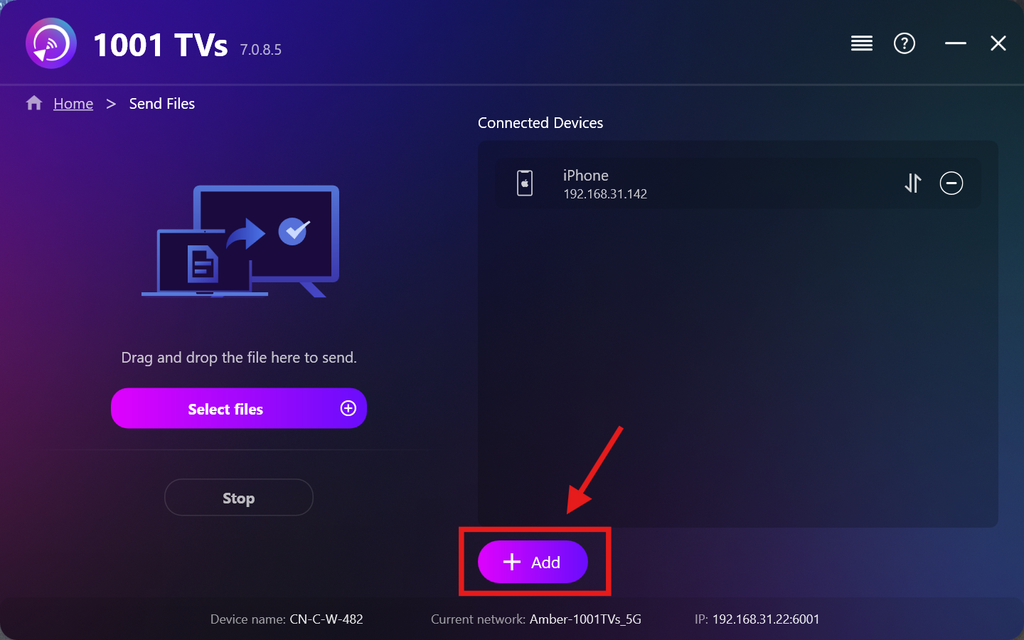
Po skonfigurowaniu pierwszego urządzenia możesz dodać kolejne urządzenia docelowe, klikając przycisk Dodaj ikona.
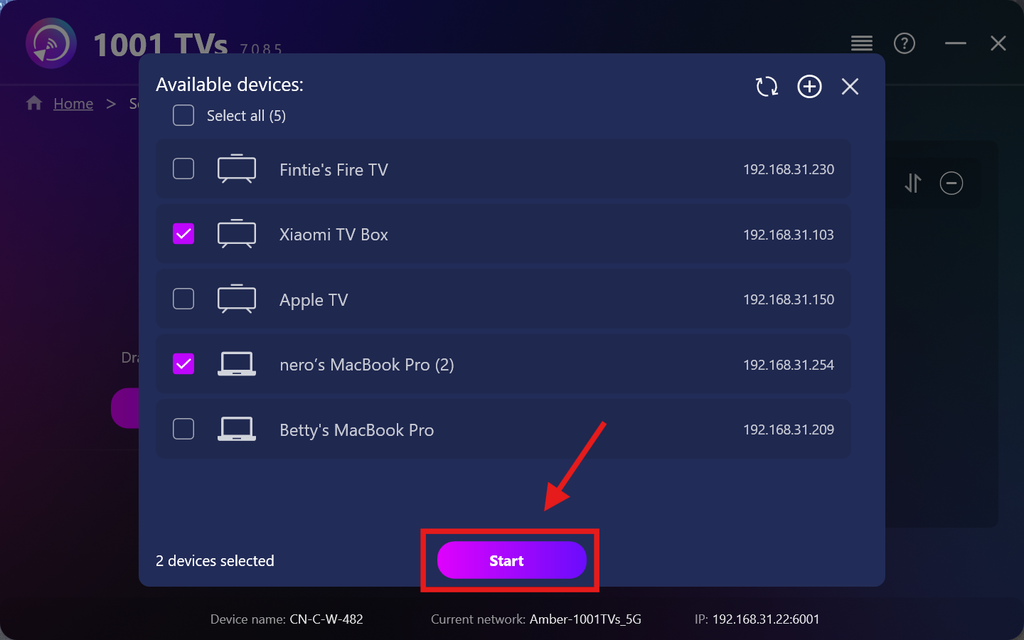
Zaznacz wszystkie urządzenia, do których chcesz wysłać pliki (możliwy jest wybór wielu urządzeń).
Kliknij Start w celu nawiązania połączenia.
Zaakceptuj prośbę o sparowanie na każdym urządzeniu docelowym podczas pierwszego parowania.
5. Wysyłanie plików na wiele urządzeń
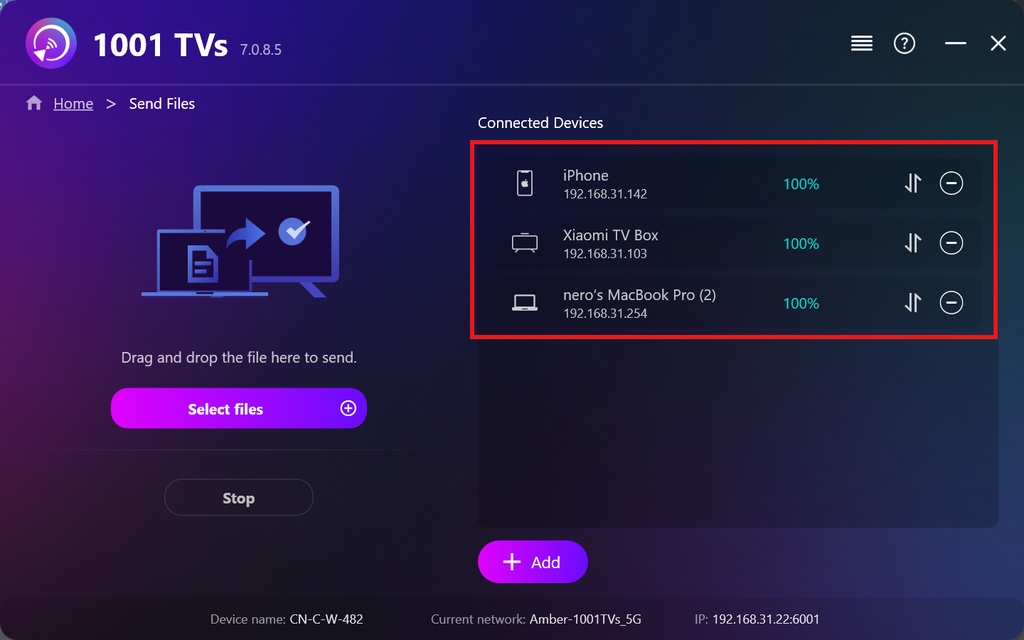
Wybierz pliki, które chcesz wysłać, lub po prostu przeciągnij je i upuść w obszarze plików po lewej stronie — nie ma żadnych ograniczeń dotyczących rozmiaru ani liczby plików.
⚠️ Upewnij się, że urządzenia, na które przesyłasz dane, mają wystarczającą ilość miejsca, w przeciwnym razie przesyłanie się nie powiedzie.
6. Zarządzaj urządzeniami odbiorczymi
Kliknij przycisk – (minus) ikona służąca do usunięcia urządzenia z listy odbiorców.
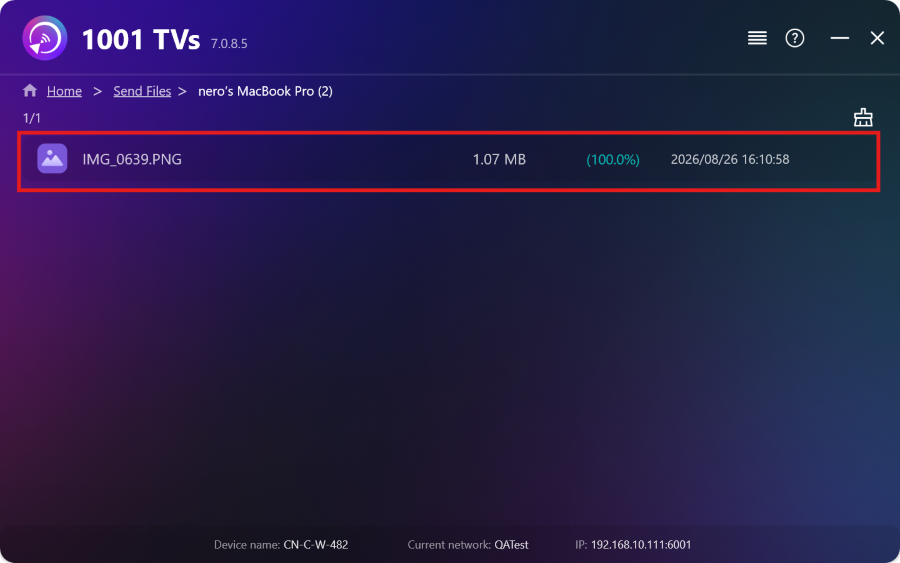
Kliknij przycisk przeniesienie ikona umożliwiająca wyświetlenie wszystkich plików wysłanych na to urządzenie.
To wszystko! Teraz możesz wysyłać pliki na wiele urządzeń jednocześnie, w dowolnym momencie i bez żadnych ograniczeń.
Pobierz 1001 TVs teraz
📱 Aplikacja iOS: Pobierz z App Store
📱 Aplikacja na Androida: Pobierz z Google Play
📥Aplikacja na PC: Pobierz z Microsoft Store
Szczegółowe informacje można znaleźć w sekcji Podręcznik instalacji na PC
📥Aplikacja dla komputerów Mac: Pobierz z App Store
📥Aplikacja TV:Jak zainstalować 1001 TVs na telewizorze

Czytaj więcej
 Instrukcja instalacji plików APK na telewizorze: Jak przesyłać i instalować pliki APK na telewizorze z komputera PC lub Mac przez Wi-Fi
Masz na telefonie, komputerze PC lub Macu plik APK, który chcesz uruchomić na telewizorze? Dzięki aplikacji 1001 TVs możesz przesłać...
Instrukcja instalacji plików APK na telewizorze: Jak przesłać i zainstalować pliki APK na telewizorze z telefonu przez Wi-Fi
Masz na telefonie lub komputerze plik APK, który chcesz uruchomić na telewizorze? Dzięki aplikacji 1001 TVs możesz przesłać plik APK...
Instrukcja instalacji plików APK na telewizorze: Jak przesyłać i instalować pliki APK na telewizorze z komputera PC lub Mac przez Wi-Fi
Masz na telefonie, komputerze PC lub Macu plik APK, który chcesz uruchomić na telewizorze? Dzięki aplikacji 1001 TVs możesz przesłać...
Instrukcja instalacji plików APK na telewizorze: Jak przesłać i zainstalować pliki APK na telewizorze z telefonu przez Wi-Fi
Masz na telefonie lub komputerze plik APK, który chcesz uruchomić na telewizorze? Dzięki aplikacji 1001 TVs możesz przesłać plik APK...

