كيفية إرسال الملفات من الكمبيوتر الشخصي إلى أجهزة متعددة في آن واحد (الكمبيوتر الشخصي، الهاتف، التلفزيون، الجهاز اللوحي)
بفضل أحدث إصدار من برنامج 1001 TVs لنظام ويندوز (الإصدار 7.0.8.5)، أصبح بإمكان جهاز الكمبيوتر الخاص بك الآن إرسال الملفات إلى أجهزة متعددة — مثل أجهزة التلفزيون، والأجهزة اللوحية، والهواتف، أو أجهزة الكمبيوتر الأخرى — كلها في آن واحد.
بمجرد الاتصال، يمكنك إرسال أي ملف، مهما كان حجمه، إلى أجهزة متعددة في آن واحد، بقدر ما تريد. بدون ضغط. بدون تعقيدات. مجرد عمليات نقل سريعة وسلسة إلى كل شاشة في الغرفة.
مثالي للتعاون الجماعي، أو التوزيع في الفصول الدراسية، أو لمجرد إرسال الملفات إلى الجميع على الفور.

برنامج تعليمي
1. قم بتثبيت 1001 TVs على جهاز الكمبيوتر الخاص بك وأجهزة الاستقبال
📱 تطبيق iOS: تنزيل من متجر التطبيقات
📱 تطبيق أندرويد: تنزيل من جوجل بلاي
📥تطبيق الكمبيوتر الشخصي: تنزيل من Microsoft Store
للاطلاع على الخطوات التفصيلية، ارجع إلى دليل تثبيت الكمبيوتر الشخصي
📥تطبيق Mac: تنزيل من متجر التطبيقات
📥تطبيق تلفزيوني: كيفية تثبيت 1001 TVs على التلفزيون الخاص بك
2. الاتصال بنفس شبكة Wi-Fi
تأكد من أن كلاً من كمبيوتر شخصي و جهاز الاستقبالs متصلة بشبكة Wi-Fi نفسها.
للحصول على أفضل أداء، استخدم شبكة Wi-Fi 5 جيجا هرتز لتقليل التأخير وتحسين الاستقرار.
3. بالنسبة لجهازك الأول، اتبع الدليل التالي:
كيفية إرسال الملفات من الكمبيوتر الشخصي/جهاز Mac إلى التلفزيون/الكمبيوتر الشخصي/جهاز Mac
كيفية إرسال الملفات إلى الهواتف والأجهزة اللوحية التي تعمل بنظامي أندرويد وiOS
4. إضافة المزيد من الأجهزة
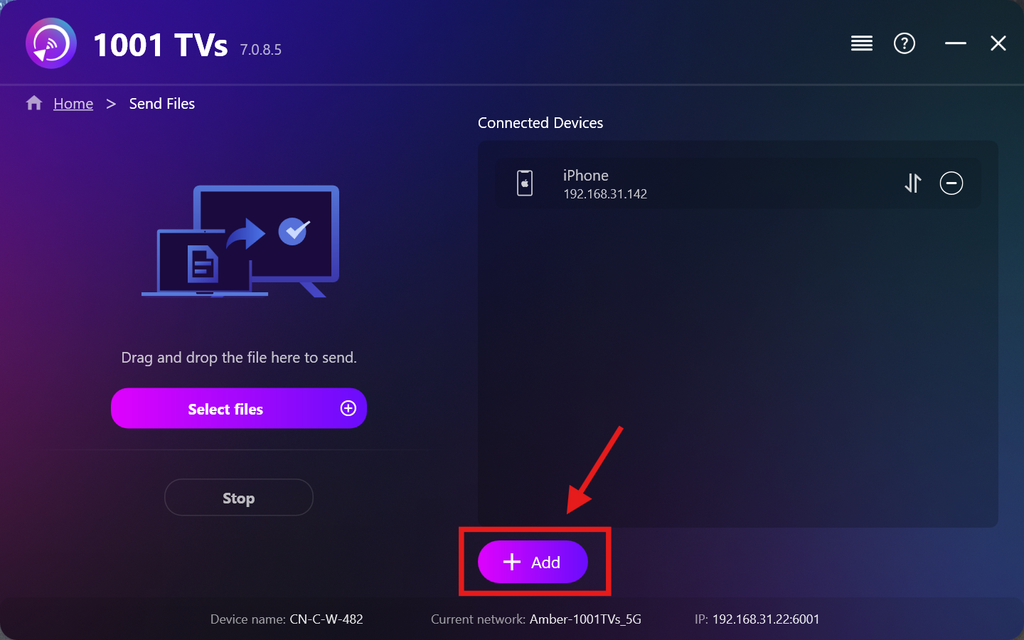
بمجرد الانتهاء من إعداد جهازك الأول، يمكنك إضافة المزيد من الأجهزة المستهدفة بالنقر فوق إضافة أيقونة.
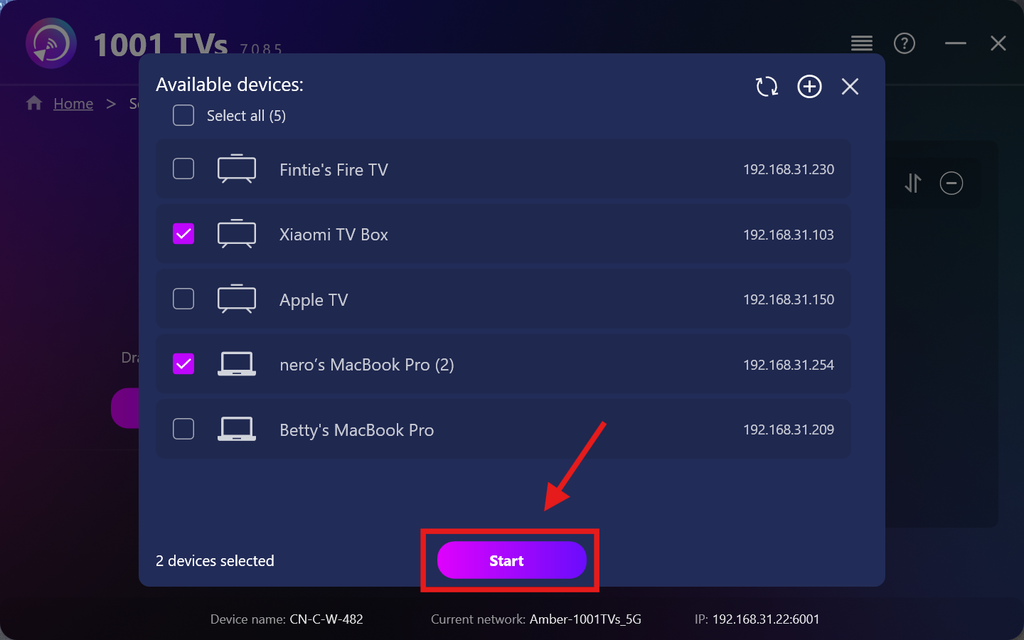
حدد جميع الأجهزة التي تريد إرسال الملفات إليها (يتم دعم التحديد المتعدد).
انقر فوق ابدأ لبدء الاتصال.
قبول طلب الاقتران على كل جهاز مستهدف عند إجراء الاقتران لأول مرة.
5. إرسال الملفات إلى أجهزة متعددة
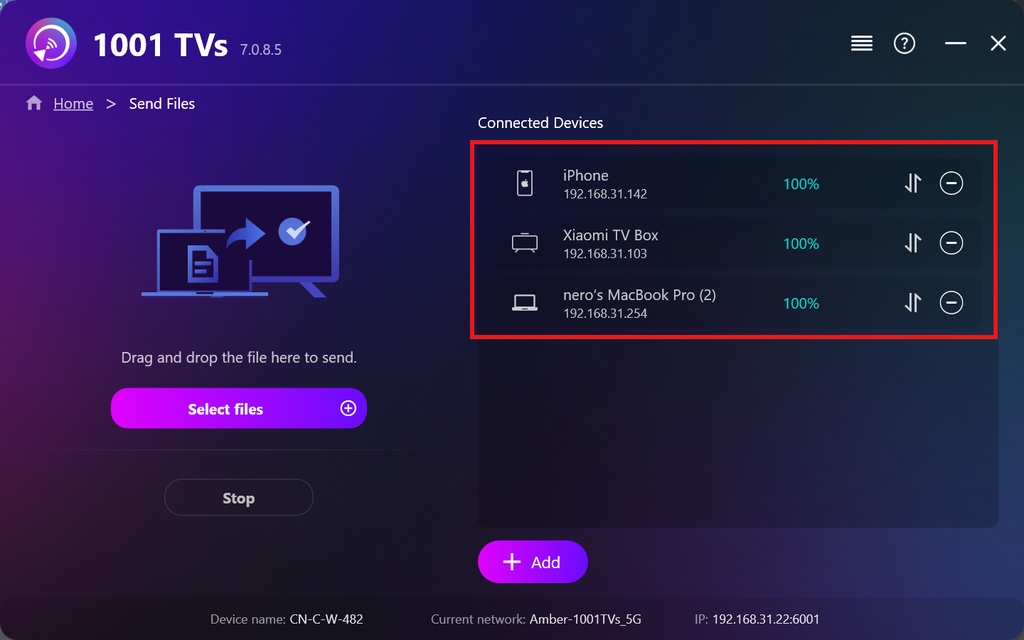
حدد الملفات التي ترغب في إرسالها، أو قم ببساطة بسحبها وإفلاتها في منطقة الملفات على اليسار — لا توجد قيود على حجم الملفات أو عددها.
⚠️ تأكد من أن أجهزة الاستقبال لديك تحتوي على مساحة تخزين كافية، وإلا فسوف يفشل النقل.
6. إدارة أجهزة الاستقبال الخاصة بك
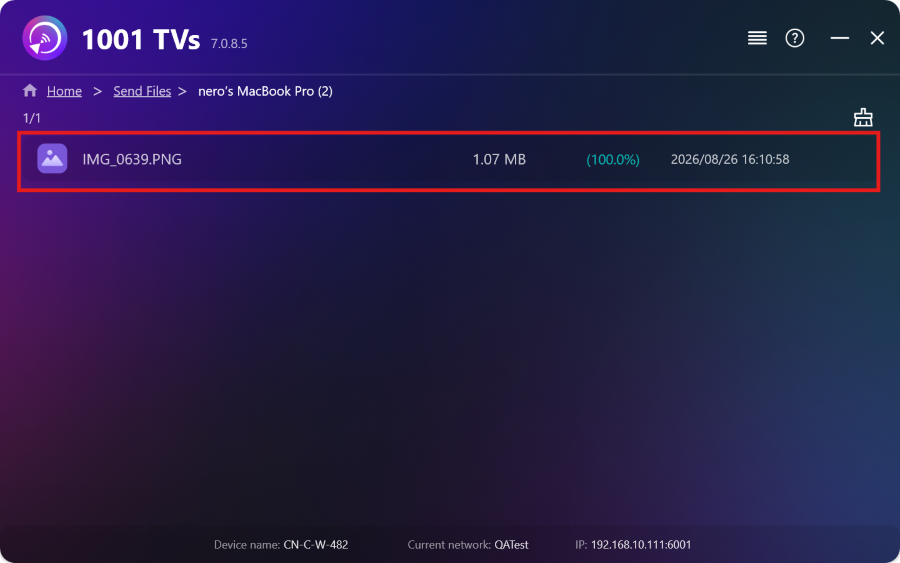
انقر فوق – (ناقص) الرمز لإزالة جهاز من قائمة المستلمين لديك.
انقر فوق التحويل الرمز لعرض جميع الملفات المرسلة إلى هذا الجهاز.
هذا كل شيء! يمكنك الآن إرسال الملفات إلى أجهزة متعددة في آن واحد، في أي وقت، دون أي قيود.
احصل على 1001 TVs الآن
📱 تطبيق iOS: تنزيل من متجر التطبيقات
📱 تطبيق أندرويد: تنزيل من جوجل بلاي
📥تطبيق الكمبيوتر الشخصي: تنزيل من Microsoft Store
للاطلاع على الخطوات التفصيلية، ارجع إلى دليل تثبيت الكمبيوتر الشخصي
📥تطبيق Mac: تنزيل من متجر التطبيقات
📥تطبيق تلفزيوني:كيفية تثبيت 1001 TVs على التلفزيون الخاص بك

اقرأ المزيد
 دليل تثبيت ملفات APK على التلفزيون: كيفية إرسال ملفات APK وتثبيتها على التلفزيون من جهاز الكمبيوتر الشخصي أو جهاز Mac عبر شبكة Wi-Fi
هل لديك ملف APK على هاتفك أو جهاز الكمبيوتر الشخصي أو جهاز Mac وتريد تشغيله على التلفاز؟ باستخدام تطبيق 1001 TVs، يمكنك إرسال...
دليل تثبيت ملفات APK على التلفزيون: كيفية إرسال ملفات APK وتثبيتها على التلفزيون من هاتفك عبر شبكة Wi-Fi
هل لديك ملف APK على هاتفك أو جهاز الكمبيوتر وتريد تشغيله على التلفاز؟ باستخدام تطبيق 1001 TVs، يمكنك إرسال ملف APK...
دليل تثبيت ملفات APK على التلفزيون: كيفية إرسال ملفات APK وتثبيتها على التلفزيون من جهاز الكمبيوتر الشخصي أو جهاز Mac عبر شبكة Wi-Fi
هل لديك ملف APK على هاتفك أو جهاز الكمبيوتر الشخصي أو جهاز Mac وتريد تشغيله على التلفاز؟ باستخدام تطبيق 1001 TVs، يمكنك إرسال...
دليل تثبيت ملفات APK على التلفزيون: كيفية إرسال ملفات APK وتثبيتها على التلفزيون من هاتفك عبر شبكة Wi-Fi
هل لديك ملف APK على هاتفك أو جهاز الكمبيوتر وتريد تشغيله على التلفاز؟ باستخدام تطبيق 1001 TVs، يمكنك إرسال ملف APK...

