PCから複数のデバイス(PC、スマホ、テレビ、タブレット)に同時にファイルを送信する方法
最新のWindows版1001 TVs(v7.0.8.5)では、PCからテレビ、タブレット、スマートフォン、あるいは他のPCなど、複数のデバイスへ同時にファイルを送信できるようになりました。.
接続が完了したら、サイズを問わず、あらゆるファイルを複数のデバイスに一度に、何度でも送信できます。圧縮も不要、手間もかかりません。部屋中のあらゆる画面へ、高速かつシームレスに転送できます。.
チームでの共同作業や、教室での配布、あるいは単に全員にファイルを即座に共有するのに最適です。.

チュートリアル
1. PCおよび受信端末に1001 TVsをインストールする
📱 iOSアプリ: App Storeからダウンロード
📱 アンドロイドアプリ: Google Playからダウンロード
📥PCアプリ: ダウンロード Microsoft ストア
詳しい手順については PCインストールガイド
📥Macアプリ: App Storeからダウンロード
📥TVアプリ: テレビに1001 TVsをインストールする方法
2. 同じWi-Fiに接続する
の両方を確認する。 PC そして 受信装置s が同じWi-Fiネットワークに接続されている場合。.
最高のパフォーマンスを得るには 5 GHz Wi-Fiネットワーク 遅延を減らし、安定性を向上させる。.
3. 最初のデバイスについては、以下のガイドに従ってください:
AndroidおよびiOSのスマートフォンやタブレットにファイルを送信する方法
4. デバイスの追加
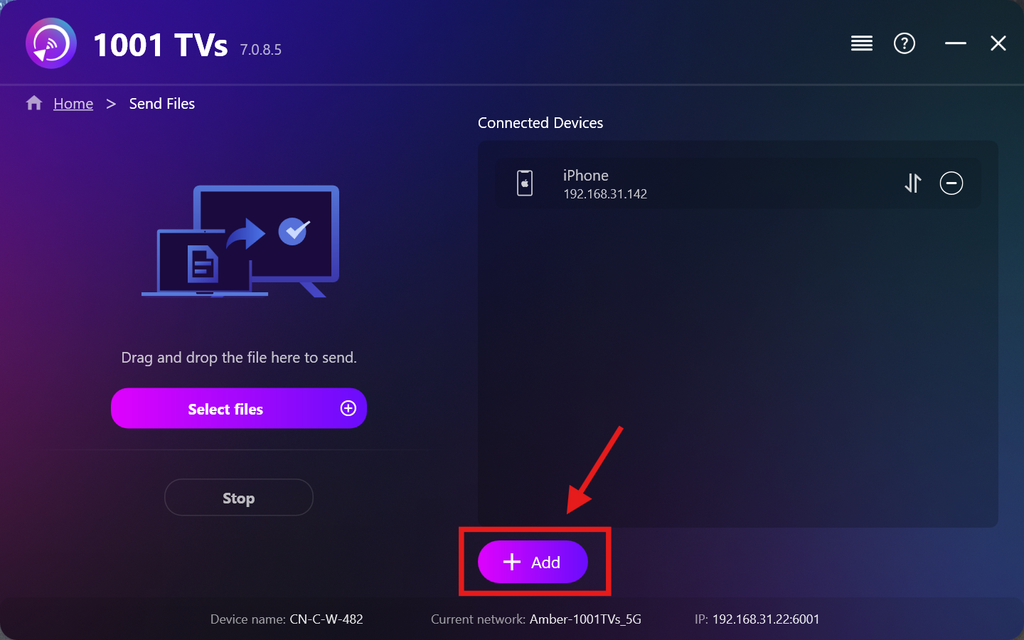
最初のデバイスの設定が完了したら、[ ] をクリックして、さらにターゲットデバイスを追加できます。 追加 アイコン。.
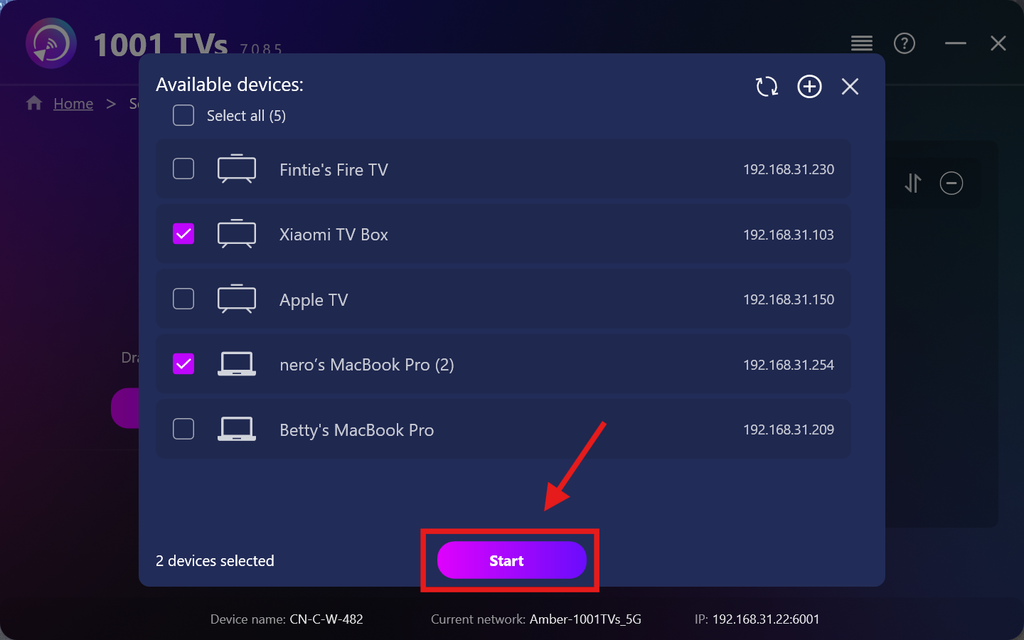
ファイルを送信したいデバイスをすべて選択してください(複数選択が可能です)。.
クリック スタート 接続を開始します。.
ペアリングリクエストを受け入れる 各ターゲットデバイスで、初めてペアリングを行う際。.
5. 複数のデバイスへのファイル送信
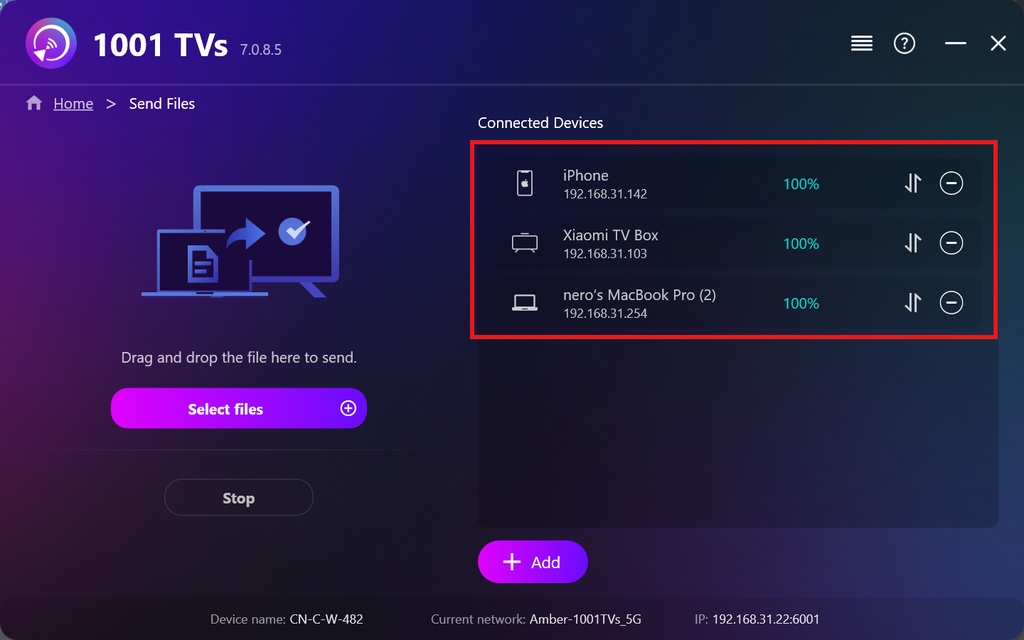
送信したいファイルを選択するか、左側のファイル領域にドラッグ&ドロップしてください。ファイルのサイズや枚数に制限はありません。.
⚠️ 転送先デバイスに十分な空き容量があることを確認してください。そうでないと、転送に失敗します。.
6. 受信デバイスの管理
をクリックする。 –(マイナス) 受信リストからデバイスを削除するアイコン。.
をクリックする。 転送 このデバイスに送信されたすべてのファイルを表示するには、このアイコンをタップしてください。.
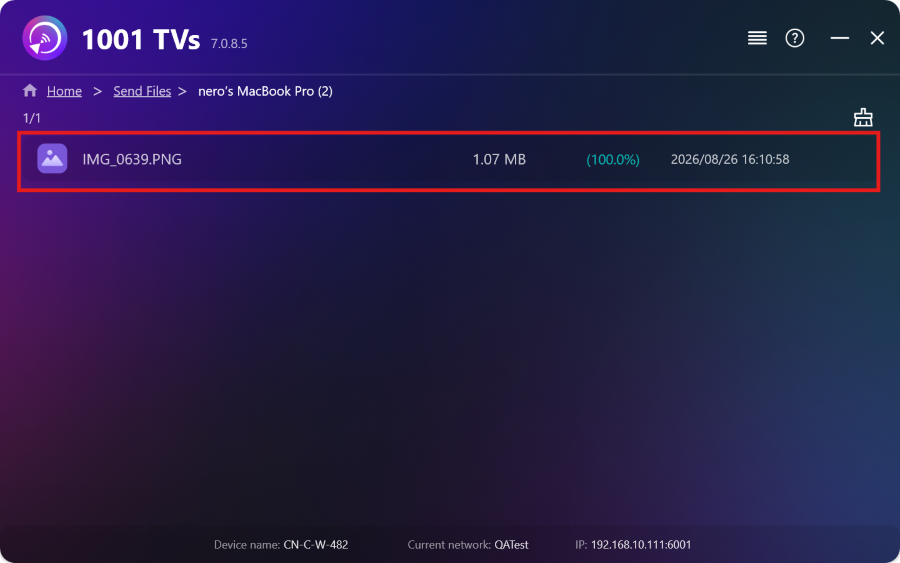
これで完了です!これで、いつでも制限なく、複数のデバイスに同時にファイルを送信できるようになりました。.
今すぐ1001 TVsを入手
📱 iOSアプリ: App Storeからダウンロード
📱 アンドロイドアプリ: Google Playからダウンロード
📥PCアプリ: ダウンロード Microsoft ストア
詳しい手順については PCインストールガイド
📥Macアプリ: App Storeからダウンロード
📥TVアプリ:テレビに1001 TVsをインストールする方法



