PC에서 여러 기기(PC, 휴대폰, TV, 태블릿)로 동시에 파일을 전송하는 방법
최신 Windows용 1001 TVs(v7.0.8.5)를 사용하면 PC에서 TV, 태블릿, 휴대폰 또는 다른 PC 등 여러 기기로 동시에 파일을 전송할 수 있습니다...
연결이 완료되면, 크기에 상관없이 어떤 파일이라도 여러 대의 기기로 한 번에 전송할 수 있으며, 필요한 만큼 몇 번이든 전송할 수 있습니다. 압축도 필요 없고, 번거로움도 없습니다. 방 안의 모든 화면으로 빠르고 원활하게 파일을 전송할 수 있습니다.
팀 협업, 교실 내 자료 배포, 혹은 단순히 모든 사람에게 파일을 즉시 전달하는 데 안성맞춤입니다.

튜토리얼
1. PC와 수신 기기에 1001 TVs를 설치하세요.
📱 iOS 앱: App Store에서 다운로드
📱 Android 앱: Google Play에서 다운로드
📥PC 앱: 다음에서 다운로드 Microsoft 스토어
자세한 단계는 PC 설치 가이드
📥Mac 앱: App Store에서 다운로드
📥TV 앱: TV에 1001 TVs를 설치하는 방법
2. 동일한 Wi-Fi에 연결
다음 두 가지를 모두 확인하십시오. PC 및 수신 장치s 는 동일한 Wi-Fi 네트워크에 연결되어 있습니다.
최상의 성능을 얻으려면 5GHz Wi-Fi 네트워크 를 사용하여 지연을 줄이고 안정성을 향상시킵니다.
3. 첫 번째 기기의 경우, 아래 안내를 따르세요:
PC/Mac에서 TV/PC/Mac으로 파일을 보내는 방법
안드로이드 및 iOS 스마트폰과 태블릿으로 파일을 전송하는 방법
4. 기기 추가하기
첫 번째 기기를 설정하면, 다음을 클릭하여 대상 기기를 더 추가할 수 있습니다. 추가 아이콘.
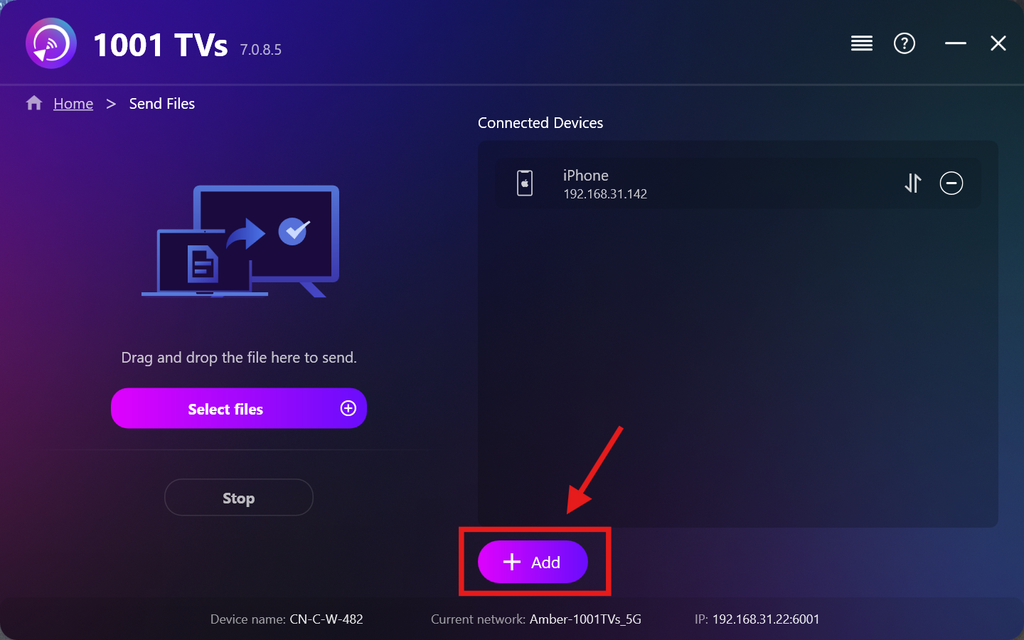
파일을 전송할 모든 기기를 선택하세요(여러 개를 동시에 선택할 수 있습니다).
클릭 시작 연결을 시작하려면.
페어링 요청 수락하기 각 대상 기기에서 처음 페어링할 때.
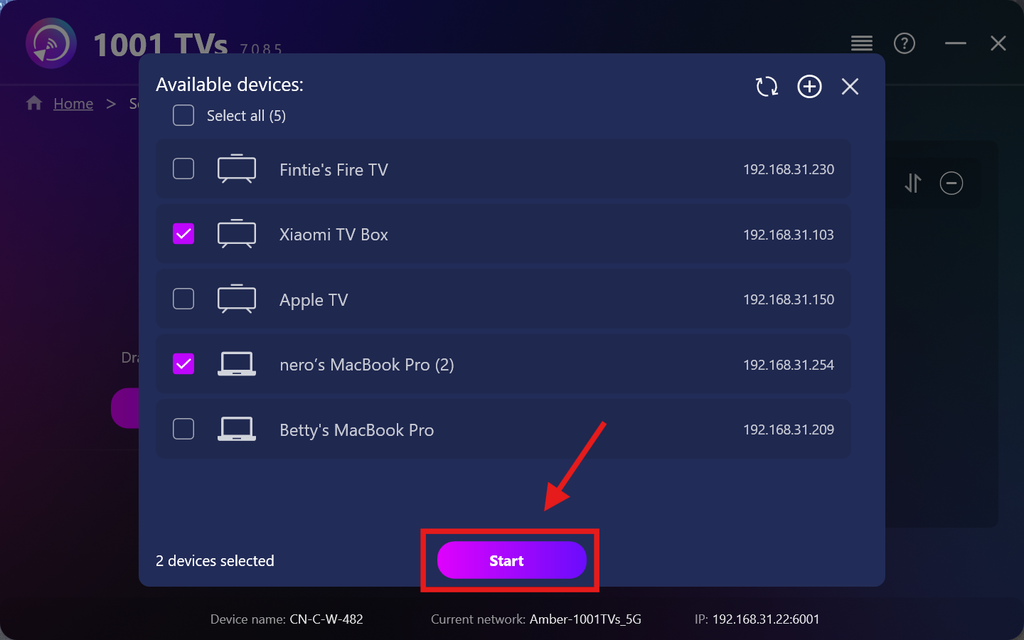
5. 여러 기기로 파일 전송하기
보내려는 파일을 선택하거나, 왼쪽의 파일 영역으로 파일을 끌어다 놓기만 하면 됩니다. 파일 크기나 개수에 제한은 없습니다.
⚠️ 수신 기기에 충분한 저장 공간이 있는지 확인하십시오. 그렇지 않으면 전송이 실패할 수 있습니다.
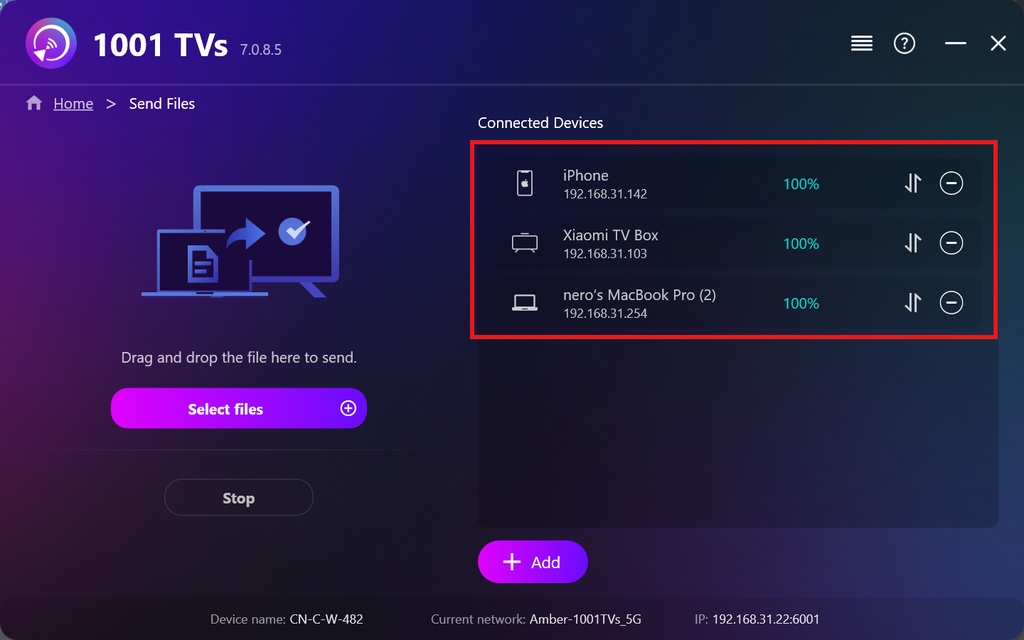
6. 수신 기기 관리하기
를 클릭합니다. – (마이너스) 수신 목록에서 기기를 제거하려면 이 아이콘을 탭하세요.
를 클릭합니다. 이체 이 기기로 전송된 모든 파일을 보려면 아이콘을 탭하세요.
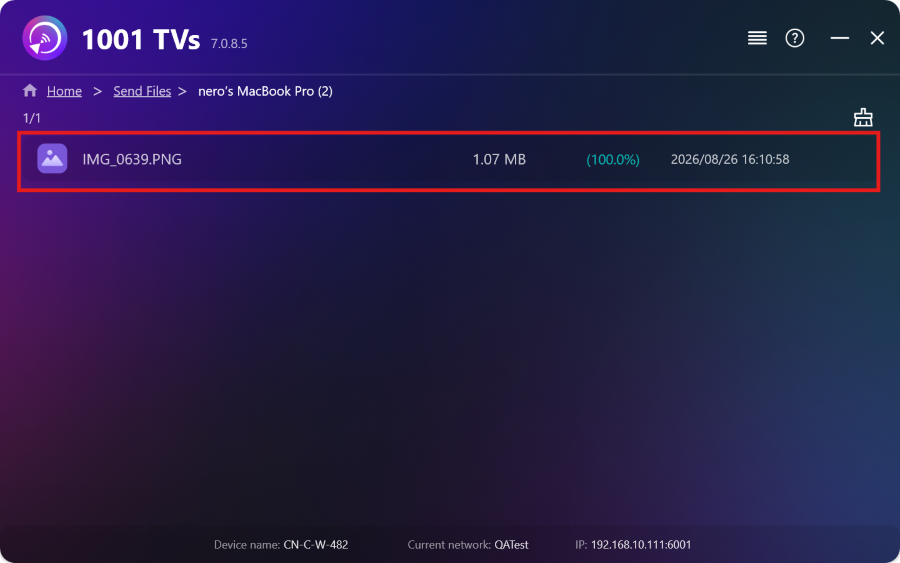
이것으로 끝입니다! 이제 언제든지 제한 없이 여러 기기에 동시에 파일을 보낼 수 있습니다.
지금 1001 TVs 받기
📱 iOS 앱: App Store에서 다운로드
📱 Android 앱: Google Play에서 다운로드
📥PC 앱: 다음에서 다운로드 Microsoft 스토어
자세한 단계는 PC 설치 가이드
📥Mac 앱: App Store에서 다운로드
📥TV 앱:TV에 1001 TVs를 설치하는 방법



