Как отправить файлы с ПК на несколько устройств одновременно (ПК, телефон, телевизор, планшет)
С последней версией 1001 TVs для Windows (v7.0.8.5) ваш компьютер теперь может одновременно отправлять файлы на несколько устройств — телевизоры, планшеты, телефоны или другие компьютеры.
После подключения отправляйте любые файлы любого размера сразу на несколько устройств — столько раз, сколько вам нужно. Без сжатия. Без лишних хлопот. Просто быстрая и беспроблемная передача данных на каждый экран в комнате.
Идеально подходит для совместной работы в команде, распространения материалов в классе или просто для мгновенной отправки файлов всем участникам.

Учебное пособие
1. Установите 1001 TVs на свой компьютер и на принимающие устройства
📱 Приложение для iOS: Скачать из App Store
📱 Приложение для Android: Скачать с Google Play
📥Приложение для ПК: Скачать с Microsoft Store
Подробные шаги см. в разделе Руководство по установке ПК
📥Приложение для Mac: Скачать из App Store
📥Телевизионное приложение: Как установить 1001 TVs на телевизор
2. Подключайтесь к одному и тому же Wi-Fi
Убедитесь, что оба ваших ПК и приёмное устройствоs подключены к одной сети Wi-Fi.
Для достижения наилучшей производительности используйте Сеть Wi-Fi 5 ГГц для уменьшения задержки и повышения стабильности.
3. Для первого устройства следуйте инструкциям, приведенным ниже:
Как отправить файлы с ПК/Mac на телевизор/ПК/Mac
Как отправлять файлы на телефоны и планшеты с Android и iOS
4. Добавление дополнительных устройств
После настройки первого устройства вы можете добавить другие целевые устройства, нажав на кнопку Добавить значок.
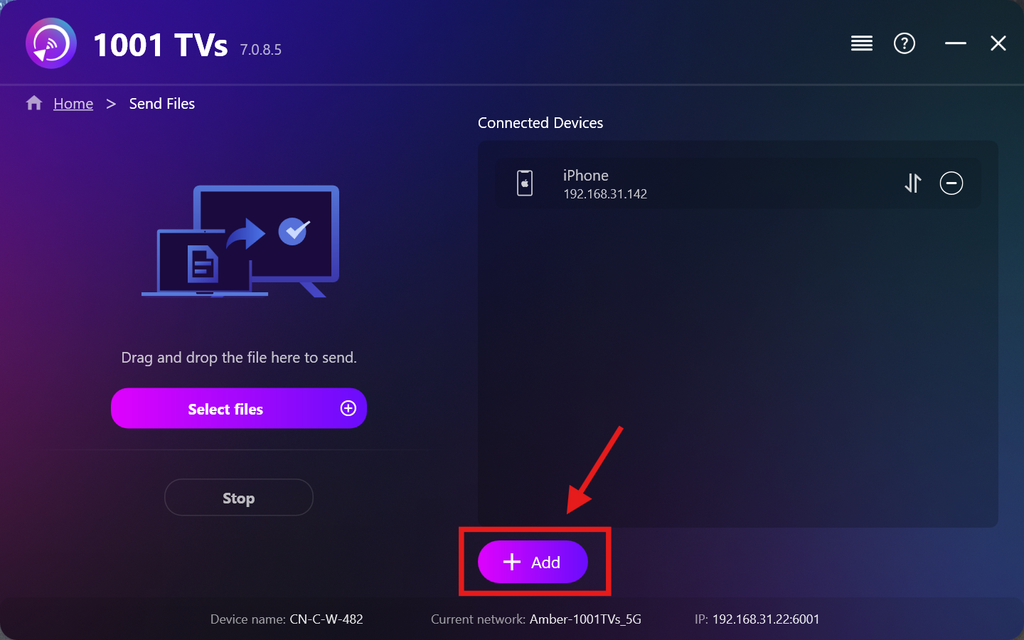
Выберите все устройства, на которые хотите отправить файлы (поддерживается множественный выбор).
Нажмите Начало чтобы установить соединение.
Принять запрос на сопряжение на каждом целевом устройстве при первом сопряжении.
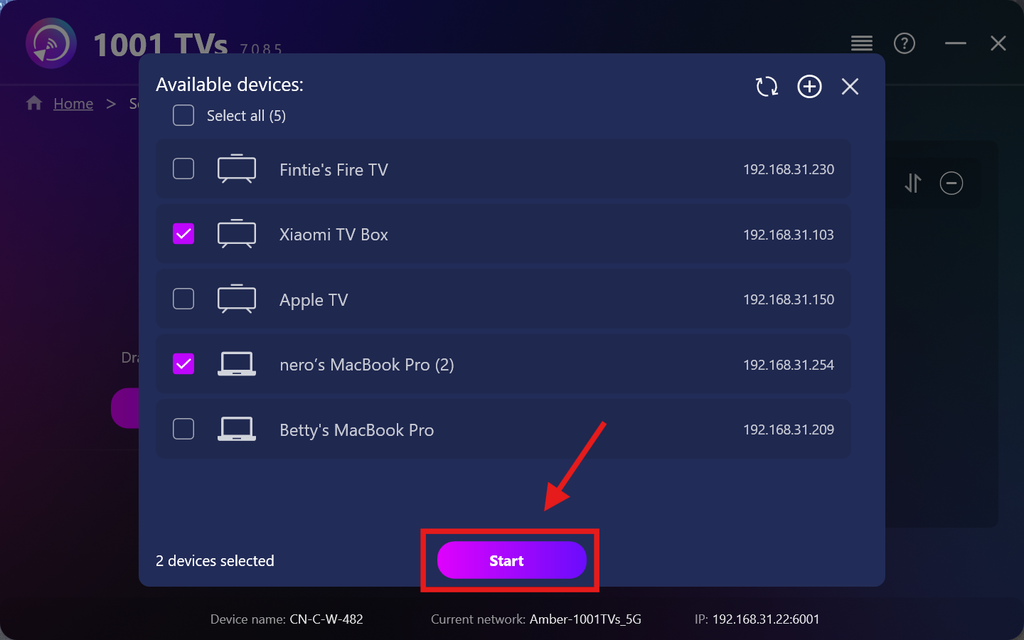
5. Отправка файлов на несколько устройств
Выберите файлы, которые хотите отправить, или просто перетащите их в область для файлов слева — ограничений по размеру или количеству файлов нет.
⚠️ Убедитесь, что на ваших устройствах-получателях достаточно места для хранения данных, иначе передача не состоится.
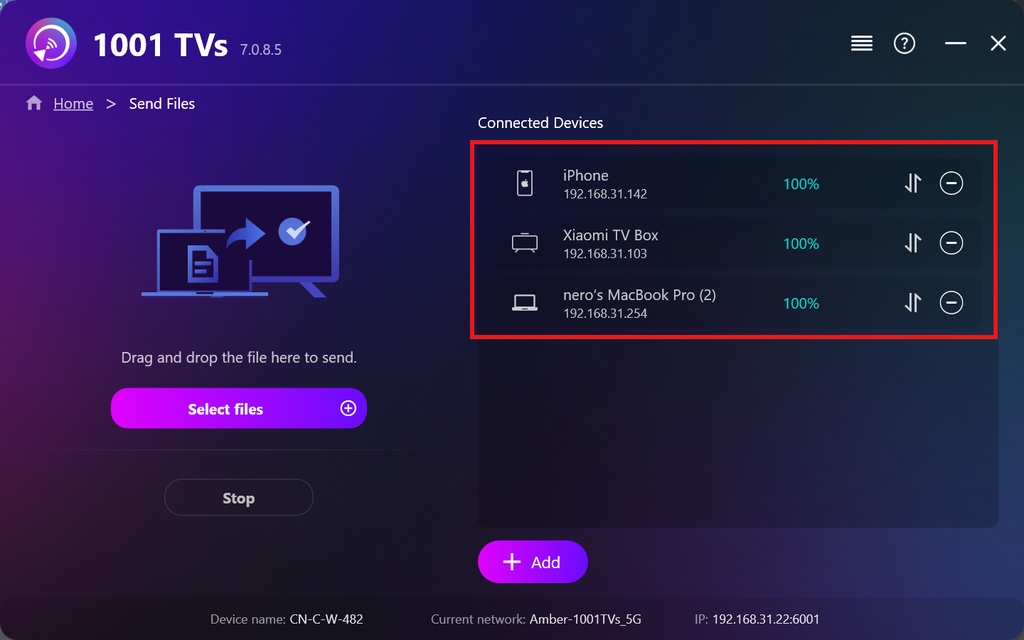
6. Управление устройствами приёма
Нажмите на кнопку – (минус) значок, чтобы удалить устройство из списка получателей.
Нажмите на кнопку передача значок, чтобы просмотреть все файлы, отправленные на это устройство.
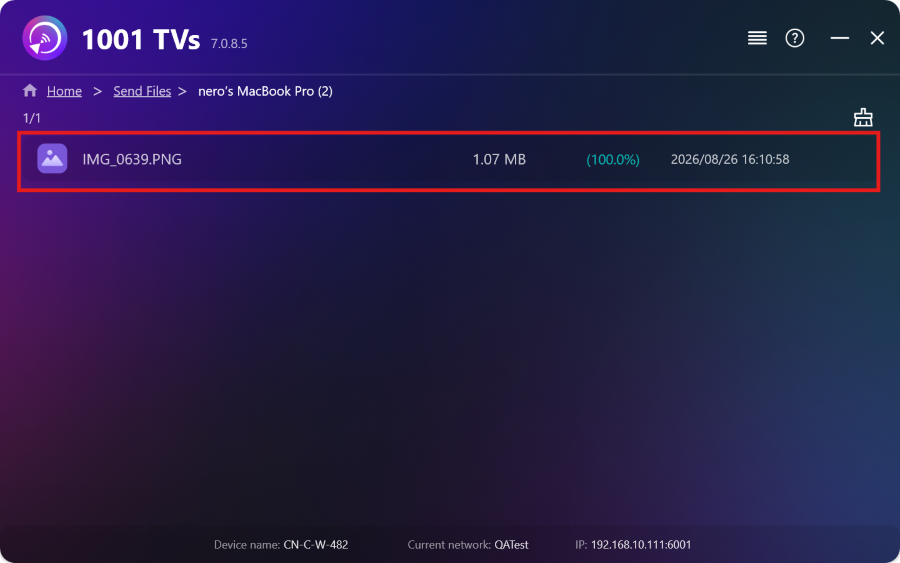
Вот и всё! Теперь вы можете отправлять файлы на несколько устройств одновременно, в любое время и без каких-либо ограничений.
Получить 1001 TVs сейчас
📱 Приложение для iOS: Скачать из App Store
📱 Приложение для Android: Скачать с Google Play
📥Приложение для ПК: Скачать с Microsoft Store
Подробные шаги см. в разделе Руководство по установке ПК
📥Приложение для Mac: Скачать из App Store
📥Телевизионное приложение:Как установить 1001 TVs на телевизор

Подробнее
 Руководство по установке APK-файлов на телевизор: как отправить и установить APK-файлы на телевизор с ПК или Mac через Wi-Fi
У вас на телефоне, ПК или Mac есть файл APK, который вы хотите запустить на телевизоре? С помощью 1001 TVs вы можете отправить...
Руководство по установке APK-файлов на телевизор: как отправить и установить APK-файлы на телевизор со смартфона через Wi-Fi
У вас на телефоне или компьютере есть файл APK, который вы хотите запустить на телевизоре? С помощью 1001 TVs вы можете отправить APK...
Руководство по установке APK-файлов на телевизор: как отправить и установить APK-файлы на телевизор с ПК или Mac через Wi-Fi
У вас на телефоне, ПК или Mac есть файл APK, который вы хотите запустить на телевизоре? С помощью 1001 TVs вы можете отправить...
Руководство по установке APK-файлов на телевизор: как отправить и установить APK-файлы на телевизор со смартфона через Wi-Fi
У вас на телефоне или компьютере есть файл APK, который вы хотите запустить на телевизоре? С помощью 1001 TVs вы можете отправить APK...

