So senden Sie Dateien vom PC gleichzeitig an mehrere Geräte (PC, Smartphone, Fernseher, Tablet)
Mit der neuesten Windows-Version von 1001 TVs (v7.0.8.5) kann Ihr PC nun Dateien gleichzeitig an mehrere Geräte senden – Fernseher, Tablets, Smartphones oder andere PCs.
Sobald die Verbindung hergestellt ist, können Sie beliebige Dateien jeder Größe gleichzeitig an mehrere Geräte senden – so oft Sie möchten. Keine Komprimierung. Kein Aufwand. Einfach schnelle, nahtlose Übertragungen auf jeden Bildschirm im Raum.
Ideal für die Zusammenarbeit im Team, die Verteilung im Unterricht oder einfach nur, um Dateien sofort an alle weiterzugeben.

Tutorial
1. Installieren Sie 1001 TVs auf Ihrem PC und Ihren Empfangsgeräten
📱 iOS-App: Vom App Store herunterladen
📱 Android-App: Von Google Play herunterladen
📥PC-Anwendung: Herunterladen von Microsoft Store
Detaillierte Schritte finden Sie in der PC-Installationsanleitung
📥Mac-Anwendung: Vom App Store herunterladen
📥TV-App: So installieren Sie 1001 TVs auf Ihrem Fernseher
2. Mit demselben Wi-Fi verbinden
Stellen Sie sicher, dass sowohl Ihr PC und die Empfangsgeräts mit demselben Wi-Fi-Netzwerk verbunden sind.
Die beste Leistung erzielen Sie, wenn Sie eine 5 GHz Wi-Fi-Netzwerk um Verzögerungen zu verringern und die Stabilität zu verbessern.
3. Befolgen Sie für Ihr erstes Gerät die nachstehende Anleitung:
Wie Sie Dateien von Ihrem PC/Mac an TV/PC/Mac senden
So senden Sie Dateien an Android- und iOS-Smartphones und -Tablets
4. Weitere Geräte hinzufügen
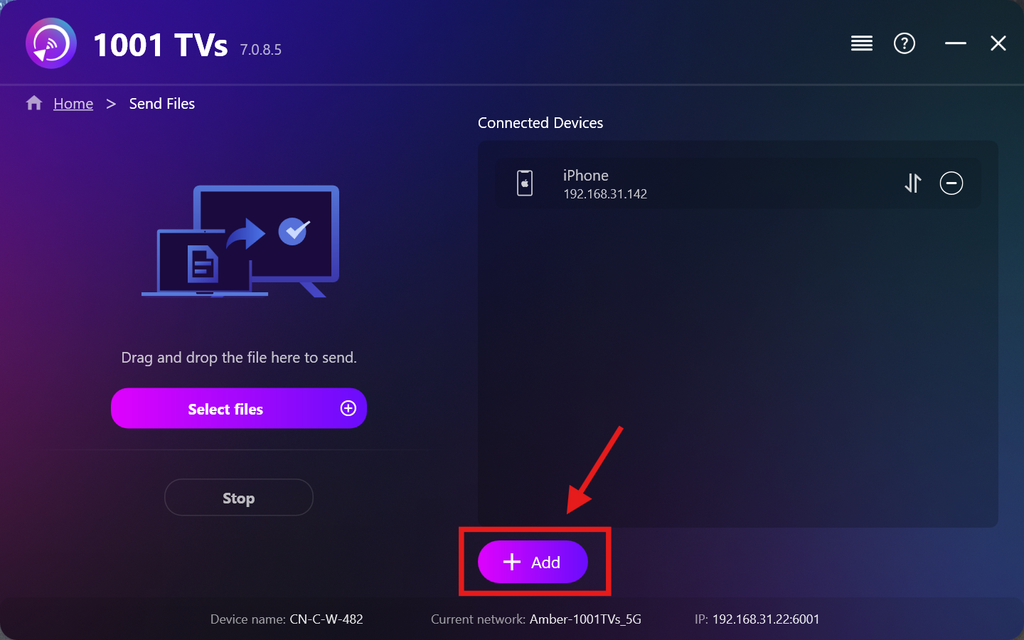
Sobald Ihr erstes Gerät eingerichtet ist, können Sie weitere Zielgeräte hinzufügen, indem Sie auf die Schaltfläche Hinzufügen Symbol.
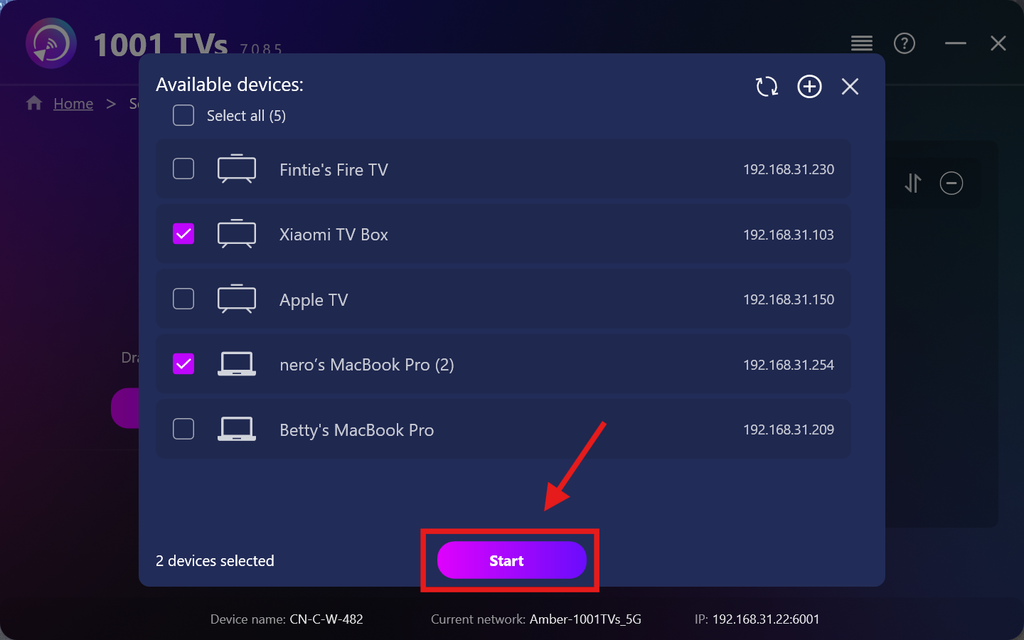
Wählen Sie alle Geräte aus, an die Sie Dateien senden möchten (die Mehrfachauswahl wird unterstützt).
Klicken Sie auf Start um die Verbindung herzustellen.
Die Kopplungsanfrage akzeptieren auf jedem Zielgerät bei der erstmaligen Kopplung.
5. Dateien an mehrere Geräte senden
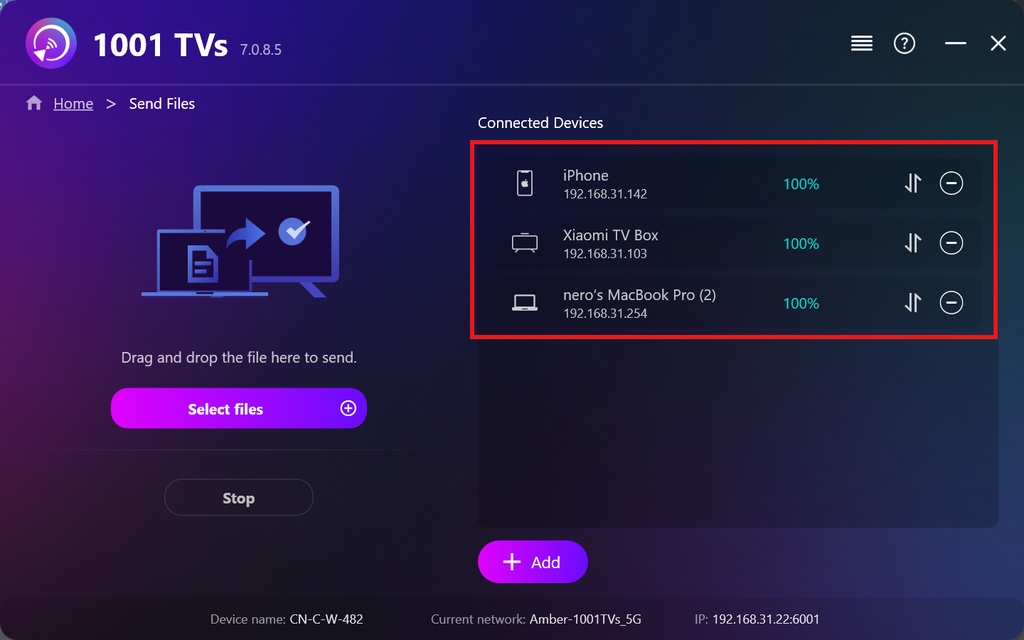
Wählen Sie die Dateien aus, die Sie versenden möchten, oder ziehen Sie sie einfach per Drag & Drop in den Dateibereich auf der linken Seite – es gibt keine Beschränkungen hinsichtlich Dateigröße oder Anzahl.
⚠️ Stellen Sie sicher, dass Ihre Empfangsgeräte über ausreichend Speicherplatz verfügen, da die Übertragung sonst fehlschlägt.
6. Verwalten Sie Ihre Empfangsgeräte
Klicken Sie auf die – (Minus) Symbol, um ein Gerät aus Ihrer Empfängerliste zu entfernen.
Klicken Sie auf die Übertragung Symbol, um alle an dieses Gerät gesendeten Dateien anzuzeigen.
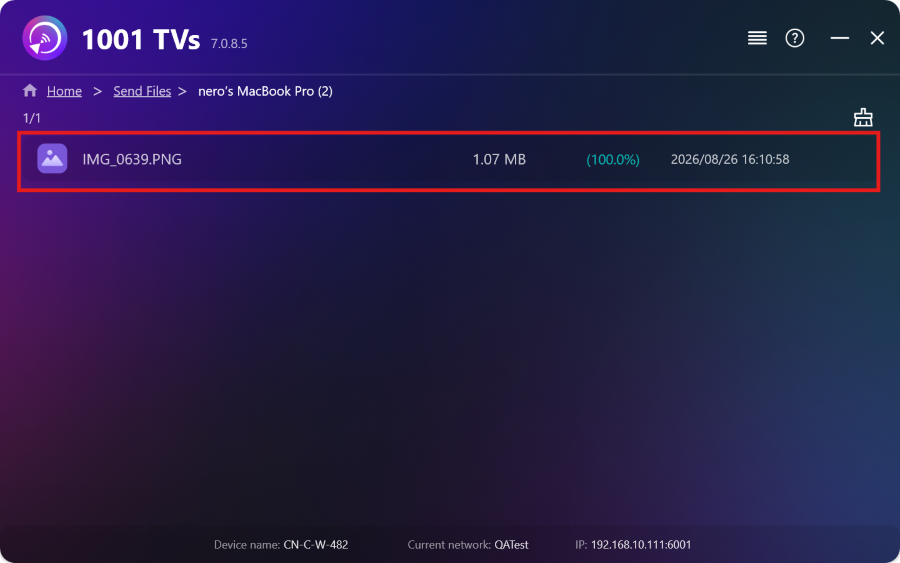
Das war's! Sie können nun jederzeit und ohne Einschränkungen Dateien gleichzeitig an mehrere Geräte senden.
1001 TVs jetzt kaufen
📱 iOS-App: Vom App Store herunterladen
📱 Android-App: Von Google Play herunterladen
📥PC-Anwendung: Herunterladen von Microsoft Store
Detaillierte Schritte finden Sie in der PC-Installationsanleitung
📥Mac-Anwendung: Vom App Store herunterladen

Weiterlesen
 Anleitung zur Installation von APK-Dateien auf dem Fernseher: So senden und installieren Sie APK-Dateien von Ihrem PC oder Mac über WLAN auf dem Fernseher
Haben Sie eine APK-Datei auf Ihrem Smartphone, PC oder Mac, die Sie auf Ihrem Fernseher ausführen möchten? Mit 1001 TVs können Sie diese senden...
Anleitung zur Installation von APK-Dateien auf dem Fernseher: So senden und installieren Sie APK-Dateien von Ihrem Smartphone über WLAN auf dem Fernseher
Hast du eine APK-Datei auf deinem Smartphone oder PC, die du auf deinem Fernseher ausführen möchtest? Mit 1001 TVs kannst du APK-Dateien senden...
Anleitung zur Installation von APK-Dateien auf dem Fernseher: So senden und installieren Sie APK-Dateien von Ihrem PC oder Mac über WLAN auf dem Fernseher
Haben Sie eine APK-Datei auf Ihrem Smartphone, PC oder Mac, die Sie auf Ihrem Fernseher ausführen möchten? Mit 1001 TVs können Sie diese senden...
Anleitung zur Installation von APK-Dateien auf dem Fernseher: So senden und installieren Sie APK-Dateien von Ihrem Smartphone über WLAN auf dem Fernseher
Hast du eine APK-Datei auf deinem Smartphone oder PC, die du auf deinem Fernseher ausführen möchtest? Mit 1001 TVs kannst du APK-Dateien senden...

