Πώς να στείλετε αρχεία από τον υπολογιστή σε πολλές συσκευές ταυτόχρονα (υπολογιστής, κινητό, τηλεόραση, tablet)
Με την πιο πρόσφατη έκδοση του 1001 TVs για Windows (v7.0.8.5), ο υπολογιστής σας μπορεί πλέον να στέλνει αρχεία σε πολλές συσκευές — τηλεοράσεις, tablet, κινητά τηλέφωνα ή άλλους υπολογιστές — όλες ταυτόχρονα...
Μόλις συνδεθείτε, στείλτε οποιοδήποτε αρχείο, ανεξαρτήτως μεγέθους, σε πολλές συσκευές ταυτόχρονα, όσες φορές χρειαστεί. Χωρίς συμπίεση. Χωρίς ταλαιπωρία. Απλά γρήγορες, απρόσκοπτες μεταφορές σε κάθε οθόνη του δωματίου.
Ιδανικό για ομαδική συνεργασία, διανομή στην τάξη ή απλώς για την άμεση αποστολή αρχείων σε όλους.

Σεμινάριο
1. Εγκαταστήστε το 1001 TVs στον υπολογιστή σας και στις συσκευές λήψης
📱 Εφαρμογή iOS: Λήψη από το App Store
📱 Εφαρμογή Android: Λήψη από το Google Play
📥Εφαρμογή για PC: Λήψη από Microsoft Store
Για λεπτομερή βήματα, ανατρέξτε στο Οδηγός εγκατάστασης PC
📥Εφαρμογή για Mac: Λήψη από το App Store
📥Εφαρμογή τηλεόρασης: Πώς να εγκαταστήσετε το 1001 TVs στην τηλεόρασή σας
2. Συνδεθείτε στο ίδιο Wi-Fi
Βεβαιωθείτε ότι και οι δύο σας PC και το συσκευή λήψηςs είναι συνδεδεμένοι στο ίδιο δίκτυο Wi-Fi.
Για καλύτερη απόδοση, χρησιμοποιήστε ένα Δίκτυο Wi-Fi 5 GHz για τη μείωση της καθυστέρησης και τη βελτίωση της σταθερότητας.
3. Για την πρώτη σας συσκευή, ακολουθήστε τον παρακάτω οδηγό:
Πώς να στείλετε αρχεία από το PC/Mac σας στην τηλεόραση/PC/Mac
Πώς να στείλετε αρχεία σε κινητά και tablet με Android και iOS
4. Προσθήκη περισσότερων συσκευών
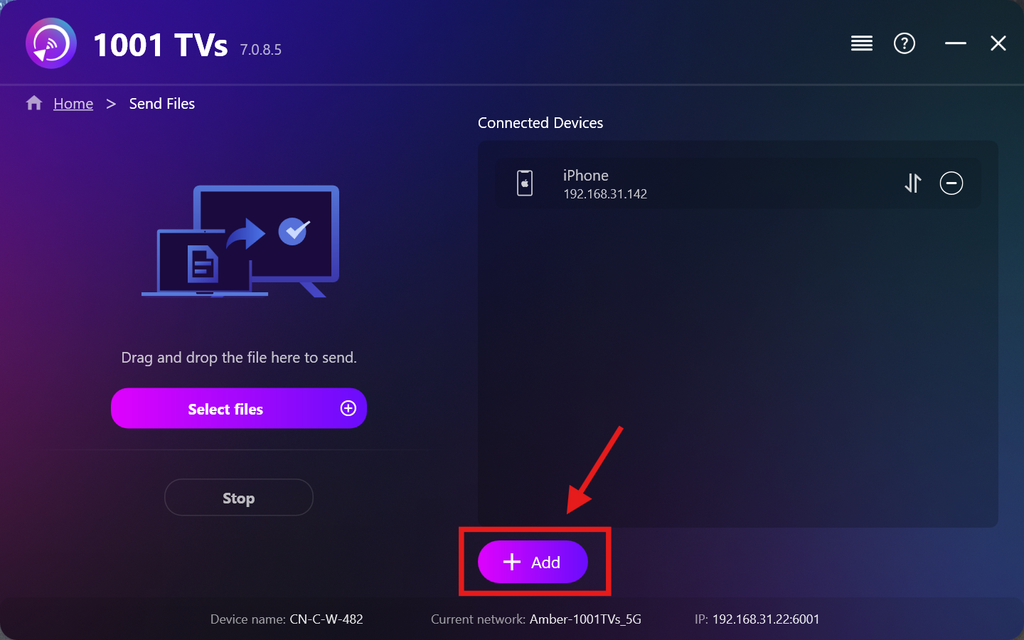
Μόλις ολοκληρωθεί η ρύθμιση της πρώτης συσκευής σας, μπορείτε να προσθέσετε κι άλλες συσκευές-στόχους κάνοντας κλικ στο Προσθήκη εικονίδιο.
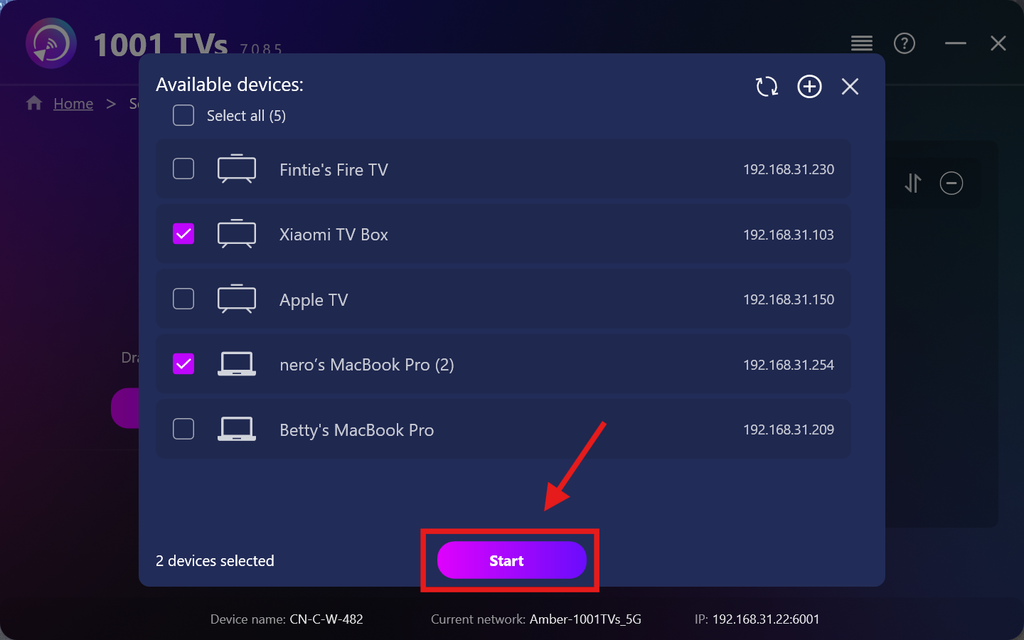
Επιλέξτε όλες τις συσκευές στις οποίες θέλετε να στείλετε αρχεία (υποστηρίζεται η πολλαπλή επιλογή).
Κάντε κλικ στο Έναρξη για να ξεκινήσει η σύνδεση.
Αποδέξου το αίτημα σύζευξης σε κάθε συσκευή-στόχο κατά την πρώτη σύζευξη.
5. Αποστολή αρχείων σε πολλές συσκευές
Επιλέξτε τα αρχεία που θέλετε να στείλετε ή απλώς σύρετε και αποθέστε τα στην περιοχή αρχείων στα αριστερά — δεν υπάρχουν περιορισμοί όσον αφορά το μέγεθος ή τον αριθμό των αρχείων.
⚠️ Βεβαιωθείτε ότι οι συσκευές προορισμού διαθέτουν αρκετό χώρο αποθήκευσης, διαφορετικά η μεταφορά θα αποτύχει.
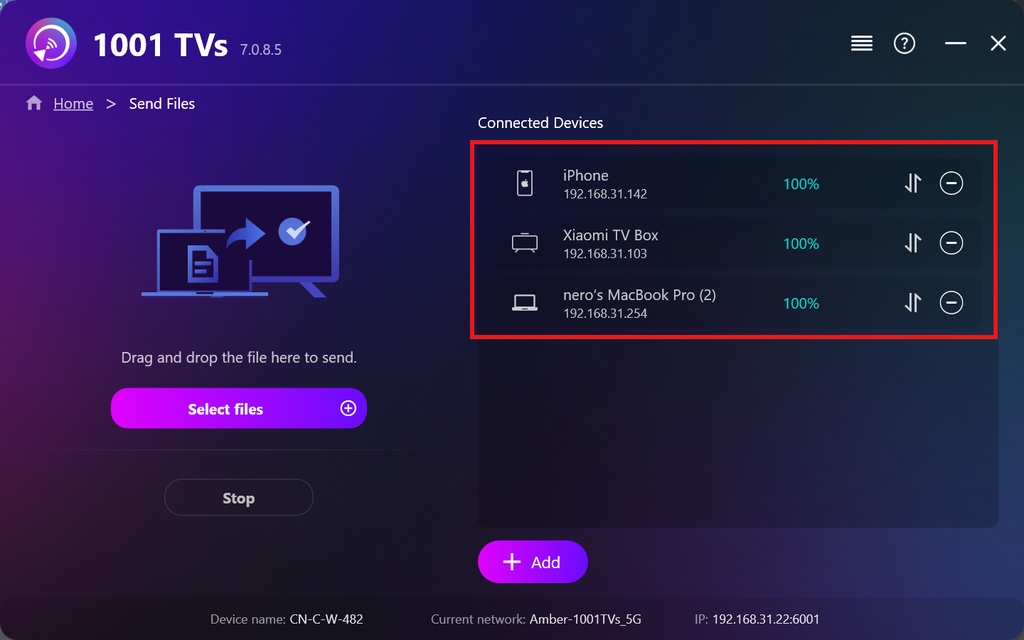
6. Διαχείριση των συσκευών λήψης σας
Κάντε κλικ στο – (μείον) εικονίδιο για να αφαιρέσετε μια συσκευή από τη λίστα παραληπτών σας.
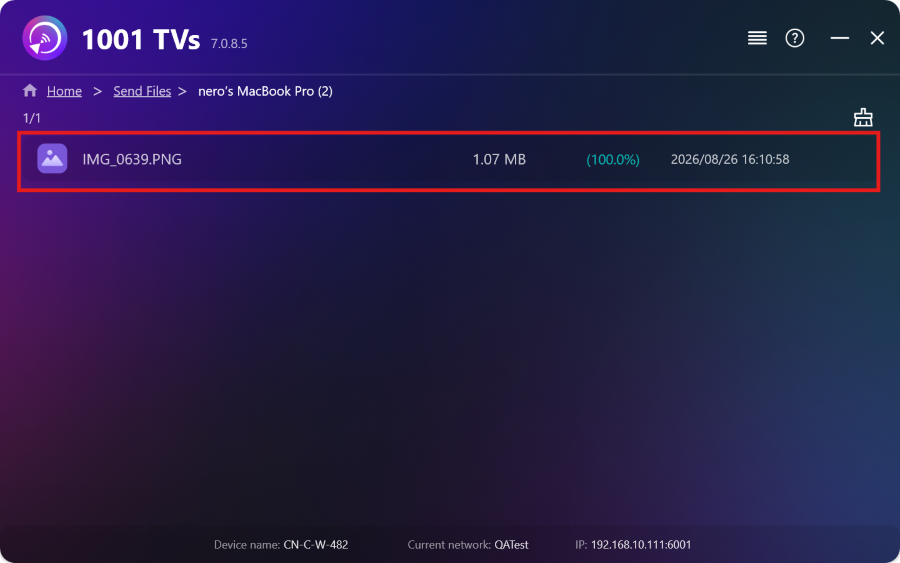
Κάντε κλικ στο μεταφορά εικονίδιο για να δείτε όλα τα αρχεία που έχουν σταλεί σε αυτή τη συσκευή.
Αυτό ήταν! Τώρα μπορείτε να στέλνετε αρχεία σε πολλές συσκευές ταυτόχρονα, οποιαδήποτε στιγμή, χωρίς περιορισμούς.
Αποκτήστε το 1001 TVs τώρα
📱 Εφαρμογή iOS: Λήψη από το App Store
📱 Εφαρμογή Android: Λήψη από το Google Play
📥Εφαρμογή για PC: Λήψη από Microsoft Store
Για λεπτομερή βήματα, ανατρέξτε στο Οδηγός εγκατάστασης PC
📥Εφαρμογή για Mac: Λήψη από το App Store
📥Εφαρμογή τηλεόρασης:Πώς να εγκαταστήσετε το 1001 TVs στην τηλεόρασή σας

Διαβάστε περισσότερα
 Οδηγός εγκατάστασης APK στην τηλεόραση: Πώς να στείλετε και να εγκαταστήσετε αρχεία APK στην τηλεόρασή σας από τον υπολογιστή ή το Mac σας μέσω Wi-Fi
Έχετε ένα αρχείο APK στο κινητό σας, στον υπολογιστή ή στο Mac και θέλετε να το εκτελέσετε στην τηλεόρασή σας; Με το 1001 TVs, μπορείτε να στείλετε...
Οδηγός εγκατάστασης APK στην τηλεόραση: Πώς να στείλετε και να εγκαταστήσετε αρχεία APK στην τηλεόραση από το κινητό σας μέσω Wi-Fi
Έχετε ένα αρχείο APK στο κινητό ή στον υπολογιστή σας και θέλετε να το εκτελέσετε στην τηλεόρασή σας; Με το 1001 TVs, μπορείτε να στείλετε το APK...
Οδηγός εγκατάστασης APK στην τηλεόραση: Πώς να στείλετε και να εγκαταστήσετε αρχεία APK στην τηλεόρασή σας από τον υπολογιστή ή το Mac σας μέσω Wi-Fi
Έχετε ένα αρχείο APK στο κινητό σας, στον υπολογιστή ή στο Mac και θέλετε να το εκτελέσετε στην τηλεόρασή σας; Με το 1001 TVs, μπορείτε να στείλετε...
Οδηγός εγκατάστασης APK στην τηλεόραση: Πώς να στείλετε και να εγκαταστήσετε αρχεία APK στην τηλεόραση από το κινητό σας μέσω Wi-Fi
Έχετε ένα αρχείο APK στο κινητό ή στον υπολογιστή σας και θέλετε να το εκτελέσετε στην τηλεόρασή σας; Με το 1001 TVs, μπορείτε να στείλετε το APK...

