Comment envoyer des fichiers depuis un PC vers plusieurs appareils à la fois (PC, téléphone, téléviseur, tablette)
Avec la dernière version Windows de 1001 TVs (v7.0.8.5), votre PC peut désormais envoyer des fichiers vers plusieurs appareils — téléviseurs, tablettes, téléphones ou autres PC —, tous en même temps.
Une fois connecté, envoyez n'importe quel fichier, quelle que soit sa taille, vers plusieurs appareils à la fois, autant de fois que vous le souhaitez. Pas de compression. Pas de tracas. Juste des transferts rapides et fluides vers tous les écrans de la pièce.
Idéal pour la collaboration en équipe, la distribution en classe ou simplement pour transmettre instantanément des fichiers à tout le monde.

Tutoriel
1. Installez 1001 TVs sur votre PC et sur vos appareils récepteurs
📱 Application iOS : Télécharger depuis l'App Store
📱 Application Android : Télécharger sur Google Play
📥PC App : Télécharger à partir de Microsoft Store
Pour les étapes détaillées, voir le Guide d'installation du PC
📥Mac App : Télécharger depuis l'App Store
📥TV App : Comment installer 1001 TVs sur votre téléviseur
2. Se connecter au même réseau Wi-Fi
Assurez-vous que votre PC et le dispositif de réceptions sont connectés au même réseau Wi-Fi.
Pour une meilleure performance, utilisez un Réseau Wi-Fi 5 GHz afin de réduire les délais et d'améliorer la stabilité.
3. Pour votre premier appareil, suivez le guide ci-dessous :
Comment envoyer des fichiers de votre PC/Mac vers votre TV/PC/Mac
Comment envoyer des fichiers vers des téléphones et tablettes Android et iOS
4. Ajouter d'autres appareils
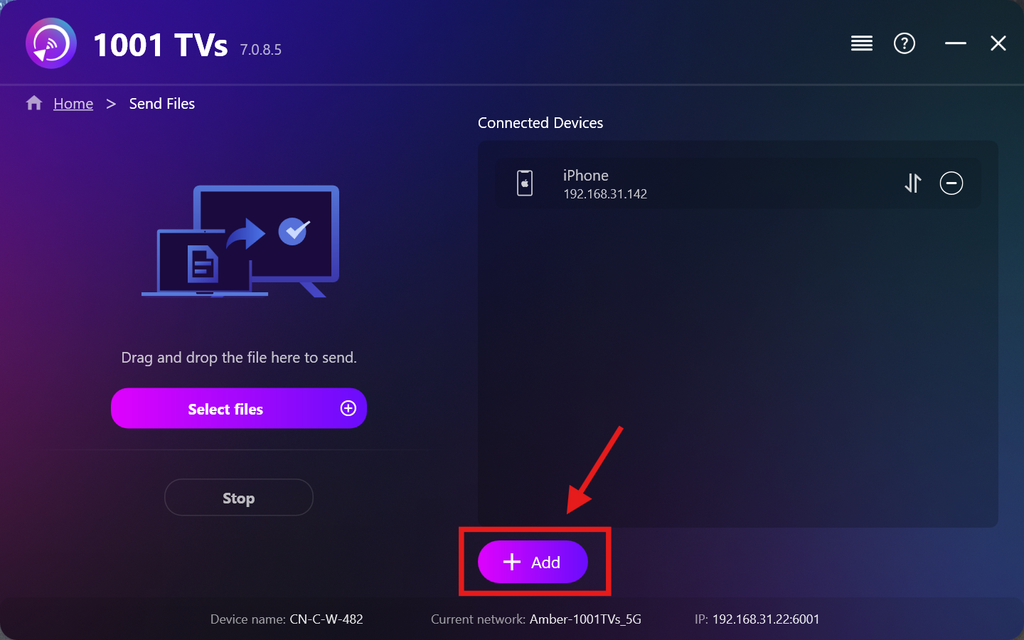
Une fois votre premier appareil configuré, vous pouvez ajouter d'autres appareils cibles en cliquant sur le Ajouter icône.
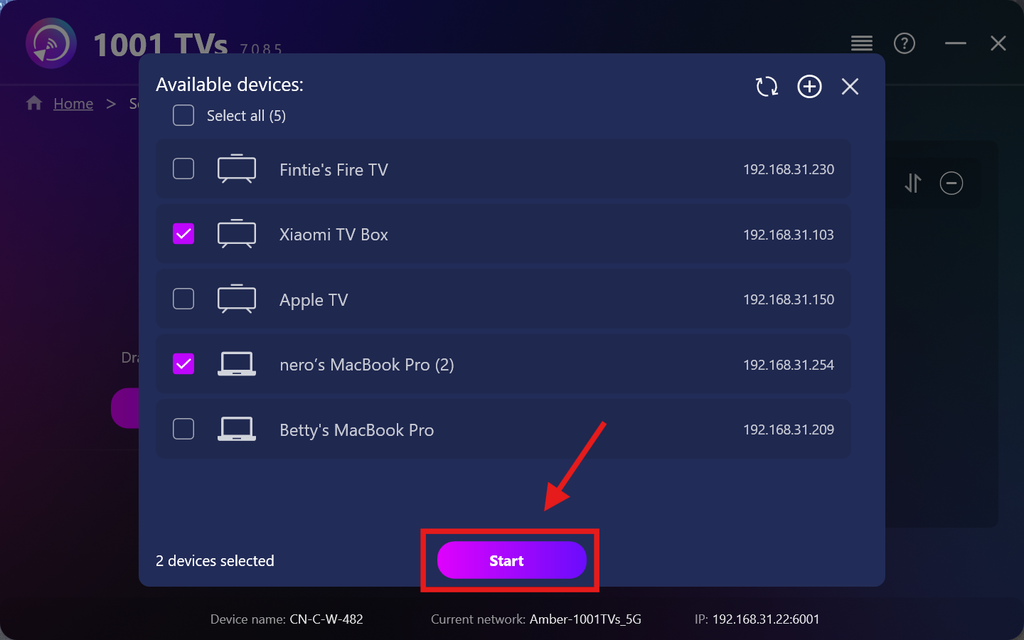
Sélectionnez tous les appareils auxquels vous souhaitez envoyer des fichiers (la sélection multiple est prise en charge).
Cliquez sur Démarrage pour établir la connexion.
Accepter la demande d'appairage sur chaque appareil cible lors du premier appairage.
5. Envoi de fichiers vers plusieurs appareils
Sélectionnez les fichiers que vous souhaitez envoyer, ou glissez-déposez-les simplement dans la zone de fichiers située à gauche — il n'y a aucune limite quant à la taille ou au nombre de fichiers.
⚠️ Assurez-vous que vos appareils destinataires disposent d'un espace de stockage suffisant, sinon le transfert échouera.
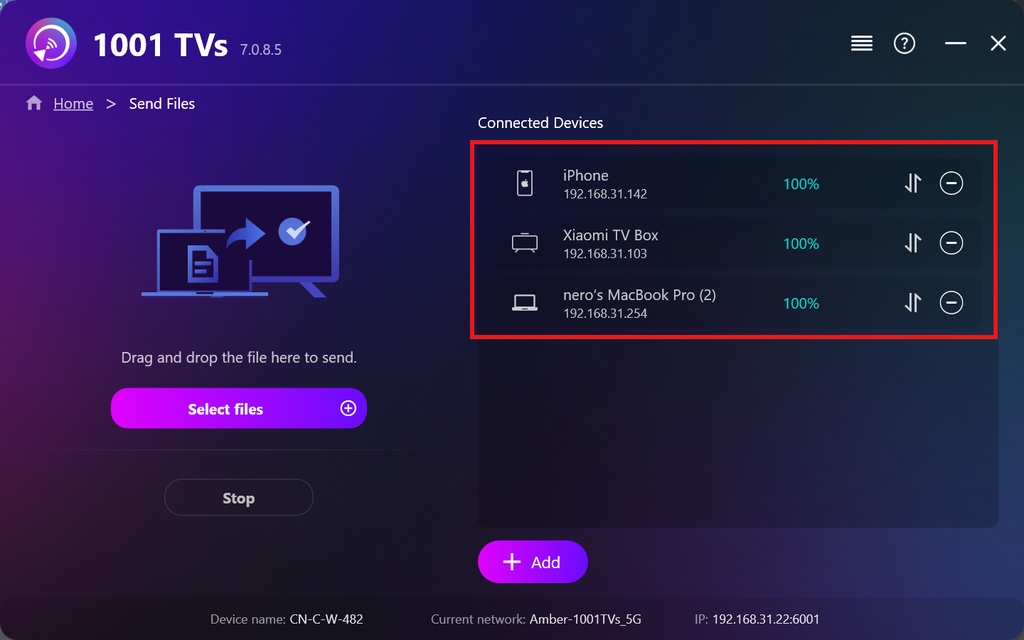
6. Gérer vos appareils de réception
Cliquez sur le bouton – (moins) icône permettant de supprimer un appareil de votre liste de destinataires.
Cliquez sur le bouton transfert icône permettant d'afficher tous les fichiers envoyés vers cet appareil.
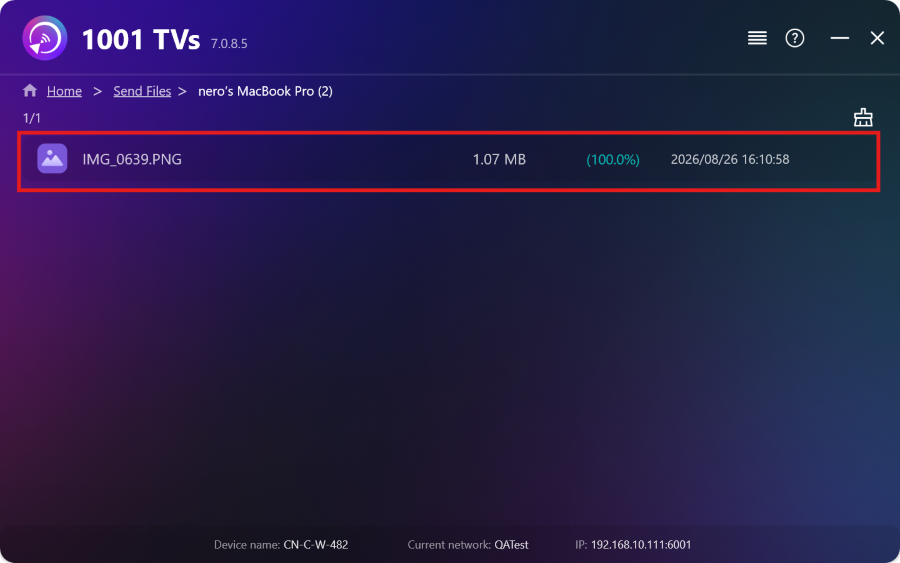
Et voilà ! Vous pouvez désormais envoyer des fichiers vers plusieurs appareils à la fois, à tout moment et sans aucune restriction.
Obtenir 1001 TVs maintenant
📱 Application iOS : Télécharger depuis l'App Store
📱 Application Android : Télécharger sur Google Play
📥PC App : Télécharger à partir de Microsoft Store
Pour les étapes détaillées, voir le Guide d'installation du PC
📥Mac App : Télécharger depuis l'App Store

En savoir plus
 Guide d'installation d'APK sur téléviseur : comment envoyer et installer des fichiers APK sur votre téléviseur depuis votre PC ou votre Mac via le Wi-Fi
Vous avez un fichier APK sur votre téléphone, votre PC ou votre Mac et vous souhaitez l'exécuter sur votre téléviseur ? Avec 1001 TVs, vous pouvez envoyer...
Guide d'installation d'APK sur téléviseur : comment envoyer et installer des fichiers APK sur votre téléviseur depuis votre téléphone via le Wi-Fi
Vous avez un fichier APK sur votre téléphone ou votre PC et vous souhaitez l'exécuter sur votre téléviseur ? Avec 1001 TVs, vous pouvez envoyer des fichiers APK...
Guide d'installation d'APK sur téléviseur : comment envoyer et installer des fichiers APK sur votre téléviseur depuis votre PC ou votre Mac via le Wi-Fi
Vous avez un fichier APK sur votre téléphone, votre PC ou votre Mac et vous souhaitez l'exécuter sur votre téléviseur ? Avec 1001 TVs, vous pouvez envoyer...
Guide d'installation d'APK sur téléviseur : comment envoyer et installer des fichiers APK sur votre téléviseur depuis votre téléphone via le Wi-Fi
Vous avez un fichier APK sur votre téléphone ou votre PC et vous souhaitez l'exécuter sur votre téléviseur ? Avec 1001 TVs, vous pouvez envoyer des fichiers APK...

