Så här skickar du filer från datorn till flera enheter samtidigt (dator, mobil, TV, surfplatta)
Med den senaste Windows-versionen av 1001 TVs (v7.0.8.5) kan din dator nu skicka filer till flera enheter – TV-apparater, surfplattor, mobiltelefoner eller andra datorer – samtidigt.
När du är ansluten kan du skicka vilken fil som helst, oavsett storlek, till flera enheter samtidigt – så många gånger du vill. Ingen komprimering. Inget krångel. Bara snabba, smidiga överföringar till varje skärm i rummet.
Perfekt för samarbete i team, utdelning i klassrummet eller helt enkelt för att snabbt dela filer med alla.

Handledning
1. Installera 1001 TVs på din dator och dina mottagande enheter
📱 iOS-app: Ladda ner från App Store
📱 Android-app: Ladda ner från Google Play
📥PC-app: Ladda ner från Microsoft Store
För detaljerade steg, se Installationshandbok för PC
📥Mac App: Ladda ner från App Store
📥TV-app: Så här installerar du 1001 TVs på din TV
2. Anslut till samma Wi-Fi
Se till att både din PC och mottagande enhets är anslutna till samma Wi-Fi-nätverk.
För bästa prestanda, använd en 5 GHz Wi-Fi-nätverk för att minska förseningar och förbättra stabiliteten.
3. Följ anvisningarna nedan för din första enhet:
Så här skickar du filer från din PC/Mac till TV/PC/Mac
Så här skickar du filer till Android- och iOS-telefoner och -surfplattor
4. Lägga till fler enheter
När din första enhet är konfigurerad kan du lägga till fler målenheter genom att klicka på Lägg till ikon.
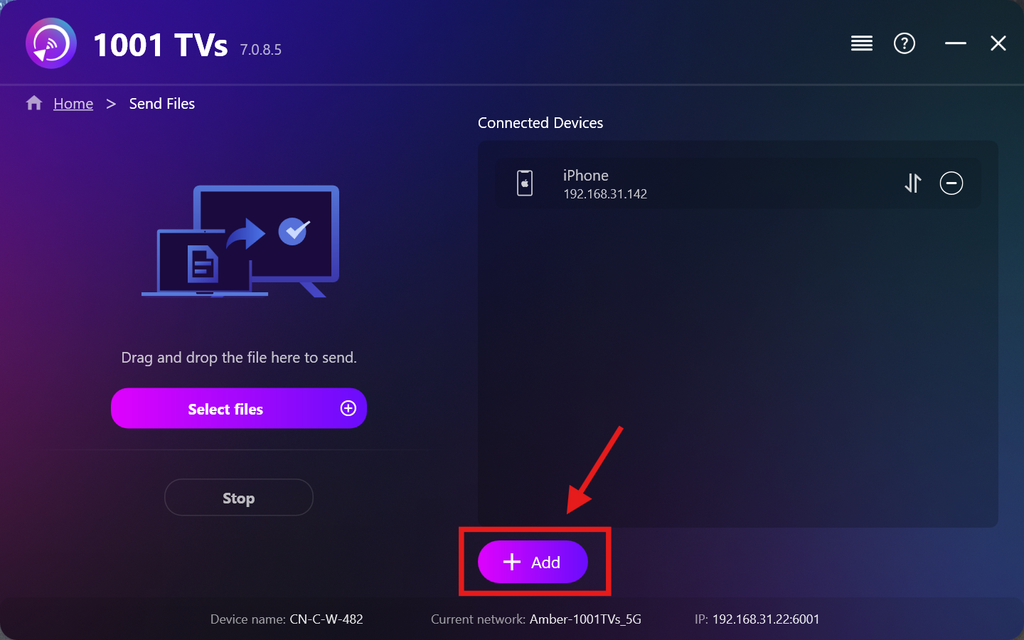
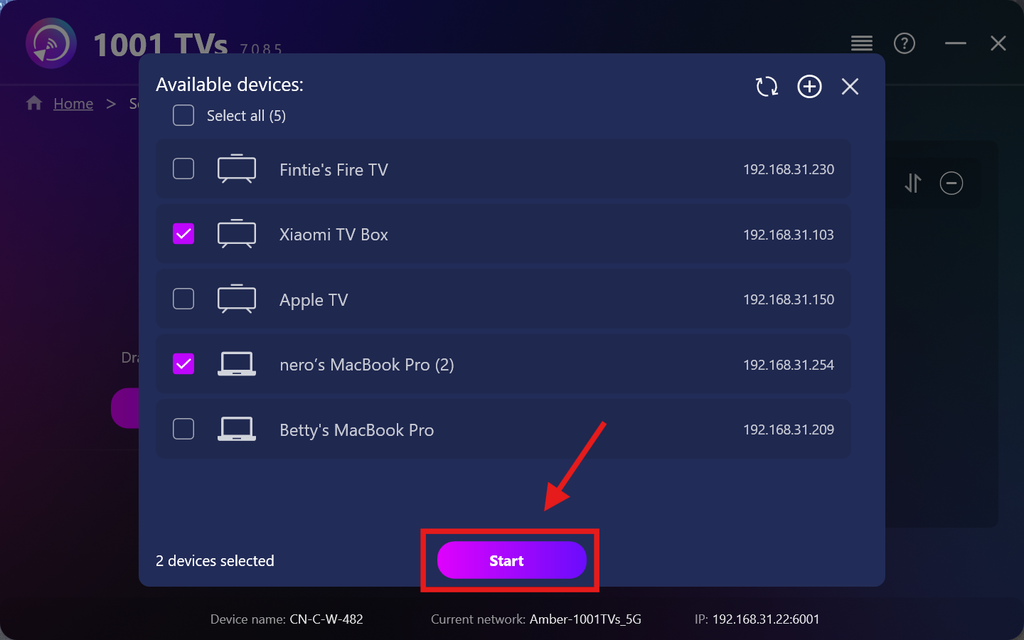
Markera alla enheter som du vill skicka filer till (det går att markera flera enheter samtidigt).
Klicka på Start för att upprätta anslutningen.
Godkänn parningsförfrågan på varje målenhet vid den första parkopplingen.
5. Skicka filer till flera enheter
Välj de filer du vill skicka, eller dra och släpp dem helt enkelt i filområdet till vänster – det finns inga begränsningar vad gäller filstorlek eller antal filer.
⚠️ Se till att dina mottagande enheter har tillräckligt med lagringsutrymme, annars misslyckas överföringen.
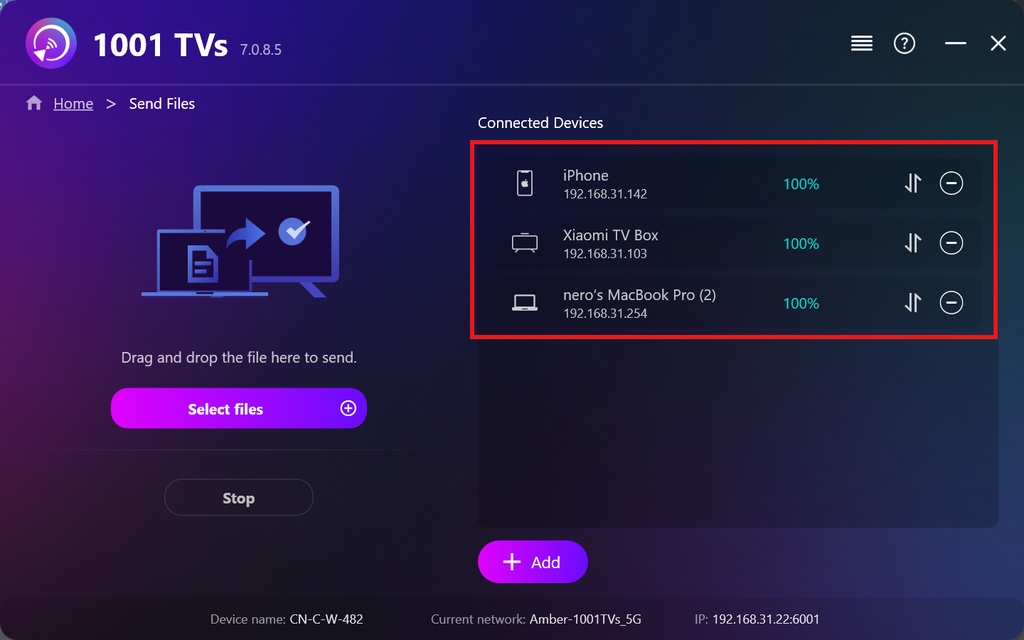
6. Hantera dina mottagande enheter
Klicka på – (minus) ikonen för att ta bort en enhet från din mottagarlista.
Klicka på överföring ikon för att visa alla filer som har skickats till den här enheten.
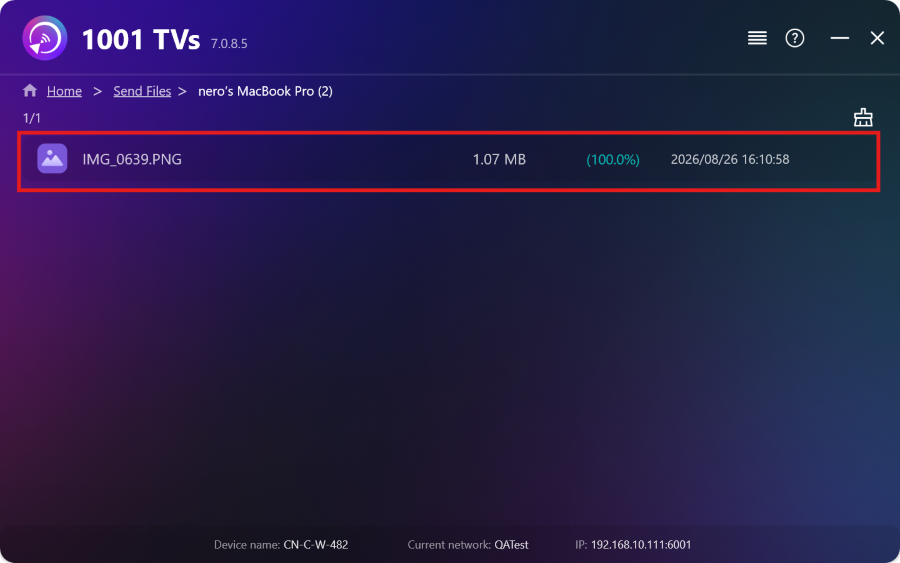
Det var allt! Nu kan du skicka filer till flera enheter samtidigt, när som helst och utan några begränsningar.
Hämta 1001 TVs nu
📱 iOS-app: Ladda ner från App Store
📱 Android-app: Ladda ner från Google Play
📥PC-app: Ladda ner från Microsoft Store
För detaljerade steg, se Installationshandbok för PC
📥Mac App: Ladda ner från App Store

Läs mer
 Installationsguide för TV-APK: Så här skickar och installerar du APK-filer på TV:n från din PC eller Mac via Wi-Fi
Har du en APK-fil på din mobil, PC eller Mac som du vill köra på din TV? Med 1001 TVs kan du skicka...
Installationsguide för TV-APK: Så här skickar och installerar du APK-filer på TV:n från din telefon via Wi-Fi
Har du en APK-fil på din mobil eller dator som du vill köra på din TV? Med 1001 TVs kan du skicka APK...
Installationsguide för TV-APK: Så här skickar och installerar du APK-filer på TV:n från din PC eller Mac via Wi-Fi
Har du en APK-fil på din mobil, PC eller Mac som du vill köra på din TV? Med 1001 TVs kan du skicka...
Installationsguide för TV-APK: Så här skickar och installerar du APK-filer på TV:n från din telefon via Wi-Fi
Har du en APK-fil på din mobil eller dator som du vill köra på din TV? Med 1001 TVs kan du skicka APK...

