วิธีส่งไฟล์จากคอมพิวเตอร์ไปยังอุปกรณ์หลายเครื่องพร้อมกัน (คอมพิวเตอร์, โทรศัพท์, ทีวี, แท็บเล็ต)
ด้วยเวอร์ชัน Windows ล่าสุดของ 1001 TVs (v7.0.8.5) คอมพิวเตอร์ของคุณสามารถส่งไฟล์ไปยังอุปกรณ์หลายเครื่อง — เช่น ทีวี แท็บเล็ต โทรศัพท์ หรือคอมพิวเตอร์เครื่องอื่น — ได้พร้อมกันทั้งหมด.
เมื่อเชื่อมต่อแล้ว คุณสามารถส่งไฟล์ใดก็ได้ ไม่ว่าขนาดจะใหญ่หรือเล็ก ไปยังอุปกรณ์หลายเครื่องพร้อมกัน ได้บ่อยเท่าที่ต้องการ ไม่มีการบีบอัด ไม่มีความยุ่งยาก เพียงแค่การส่งข้อมูลที่รวดเร็วและราบรื่นไปยังทุกหน้าจอในห้อง.
เหมาะอย่างยิ่งสำหรับการทำงานร่วมกันในทีม การแจกจ่ายในชั้นเรียน หรือเพียงเพื่อส่งไฟล์ให้ทุกคนทันที.

คู่มือการสอน
1. ติดตั้ง 1001 TVs บนคอมพิวเตอร์และอุปกรณ์รับสัญญาณของคุณ
📱 แอปพลิเคชัน iOS: ดาวน์โหลดจาก App Store
📱 แอปพลิเคชัน Android: ดาวน์โหลดจาก Google Play
📥แอปพลิเคชันสำหรับพีซี: ดาวน์โหลดจาก Microsoft Store
สำหรับขั้นตอนโดยละเอียด โปรดดูที่ คู่มือการติดตั้ง PC
📥แอป Mac: ดาวน์โหลดจาก App Store
📥แอปทีวี: วิธีติดตั้ง 1001 TVs บนทีวีของคุณ
2. เชื่อมต่อกับ Wi-Fi เดียวกัน
ตรวจสอบให้แน่ใจว่าทั้งสองของคุณ พีซี และ อุปกรณ์รับสัญญาณs เชื่อมต่อกับเครือข่าย Wi-Fi เดียวกัน.
เพื่อประสิทธิภาพสูงสุด ให้ใช้ เครือข่าย Wi-Fi ความถี่ 5 GHz เพื่อลดความล่าช้าและปรับปรุงความเสถียร.
3. สำหรับอุปกรณ์แรกของคุณ โปรดทำตามคู่มือด้านล่างนี้:
วิธีส่งไฟล์จากคอมพิวเตอร์ของคุณไปยังทีวี/คอมพิวเตอร์/แมค
วิธีส่งไฟล์ไปยังโทรศัพท์และแท็บเล็ตระบบ Android และ iOS
4. เพิ่มอุปกรณ์เพิ่มเติม
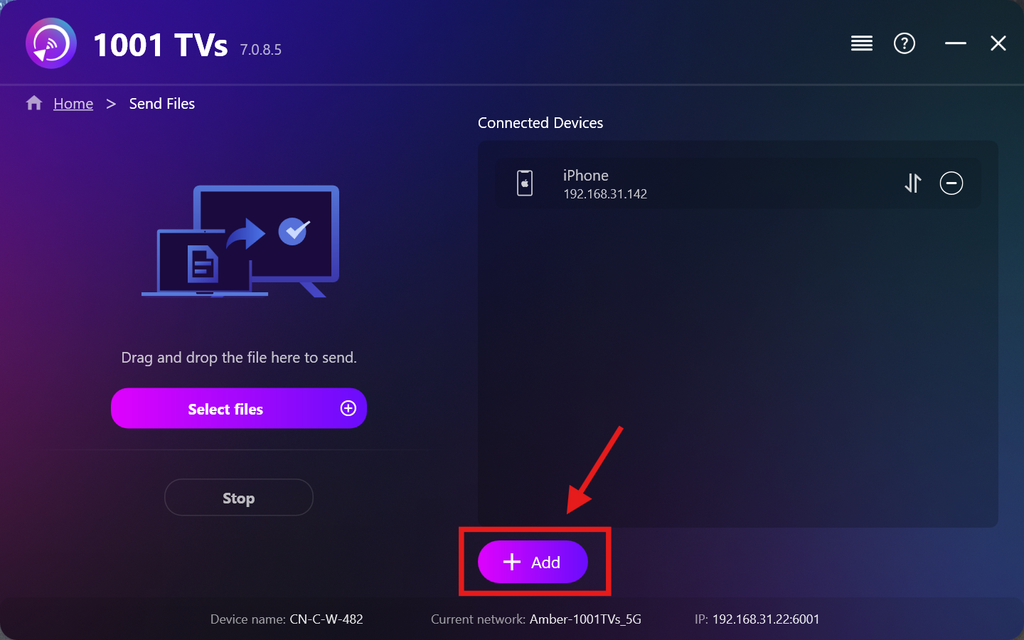
เมื่อตั้งค่าอุปกรณ์แรกเสร็จแล้ว คุณสามารถเพิ่มอุปกรณ์เป้าหมายเพิ่มเติมได้โดยคลิกที่ เพิ่ม ไอคอน.
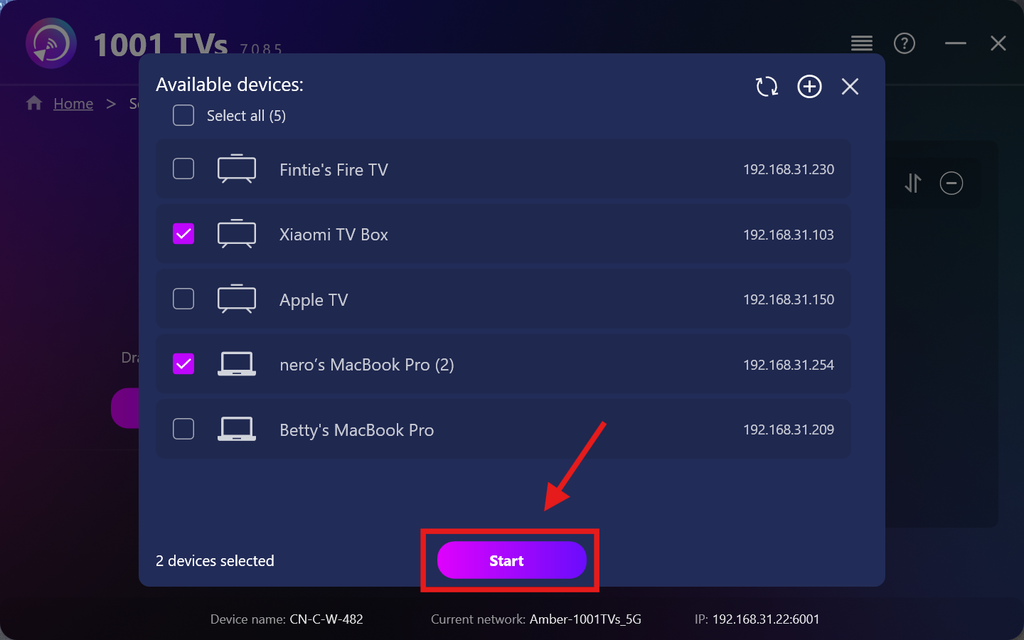
เลือกอุปกรณ์ทั้งหมดที่คุณต้องการส่งไฟล์ไป (สามารถเลือกหลายอุปกรณ์ได้).
คลิก เริ่มต้น เพื่อเริ่มการเชื่อมต่อ.
รับคำขอจับคู่ บนอุปกรณ์เป้าหมายแต่ละเครื่องเมื่อทำการจับคู่เป็นครั้งแรก.
5. การส่งไฟล์ไปยังอุปกรณ์หลายเครื่อง
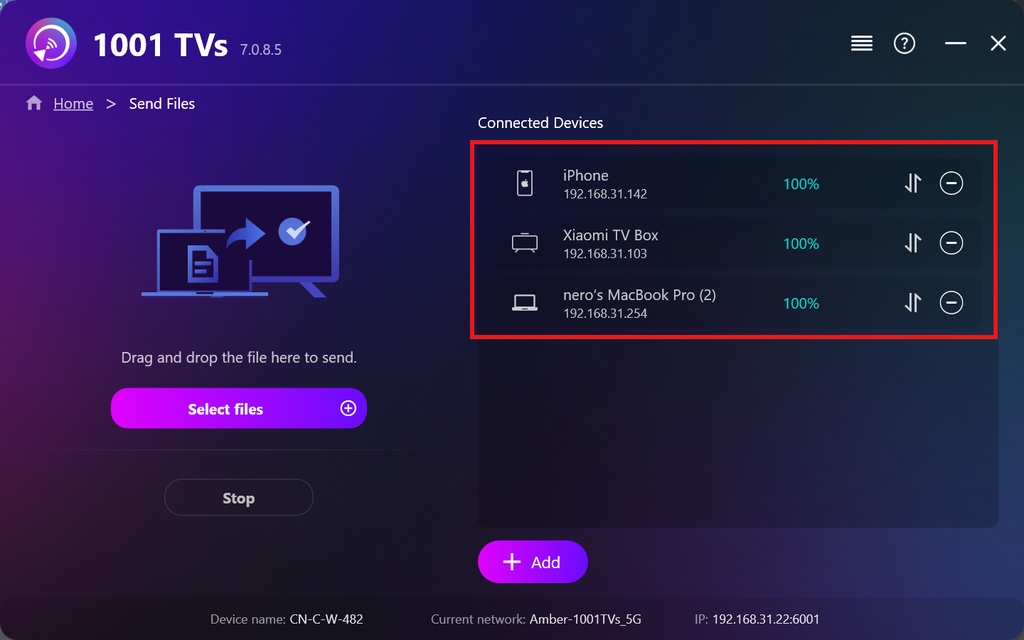
เลือกไฟล์ที่คุณต้องการส่ง หรือเพียงลากและวางไฟล์เหล่านั้นลงในพื้นที่ไฟล์ด้านซ้าย — ไม่มีข้อจำกัดเกี่ยวกับขนาดหรือจำนวนไฟล์.
⚠️ โปรดตรวจสอบให้แน่ใจว่าอุปกรณ์รับมีพื้นที่จัดเก็บข้อมูลเพียงพอ มิฉะนั้นการโอนข้อมูลจะล้มเหลว.
6. จัดการอุปกรณ์รับสัญญาณของคุณ
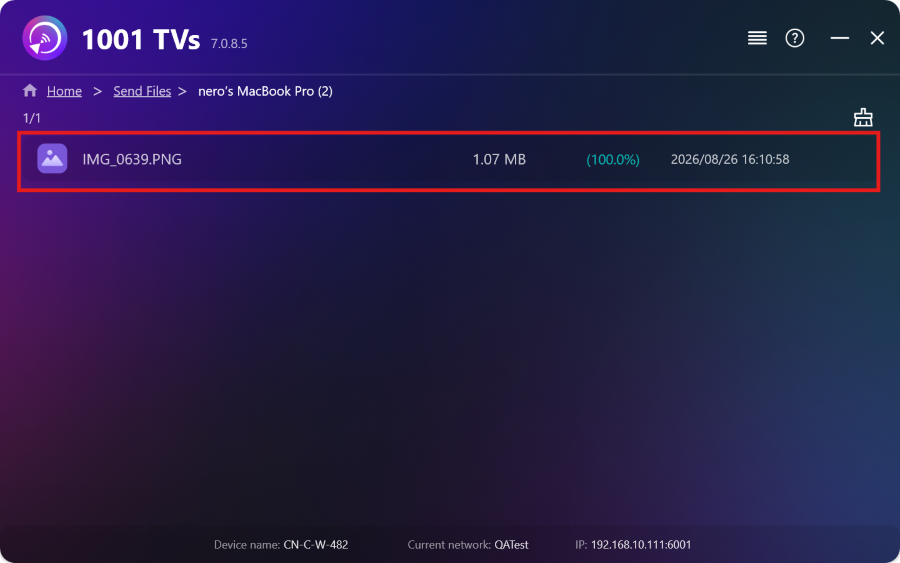
คลิกที่ – (ลบ) ไอคอนเพื่อลบอุปกรณ์ออกจากรายชื่อผู้รับของคุณ.
คลิกที่ โอน ไอคอนเพื่อดูไฟล์ทั้งหมดที่ส่งมาสู่อุปกรณ์นี้.
นี่แหละ! ตอนนี้คุณสามารถส่งไฟล์ไปยังหลายอุปกรณ์พร้อมกัน ได้ทุกเมื่อ โดยไม่มีข้อจำกัดใดๆ.
รับ 1001 TVs ตอนนี้
📱 แอปพลิเคชัน iOS: ดาวน์โหลดจาก App Store
📱 แอปพลิเคชัน Android: ดาวน์โหลดจาก Google Play
📥แอปพลิเคชันสำหรับพีซี: ดาวน์โหลดจาก Microsoft Store
สำหรับขั้นตอนโดยละเอียด โปรดดูที่ คู่มือการติดตั้ง PC
📥แอป Mac: ดาวน์โหลดจาก App Store
📥แอปทีวี:วิธีติดตั้ง 1001 TVs บนทีวีของคุณ

อ่านเพิ่มเติม
 คู่มือการติดตั้ง APK บนทีวี: วิธีส่งและติดตั้งไฟล์ APK บนทีวีจาก PC หรือ Mac ผ่าน Wi-Fi
มีไฟล์ APK บนโทรศัพท์มือถือ คอมพิวเตอร์ หรือ Mac ที่คุณต้องการเปิดบนทีวีหรือไม่? ด้วย 1001 TVs คุณสามารถส่ง...
คู่มือการติดตั้ง APK บนทีวี: วิธีส่งและติดตั้งไฟล์ APK บนทีวีจากโทรศัพท์ผ่าน Wi-Fi
มีไฟล์ APK ในโทรศัพท์หรือคอมพิวเตอร์ของคุณ และต้องการเปิดใช้งานบนทีวีใช่ไหม? ด้วย 1001 TVs คุณสามารถส่งไฟล์ APK...
คู่มือการติดตั้ง APK บนทีวี: วิธีส่งและติดตั้งไฟล์ APK บนทีวีจาก PC หรือ Mac ผ่าน Wi-Fi
มีไฟล์ APK บนโทรศัพท์มือถือ คอมพิวเตอร์ หรือ Mac ที่คุณต้องการเปิดบนทีวีหรือไม่? ด้วย 1001 TVs คุณสามารถส่ง...
คู่มือการติดตั้ง APK บนทีวี: วิธีส่งและติดตั้งไฟล์ APK บนทีวีจากโทรศัพท์ผ่าน Wi-Fi
มีไฟล์ APK ในโทรศัพท์หรือคอมพิวเตอร์ของคุณ และต้องการเปิดใช้งานบนทีวีใช่ไหม? ด้วย 1001 TVs คุณสามารถส่งไฟล์ APK...

