TV APK Installation Guide: How to Send and Install APK Files on TV from Your Phone via Wi-Fi
Got an APK file on your phone that you want to install and run on your TV?
With 1001 TVs, you can now send APK files from your phone to your TV via Wi-Fi and install them directly — no cables, no USB drives, no hassle. It’s fast, simple, and completely wireless.
Here’s how to get started.

1. Install and Open 1001 TVs on both devices
📺 แอปทีวี: วิธีติดตั้ง 1001 TVs บนทีวีของคุณ
📥 แอปพลิเคชัน iOS: ดาวน์โหลดจาก App Store
📥 แอปพลิเคชัน Android: ดาวน์โหลดจาก Google Play
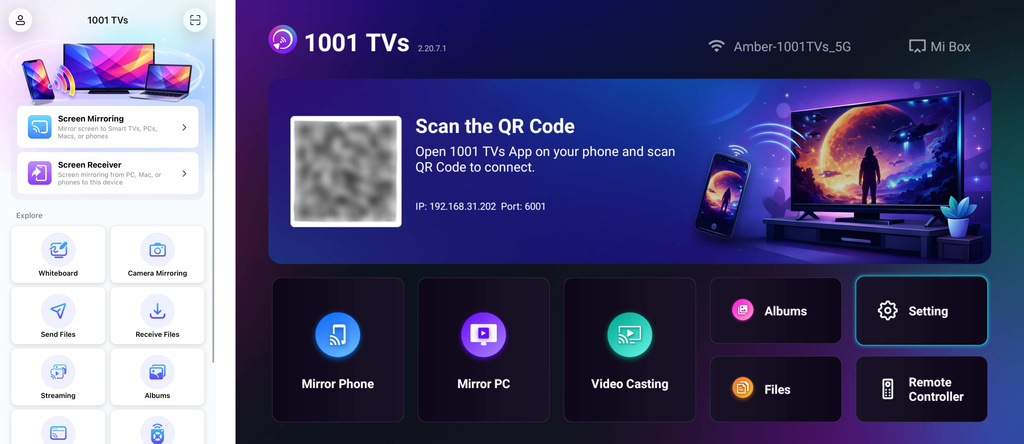
2. Connect to the Same Wi-Fi:
ตรวจสอบให้แน่ใจว่าทั้งสองอุปกรณ์ของคุณเชื่อมต่อกับเครือข่าย Wi-Fi เดียวกัน.
(แนะนำให้ใช้การเชื่อมต่อ Wi-Fi บนย่านความถี่ 5G เพื่อประสิทธิภาพที่ดีที่สุด)
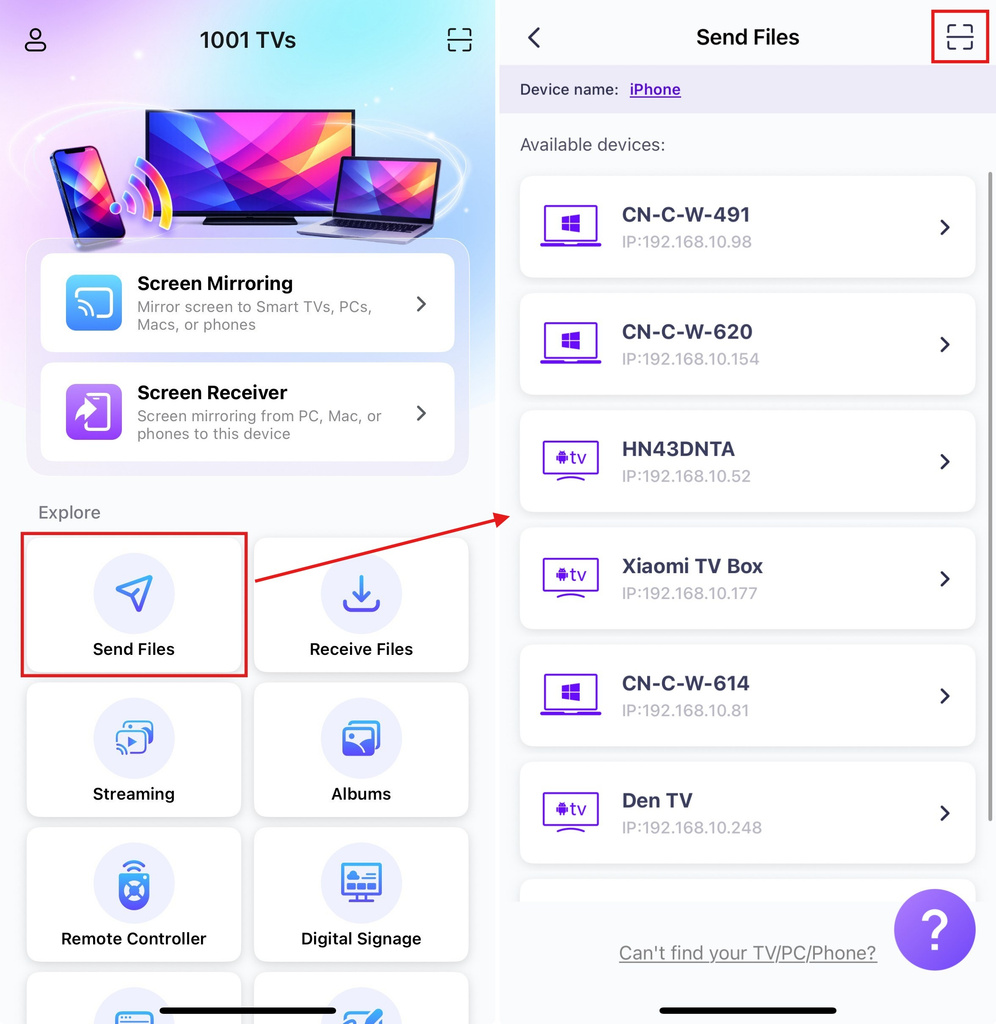
3. Send APK File to TV
เปิดตัว 1001 TVs app on your phone and tap ส่งไฟล์.
Select your target TV from the device list, or scan the QR code displayed on your TV screen.
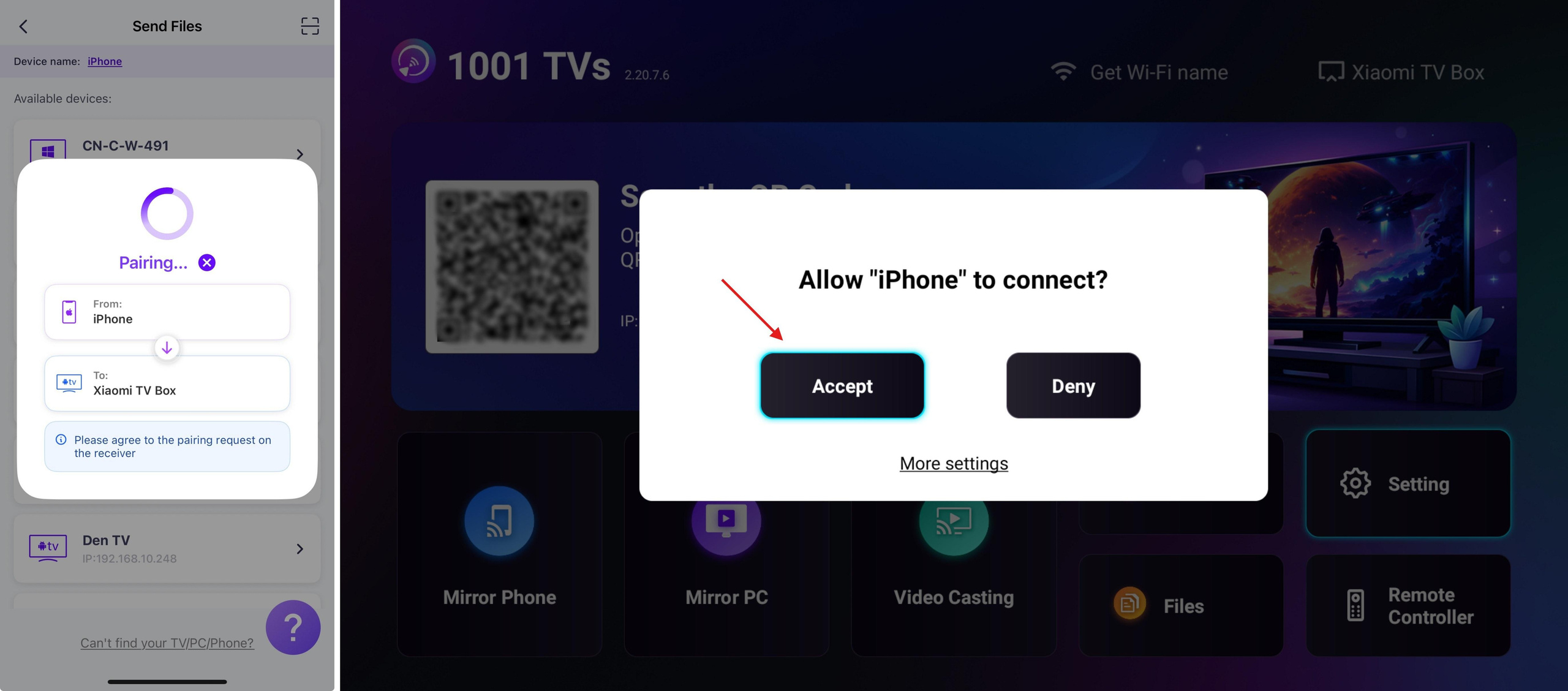
On the TV, confirm the pairing.
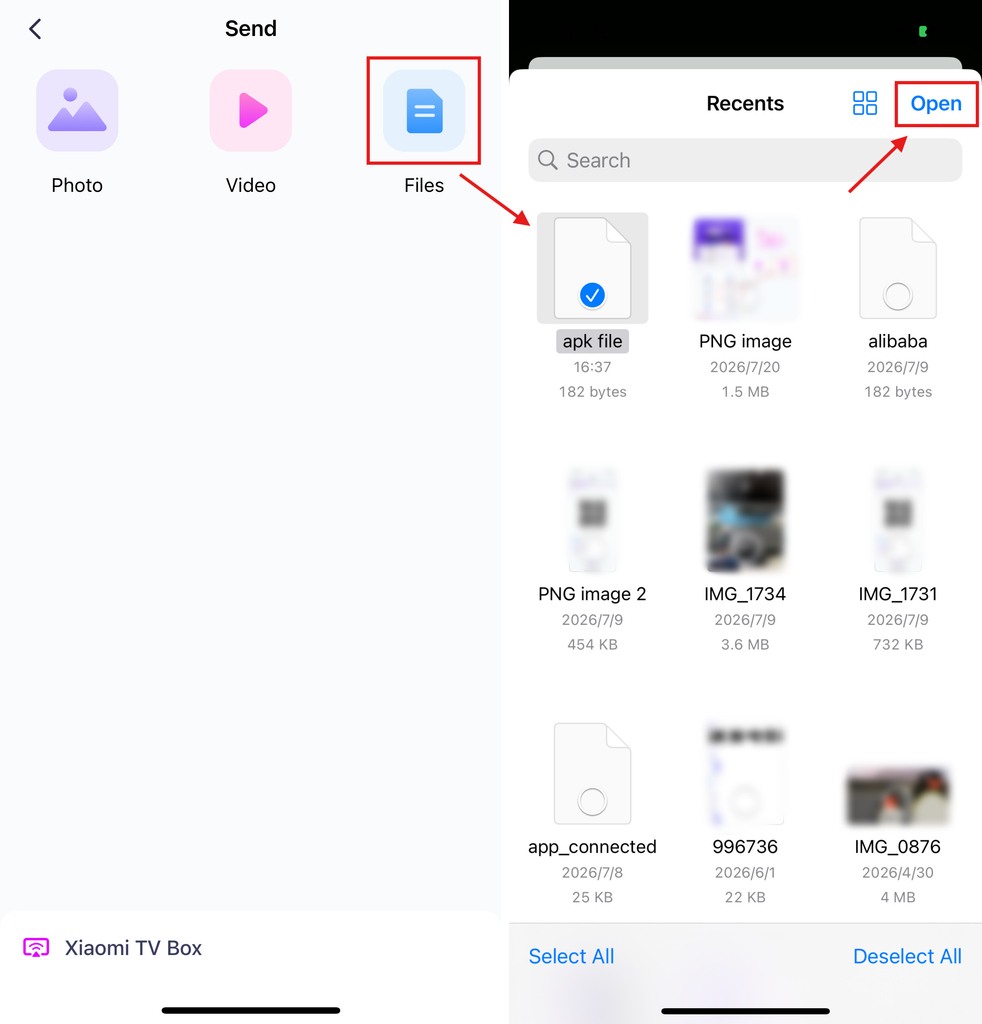
On your phone, select the APK file you want to send.
4. Install APK on TV
Using your TV remote, open ไฟล์ and select the APK file you want to install.
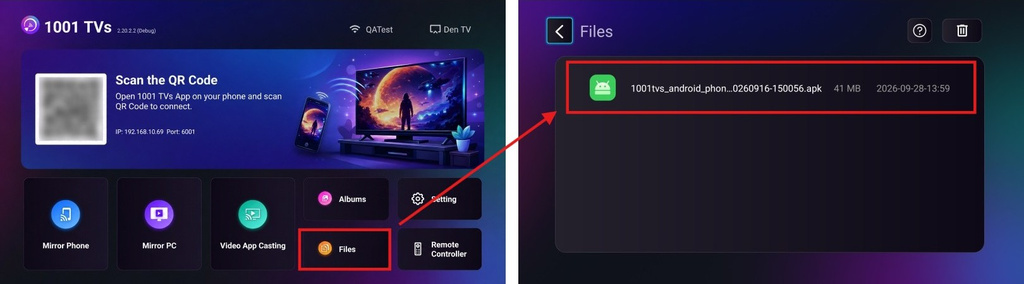
เลือก Install via Google Play and complete the installation.
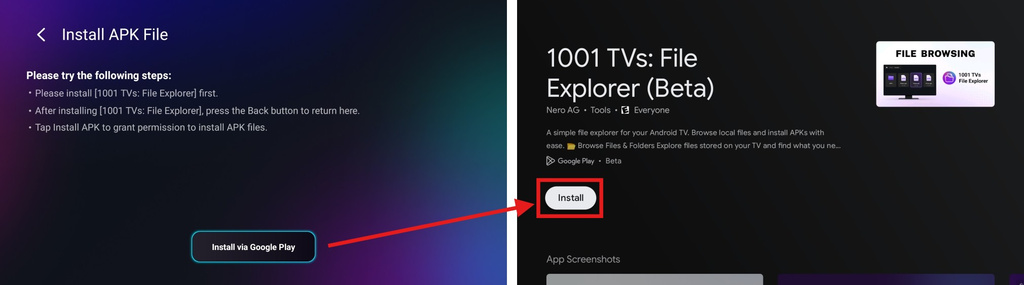
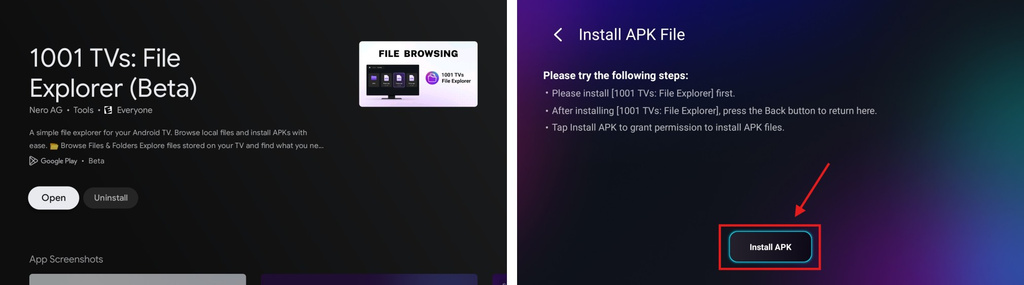
Once finished, press the กลับ button on your remote to return to the previous page. (There’s no need to open 1001 TVs – File Explorer.)
The button below will now change to Install APK. Select it to go to the app install permission page.
อนุญาต 1001 TVs – File Explorer to install unknown apps (your APK file)
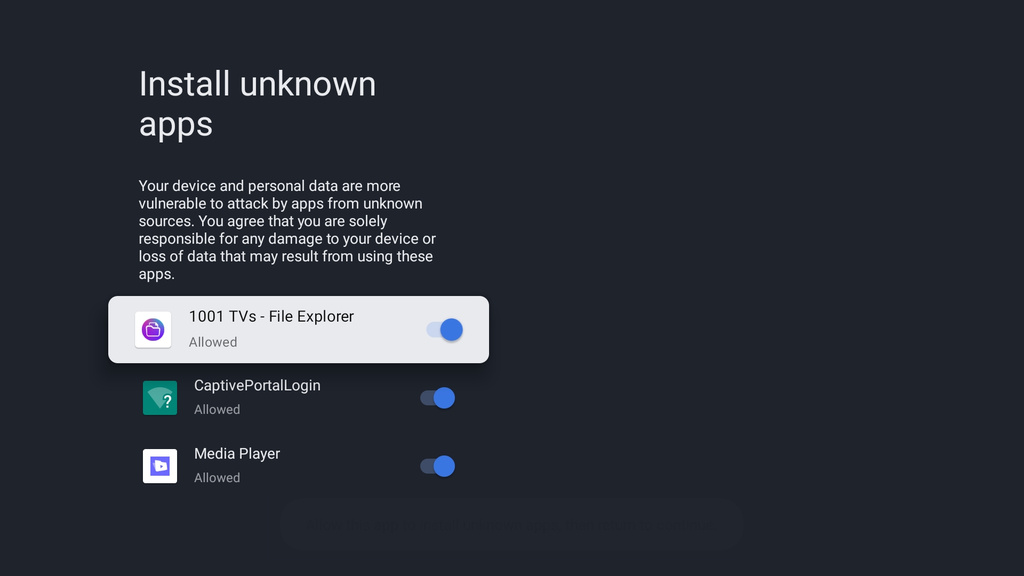
Press the กลับ button, then select ติดตั้ง to install your APK.
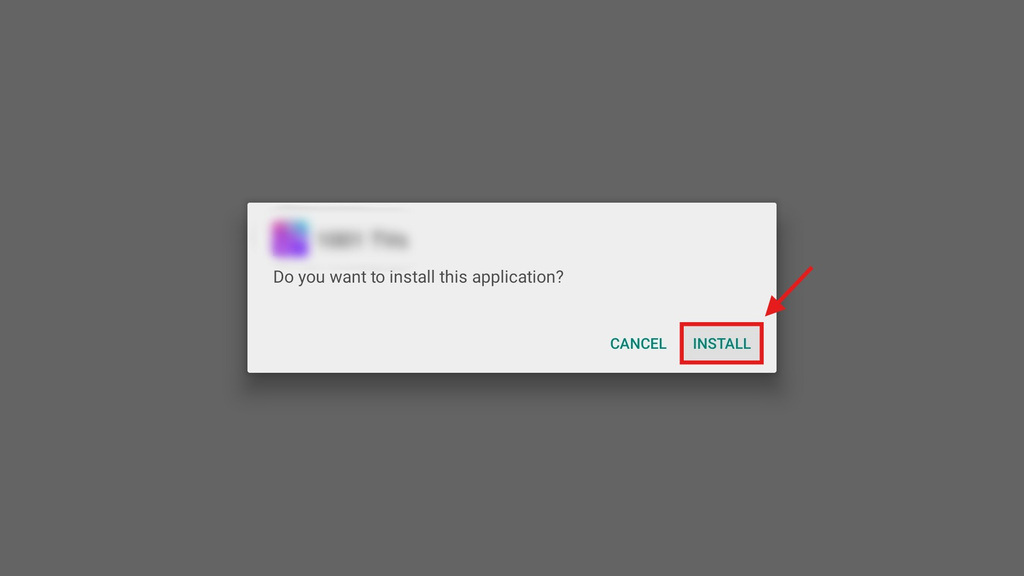
5. Installation Complete
Your APK is now ready to use on your TV. Just open it from your TV’s app list and start enjoying it on the big screen. 🚀
1001 TVs provides a simple, cable-free way to send and install APK files from your phone to your TV over Wi-Fi.
รับ 1001 TVs ตอนนี้
📺 แอปทีวี: วิธีติดตั้ง 1001 TVs บนทีวีของคุณ
📥 แอปพลิเคชัน iOS: ดาวน์โหลดจาก App Store
📥 แอปพลิเคชัน Android: ดาวน์โหลดจาก Google Play
Disclaimer
- Users are solely responsible for the content they choose to install. This app only invokes the system PackageInstaller to perform installations. It does not store, distribute, or provide downloads of any APK files.
- Bundling and distributing this installer (1001 TVs: File Explorer) with infringing content is strictly prohibited.

อ่านเพิ่มเติม
 วิธีส่งไฟล์จากคอมพิวเตอร์ไปยังอุปกรณ์หลายเครื่องพร้อมกัน (คอมพิวเตอร์, โทรศัพท์, ทีวี, แท็บเล็ต)
ด้วยเวอร์ชัน Windows ล่าสุดของ 1001 TVs (v7.0.8.5) คอมพิวเตอร์ของคุณสามารถส่งไฟล์ไปยังอุปกรณ์หลายชนิดได้แล้ว — เช่น TV, แท็บเล็ต, โทรศัพท์มือถือ หรืออุปกรณ์อื่น ๆ...
วิธีส่งไฟล์จากคอมพิวเตอร์ไปยังอุปกรณ์หลายเครื่องพร้อมกัน (คอมพิวเตอร์, โทรศัพท์, ทีวี, แท็บเล็ต)
ด้วยเวอร์ชัน Windows ล่าสุดของ 1001 TVs (v7.0.8.5) คอมพิวเตอร์ของคุณสามารถส่งไฟล์ไปยังอุปกรณ์หลายชนิดได้แล้ว — เช่น TV, แท็บเล็ต, โทรศัพท์มือถือ หรืออุปกรณ์อื่น ๆ...
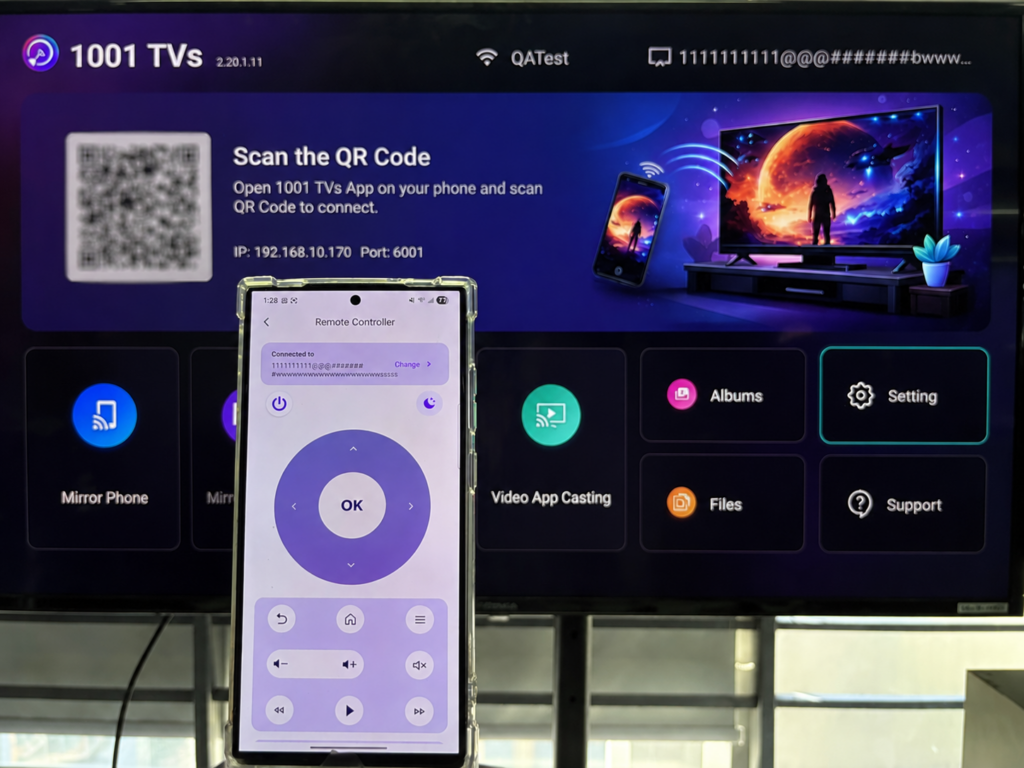 วิธีใช้โทรศัพท์ของคุณเป็นรีโมทคอนโทรลสำหรับ Android TV
อยากควบคุม Android TV ของคุณ สตรีมวิดีโอ หรือค้นหาแอป โดยไม่ต้องเสียเวลาหารีโมทหรือไม่? ด้วย 1001 TVs คุณสามารถเปลี่ยนสมาร์ทโฟนของคุณให้เป็น...
วิธีใช้โทรศัพท์ของคุณเป็นรีโมทคอนโทรลสำหรับ Android TV
อยากควบคุม Android TV ของคุณ สตรีมวิดีโอ หรือค้นหาแอป โดยไม่ต้องเสียเวลาหารีโมทหรือไม่? ด้วย 1001 TVs คุณสามารถเปลี่ยนสมาร์ทโฟนของคุณให้เป็น...

