Hoe je bestanden tegelijkertijd vanaf je pc naar meerdere apparaten kunt verzenden (pc, telefoon, tv, tablet)
Met de nieuwste Windows-versie van 1001 TVs (v7.0.8.5) kan je pc nu bestanden naar meerdere apparaten tegelijk verzenden — tv’s, tablets, telefoons of andere pc’s.
Zodra de verbinding tot stand is gebracht, kun je elk bestand, ongeacht de grootte, in één keer naar meerdere apparaten verzenden, zo vaak als je wilt. Geen compressie. Geen gedoe. Gewoon snelle, naadloze overdrachten naar elk scherm in de kamer.
Ideaal voor samenwerking binnen een team, het uitdelen van materiaal in de klas of om bestanden gewoon direct naar iedereen te sturen.

Les
1. Installeer 1001 TVs op je pc en je ontvangstapparaten
📱 iOS-app: Downloaden van App Store
📱 Android-app: Downloaden van Google Play
📥PC-app: Downloaden van Microsoft Store
Raadpleeg voor gedetailleerde stappen de PC Installatiegids
📥Mac-app: Downloaden van App Store
📥TV-app: Hoe installeer je 1001 TVs op je tv?
2. Verbinding maken met dezelfde Wi-Fi
Zorg ervoor dat zowel je PC en de ontvangend apparaats verbonden zijn met hetzelfde Wi-Fi-netwerk.
Gebruik voor de beste prestaties een 5 GHz Wi-Fi-netwerk om vertraging te verminderen en stabiliteit te verbeteren.
3. Volg voor je eerste apparaat de onderstaande handleiding:
Hoe stuur ik bestanden van mijn PC/Mac naar mijn TV/PC/Mac?
Bestanden verzenden naar Android- en iOS-telefoons en -tablets
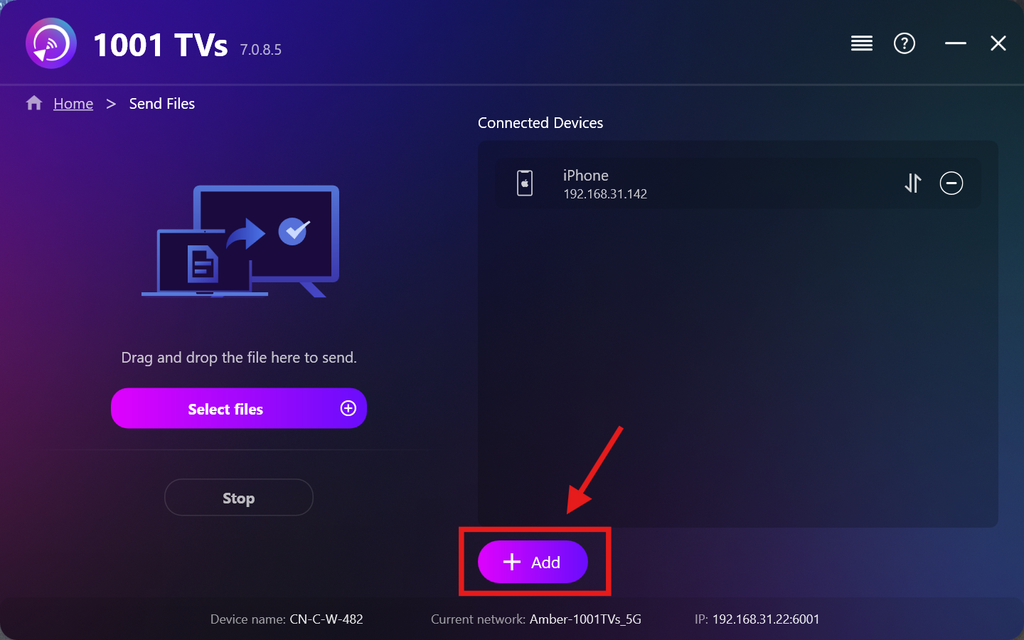
4. Meer apparaten toevoegen
Zodra je eerste apparaat is ingesteld, kun je meer doelapparaten toevoegen door op de Toevoegen pictogram.
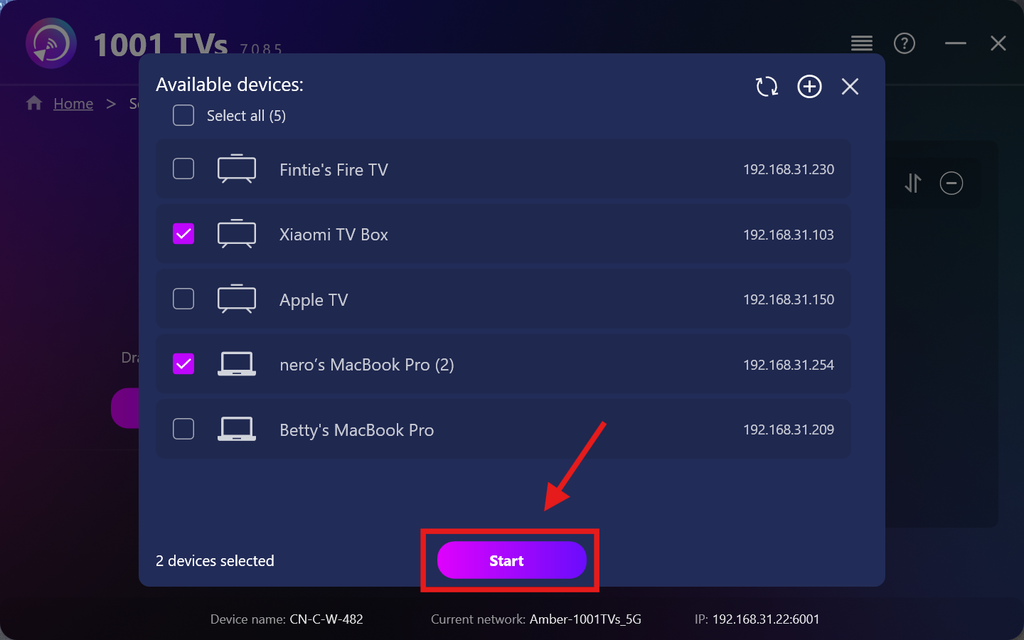
Selecteer alle apparaten waarnaar u bestanden wilt verzenden (meerdere apparaten tegelijk selecteren is mogelijk).
Klik op Start om de verbinding tot stand te brengen.
Accepteer het koppelingsverzoek op elk doelapparaat bij de eerste koppeling.
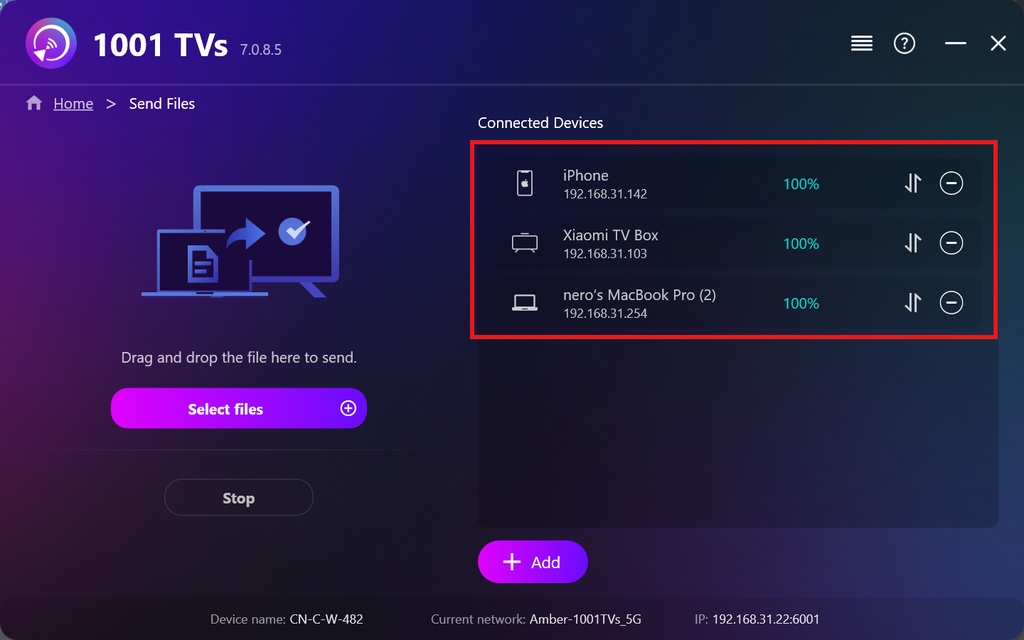
5. Bestanden naar meerdere apparaten verzenden
Selecteer de bestanden die u wilt verzenden, of sleep ze gewoon naar het bestandsgebied aan de linkerkant — er gelden geen beperkingen wat betreft bestandsgrootte of aantal.
⚠️ Zorg ervoor dat je ontvangende apparaten voldoende opslagruimte hebben, anders mislukt de overdracht.
6. Je ontvangstapparaten beheren
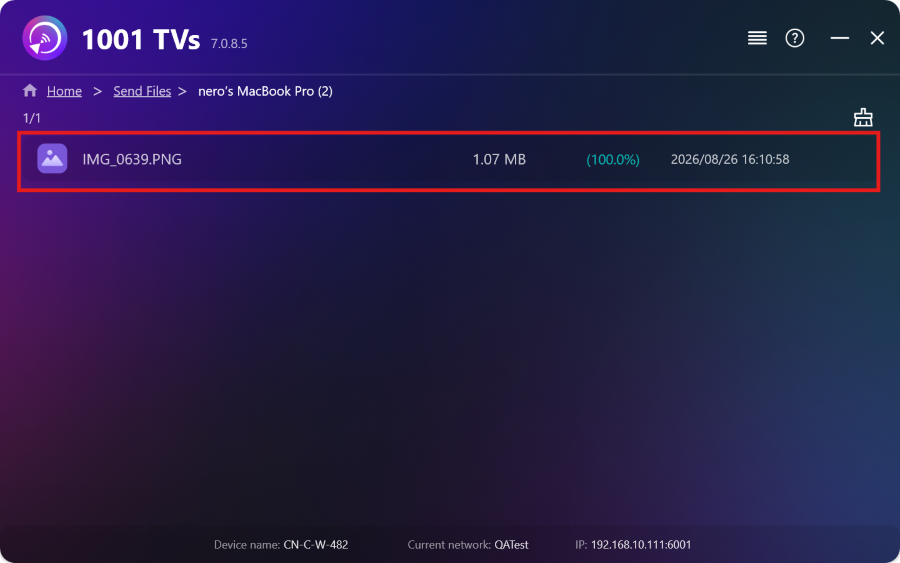
Klik op de – (min) pictogram om een apparaat uit je ontvangstlijst te verwijderen.
Klik op de overdracht pictogram om alle bestanden te bekijken die naar dit apparaat zijn verzonden.
Dat is alles! Je kunt nu op elk moment en zonder beperkingen bestanden naar meerdere apparaten tegelijk verzenden.
Krijg nu 1001 TVs
📱 iOS-app: Downloaden van App Store
📱 Android-app: Downloaden van Google Play
📥PC-app: Downloaden van Microsoft Store
Raadpleeg voor gedetailleerde stappen de PC Installatiegids
📥Mac-app: Downloaden van App Store

Lees meer
 Installatiehandleiding voor TV-APK’s: hoe je APK-bestanden vanaf je pc of Mac via wifi naar je tv kunt verzenden en installeren
Heb je een APK-bestand op je telefoon, pc of Mac dat je op je tv wilt uitvoeren? Met 1001 TVs kun je...
Installatiehandleiding voor APK-bestanden op de tv: hoe je APK-bestanden vanaf je telefoon via wifi naar de tv kunt verzenden en installeren
Heb je een APK-bestand op je telefoon of pc dat je op je tv wilt uitvoeren? Met 1001 TVs kun je APK-bestanden verzenden...
Installatiehandleiding voor TV-APK’s: hoe je APK-bestanden vanaf je pc of Mac via wifi naar je tv kunt verzenden en installeren
Heb je een APK-bestand op je telefoon, pc of Mac dat je op je tv wilt uitvoeren? Met 1001 TVs kun je...
Installatiehandleiding voor APK-bestanden op de tv: hoe je APK-bestanden vanaf je telefoon via wifi naar de tv kunt verzenden en installeren
Heb je een APK-bestand op je telefoon of pc dat je op je tv wilt uitvoeren? Met 1001 TVs kun je APK-bestanden verzenden...

