Cómo enviar archivos desde el ordenador a varios dispositivos a la vez (ordenador, móvil, televisión, tableta)
Con la última versión para Windows de 1001 TVs (v7.0.8.5), tu ordenador ya puede enviar archivos a varios dispositivos —televisores, tabletas, teléfonos u otros ordenadores— todos a la vez.
Una vez conectado, envía cualquier archivo, sin importar su tamaño, a varios dispositivos a la vez, tantas veces como necesites. Sin compresión. Sin complicaciones. Solo transferencias rápidas y fluidas a todas las pantallas de la habitación.
Perfecto para la colaboración en equipo, para distribuir material en el aula o simplemente para enviar archivos a todo el mundo al instante.

Tutorial
1. Instala 1001 TVs en tu ordenador y en los dispositivos receptores
📱 Aplicación iOS: Descargar desde App Store
📱 Aplicación Android: Descargar desde Google Play
📥Aplicación para PC: Descargar desde Microsoft Store
Para obtener información detallada, consulte el Guía de instalación en PC
📥Aplicación para Mac: Descargar desde App Store
📥TV App: Cómo instalar 1001 TVs en tu televisor
2. Conectarse a la misma Wi-Fi
Asegúrese de que tanto su PC y el dispositivo receptors están conectados a la misma red Wi-Fi.
Para un mejor rendimiento, utilice un Red Wi-Fi de 5 GHz para reducir el retraso y mejorar la estabilidad.
3. Para tu primer dispositivo, sigue la guía que aparece a continuación:
Cómo enviar archivos desde tu PC/Mac a la TV/PC/Mac
Cómo enviar archivos a teléfonos y tabletas con Android e iOS
4. Añadir más dispositivos
Una vez configurado tu primer dispositivo, puedes añadir más dispositivos de destino haciendo clic en el Añadir icono.
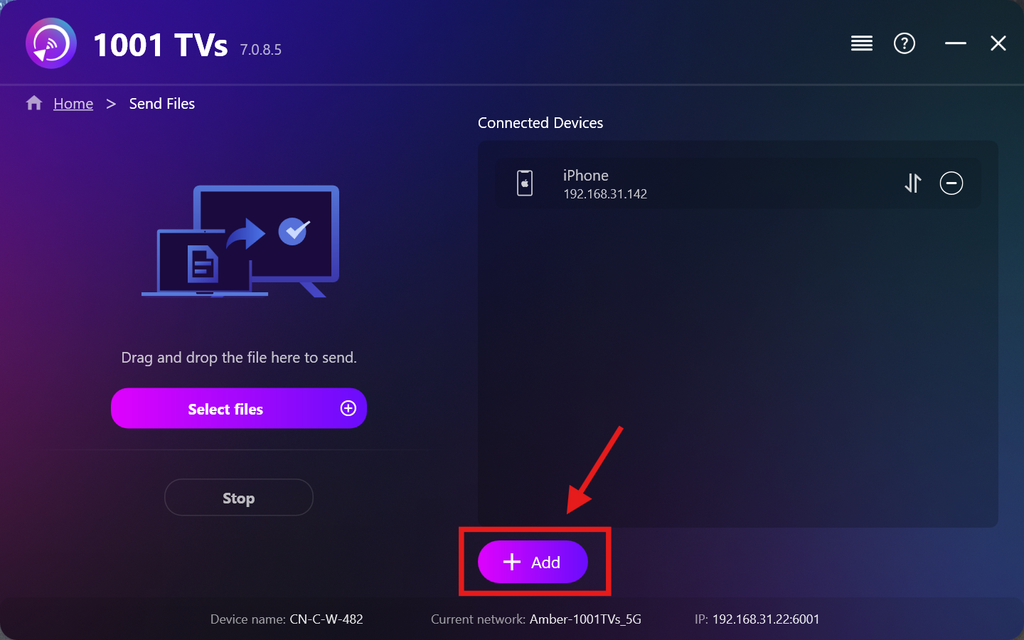
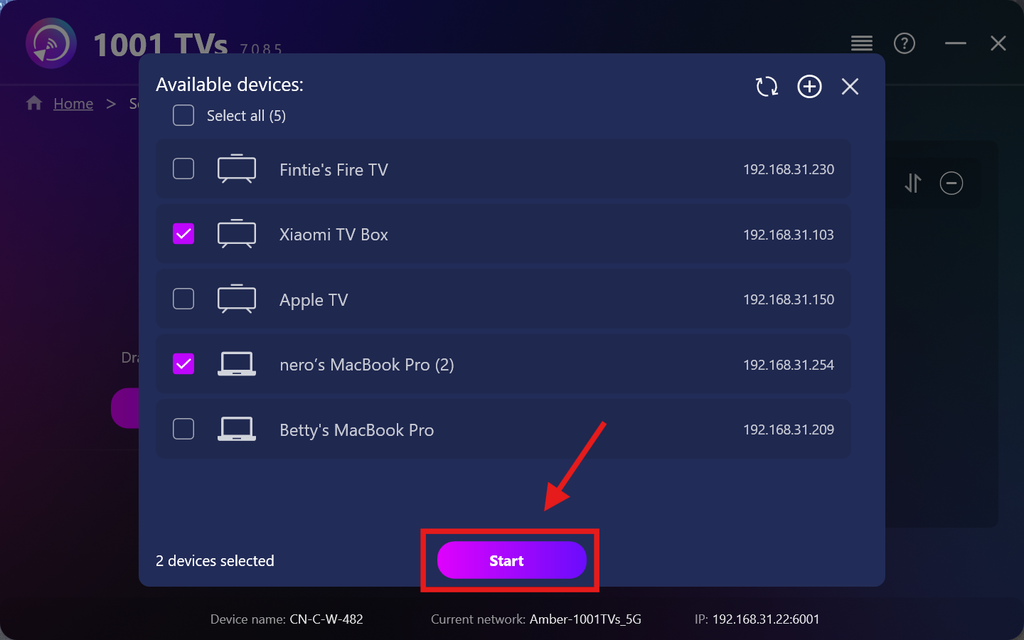
Selecciona todos los dispositivos a los que quieras enviar archivos (se admite la selección múltiple).
Haga clic en Inicio para iniciar la conexión.
Acepta la solicitud de emparejamiento en cada dispositivo de destino al emparejarlo por primera vez.
5. Envío de archivos a varios dispositivos
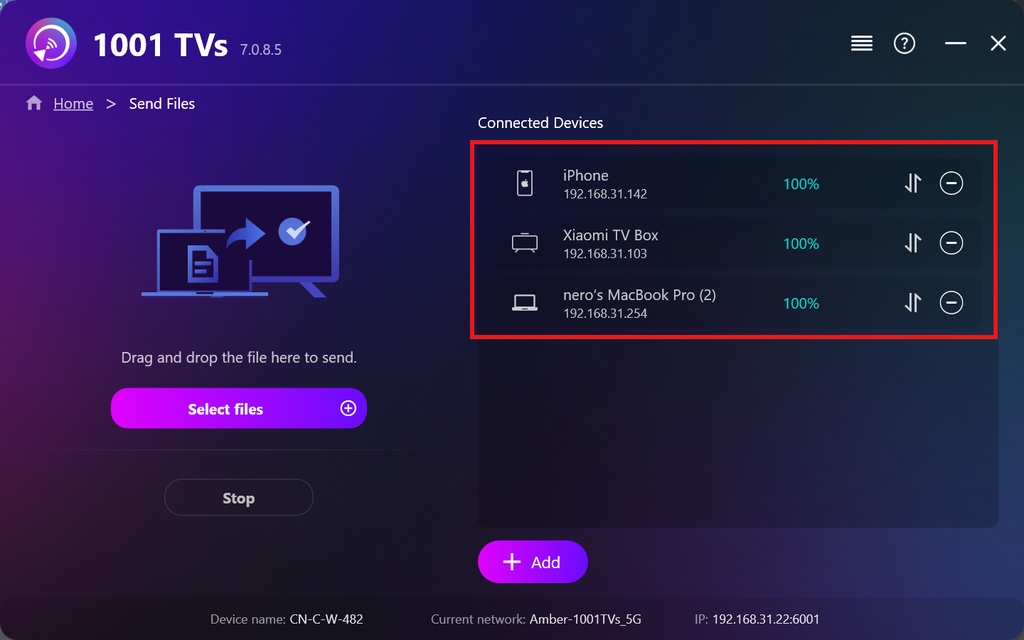
Selecciona los archivos que quieras enviar o, simplemente, arrástralos y suéltalos en el área de archivos de la izquierda; no hay límites en cuanto al tamaño ni al número de archivos.
⚠️ Asegúrate de que los dispositivos de destino tengan suficiente espacio de almacenamiento; de lo contrario, la transferencia fallará.
6. Gestiona tus dispositivos receptores
Haga clic en el botón – (menos) icono para eliminar un dispositivo de tu lista de destinatarios.
Haga clic en el botón transferencia icono para ver todos los archivos enviados a este dispositivo.
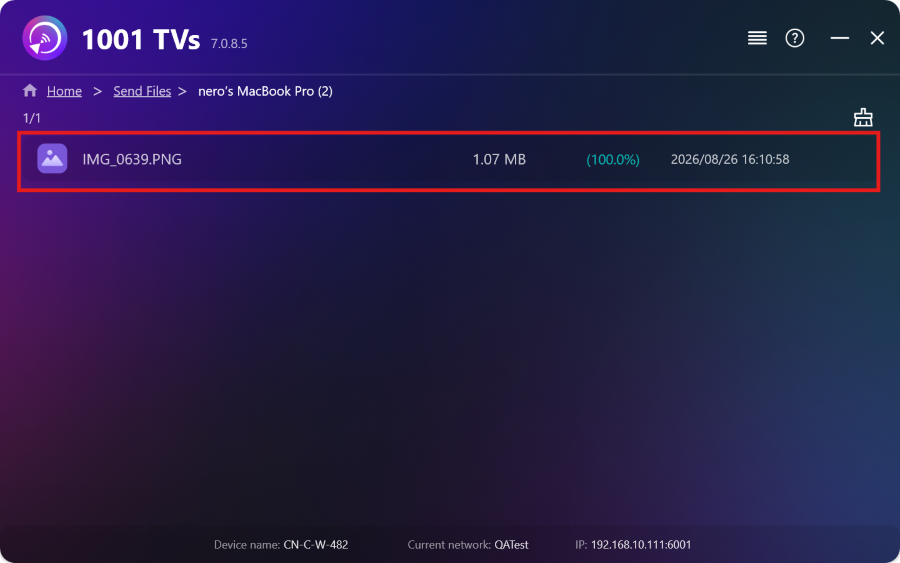
¡Y ya está! Ahora puedes enviar archivos a varios dispositivos a la vez, en cualquier momento y sin restricciones.
Consiga 1001 TVs ahora
📱 Aplicación iOS: Descargar desde App Store
📱 Aplicación Android: Descargar desde Google Play
📥Aplicación para PC: Descargar desde Microsoft Store
Para obtener información detallada, consulte el Guía de instalación en PC
📥Aplicación para Mac: Descargar desde App Store

Leer más
 Guía de instalación de APK en la televisión: cómo enviar e instalar archivos APK en la televisión desde tu PC o Mac a través de Wi-Fi
¿Tienes un archivo APK en tu móvil, PC o Mac y quieres ejecutarlo en tu televisor? Con 1001 TVs, puedes enviar...
Guía de instalación de APK en la televisión: cómo enviar e instalar archivos APK en la televisión desde tu teléfono a través de Wi-Fi
¿Tienes un archivo APK en tu móvil o en tu ordenador y quieres ejecutarlo en tu televisor? Con 1001 TVs, puedes enviar el APK...
Guía de instalación de APK en la televisión: cómo enviar e instalar archivos APK en la televisión desde tu PC o Mac a través de Wi-Fi
¿Tienes un archivo APK en tu móvil, PC o Mac y quieres ejecutarlo en tu televisor? Con 1001 TVs, puedes enviar...
Guía de instalación de APK en la televisión: cómo enviar e instalar archivos APK en la televisión desde tu teléfono a través de Wi-Fi
¿Tienes un archivo APK en tu móvil o en tu ordenador y quieres ejecutarlo en tu televisor? Con 1001 TVs, puedes enviar el APK...

