Come inviare file dal PC a più dispositivi contemporaneamente (PC, telefono, TV, tablet)
Con l'ultima versione per Windows di 1001 TVs (v7.0.8.5), il tuo PC può ora inviare file a più dispositivi — televisori, tablet, telefoni o altri PC — tutti contemporaneamente.
Una volta connesso, invia qualsiasi file, di qualsiasi dimensione, a più dispositivi contemporaneamente, tutte le volte che vuoi. Nessuna compressione. Nessuna seccatura. Solo trasferimenti veloci e senza intoppi su ogni schermo della stanza.
Ideale per la collaborazione in team, la distribuzione in classe o semplicemente per far arrivare i file a tutti in un attimo.

Tutorial
1. Installa 1001 TVs sul tuo PC e sui dispositivi di ricezione
📱 App iOS: Scarica da App Store
📱 Applicazione Android: Scarica da Google Play
📥App per PC: Scarica da Microsoft Store
Per i passaggi dettagliati, consultare la sezione Guida all'installazione del PC
📥App per Mac: Scarica da App Store
📥App TV: Come installare l'1001 TVs sul televisore
2. Connettersi allo stesso Wi-Fi
Assicuratevi che entrambi i vostri PC e il dispositivo di riceziones sono collegati alla stessa rete Wi-Fi.
Per ottenere prestazioni ottimali, utilizzare un Rete Wi-Fi a 5 GHz per ridurre il ritardo e migliorare la stabilità.
3. Per il tuo primo dispositivo, segui la guida riportata di seguito:
Come inviare file dal PC/Mac alla TV/PC/Mac
Come inviare file a telefoni e tablet Android e iOS
4. Aggiungere altri dispositivi
Una volta configurato il primo dispositivo, puoi aggiungere altri dispositivi di destinazione cliccando sul Aggiungi icona.
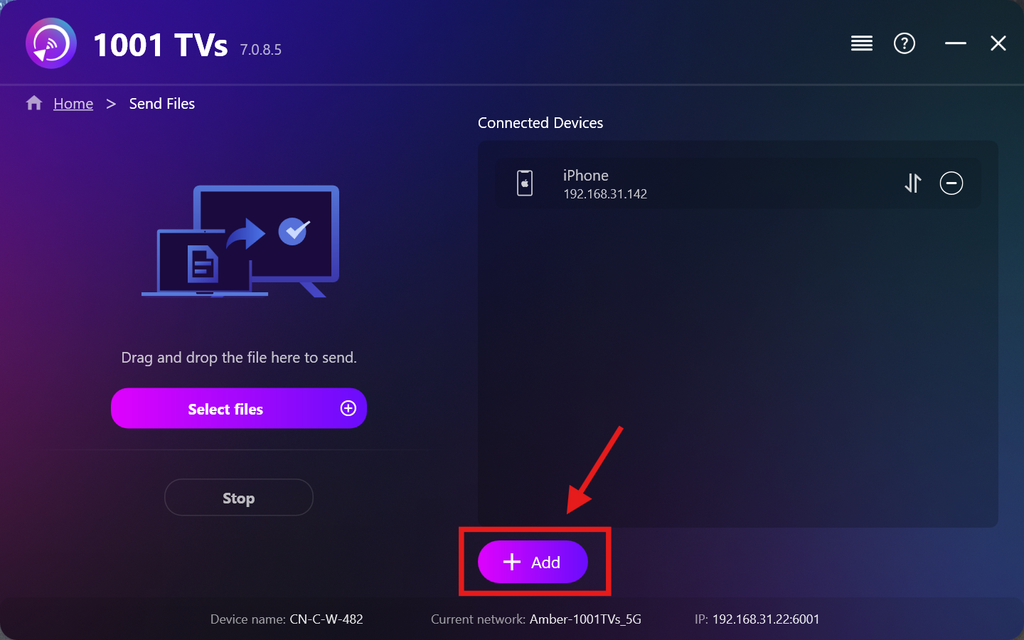
Seleziona tutti i dispositivi a cui desideri inviare i file (è supportata la selezione multipla).
Cliccare Inizio per avviare la connessione.
Accetta la richiesta di accoppiamento su ciascun dispositivo di destinazione al momento del primo accoppiamento.
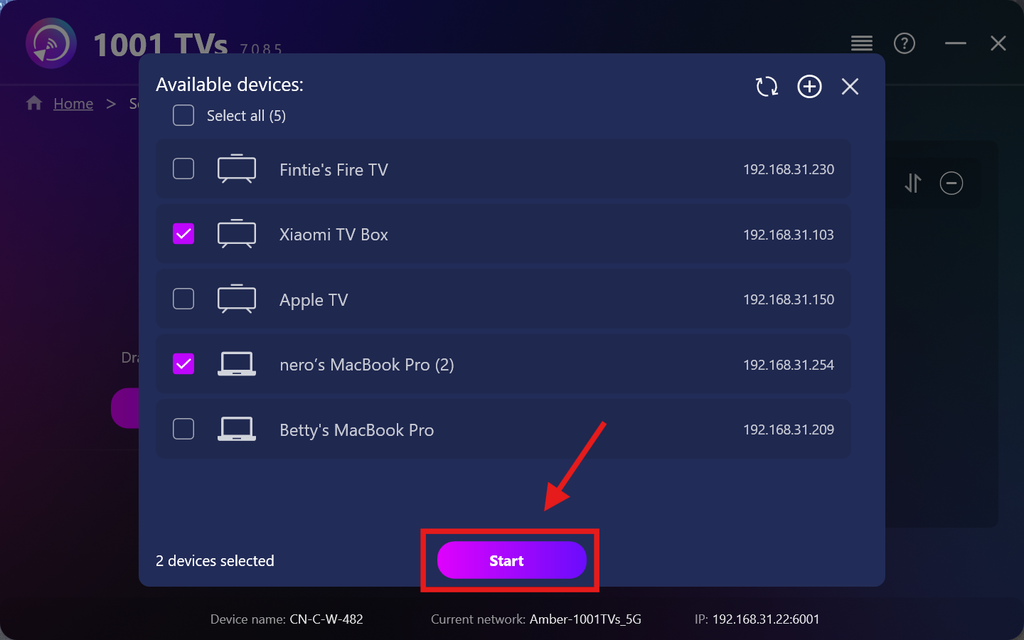
5. Invio di file a più dispositivi
Seleziona i file che desideri inviare oppure trascinali semplicemente nell'area dei file a sinistra: non ci sono limiti né alla dimensione né al numero dei file.
⚠️ Assicurati che i dispositivi di destinazione dispongano di spazio di archiviazione sufficiente, altrimenti il trasferimento non andrà a buon fine.
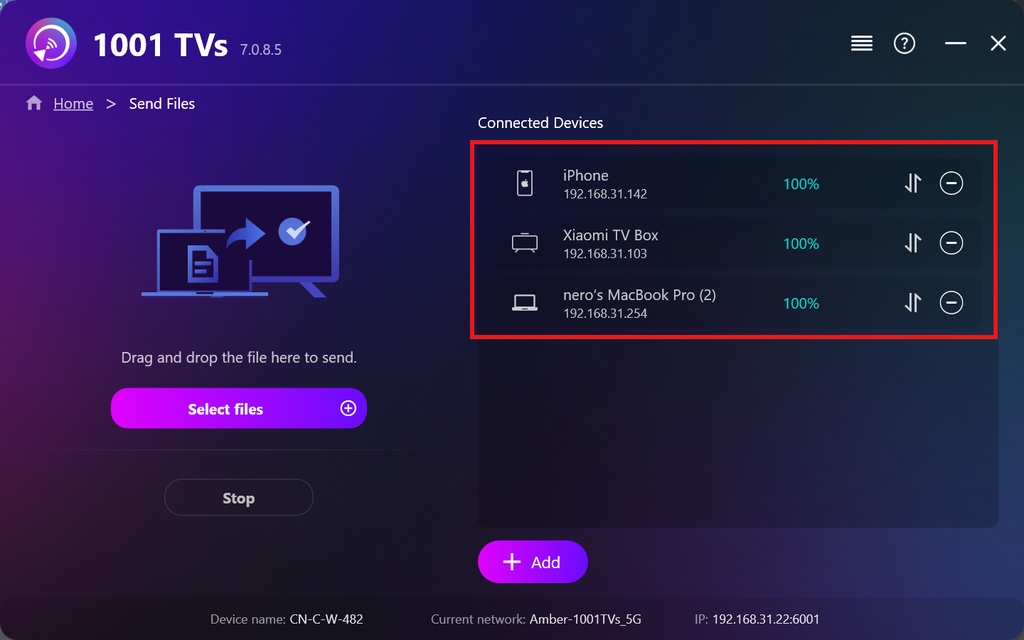
6. Gestisci i tuoi dispositivi di ricezione
Fare clic sul pulsante – (meno) icona per rimuovere un dispositivo dall'elenco dei destinatari.
Fare clic sul pulsante trasferimento icona per visualizzare tutti i file inviati a questo dispositivo.
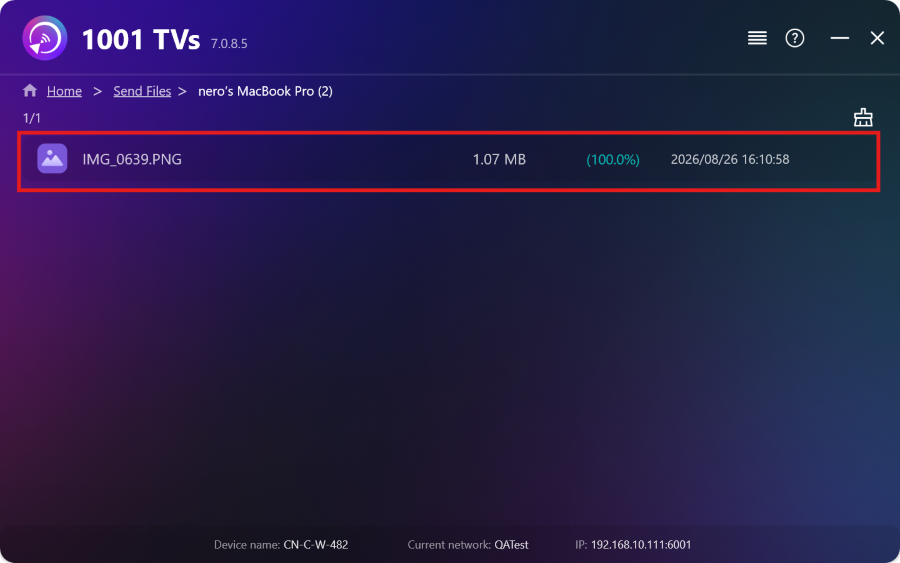
Ecco fatto! Ora puoi inviare file a più dispositivi contemporaneamente, in qualsiasi momento e senza alcuna limitazione.
Ottieni ora 1001 TVs
📱 App iOS: Scarica da App Store
📱 Applicazione Android: Scarica da Google Play
📥App per PC: Scarica da Microsoft Store
Per i passaggi dettagliati, consultare la sezione Guida all'installazione del PC
📥App per Mac: Scarica da App Store

Leggi di più
 Guida all'installazione di APK sulla TV: come inviare e installare file APK sulla TV dal PC o dal Mac tramite Wi-Fi
Hai un file APK sul tuo telefono, PC o Mac che vorresti eseguire sulla TV? Con 1001 TVs, puoi inviare...
Guida all'installazione di APK sulla TV: come inviare e installare file APK sulla TV dal proprio telefono tramite Wi-Fi
Hai un file APK sul tuo telefono o sul PC che vorresti eseguire sulla tua TV? Con 1001 TVs, puoi inviare l'APK...
Guida all'installazione di APK sulla TV: come inviare e installare file APK sulla TV dal PC o dal Mac tramite Wi-Fi
Hai un file APK sul tuo telefono, PC o Mac che vorresti eseguire sulla TV? Con 1001 TVs, puoi inviare...
Guida all'installazione di APK sulla TV: come inviare e installare file APK sulla TV dal proprio telefono tramite Wi-Fi
Hai un file APK sul tuo telefono o sul PC che vorresti eseguire sulla tua TV? Con 1001 TVs, puoi inviare l'APK...

