Sådan sender du filer fra pc'en til flere enheder på samme tid (pc, telefon, tv, tablet)
Med den nyeste Windows-version af 1001 TVs (v7.0.8.5) kan din pc nu sende filer til flere enheder – tv’er, tablets, telefoner eller andre pc’er – på samme tid.
Når forbindelsen er oprettet, kan du sende enhver fil, uanset størrelse, til flere enheder på én gang – så mange gange, du har brug for. Ingen komprimering. Ingen besvær. Bare hurtige, problemfri overførsler til alle skærme i rummet.
Perfekt til teamsamarbejde, uddeling i klasseværelset eller blot til at sende filer til alle med det samme.

Vejledning
1. Installer 1001 TVs på din pc og dine modtagerenheder
📱 iOS-app: Download fra App Store
📱 Android-app: Download fra Google Play
📥PC-app: Download fra Microsoft Store
For detaljerede trin henvises til Installationsvejledning til pc
📥Mac-app: Download fra App Store
📥TV-app: Sådan installerer du 1001 TVs på dit tv
2. Opret forbindelse til det samme Wi-Fi
Sørg for, at både din PC og den Modtagerenheds er forbundet til det samme Wi-Fi-netværk.
For at få den bedste ydelse skal du bruge en 5 GHz Wi-Fi-netværk for at reducere forsinkelsen og forbedre stabiliteten.
3. Følg vejledningen nedenfor for din første enhed:
Sådan sender du filer fra din PC/Mac til TV/PC/Mac
Sådan sender du filer til Android- og iOS-telefoner og -tablets
4. Tilføjelse af flere enheder
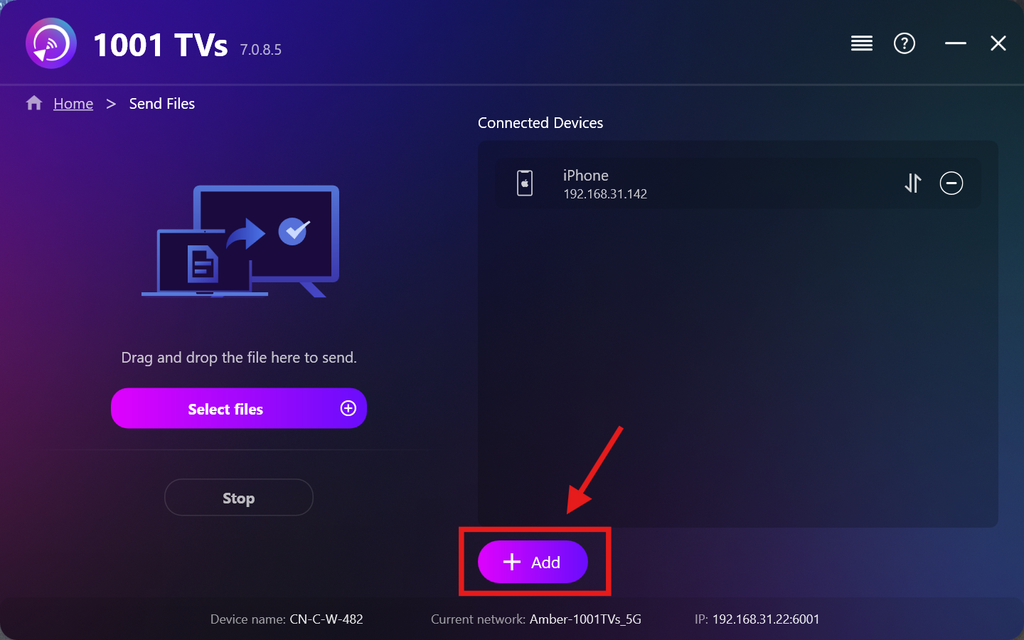
Når din første enhed er konfigureret, kan du tilføje flere målenheder ved at klikke på Tilføj ikon.
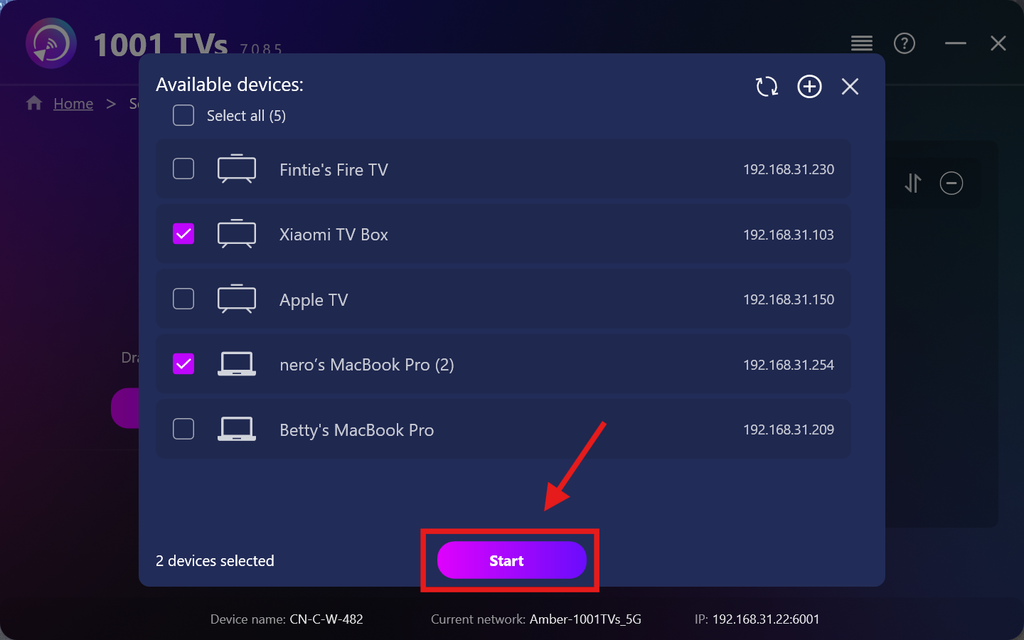
Vælg alle de enheder, du vil sende filer til (det er muligt at vælge flere på én gang).
Klik på Start for at oprette forbindelsen.
Godkend parringsanmodningen på hver målenhed, når der parres for første gang.
5. Afsendelse af filer til flere enheder
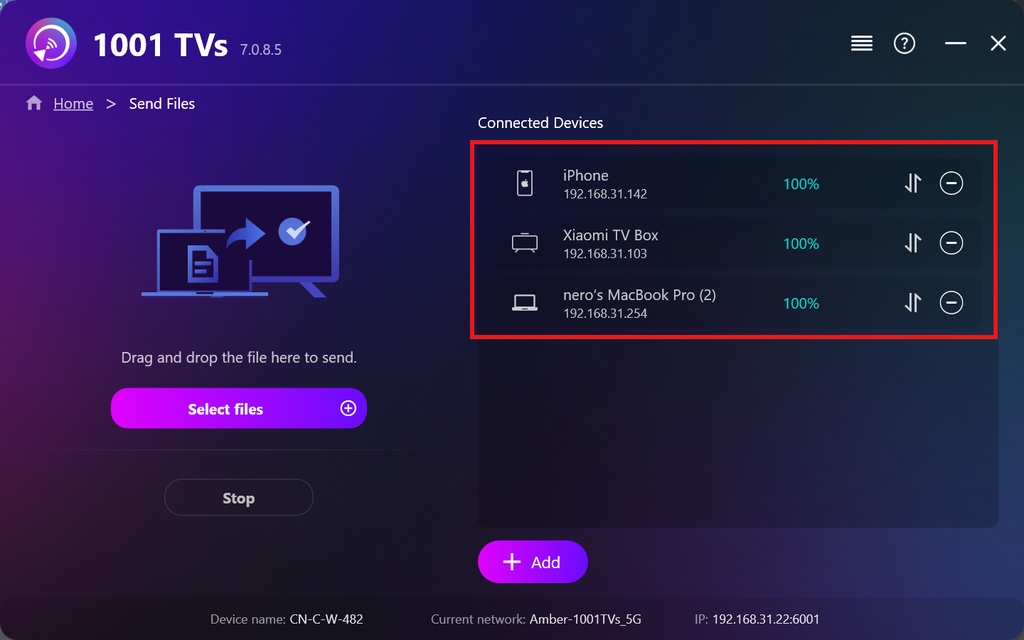
Vælg de filer, du vil sende, eller træk og slip dem blot ind i filområdet til venstre — der er ingen begrænsninger på filstørrelse eller antal.
⚠️ Sørg for, at dine modtagende enheder har tilstrækkelig lagerplads, ellers vil overførslen mislykkes.
6. Administrer dine modtagerenheder
Klik på – (minus) ikonet for at fjerne en enhed fra din modtagerliste.
Klik på overførsel ikonet for at se alle filer, der er sendt til denne enhed.
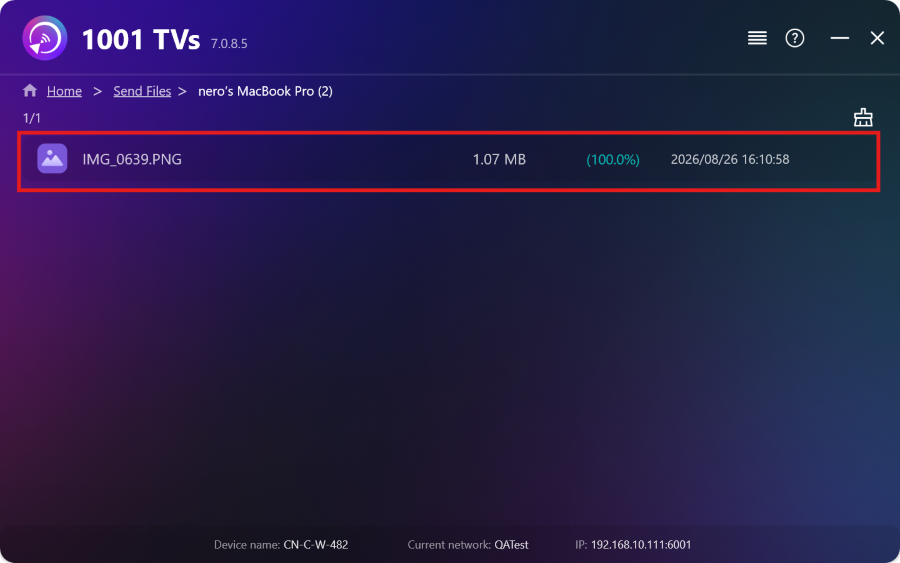
Sådan! Nu kan du sende filer til flere enheder på samme tid, når som helst og uden begrænsninger.
Få 1001 TVs nu
📱 iOS-app: Download fra App Store
📱 Android-app: Download fra Google Play
📥PC-app: Download fra Microsoft Store
For detaljerede trin henvises til Installationsvejledning til pc
📥Mac-app: Download fra App Store

Læs mere
 Vejledning til installation af APK-filer på tv: Sådan overfører og installerer du APK-filer på tv'et fra din PC eller Mac via Wi-Fi
Har du en APK-fil på din telefon, PC eller Mac, som du gerne vil køre på dit tv? Med 1001 TVs kan du sende...
Vejledning til installation af APK-filer på tv: Sådan overfører og installerer du APK-filer på tv’et fra din telefon via Wi-Fi
Har du en APK-fil på din telefon eller pc, som du gerne vil køre på dit tv? Med 1001 TVs kan du sende APK...
Vejledning til installation af APK-filer på tv: Sådan overfører og installerer du APK-filer på tv'et fra din PC eller Mac via Wi-Fi
Har du en APK-fil på din telefon, PC eller Mac, som du gerne vil køre på dit tv? Med 1001 TVs kan du sende...
Vejledning til installation af APK-filer på tv: Sådan overfører og installerer du APK-filer på tv’et fra din telefon via Wi-Fi
Har du en APK-fil på din telefon eller pc, som du gerne vil køre på dit tv? Med 1001 TVs kan du sende APK...

