
Auto Arrange Multiple Casting Windows on Desktop
The 1001 TVs desktop app can automatically arrange multiple casting windows. Once enabled, mirrored phone screens are neatly organized based on a preset layout—no manual resizing or repositioning needed.
How to Use
Step 1: Enable Auto Arrange
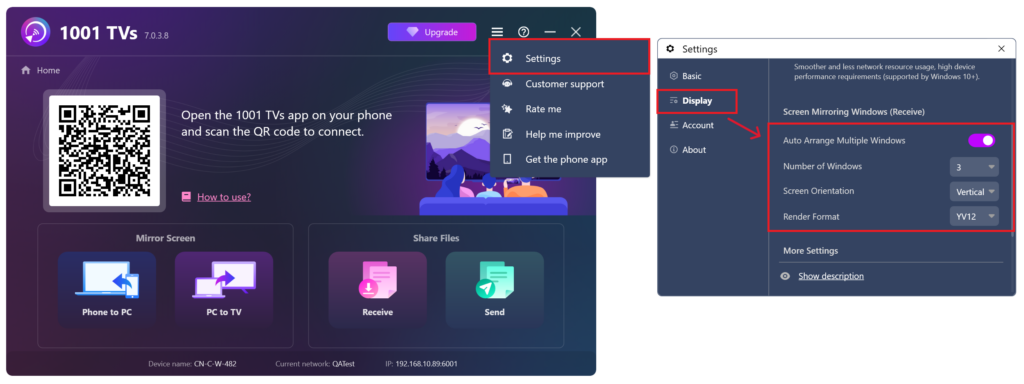
Open the 1001 TVs desktop app, go to Settings, and turn on Auto-Arrange Multiple Windows. You can also set the number of windows to display simultaneously based on your preference.
The auto-arrange layout supports up to 20 windows. Note that while the layout has this limit, the casting feature itself does not restrict how many devices can be connected.
Step 2: Connect Devices for Casting
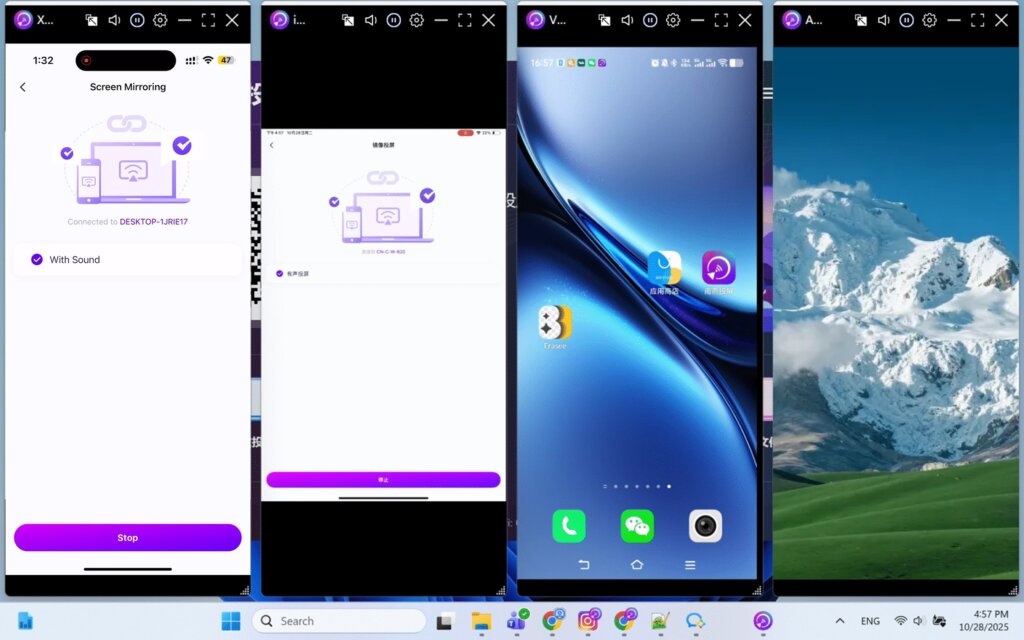
Follow the standard casting steps to mirror multiple phones to your computer. Once connected, all mirrored screens will be automatically arranged on your desktop based on the preset window count.
This feature also works when casting four phones simultaneously. For more details, see: 1001 TVs — Cast Four Devices at Once with One-Click Auto Window Arrangement.
Supported Platforms
Supported systems:
- Windows 7 or later
- macOS 10.15 or later
Supported casting mode:
- Mobile screen mirroring
Notes
- Adjust the number of windows based on your screen resolution to ensure each mirrored screen displays properly.
- If windows are not arranged automatically, try restarting the app or toggling the auto-arrange feature off and on again before reconnecting.
Need Help?
If you encounter any issues, feel free to contact our support team:
- More Guides: Guidance
- Email: 1001tvs@nero.com
- Website: www.1001tvs.com