ایک ہی وقت میں پی سی سے متعدد آلات (پی سی، فون، ٹی وی، ٹیبلٹ) میں فائلیں کیسے بھیجی جائیں
1001 TVs کے تازہ ترین ونڈوز ورژن (v7.0.8.5) کے ساتھ، آپ کا پی سی اب متعدد آلات — ٹی وی، ٹیبلٹس، فونز یا دیگر پی سیز — کو ایک ہی وقت میں فائلیں بھیج سکتا ہے…
ایک بار کنکشن ہو جانے کے بعد، کسی بھی سائز کی کوئی بھی فائل ایک ساتھ متعدد آلات پر بھیجیں، جتنی بار چاہیں، بغیر کسی کمپریشن کے، بغیر کسی جھنجھٹ کے۔ صرف تیز اور بے رکاوٹ منتقلیاں کمرے کی ہر اسکرین تک۔.
ٹیم کے تعاون، کلاس روم میں تقسیم، یا فائلز کو سب تک فوری طور پر پہنچانے کے لیے بہترین۔.

ٹیوٹوریل
1. اپنے پی سی اور وصول کرنے والے آلات پر 1001 TVs انسٹال کریں۔
📱 iOS ایپ: ایپ اسٹور سے ڈاؤن لوڈ کریں۔
📱 اینڈرائیڈ ایپ: گوگل پلے سے ڈاؤن لوڈ کریں۔
📥پی سی ایپ: سے ڈاؤن لوڈ کریں۔ مائیکروسافٹ اسٹور
تفصیلی اقدامات کے لیے، کا حوالہ دیں۔ پی سی انسٹالیشن گائیڈ
📥میک ایپ: ایپ اسٹور سے ڈاؤن لوڈ کریں۔
📥ٹی وی ایپ: اپنے ٹی وی پر 1001 TVs کیسے انسٹال کریں۔
2. اسی Wi-Fi سے جڑیں۔
یقینی بنائیں کہ آپ دونوں پی سی اور وصول کرنے والا آلہs ایک ہی Wi-Fi نیٹ ورک سے جڑے ہوئے ہیں۔.
بہترین کارکردگی کے لیے، استعمال کریں a 5 GHz Wi-Fi نیٹ ورک تاخیر کو کم کرنے اور استحکام کو بہتر بنانے کے لیے۔.
3. اپنے پہلے آلے کے لیے، نیچے دی گئی رہنمائی پر عمل کریں:
اپنے پی سی/میک سے ٹی وی/پی سی/میک میں فائلیں کیسے بھیجیں
اینڈرائیڈ اور آئی او ایس فونز اور ٹیبلٹس میں فائلیں کیسے بھیجی جائیں
4. مزید ڈیوائسز شامل کرنا
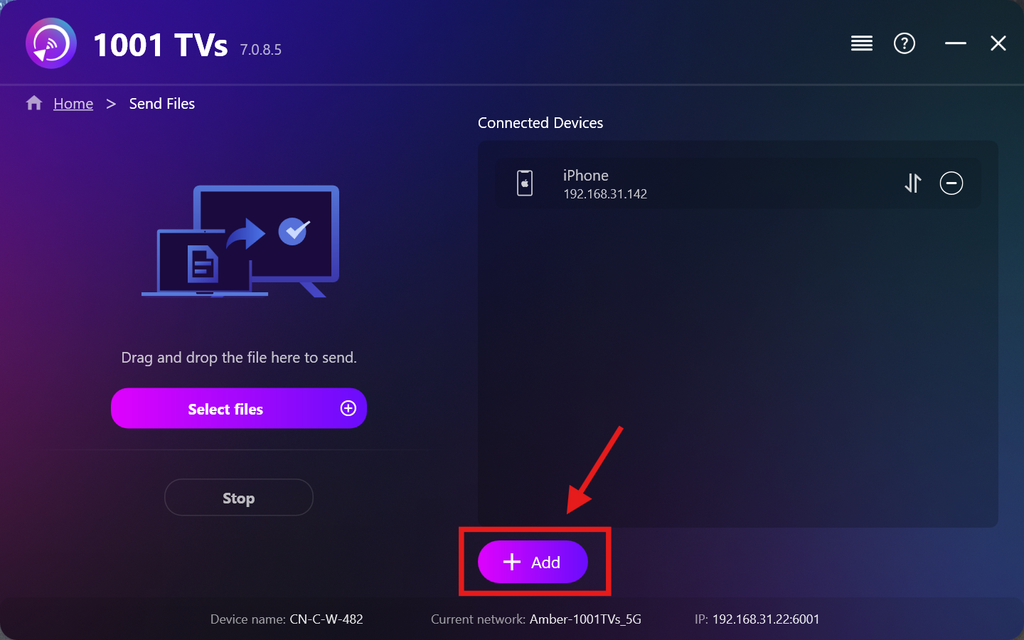
ایک بار جب آپ کا پہلا آلہ سیٹ اپ ہو جائے، تو آپ مزید ہدف آلات شامل کرنے کے لیے پر کلک کر سکتے ہیں۔ شامل کریں علامت.
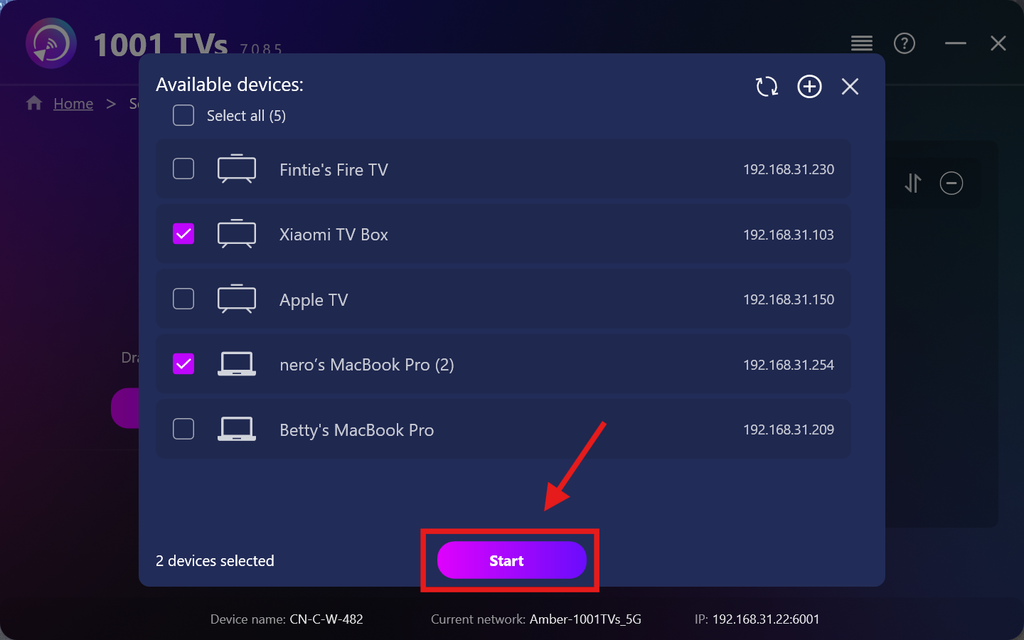
وہ تمام آلات منتخب کریں جن پر آپ فائلیں بھیجنا چاہتے ہیں (ایک سے زیادہ منتخب کرنا ممکن ہے)۔.
کلک کریں۔ شروع کریں۔ ربط شروع کرنے کے لیے۔.
جوڑی کی درخواست قبول کریں ہر ہدف ڈیوائس پر پہلی بار جوڑا بناتے وقت۔.
5. متعدد آلات پر فائلیں بھیجنا
وہ فائلیں منتخب کریں جو آپ بھیجنا چاہتے ہیں، یا بس انہیں بائیں جانب موجود فائل ایریا میں ڈریگ اور ڈراپ کریں — فائل کے سائز یا تعداد کی کوئی حد نہیں ہے۔.
⚠️ یقینی بنائیں کہ آپ کے وصول کنندہ آلات میں کافی اسٹوریج جگہ موجود ہو، ورنہ منتقلی ناکام ہو جائے گی۔.
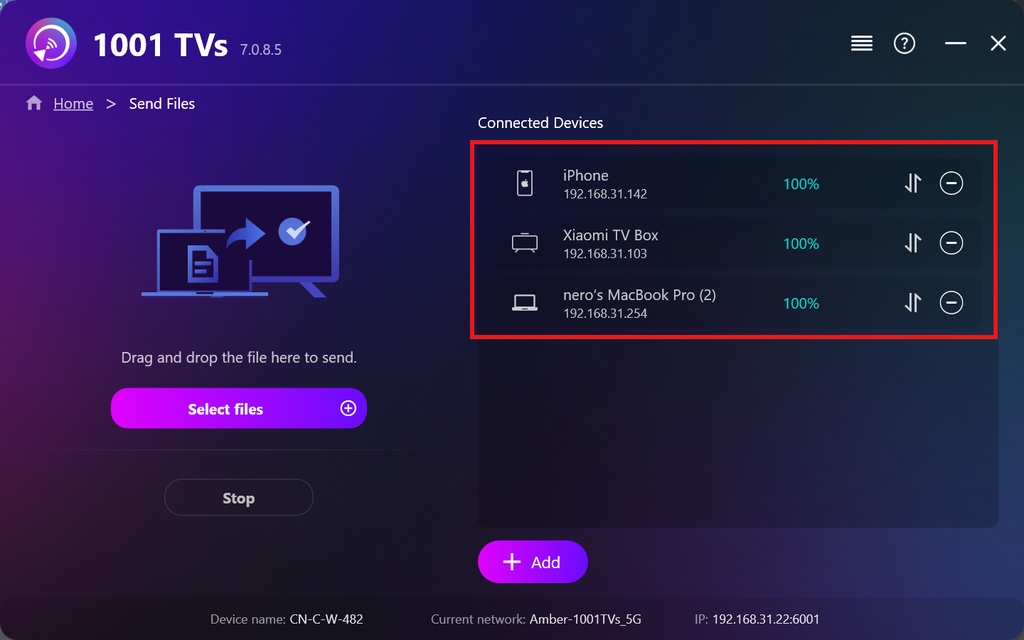
۶۔ اپنے وصول کرنے والے آلات کا انتظام کریں
پر کلک کریں۔ – (منفی) آئیکن کو اپنی وصول کنندگان کی فہرست سے ڈیوائس ہٹانے کے لیے۔.
پر کلک کریں۔ منتقل اس ڈیوائس پر بھیجی گئی تمام فائلوں کو دیکھنے کے لیے آئیکن۔.
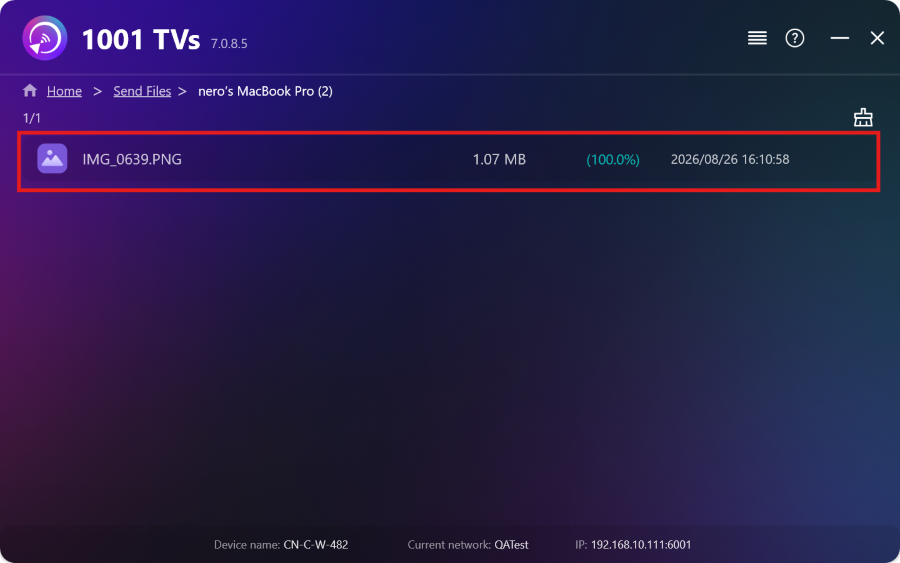
بس! اب آپ بغیر کسی پابندی کے کسی بھی وقت متعدد آلات کو ایک ساتھ فائلیں بھیج سکتے ہیں۔.
ابھی 1001 TVs حاصل کریں۔
📱 iOS ایپ: ایپ اسٹور سے ڈاؤن لوڈ کریں۔
📱 اینڈرائیڈ ایپ: گوگل پلے سے ڈاؤن لوڈ کریں۔
📥پی سی ایپ: سے ڈاؤن لوڈ کریں۔ مائیکروسافٹ اسٹور
تفصیلی اقدامات کے لیے، کا حوالہ دیں۔ پی سی انسٹالیشن گائیڈ
📥میک ایپ: ایپ اسٹور سے ڈاؤن لوڈ کریں۔
📥ٹی وی ایپ:اپنے ٹی وی پر 1001 TVs کیسے انسٹال کریں۔

مزید پڑھیں
 ٹی وی کے لیے APK انسٹالیشن گائیڈ: اپنے پی سی یا میک سے وائی فائی کے ذریعے ٹی وی پر APK فائلیں بھیجنے اور انسٹال کرنے کا طریقہ
کیا آپ کے فون، پی سی یا میک پر کوئی APK فائل ہے جسے آپ اپنی ٹی وی پر چلانا چاہتے ہیں؟ 1001 TVs کے ساتھ، آپ بھیج سکتے ہیں…
ٹی وی کے لیے APK انسٹالیشن گائیڈ: اپنے فون سے وائی فائی کے ذریعے ٹی وی پر APK فائلیں بھیجنے اور انسٹال کرنے کا طریقہ
کیا آپ کے فون یا پی سی پر کوئی APK فائل ہے جسے آپ اپنی ٹی وی پر چلانا چاہتے ہیں؟ 1001 TVs کے ساتھ، آپ APK بھیج سکتے ہیں…
ٹی وی کے لیے APK انسٹالیشن گائیڈ: اپنے پی سی یا میک سے وائی فائی کے ذریعے ٹی وی پر APK فائلیں بھیجنے اور انسٹال کرنے کا طریقہ
کیا آپ کے فون، پی سی یا میک پر کوئی APK فائل ہے جسے آپ اپنی ٹی وی پر چلانا چاہتے ہیں؟ 1001 TVs کے ساتھ، آپ بھیج سکتے ہیں…
ٹی وی کے لیے APK انسٹالیشن گائیڈ: اپنے فون سے وائی فائی کے ذریعے ٹی وی پر APK فائلیں بھیجنے اور انسٹال کرنے کا طریقہ
کیا آپ کے فون یا پی سی پر کوئی APK فائل ہے جسے آپ اپنی ٹی وی پر چلانا چاہتے ہیں؟ 1001 TVs کے ساتھ، آپ APK بھیج سکتے ہیں…

