
ลบแถบสีดำ: การสะท้อนภาพในแนวตั้งและแนวนอน

เห็นแถบสีดำเมื่อสะท้อนหน้าจอหรือไม่? ไม่ว่าคุณจะอยู่ในโหมดแนวตั้งที่มีแถบสีดำด้านข้าง หรือโหมดแนวนอนที่มีแถบสีดำด้านบน ด้านล่าง หรือด้านข้าง — ไม่ต้องกังวล ทั้งสองกรณีสามารถแก้ไขได้ด้วยการปรับตั้งง่ายๆ ไม่กี่ขั้นตอนในแอป 1001 TVs TV.
สำหรับการสะท้อนภาพในแนวตั้ง มีตัวเลือกเฉพาะเพื่อลบแถบด้านข้าง (ดูวิธีตั้งค่าการสะท้อนภาพในแนวตั้ง 👉การสะท้อนหน้าจอแบบแนวตั้ง)
สำหรับการสะท้อนภาพแบบแนวนอน ยังมีวิธีที่สามารถลดแถบสีดำลงได้อย่างมากด้วย.
ทำตามขั้นตอนต่อไปนี้เพื่อทำให้เนื้อหาของคุณแสดงแบบเต็มหน้าจออย่างแท้จริงและสร้างประสบการณ์ที่ดื่มด่ำอย่างเต็มที่.
สำหรับการสะท้อนภาพแบบพอร์ตเรต
ขั้นตอนที่ 1. บนทีวีของคุณ ให้เปิดแอป 1001 TVs และไปที่ “การตั้งค่า"".
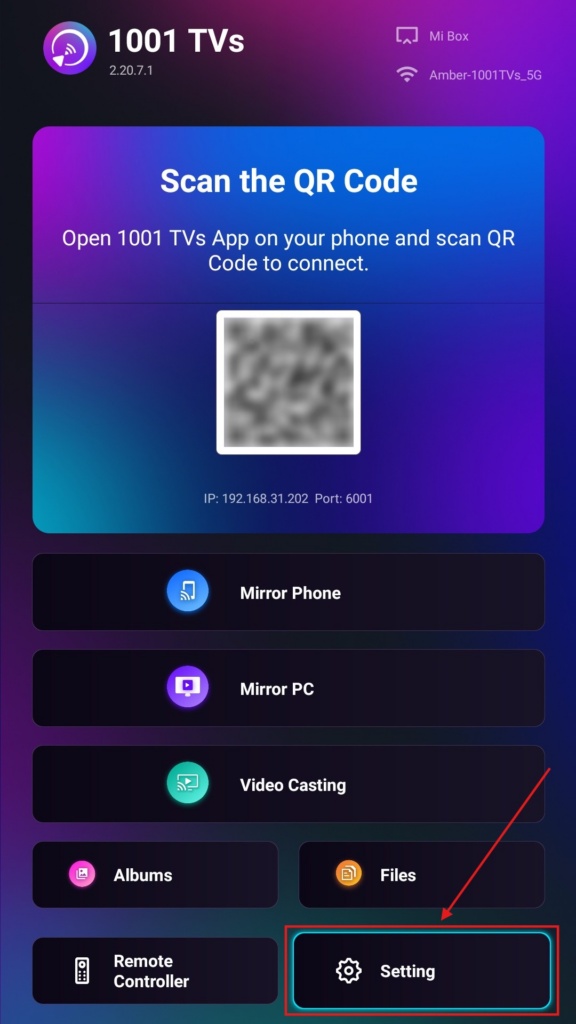
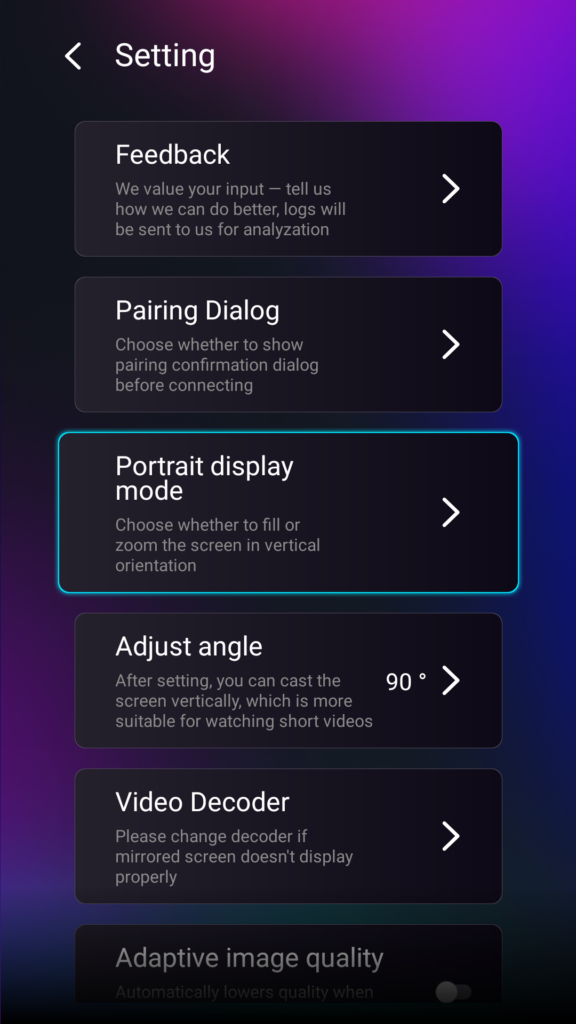
ขั้นตอนที่ 2. เลือก “โหมดแสดงภาพแนวตั้ง”.
ขั้นตอนที่ 3. เพียงเลือกโหมดที่คุณต้องการเพื่อแสดงบนทีวีของคุณ.
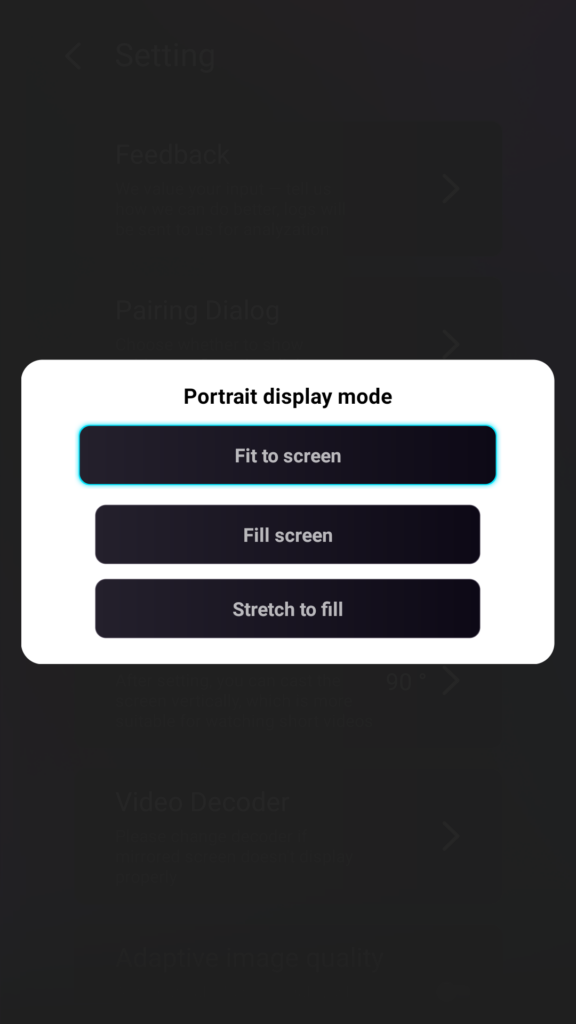
เคล็ดลับเกี่ยวกับโหมดแสดงภาพบุคคล
- ปรับให้พอดีกับหน้าจอ
ขยายเนื้อหาให้เต็มหน้าจอทีวีแนวตั้งของคุณ เมื่อเปิดใช้งานแล้ว คุณจะเห็นผลลัพธ์ที่แตกต่างไปอย่างสิ้นเชิงในครั้งต่อไปที่คุณทำการสะท้อนหน้าจอ. - เต็มหน้าจอ
รักษาอัตราส่วนภาพเดิมไว้ แต่ขึ้นอยู่กับอุปกรณ์ของคุณ อาจมีแถบสีดำปรากฏขึ้นที่ด้านข้าง. - ขยายให้เต็ม
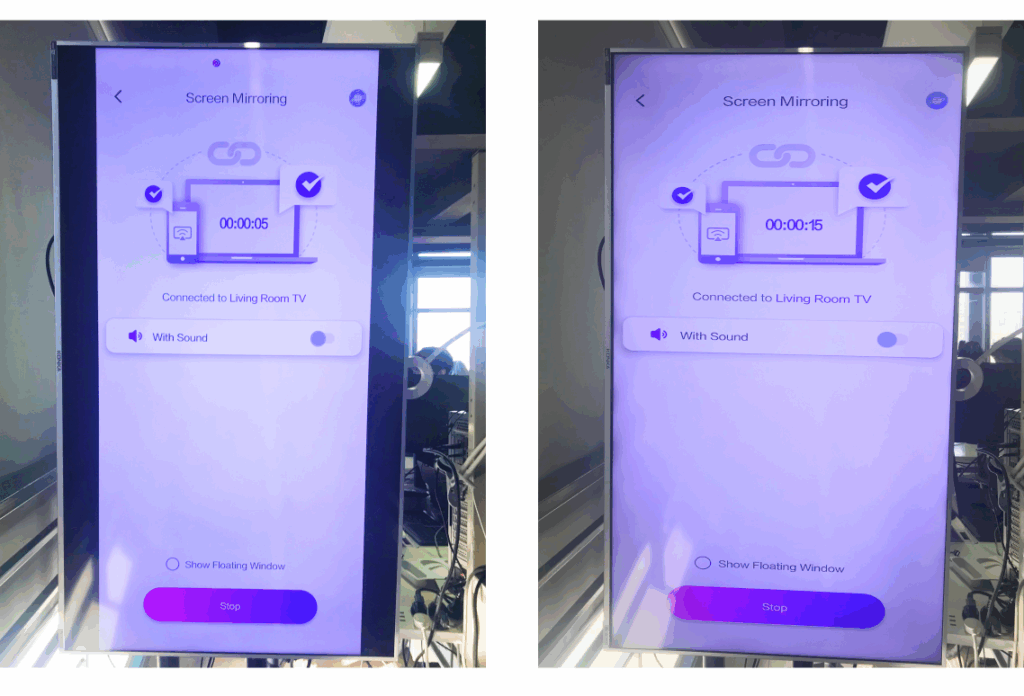
เติมให้เต็มด้านหนึ่ง โดยรักษาสัดส่วนที่ถูกต้อง.
ดูการเปรียบเทียบแบบเคียงข้างกันด้านล่าง (ขยายให้เต็ม (โหมดที่แสดง):
คุณสมบัตินี้มีประโยชน์เมื่อใด?
การตั้งค่านี้เหมาะสำหรับ:
- ร้านค้าปลีกที่ใช้ป้ายดิจิทัลแนวตั้ง
- ผู้ใช้ตามบ้านที่สร้างหน้าจอสร้างบรรยากาศแนวตั้ง
- ครูที่จัดแสดงสื่อการสอนในแนวตั้ง
- การแสดงภาพถ่ายแนวตั้งหรือวิดีโอในโหมดแนวตั้ง
- เล่น TikTok/YouTube Shorts แบบเต็มหน้าจอ
- สตูดิโอ แกลเลอรี หรือการจัดแสดงศิลปะ
สำหรับการสะท้อนภาพแบบทิวทัศน์
ขั้นตอนที่ 1. บนทีวีของคุณ ให้เปิดแอป 1001 TVs และไปที่ “การตั้งค่า”.
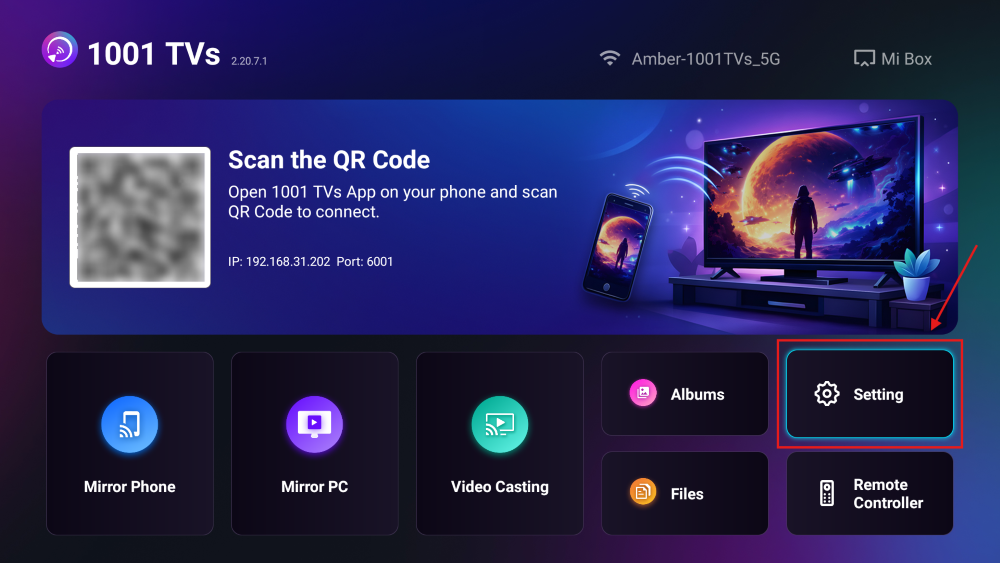
ขั้นตอนที่ 2. เปิดใช้งาน “Fill Mode”.
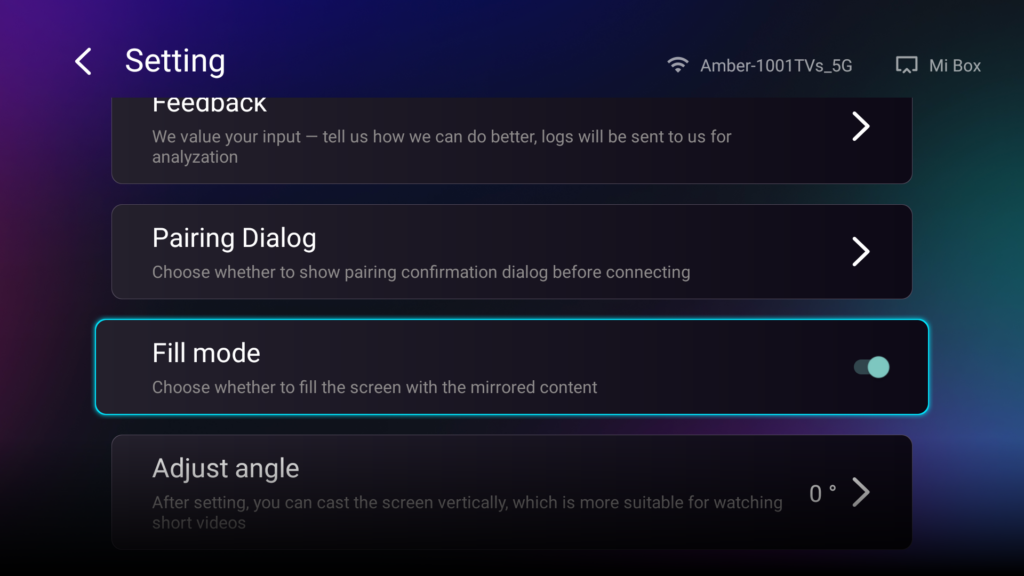
หลังจากเปิดตัวเลือกนี้แล้ว ให้ใช้ปุ่มขึ้น/ลงบนรีโมทของทีวีเพื่อเปลี่ยนระหว่างโหมดปรับขนาดที่มีอยู่: 1×, 2×, 3× และ Fit to Screen.
- 1× / 2× / 3×
ซูมเข้าด้วยระยะห่างที่คงที่ - ปรับให้พอดีกับหน้าจอ
ปรับขนาดเนื้อหาโดยอัตโนมัติให้เต็มหน้าจอทีวี
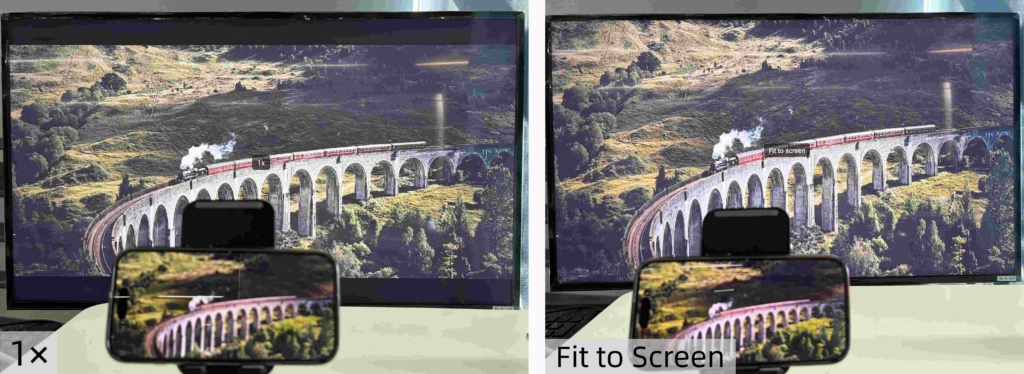
ตอนนี้คุณสามารถนั่งสบายๆ และเพลิดเพลินกับเนื้อหาของคุณ — หน้าจอเต็ม ไม่มีแถบสีดำ ให้ประสบการณ์ที่ดื่มด่ำอย่างเต็มที่.
เคล็ดลับและบทแนะนำเพิ่มเติม: