Jak odesílat soubory z počítače na více zařízení najednou (počítač, telefon, televize, tablet)
Díky nejnovější verzi aplikace 1001 TVs pro Windows (v7.0.8.5) může váš počítač nyní odesílat soubory na více zařízení – televizory, tablety, telefony nebo jiné počítače – a to vše současně.
Jakmile se připojíte, můžete odesílat libovolné soubory jakékoli velikosti na více zařízení najednou, a to tolikrát, kolikrát potřebujete. Bez komprese. Bez potíží. Prostě rychlé a plynulé přenosy na každou obrazovku v místnosti.
Ideální pro týmovou spolupráci, rozesílání v učebně nebo prostě pro okamžité sdílení souborů se všemi.

Výukový program
1. Nainstalujte si 1001 TVs do počítače a do přijímacích zařízení
📱 Aplikace pro iOS: Stáhnout z App Store
📱 Aplikace pro Android: Stáhnout z Google Play
📥Aplikace pro PC: Stáhnout z Microsoft Store
Podrobný postup naleznete v Průvodce instalací počítače
📥Aplikace pro Mac: Stáhnout z App Store
📥TV aplikace: Jak nainstalovat 1001 TVs do televizoru
2. Připojení ke stejné síti Wi-Fi
Ujistěte se, že oba PC a přijímací zařízenís jsou připojeny ke stejné síti Wi-Fi.
Pro dosažení nejlepšího výkonu použijte Síť Wi-Fi 5 GHz snížit zpoždění a zlepšit stabilitu.
3. U prvního zařízení postupujte podle níže uvedeného návodu:
Jak odesílat soubory z PC/Mac do TV/PC/Mac
Jak odesílat soubory na telefony a tablety s operačními systémy Android a iOS
4. Přidání dalších zařízení
Jakmile nastavíte první zařízení, můžete přidat další cílová zařízení kliknutím na tlačítko Přidat ikona.
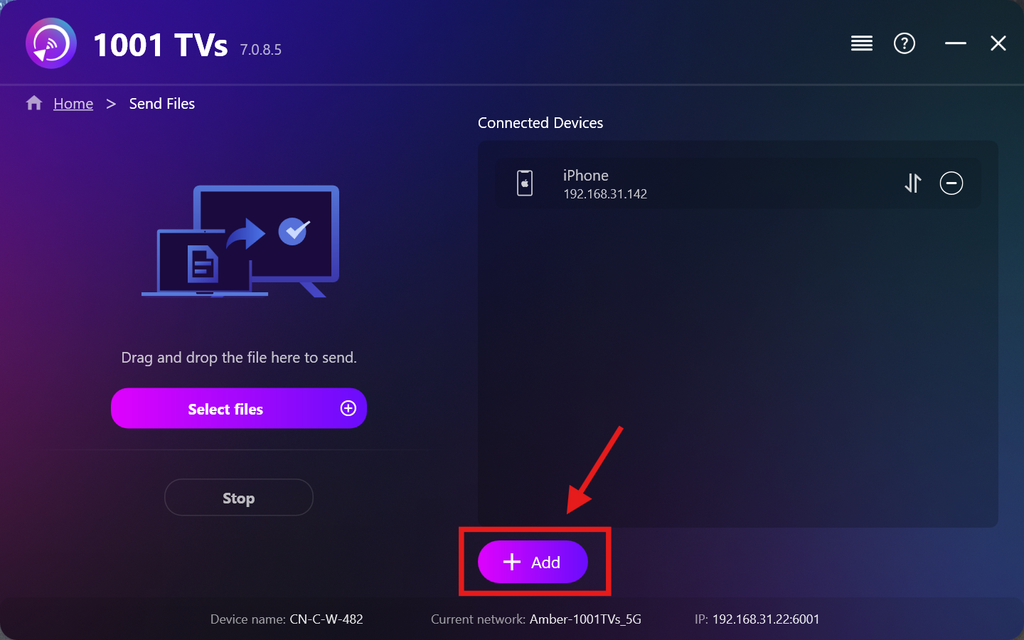
Vyberte všechna zařízení, na která chcete odeslat soubory (je možné vybrat více položek).
Klikněte na Start k navázání spojení.
Přijmout žádost o spárování na každém cílovém zařízení při prvním spárování.
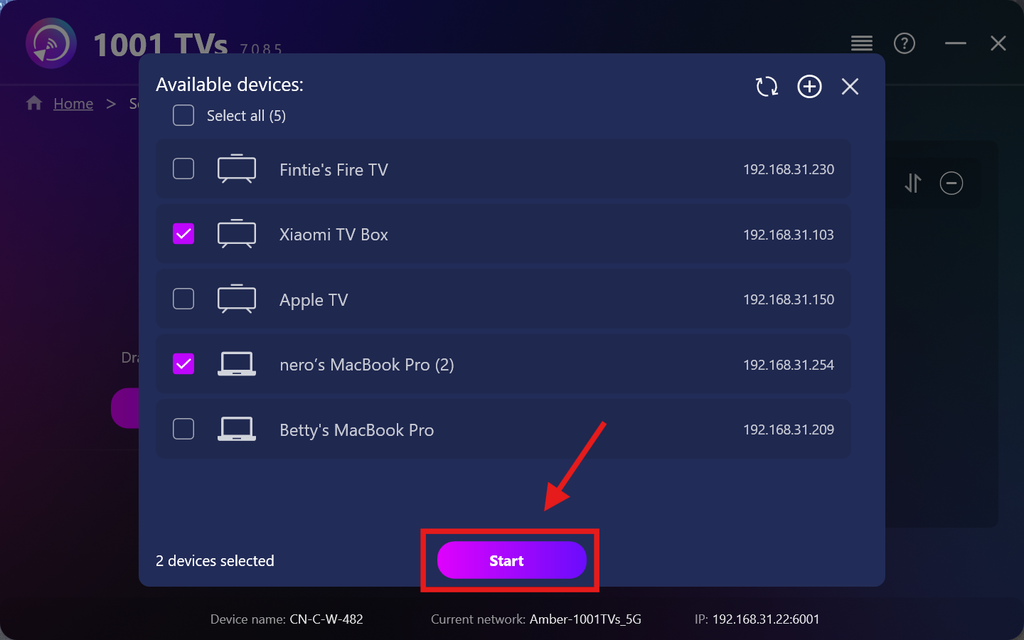
5. Odesílání souborů na více zařízení
Vyberte soubory, které chcete odeslat, nebo je jednoduše přetáhněte do oblasti pro soubory vlevo – neexistují žádná omezení ohledně velikosti ani počtu souborů.
⚠️ Ujistěte se, že vaše přijímací zařízení mají dostatek úložného prostoru, jinak přenos selže.
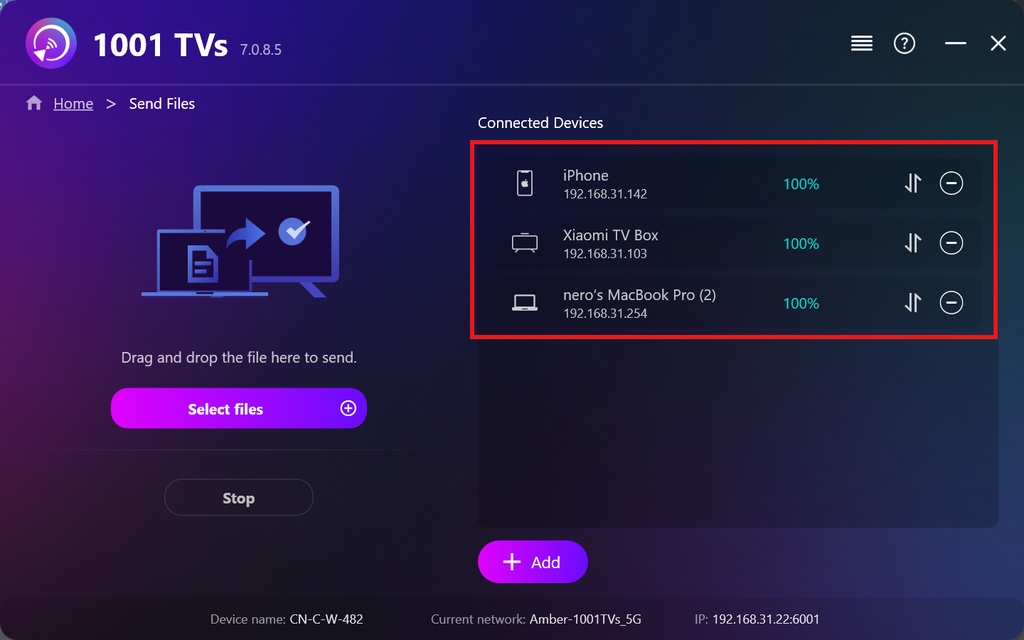
6. Správa vašich přijímacích zařízení
Klikněte na – (mínus) ikona pro odebrání zařízení ze seznamu příjemců.
Klikněte na převod ikona pro zobrazení všech souborů odeslaných na toto zařízení.
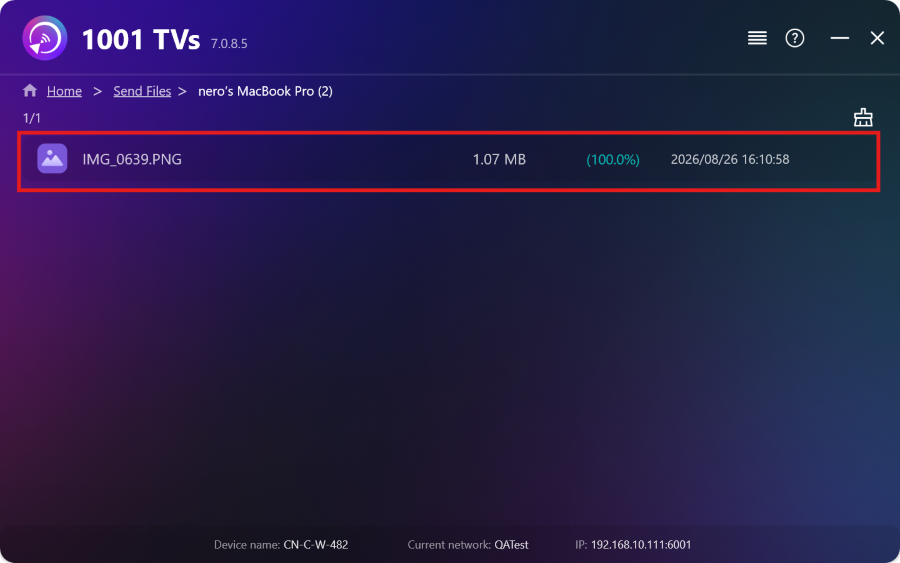
A je to! Nyní můžete kdykoli a bez jakýchkoli omezení odesílat soubory na více zařízení najednou.
Získat 1001 TVs nyní
📱 Aplikace pro iOS: Stáhnout z App Store
📱 Aplikace pro Android: Stáhnout z Google Play
📥Aplikace pro PC: Stáhnout z Microsoft Store
Podrobný postup naleznete v Průvodce instalací počítače
📥Aplikace pro Mac: Stáhnout z App Store
📥TV aplikace:Jak nainstalovat 1001 TVs do televizoru

Číst více
 Průvodce instalací APK na televizi: Jak odeslat a nainstalovat soubory APK do televize z počítače PC nebo Mac přes Wi-Fi
Máte v telefonu, na PC nebo na Macu soubor APK, který chcete spustit na televizi? S aplikací 1001 TVs můžete odeslat…
Návod k instalaci APK na televizi: Jak odeslat a nainstalovat soubory APK do televize z telefonu přes Wi-Fi
Máte v telefonu nebo na počítači soubor APK, který chcete spustit na televizi? S aplikací 1001 TVs můžete odeslat soubor APK…
Průvodce instalací APK na televizi: Jak odeslat a nainstalovat soubory APK do televize z počítače PC nebo Mac přes Wi-Fi
Máte v telefonu, na PC nebo na Macu soubor APK, který chcete spustit na televizi? S aplikací 1001 TVs můžete odeslat…
Návod k instalaci APK na televizi: Jak odeslat a nainstalovat soubory APK do televize z telefonu přes Wi-Fi
Máte v telefonu nebo na počítači soubor APK, který chcete spustit na televizi? S aplikací 1001 TVs můžete odeslat soubor APK…

