Como enviar ficheiros do PC para vários dispositivos ao mesmo tempo (PC, telemóvel, televisão, tablet)
Com a versão mais recente do 1001 TVs para Windows (v7.0.8.5), o seu computador pode agora enviar ficheiros para vários dispositivos — televisões, tablets, telemóveis ou outros computadores —, tudo ao mesmo tempo.
Assim que estiver ligado, envie qualquer ficheiro, independentemente do tamanho, para vários dispositivos ao mesmo tempo, quantas vezes for necessário. Sem compressão. Sem complicações. Apenas transferências rápidas e sem interrupções para todos os ecrãs da sala.
Ideal para a colaboração em equipa, distribuição em sala de aula ou simplesmente para enviar ficheiros a todos instantaneamente.

Tutorial
1. Instale o 1001 TVs no seu computador e nos dispositivos de receção
📱 Aplicação iOS: Descarregar da App Store
📱 Aplicação para Android: Descarregar a partir do Google Play
📥Aplicação para PC: Descarregar de Microsoft Store
Para obter passos pormenorizados, consultar o Guia de instalação do PC
📥Mac App: Descarregar da App Store
📥Aplicação de TV: Como instalar o 1001 TVs na sua TV
2. Ligar à mesma rede Wi-Fi
Certifique-se de que ambos os seus PC e o dispositivo de receçãos estão ligados à mesma rede Wi-Fi.
Para um melhor desempenho, utilize um Rede Wi-Fi de 5 GHz para reduzir o atraso e melhorar a estabilidade.
3. Para o seu primeiro dispositivo, siga o guia abaixo:
Como enviar ficheiros do seu PC/Mac para a TV/PC/Mac
Como enviar ficheiros para telemóveis e tablets Android e iOS
4. Adicionar mais dispositivos
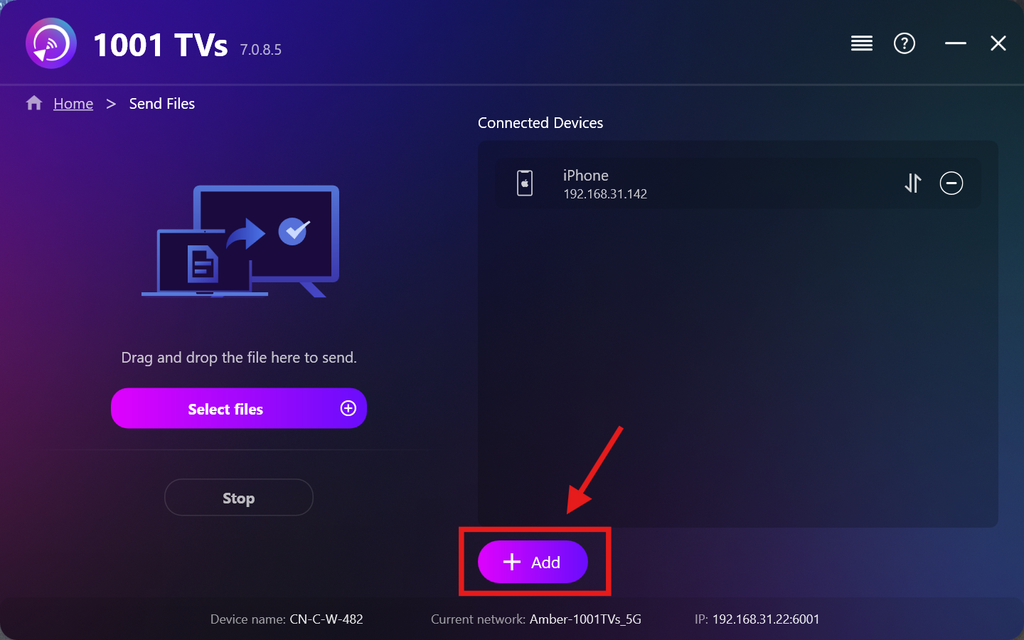
Depois de configurar o seu primeiro dispositivo, pode adicionar mais dispositivos de destino clicando no Adicionar ícone.
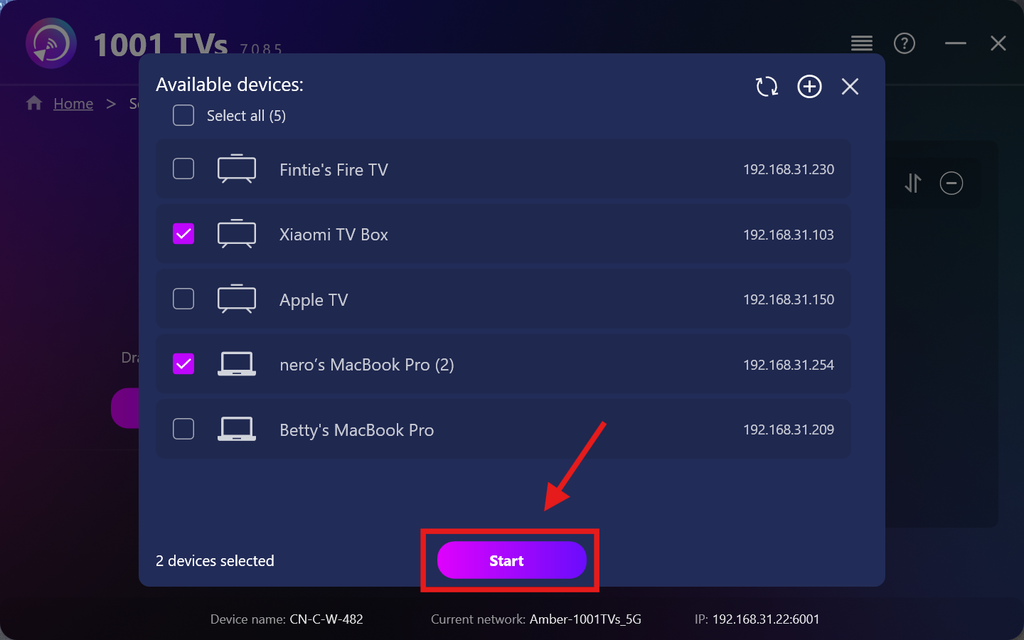
Selecione todos os dispositivos para os quais pretende enviar ficheiros (é possível selecionar vários dispositivos).
Clicar Início para iniciar a ligação.
Aceitar o pedido de emparelhamento em cada dispositivo de destino ao emparelhar pela primeira vez.
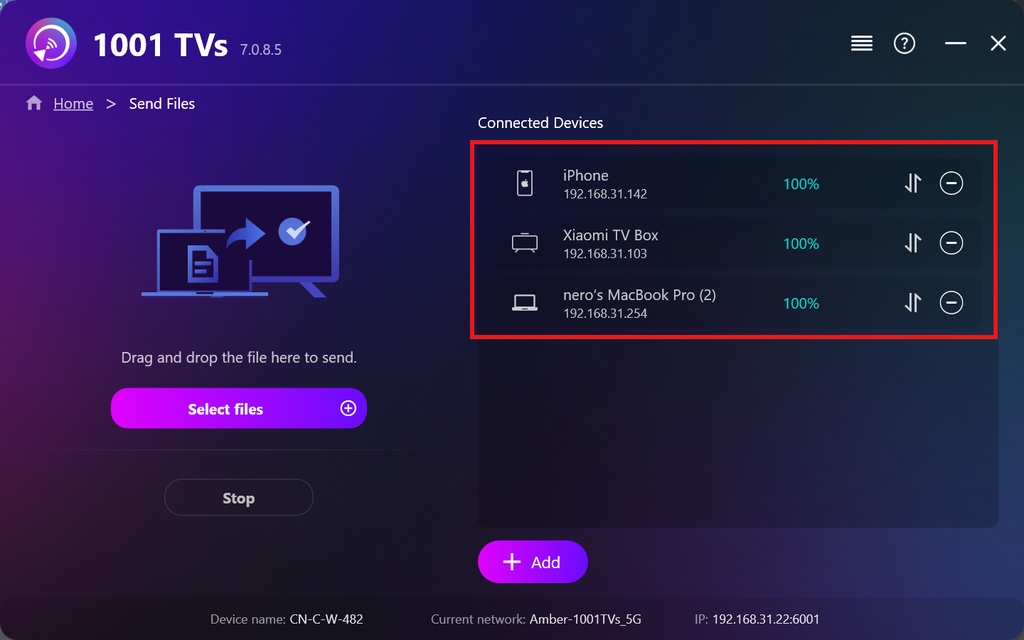
5. Envio de ficheiros para vários dispositivos
Selecione os ficheiros que pretende enviar ou basta arrastá-los e soltá-los na área de ficheiros à esquerda — não há limites quanto ao tamanho ou à quantidade dos ficheiros.
⚠️ Certifique-se de que os seus dispositivos de destino têm espaço de armazenamento suficiente, caso contrário a transferência falhará.
6. Gerir os seus dispositivos de receção
Clique no botão – (menos) ícone para remover um dispositivo da sua lista de destinatários.
Clique no botão transferência ícone para ver todos os ficheiros enviados para este dispositivo.
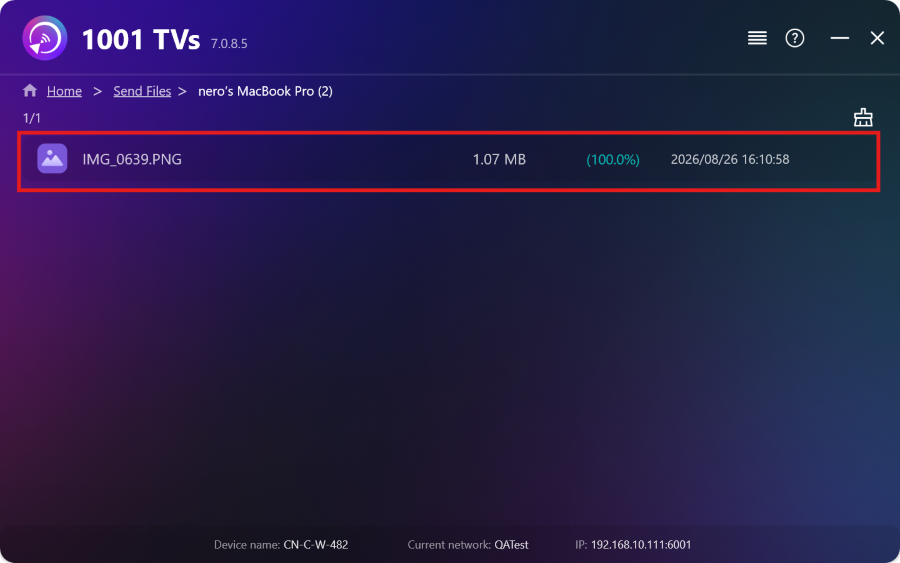
E já está! Agora já podes enviar ficheiros para vários dispositivos ao mesmo tempo, a qualquer momento e sem restrições.
Obter 1001 TVs agora
📱 Aplicação iOS: Descarregar da App Store
📱 Aplicação para Android: Descarregar a partir do Google Play
📥Aplicação para PC: Descarregar de Microsoft Store
Para obter passos pormenorizados, consultar o Guia de instalação do PC
📥Mac App: Descarregar da App Store
📥Aplicação de TV:Como instalar o 1001 TVs na sua TV

Ler mais
 Guia de instalação de APK na TV: Como enviar e instalar ficheiros APK na TV a partir do seu PC ou Mac através de Wi-Fi
Tem um ficheiro APK no telemóvel, no PC ou no Mac que quer executar na televisão? Com o 1001 TVs, pode enviar...
Guia de instalação de APK na TV: Como enviar e instalar ficheiros APK na TV a partir do telemóvel através de Wi-Fi
Tem um ficheiro APK no telemóvel ou no computador que quer executar na televisão? Com o 1001 TVs, pode enviar o APK...
Guia de instalação de APK na TV: Como enviar e instalar ficheiros APK na TV a partir do seu PC ou Mac através de Wi-Fi
Tem um ficheiro APK no telemóvel, no PC ou no Mac que quer executar na televisão? Com o 1001 TVs, pode enviar...
Guia de instalação de APK na TV: Como enviar e instalar ficheiros APK na TV a partir do telemóvel através de Wi-Fi
Tem um ficheiro APK no telemóvel ou no computador que quer executar na televisão? Com o 1001 TVs, pode enviar o APK...

