1001 TVs: Mirror Your PC/Mac Screen to Multiple Devices at the Same Time (TV, Tablet, Phone, PC)
はじめに
1001 TVsの最新Windows版(v7.0.0.7)では、強力な新機能が追加されました。 同時に複数の受信機 (TVs, tablets, phones, or even another PC). And Mac also has this feature.
まるであなたのPCが “全世界に向けて放送している ”ようだ。😄
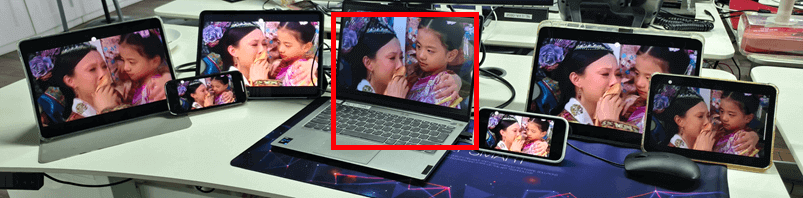
中央のPC(赤くハイライトされている)は、画面をミラーリングしている。 6種類のデバイスを同時に使用可能.
もちろん、この機能は、1台のコンピューターから複数のテレビにコンテンツを表示する必要がある会議室などで特に役立ちます。.
初めてのデバイスミラーリングのチュートリアル
For Windows:
[ Windows ] PCからテレビに画面をミラーリングする方法は?
[Windows] Windows PCの画面をMac/Windows PCにミラーリングする方法
[Windows] PCの画面をAndroidスマホやiPhoneにミラーリングする方法
For Mac:
[Mac] How to Mirror Your Screen to an Android Phone or iPhone
デバイスの追加方法
1. Mirror your PC/Mac to the first device.
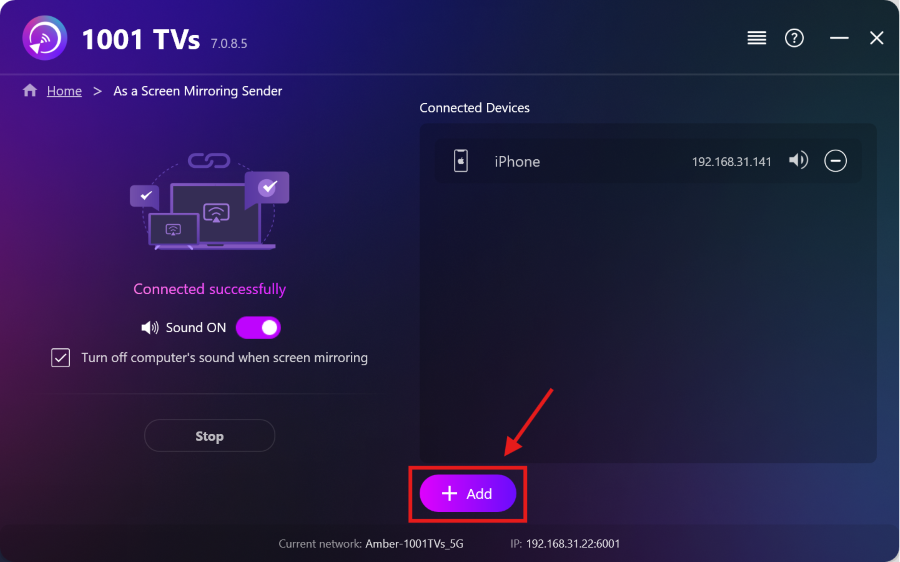
2.最初のデバイスが正常に接続されたら “追加” をミラーリング・インターフェースに追加してください。.
注: マルチデバイスミラーリング機能は有料プランが必要です。.
1001 TVsのその他のコンテンツを見る