Kuinka lähettää tiedostoja tietokoneelta useille laitteille samanaikaisesti (tietokone, puhelin, televisio, tabletti)
1001 TVs:n uusimman Windows-version (v7.0.8.5) avulla tietokoneesi voi nyt lähettää tiedostoja useille laitteille – televisioille, tableteille, puhelimille tai muille tietokoneille – kaikki samanaikaisesti.
Kun yhteys on muodostettu, voit lähettää minkä tahansa tiedoston, koosta riippumatta, useille laitteille kerralla niin monta kertaa kuin tarvitset. Ei pakkausta. Ei vaivaa. Vain nopeita ja saumattomia tiedostonsiirtoja huoneen jokaiseen näyttöön.
Sopii erinomaisesti tiimityöskentelyyn, jakeluun luokkahuoneessa tai yksinkertaisesti tiedostojen välittämiseen kaikille välittömästi.

Tutorial
1. Asenna 1001 TVs tietokoneellesi ja vastaanottolaitteisiisi
📱 iOS-sovellus: Lataa App Storesta
📱 Android-sovellus: Lataa Google Playsta
📥PC-sovellus: Lataa osoitteesta Microsoft Store
Yksityiskohtaiset vaiheet löytyvät PC-asennusopas
📥Mac-sovellus: Lataa App Storesta
📥TV-sovellus: 1001 TVs:n asentaminen televisioon
2. Yhdistä samaan Wi-Fi-yhteyteen
Varmista, että sekä PC ja vastaanottolaites ovat yhteydessä samaan Wi-Fi-verkkoon.
Parhaan suorituskyvyn saat käyttämällä 5 GHz:n Wi-Fi-verkko vähentää viivettä ja parantaa vakautta.
3. Noudata ensimmäisen laitteesi osalta alla olevia ohjeita:
Kuinka lähettää tiedostoja PC:stä/Macista TV:hen/PC:hen/Maciin?
Kuinka lähettää tiedostoja Android- ja iOS-puhelimiin ja -tableteihin
4. Lisää laitteita
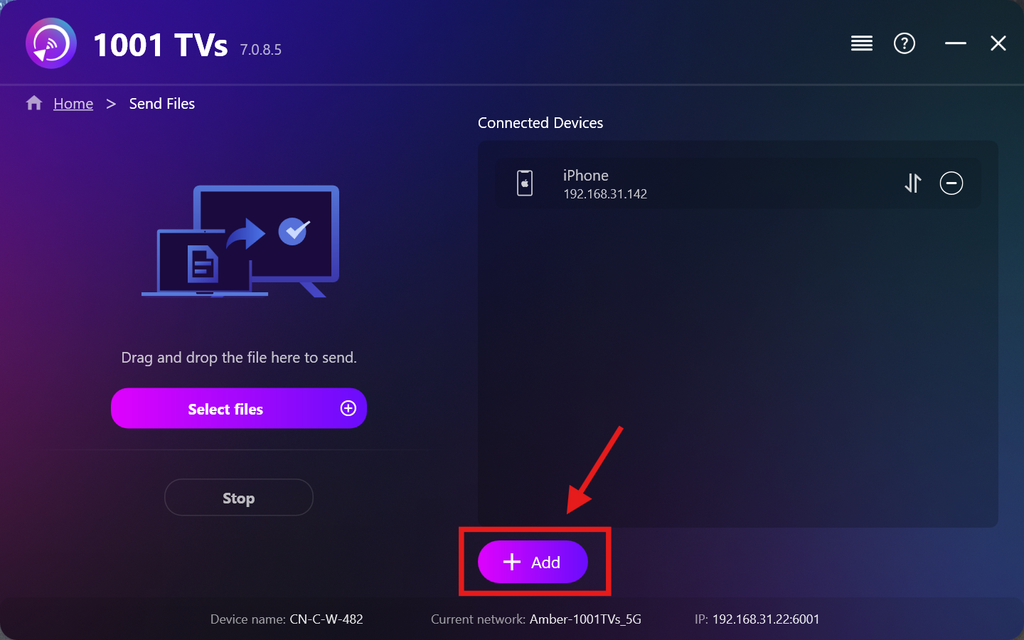
Kun ensimmäinen laite on määritetty, voit lisätä muita kohdelaitteita napsauttamalla Lisää kuvake.
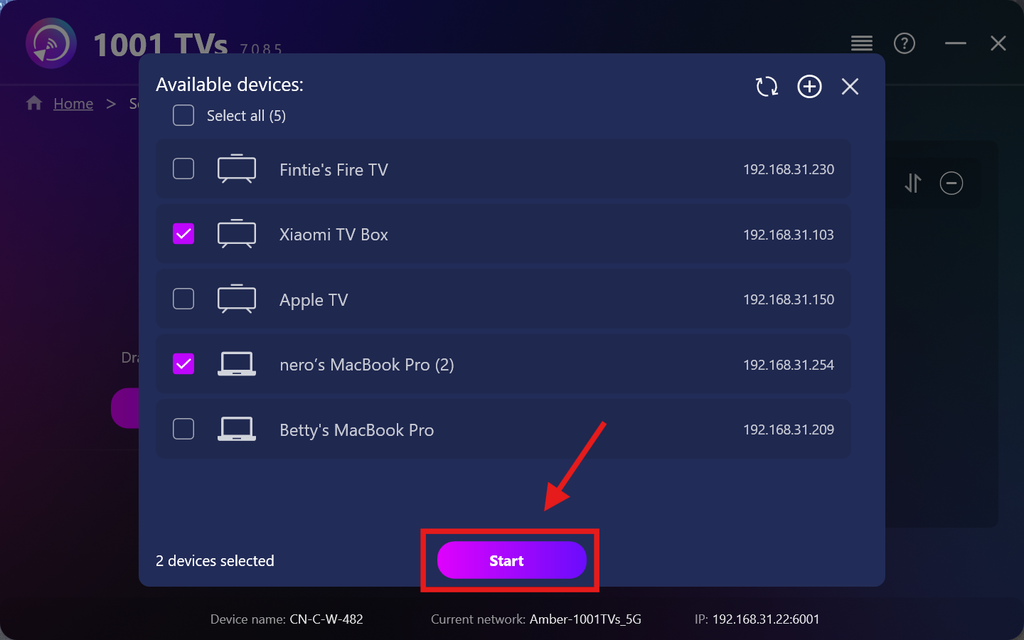
Valitse kaikki laitteet, joihin haluat lähettää tiedostoja (monivalinta on mahdollista).
Klikkaa Aloita yhteyden muodostamiseksi.
Hyväksy pariliitospyyntö jokaisella kohdelaitteella, kun laitteet yhdistetään ensimmäistä kertaa.
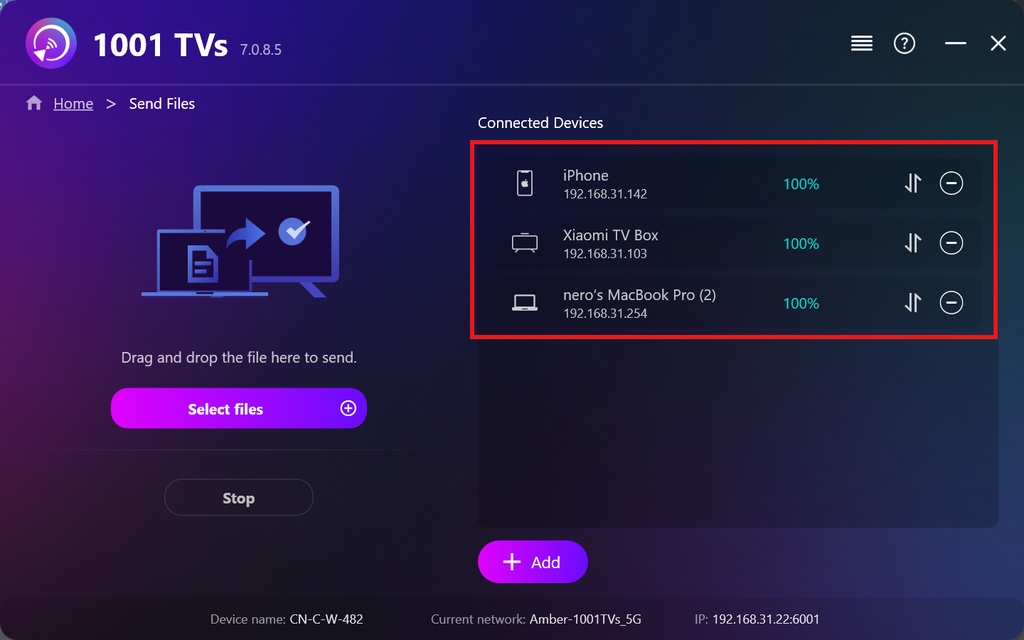
5. Tiedostojen lähettäminen useille laitteille
Valitse tiedostot, jotka haluat lähettää, tai vedä ja pudota ne suoraan vasemmalla olevaan tiedostoalueeseen — tiedostojen koosta tai määrästä ei ole rajoituksia.
⚠️ Varmista, että vastaanottavissa laitteissa on riittävästi tallennustilaa, muuten tiedostojen siirto epäonnistuu.
6. Hallitse vastaanottolaitteitasi
Napsauta – (miinus) kuvake, jolla voit poistaa laitteen vastaanottajalistaltasi.
Napsauta siirto kuvake, jolla voit tarkastella kaikkia tähän laitteeseen lähetettyjä tiedostoja.
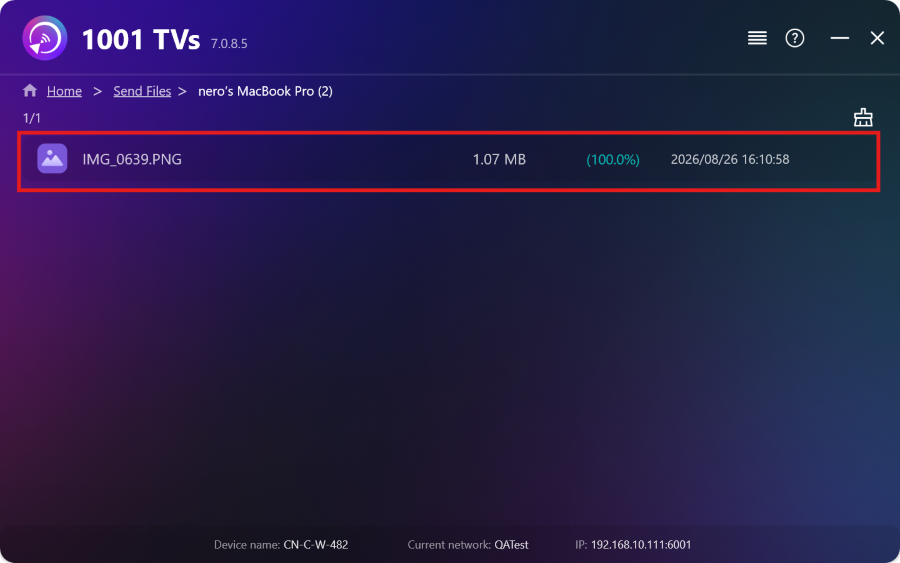
Siinä se! Voit nyt lähettää tiedostoja useille laitteille samanaikaisesti milloin tahansa ilman rajoituksia.
Hanki 1001 TVs nyt
📱 iOS-sovellus: Lataa App Storesta
📱 Android-sovellus: Lataa Google Playsta
📥PC-sovellus: Lataa osoitteesta Microsoft Store
Yksityiskohtaiset vaiheet löytyvät PC-asennusopas
📥Mac-sovellus: Lataa App Storesta
📥TV-sovellus:1001 TVs:n asentaminen televisioon

Lue lisää
 TV:n APK-asennusopas: Kuinka lähettää ja asentaa APK-tiedostoja televisioon tietokoneelta tai Macilta Wi-Fi-yhteyden kautta
Onko puhelimessasi, PC:lläsi tai Macillasi APK-tiedosto, jonka haluat suorittaa televisiossasi? 1001 TVs:n avulla voit lähettää...
TV:n APK-asennusopas: Kuinka lähettää ja asentaa APK-tiedostoja televisioon puhelimesta Wi-Fi-yhteyden kautta
Onko puhelimessasi tai tietokoneellasi APK-tiedosto, jonka haluat ajaa televisiossasi? 1001 TVs:n avulla voit lähettää APK-tiedoston...
TV:n APK-asennusopas: Kuinka lähettää ja asentaa APK-tiedostoja televisioon tietokoneelta tai Macilta Wi-Fi-yhteyden kautta
Onko puhelimessasi, PC:lläsi tai Macillasi APK-tiedosto, jonka haluat suorittaa televisiossasi? 1001 TVs:n avulla voit lähettää...
TV:n APK-asennusopas: Kuinka lähettää ja asentaa APK-tiedostoja televisioon puhelimesta Wi-Fi-yhteyden kautta
Onko puhelimessasi tai tietokoneellasi APK-tiedosto, jonka haluat ajaa televisiossasi? 1001 TVs:n avulla voit lähettää APK-tiedoston...

