
Cast Four Devices at Once with One-Click Auto Window Arrangement
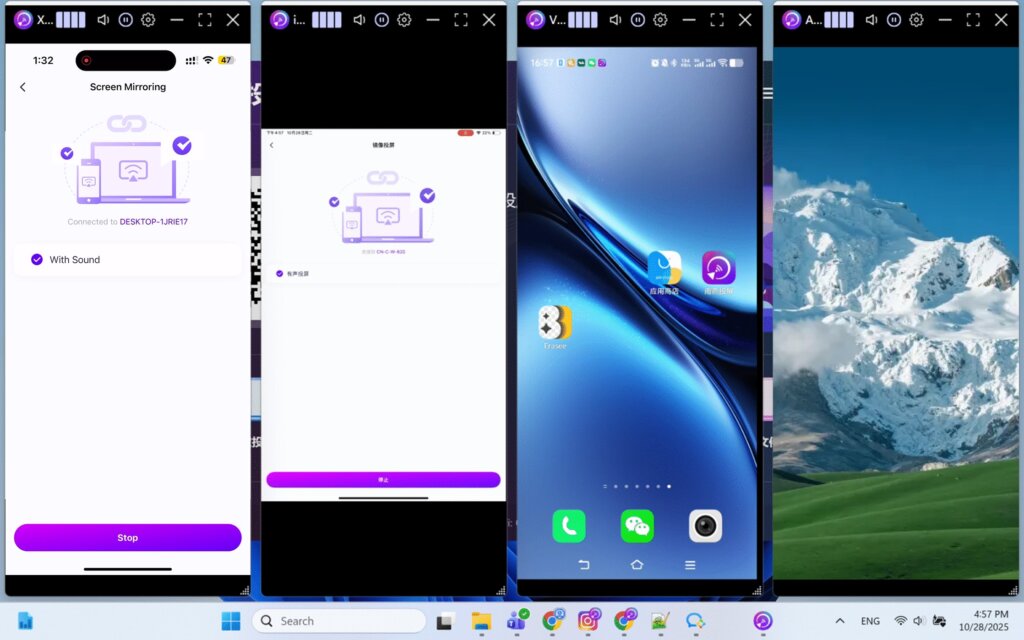
When multiple phones or tablets are mirrored to a computer at the same time, casting windows often overlap and require manual repositioning and resizing.
Version 7.0.0.7 of the 1001 TVs desktop app solves this issue with a new auto-arrange window feature. In the top-left corner of each casting window, you’ll find four vertical bar icons, each representing a preset position.
Click one of the bars to instantly move the casting window to the corresponding position on the screen. The window size is adjusted automatically, ensuring a clean and organized layout.
To focus on a single device, simply double-click the center of the window or click the Full Screen button in the title bar. Double-click again to return to the original layout.
If this is a feature you’ve been looking for, make sure to upgrade to the latest desktop version.
More tutorials:
https://www.1001tvs.cn/features/
Device Limits
There is no limit on the number of devices that can be cast at the same time. As long as your hardware can handle it, you can mirror as many devices as needed.
Need Help?
If you encounter any issues, feel free to contact our support team:
- More Guides: Guidance
- Email: 1001tvs@nero.com
- Website: www.1001tvs.com