
عمودی آئینہ لگنے پر سیاہ سلاخوں کو ہٹا دیں۔

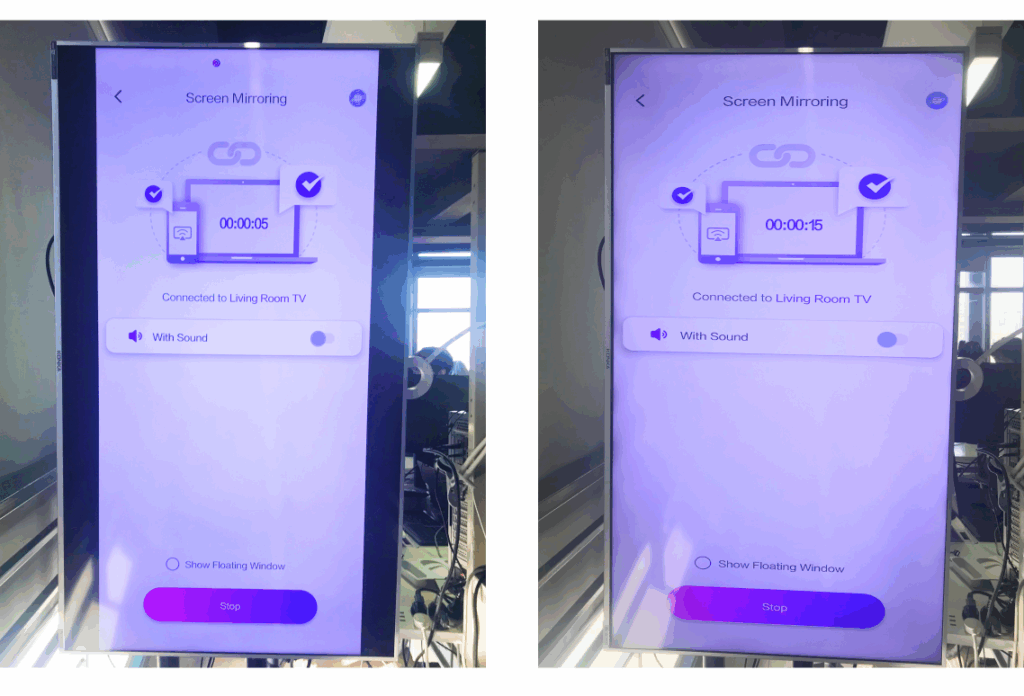
اگر آپ کا ٹی وی عمودی طور پر رکھا گیا ہے لیکن عکس والی اسکرین اب بھی بائیں اور دائیں جانب سیاہ پٹیاں دکھاتی ہے، تو پریشان نہ ہوں — 1001 TVs TV ایپ میں ایک سادہ ترتیب کو ایڈجسٹ کرکے اس مسئلے کو مستقل طور پر حل کیا جا سکتا ہے۔ (دیکھیں کہ عمودی آئینہ لگانے کا طریقہ 👉عمودی سکرین مررنگ)
اپنے عمودی مواد کو صحیح معنوں میں بنانے کے لیے نیچے دیے گئے مراحل پر عمل کریں۔ مکمل سکرین اور مکمل طور پر عمیق.
❶ 1001 TVs TV ایپ کھولیں اور "پر جائیں۔“ترتیب”

❷ "پورٹریٹ ڈسپلے موڈ" کو تھپتھپائیں“
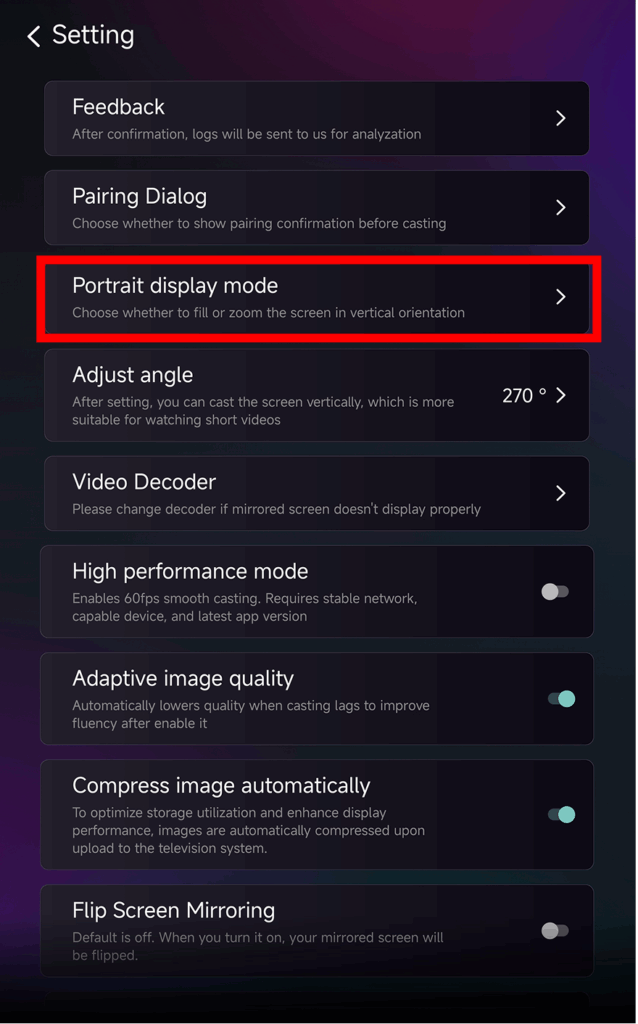
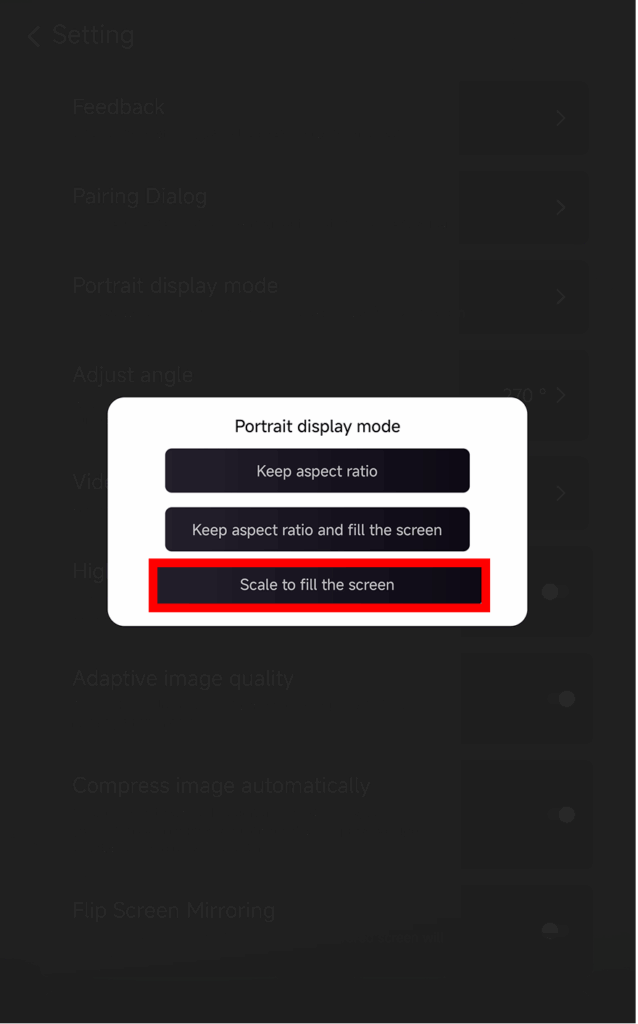
❸ ڈسپلے کو وسعت دینے کے لیے "اسکرین کو بھرنے کے لیے اسکیل" کا انتخاب کریں۔
اس ترتیب کو فعال کرنے کے بعد، اگلا آئینہ دار سیشن بالکل مختلف نظر آئے گا۔.
ذیل میں بہ پہلو موازنہ چیک کریں:
ڈسپلے کے اختیارات کے بارے میں نکات
اندر عمودی ڈسپلے موڈ آپ تین انتخاب دیکھیں گے:
- پہلو کا تناسب رکھیں
اصل تناسب رکھتا ہے؛ کالی سلاخیں ڈیوائس پر منحصر رہ سکتی ہیں۔. - پہلو کا تناسب رکھیں اور اسکرین کو بھریں۔
صحیح تناسب رکھتے ہوئے ایک طرف بھرتا ہے۔. - اسکرین کو بھرنے کے لیے اسکیل کریں۔
عمودی ٹی وی کو مکمل طور پر بھرنے کے لیے مواد کو پھیلاتا ہے۔.
یہ خصوصیت کب مفید ہے؟
یہ ترتیب اس کے لیے بہترین ہے:
- عمودی ڈیجیٹل اشارے کا استعمال کرتے ہوئے خوردہ اسٹورز
- گھریلو صارفین عمودی ماحول کی اسکرین بنا رہے ہیں۔
- اساتذہ عمودی کلاس کا مواد دکھا رہے ہیں۔
- عمودی تصاویر یا پورٹریٹ موڈ ویڈیوز دکھا رہا ہے۔
- پوری اسکرین میں TikTok/YouTube Shorts چل رہا ہے۔
- اسٹوڈیو، گیلری، یا آرٹ ڈسپلے سیٹ اپ
مزید تجاویز اور سبق: