
ئېكرانىڭىزنى ئاندروئىد تېلېفونى ياكى ئايفونغا قانداق قىلىپ ئەكس ئەتتۈرۈش كېرەك
1. ئوخشاش Wi-Fi غا ئۇلاڭ:
ئەۋەتكۈچى ئۈسكۈنىڭىز (مەسىلەن، كومپيۇتېر، Mac، تاختا كومپيۇتېر ياكى تېلېفون) بىلەن قوبۇل قىلغۇچى ئۈسكۈنىڭىزنىڭ (ئاندروئىد ياكى iOS تېلېفونى) ئوخشاش Wi-Fi تورىغا ئۇلانغانلىقىغا كاپالەتلىك قىلىڭ.
ئەڭ ياخشى ئۈنۈمگە ئېرىشىش ئۈچۈن، بىرنى ئىشلىتىڭ 5 گىگاگېرتسلىق Wi-Fi تورى كېچىكىشنى ئازايتىش ۋە مۇقىملىقنى ياخشىلاش ئۈچۈن.
2. ئىككى ئۈسكۈنىگە 1001 TVs نى ئورنىتىپ ئېچىڭ
📥 Mac ئەپ دېتالى: App Store دىن چۈشۈرۈڭ
📥 كومپيۇتېر ئەپلىرى: چۈشۈرۈش Microsoft دۇكىنى
تەپسىلىي قەدەملەر ئۈچۈن، تۆۋەندىكىگە قاراڭ كومپيۇتېر ئورنىتىش قوللانمىسى
📱 iOS ئەپ: App Store دىن چۈشۈرۈڭ
📱 ئاندروئىد ئەپ: Google Play دىن چۈشۈرۈڭ
3. ئەينەك كۆرسىتىشنى باشلاڭ
1) Mirror Phone/iPad/Android tablet to Phone
قوبۇل قىلغۇچى تېلېفوندا، چېكىڭ “ئېكران قوبۇللىغۇچ” ۋە ئۈسكۈنىنى ئۇلىنىشقا تەييار تۇرۇڭ.
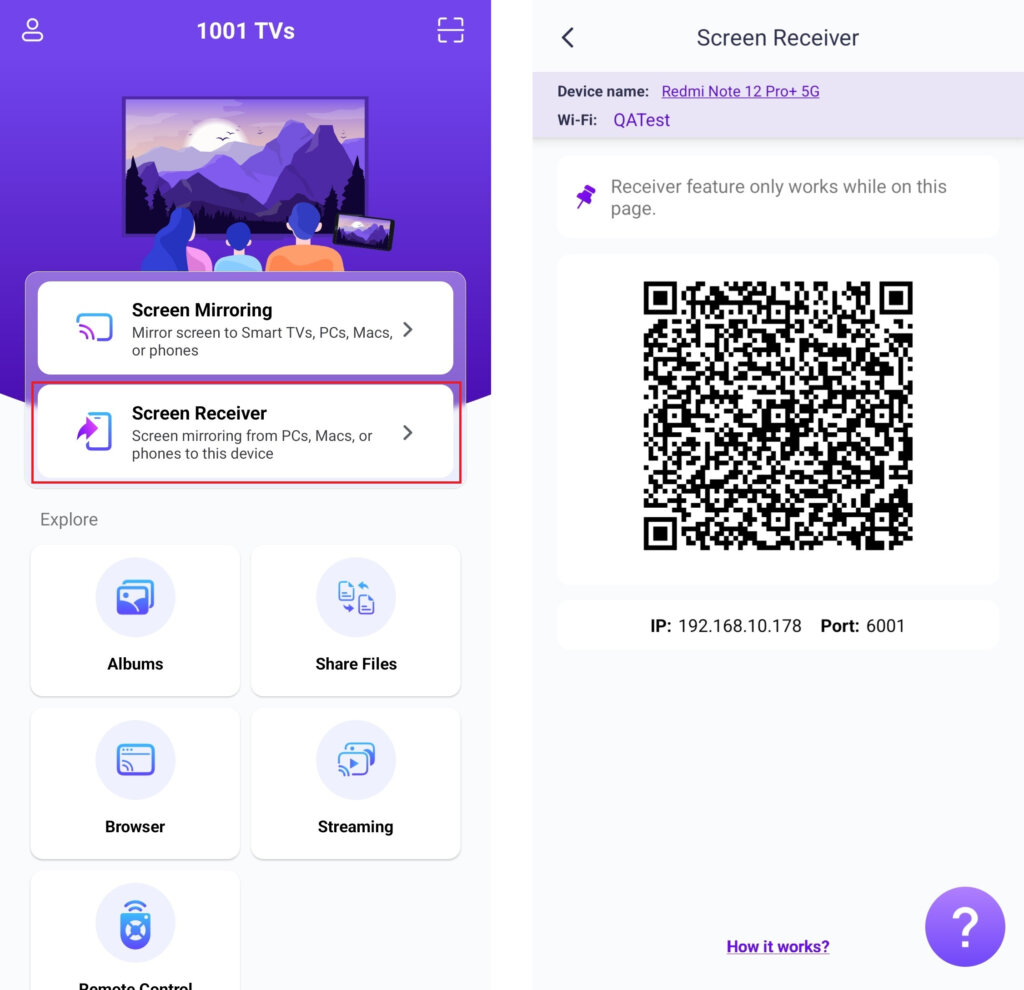
ئەۋەتىۋاتقان تېلېفوندا، ئۇلىنىش ئۇسۇلىنى تاللاڭ:
• باش بەتتە ياكى كومپيۇتېردا QR كودىنى سىكانىرلاڭ ئېكران ئەينىكى بەت.
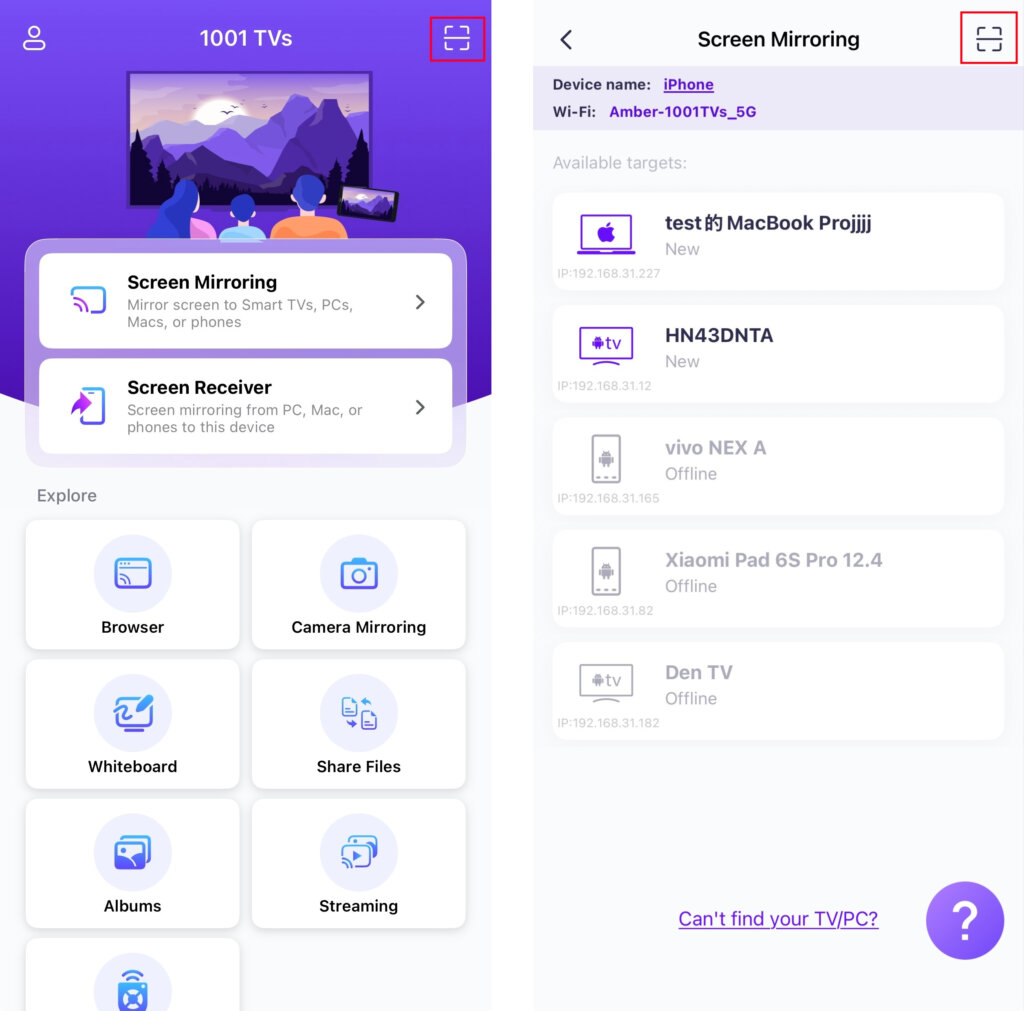
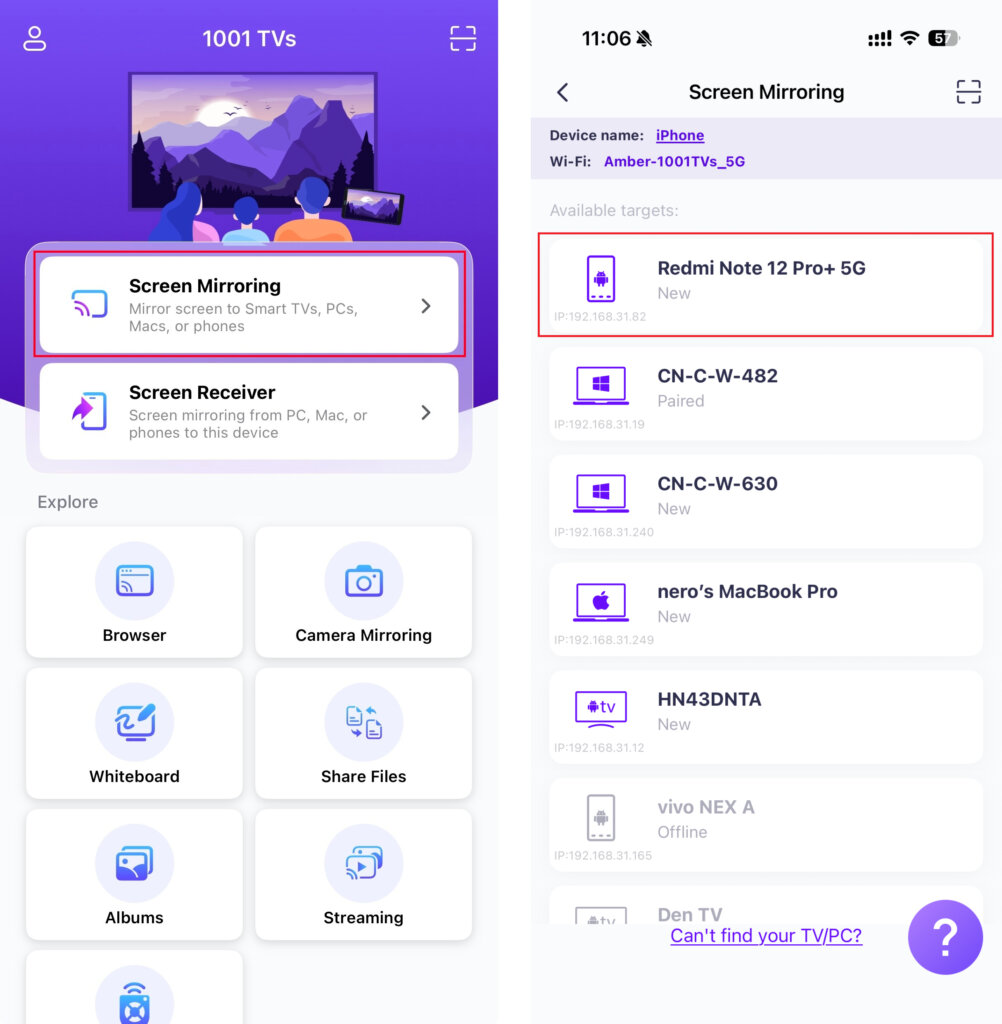
• ياكى “ئېكران ئەينىكى”, ، ئەپنىڭ بار بولغان ئۈسكۈنىلەرنى بايقىشىنى ساقلاڭ ۋە نىشان ئۈسكۈنىڭىزنى تاللاڭ.
2) كومپيۇتېرنى تېلېفونغا ئايلاندۇرۇش
قوبۇل قىلغۇچى تېلېفوندا، چېكىڭ “ئېكران قوبۇللىغۇچ” ۋە ئۈسكۈنىنى ئۇلىنىشقا تەييار تۇرۇڭ.
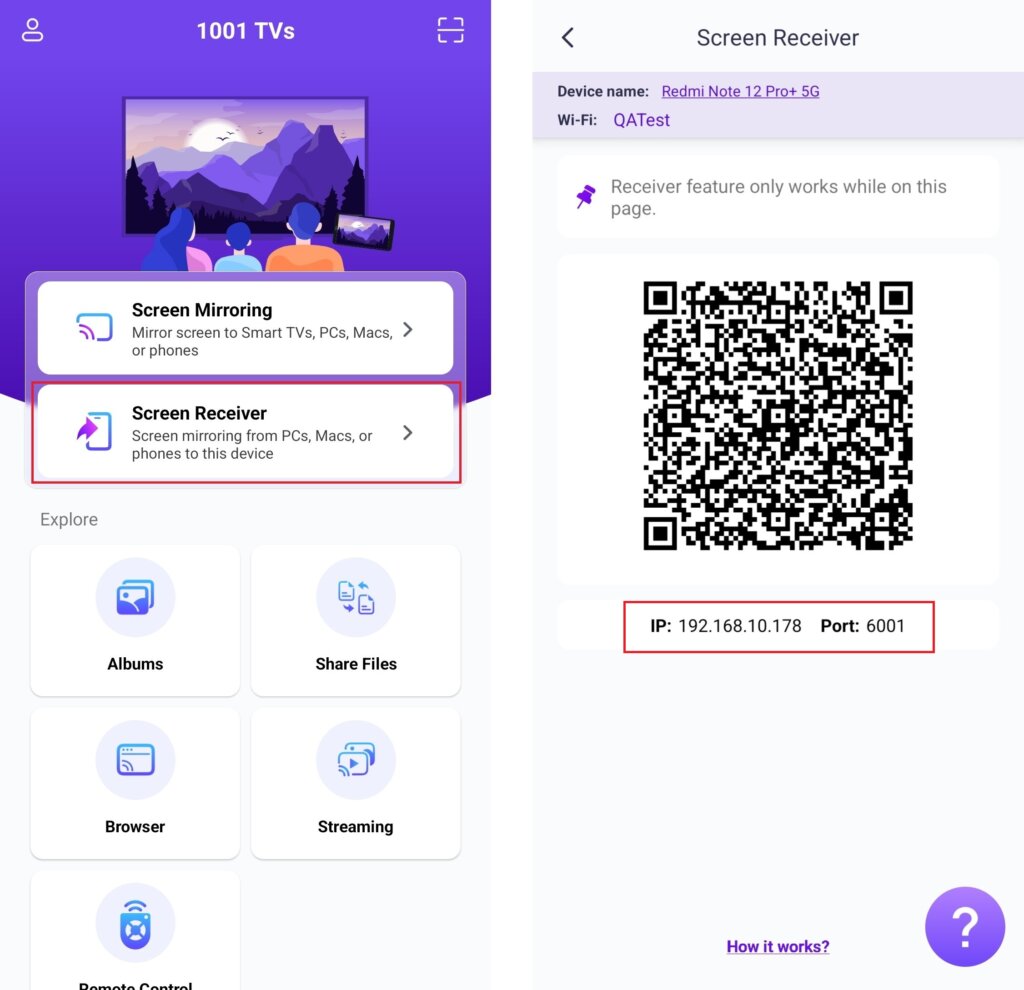
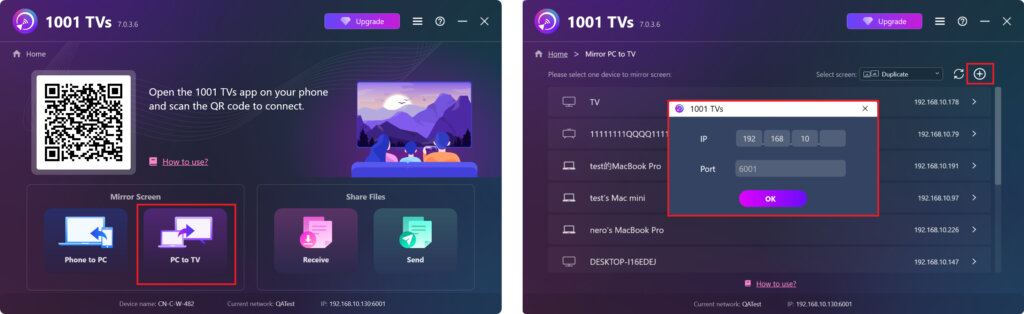
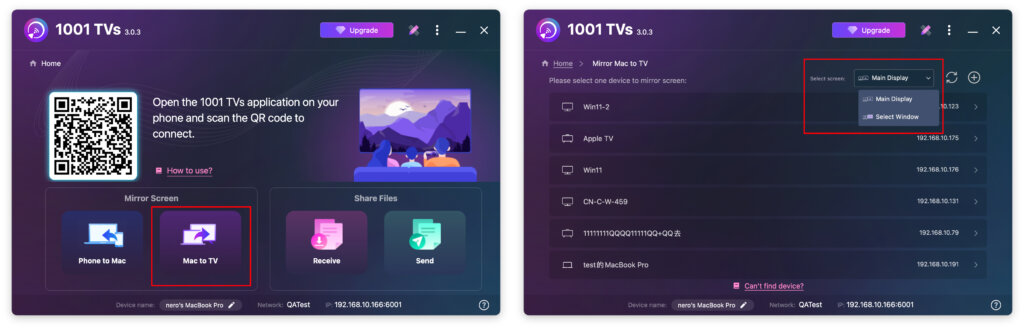
كومپيۇتېرىڭىزدا، تاللاڭ “كومپيۇتېردىن تېلېۋىزورغا” ياكى “ماكتىن تېلېۋىزورغا”.
چېكىڭ + سىنبەلگە ئۈستۈنكى ئوڭ بۇلۇڭغا، ئاندىن تېلېفونىڭىزدا كۆرسىتىلگەن IP ئادرېسىنى كىرگۈزۈڭ.
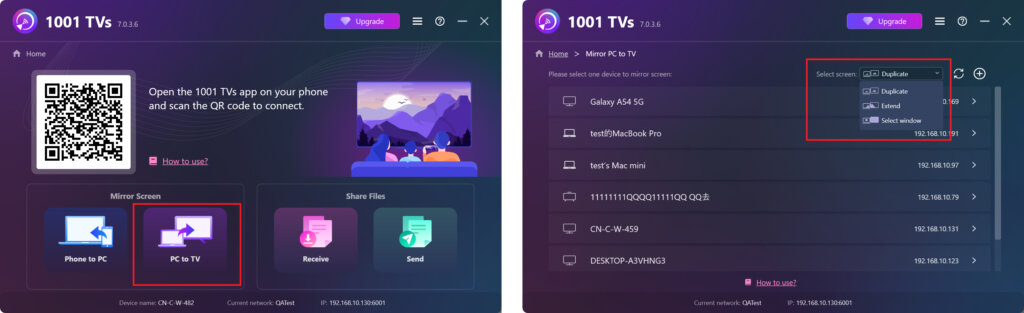
- Windows تۆۋەندىكى ئېكران ھالەتلىرىنى قوللايدۇ: “قوشۇمچە“, ”كېڭەيتىش“, ، ياكى ”دېرىزە تاللاش“
- Mac تۆۋەندىكى ئېكران ھالەتلىرىنى قوللايدۇ: ”ئاساسلىق كۆرسىتىش“ ياكى ”دېرىزە تاللاش“
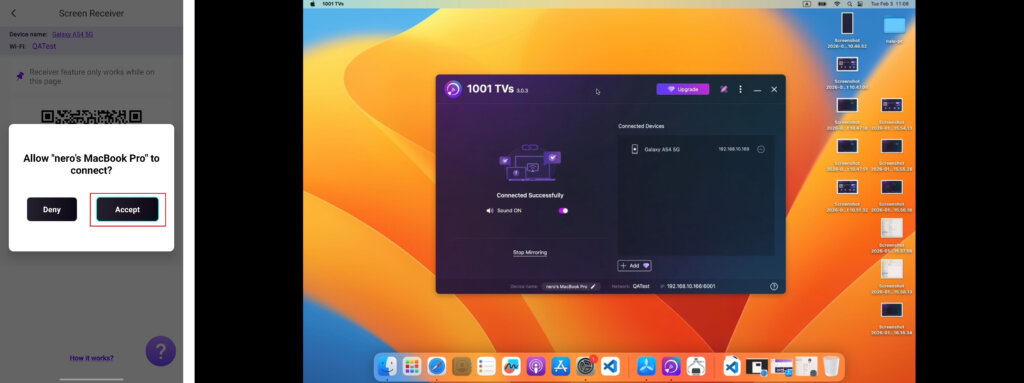
قوبۇل قىلغۇچى تېلېفوندا، چېكىڭ ”قوبۇل قىلىش“ تەلەپنى جەزملەشتۈرۈش ۋە ئەينەك كۆرسىتىشنى باشلاش ئۈچۈن.
ھازىر 1001 TVs نى ئېلىڭ!
📥 Mac ئەپ دېتالى: App Store دىن چۈشۈرۈڭ
📥 PC App: Download from Microsoft دۇكىنى
تەپسىلىي قەدەملەر ئۈچۈن، تۆۋەندىكىگە قاراڭ كومپيۇتېر ئورنىتىش قوللانمىسى
📱 iOS ئەپ: App Store دىن چۈشۈرۈڭ
📱 ئاندروئىد ئەپ: Google Play دىن چۈشۈرۈڭ