एक ही समय में पीसी से कई डिवाइसों (पीसी, फोन, टीवी, टैबलेट) में फ़ाइलें कैसे भेजें
1001 TVs के नवीनतम विंडोज संस्करण (v7.0.8.5) के साथ, आपका पीसी अब टीवी, टैबलेट, फोन या अन्य पीसी जैसे कई उपकरणों पर एक साथ फ़ाइलें भेज सकता है।.
एक बार कनेक्ट हो जाने पर, किसी भी आकार की कोई भी फ़ाइल एक साथ कई डिवाइसों पर भेजें, जितनी बार चाहें। बिना कंप्रेशन के। बिना झंझट के। बस कमरे की हर स्क्रीन पर तेज़, निर्बाध ट्रांसफ़र।.
टीम सहयोग, कक्षा में वितरण, या बस सभी को तुरंत फ़ाइलें पहुँचाने के लिए एकदम सही।.

ट्यूटोरियल
1. अपने पीसी और रिसीविंग डिवाइसों पर 1001 TVs इंस्टॉल करें
📱 आईओएस ऐप: ऐप स्टोर से डाउनलोड करें
📱 एंड्रॉइड ऐप: Google Play से डाउनलोड करें
📥पीसी ऐप: यहां से डाउनलोड करें माइक्रोसॉफ्ट स्टोर
विस्तृत चरणों के लिए, देखें पीसी इंस्टॉलेशन गाइड
📥मैक ऐप: ऐप स्टोर से डाउनलोड करें
📥टीवी ऐप: अपने टीवी पर 1001 TVs कैसे इंस्टॉल करें
2. एक ही वाई-फाई से कनेक्ट करें
सुनिश्चित करें कि आपके दोनों पीसी और यह प्राप्त करने वाला उपकरणs एक ही वाई-फाई नेटवर्क से जुड़े हुए हैं।.
सर्वोत्तम प्रदर्शन के लिए, इसका उपयोग करें 5 GHz वाई-फाई नेटवर्क विलंब को कम करने और स्थिरता में सुधार करने के लिए।.
3. अपने पहले डिवाइस के लिए, नीचे दी गई गाइड का पालन करें:
अपने पीसी/मैक से टीवी/पीसी/मैक पर फ़ाइलें कैसे भेजें
एंड्रॉइड और आईओएस फोन और टैबलेट में फ़ाइलें कैसे भेजें
4. और डिवाइस जोड़ना
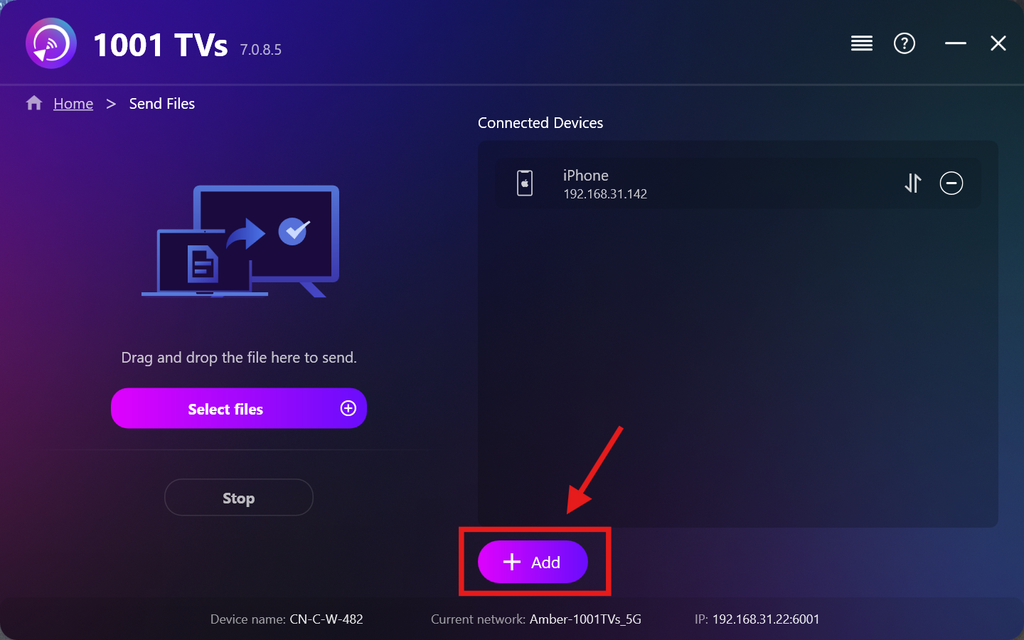
एक बार आपका पहला डिवाइस सेट हो जाने के बाद, आप क्लिक करके और लक्ष्य डिवाइस जोड़ सकते हैं। जोड़ें चिह्न।.
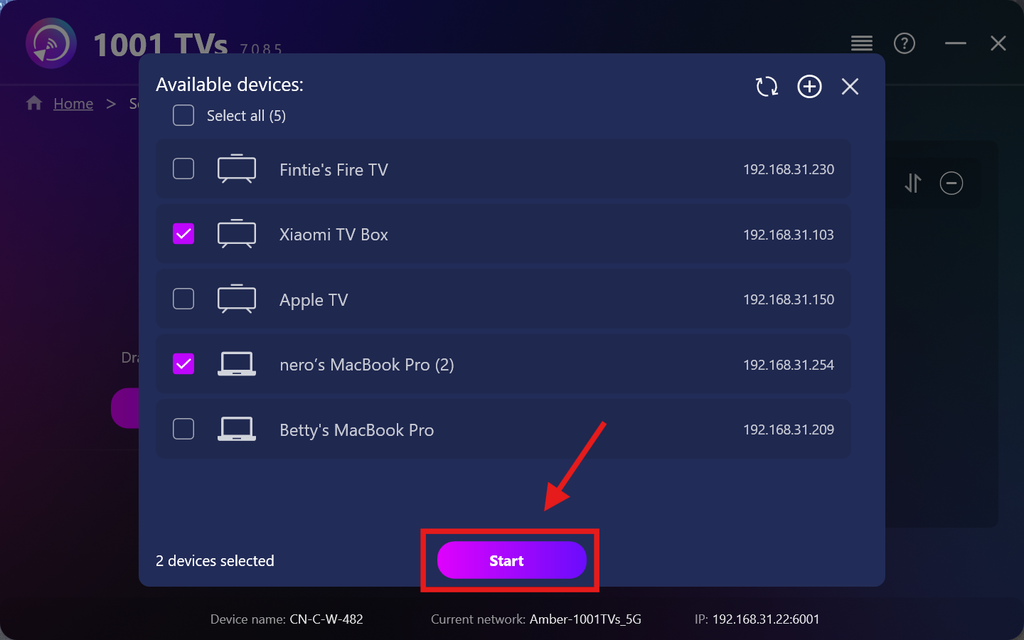
उन सभी डिवाइसों का चयन करें जिन पर आप फ़ाइलें भेजना चाहते हैं (एकाधिक चयन समर्थित है)।.
क्लिक शुरू कनेक्शन शुरू करने के लिए।.
जोड़ी के अनुरोध को स्वीकार करें प्रत्येक लक्षित डिवाइस पर पहली बार पेयर करते समय।.
5. कई डिवाइसों पर फ़ाइलें भेजना
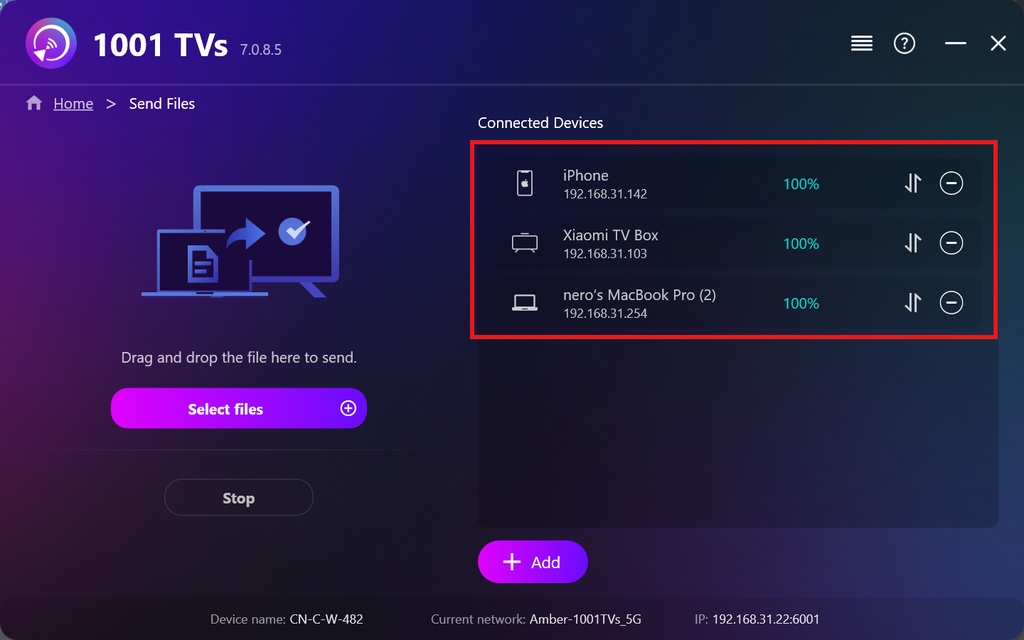
आप जिन फ़ाइलों को भेजना चाहते हैं, उन्हें चुनें, या बस उन्हें बाईं ओर फ़ाइल क्षेत्र में ड्रैग और ड्रॉप करें — फ़ाइल आकार या मात्रा पर कोई सीमा नहीं है।.
⚠️ सुनिश्चित करें कि आपके प्राप्त करने वाले उपकरणों में पर्याप्त भंडारण स्थान हो, अन्यथा स्थानांतरण विफल हो जाएगा।.
6. अपने रिसीविंग डिवाइस प्रबंधित करें
क्लिक करें – (घटाना) अपने रिसीविंग लिस्ट से किसी डिवाइस को हटाने के लिए आइकन।.
क्लिक करें स्थानांतरण इस डिवाइस पर भेजी गई सभी फ़ाइलें देखने के लिए आइकन।.
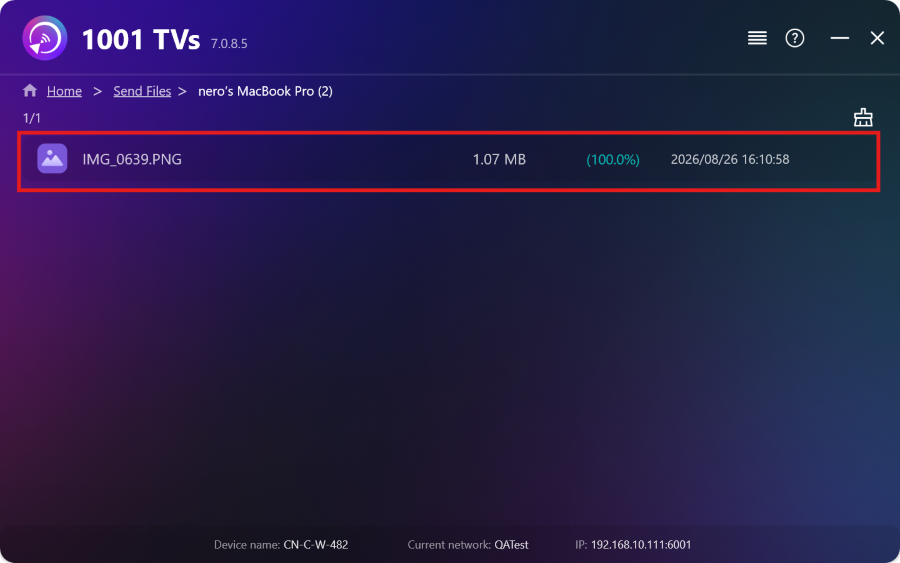
बस! अब आप बिना किसी प्रतिबंध के, कभी भी, एक साथ कई डिवाइसों पर फ़ाइलें भेज सकते हैं।.
अभी 1001 TVs प्राप्त करें
📱 आईओएस ऐप: ऐप स्टोर से डाउनलोड करें
📱 एंड्रॉइड ऐप: Google Play से डाउनलोड करें
📥पीसी ऐप: यहां से डाउनलोड करें माइक्रोसॉफ्ट स्टोर
विस्तृत चरणों के लिए, देखें पीसी इंस्टॉलेशन गाइड
📥मैक ऐप: ऐप स्टोर से डाउनलोड करें

और पढ़ें
 टीवी APK इंस्टॉलेशन गाइड: अपने पीसी या मैक से वाई-फाई के माध्यम से टीवी पर APK फ़ाइलें कैसे भेजें और इंस्टॉल करें
क्या आपके फोन, पीसी या मैक पर कोई APK फ़ाइल है जिसे आप अपने टीवी पर चलाना चाहते हैं? 1001 TVs के साथ, आप भेज सकते हैं…
टीवी APK इंस्टॉलेशन गाइड: अपने फोन से वाई-फाई के माध्यम से टीवी पर APK फ़ाइलें कैसे भेजें और इंस्टॉल करें
क्या आपके फोन या पीसी पर कोई APK फ़ाइल है जिसे आप अपने टीवी पर चलाना चाहते हैं? 1001 TVs के साथ, आप APK भेज सकते हैं…
टीवी APK इंस्टॉलेशन गाइड: अपने पीसी या मैक से वाई-फाई के माध्यम से टीवी पर APK फ़ाइलें कैसे भेजें और इंस्टॉल करें
क्या आपके फोन, पीसी या मैक पर कोई APK फ़ाइल है जिसे आप अपने टीवी पर चलाना चाहते हैं? 1001 TVs के साथ, आप भेज सकते हैं…
टीवी APK इंस्टॉलेशन गाइड: अपने फोन से वाई-फाई के माध्यम से टीवी पर APK फ़ाइलें कैसे भेजें और इंस्टॉल करें
क्या आपके फोन या पीसी पर कोई APK फ़ाइल है जिसे आप अपने टीवी पर चलाना चाहते हैं? 1001 TVs के साथ, आप APK भेज सकते हैं…

