एंड्रॉइड/आईओएस फोन पर फाइलें कैसे भेजें
1टीपी1टी आपको उपकरणों के बीच फ़ाइलें सहजता से स्थानांतरित करने देता है — पीसी/मैक से फोन तक, या फ़ोन से फ़ोन तक — बिना किसी केबल की आवश्यकता के पूरे वाई-फाई में। चाहे आप साझा करना दस्तावेज़, संगीत, तस्वीरें, या वीडियो, प्रक्रिया तेज़, सरल और वायरलेस है।.
यहाँ बताया गया है कि आप अपने उपकरणों के बीच फ़ाइलें कैसे भेज सकते हैं।.
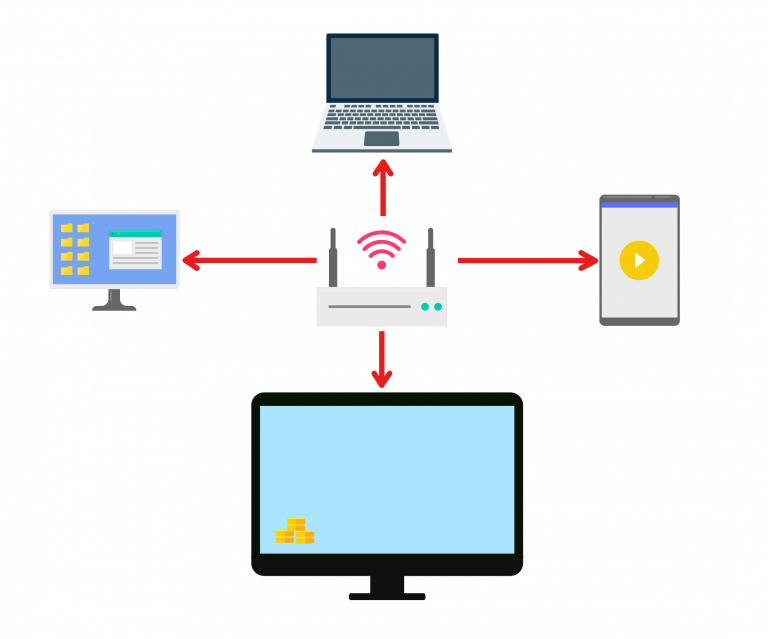
1. एक ही वाई-फाई से कनेक्ट करें:
सुनिश्चित करें कि आपके दोनों डिवाइस एक ही वाई-फाई नेटवर्क से जुड़े हों।.
(सर्वोत्तम प्रदर्शन के लिए 5G बैंड वाई-फाई कनेक्शन की अनुशंसा की जाती है।)
2. फ़ोन और मैक/पीसी पर 1001 TVs इंस्टॉल करें
📥 मैक ऐप: ऐप स्टोर से डाउनलोड करें
📥 पीसी ऐप: यहां से डाउनलोड करें माइक्रोसॉफ्ट स्टोर
विस्तृत चरणों के लिए, देखें पीसी इंस्टॉलेशन गाइड
📱 iOS ऐप: ऐप स्टोर से डाउनलोड करें
📱 एंड्रॉइड ऐप: Google Play से डाउनलोड करें
3. स्थानांतरण शुरू करें
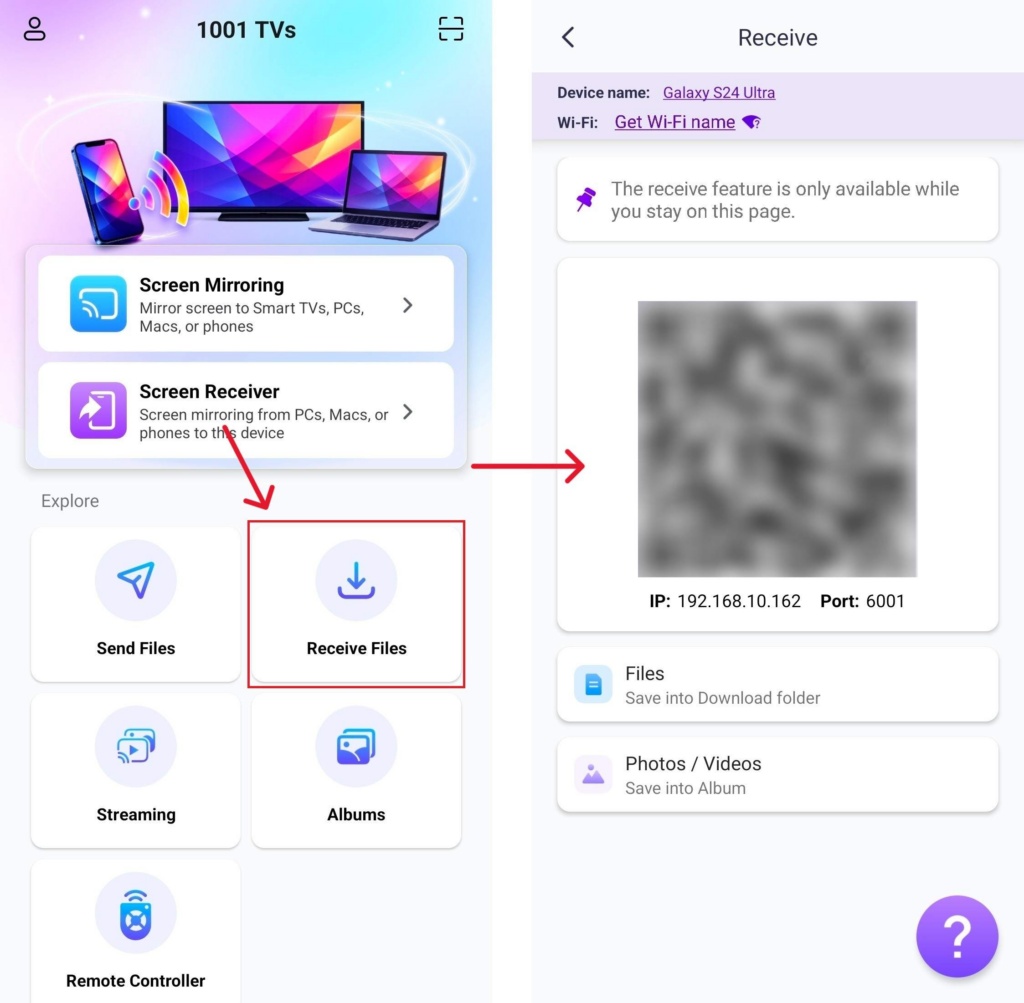
अपने प्राप्त करने वाले फोन पर 1001 TVs लॉन्च करें और टैप करें फ़ाइलें प्राप्त करें.
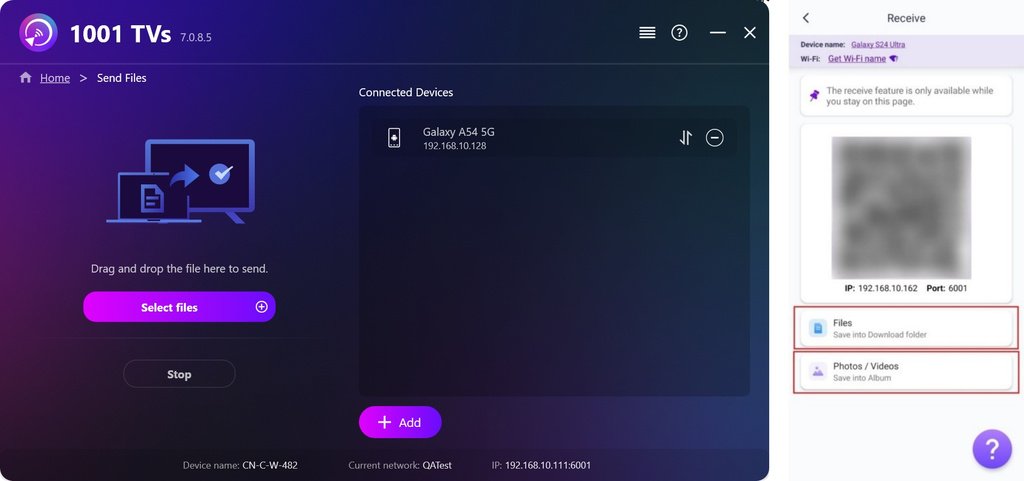
1) पीसी/मैक से फोन तक
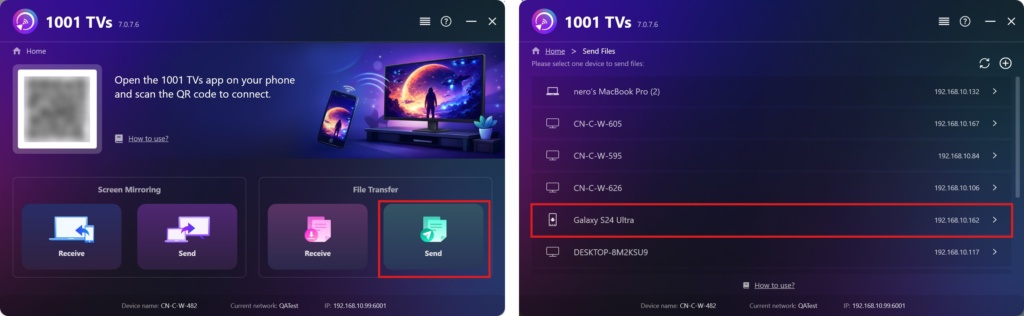
अपने पीसी/मैक पर क्लिक करें भेजना और डिवाइस सूची से अपना लक्ष्य फ़ोन चुनें।.
नोट: यदि लक्ष्य डिवाइस है ऑफलाइन, आप अभी भी प्राप्त की गई फ़ाइलें देख सकते हैं।.
डिवाइस को कनेक्ट करने के लिए, अपने नेटवर्क कनेक्शन की जाँच करें, या “ पर क्लिक करें।“+” आइकन पर क्लिक करें और अपने फोन का आईपी पता दर्ज करें।.
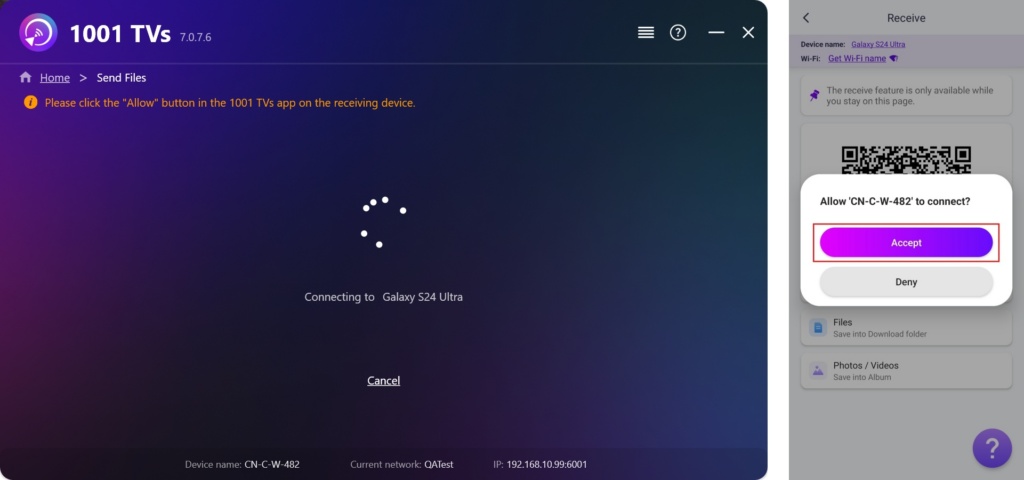
नल स्वीकार करना पेयरिंग की पुष्टि करने के लिए अपने फोन पर।.
एक बार सफलतापूर्वक जोड़ने के बाद, आप आसानी से अपने फोन में फाइलें स्थानांतरित कर सकते हैं।.
प्राप्त फाइलें डाउनलोड फ़ोल्डर में सहेजी जाती हैं, और फ़ोटो/वीडियो एल्बम में।.
2) फोन से फोन में फ़ाइलें भेजें
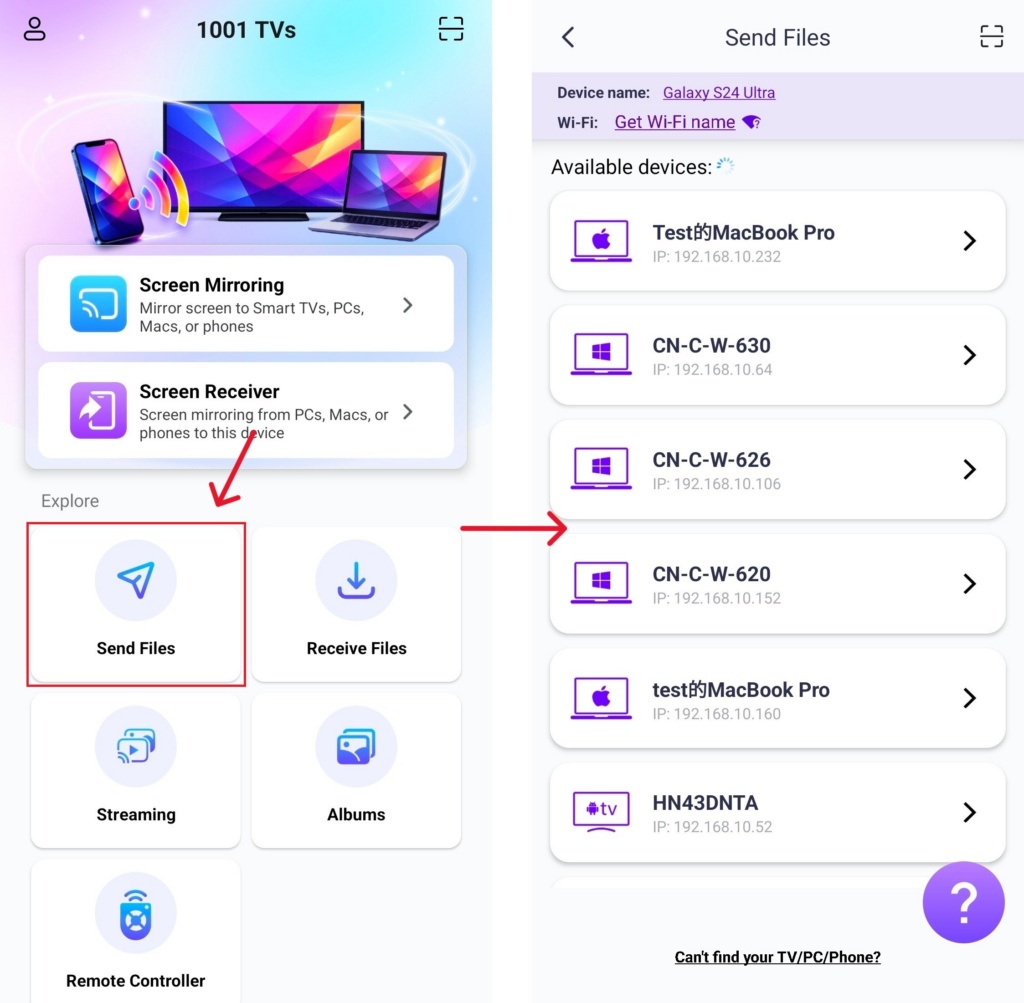
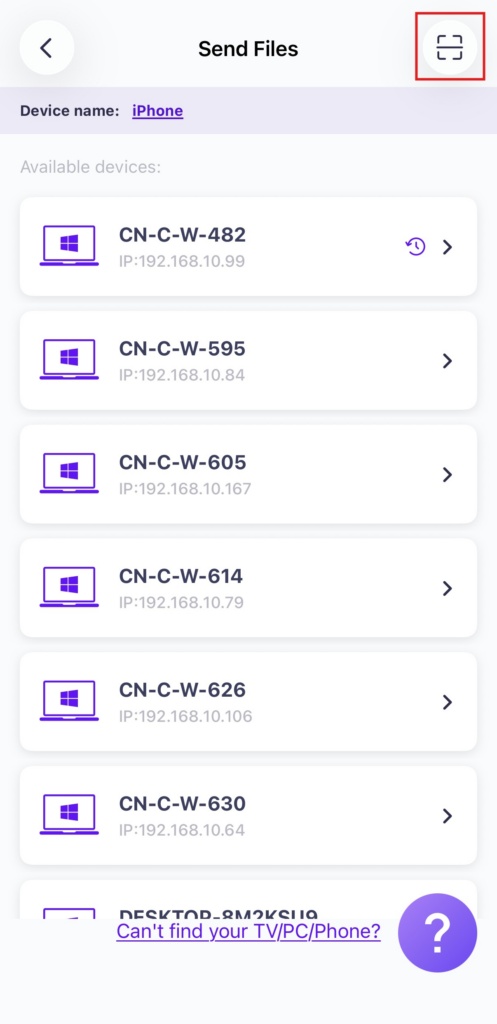
भेजने वाले डिवाइस पर, 1001 TVs खोलें, टैप करें फ़ाइलें भेजें, और सूची से अपना लक्ष्य डिवाइस चुनें।.
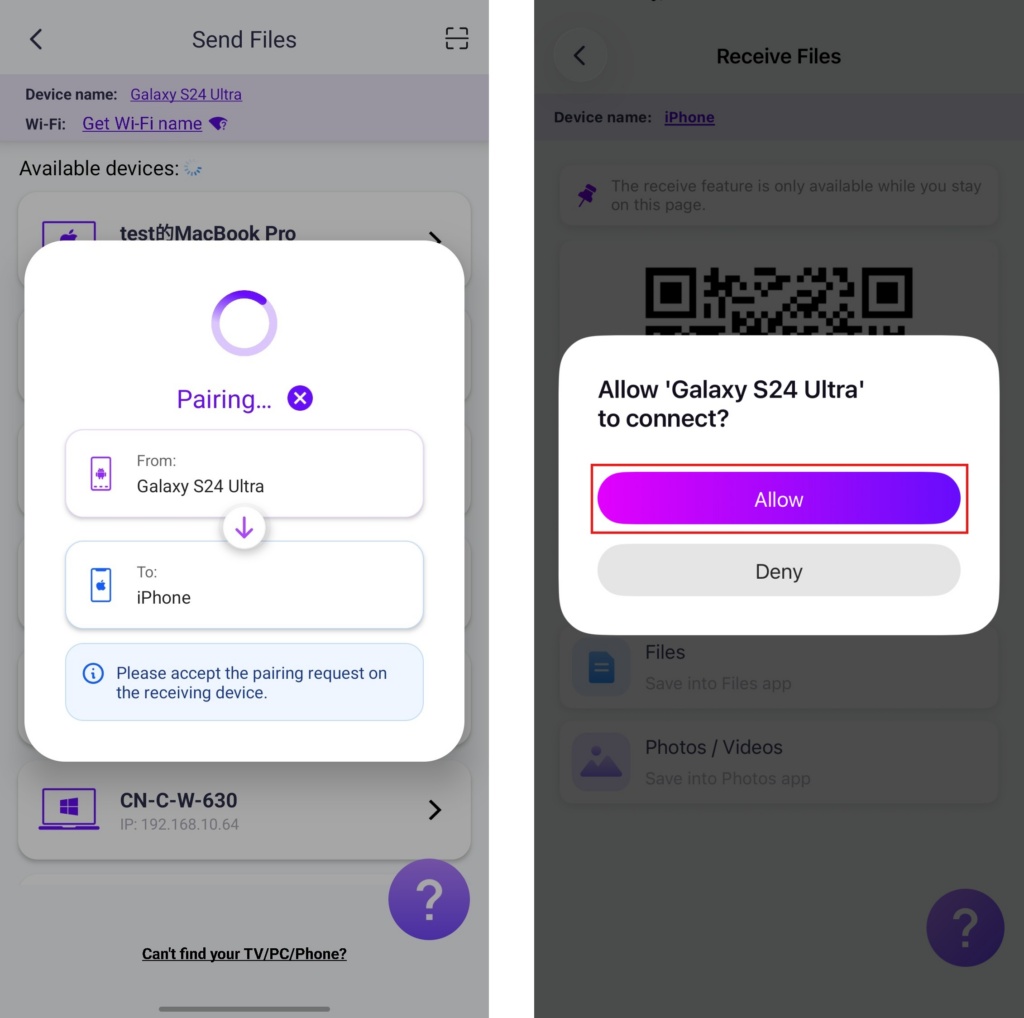
नल अनुमति दें पेयरिंग की पुष्टि करने के लिए अपने प्राप्त करने वाले फोन पर।.
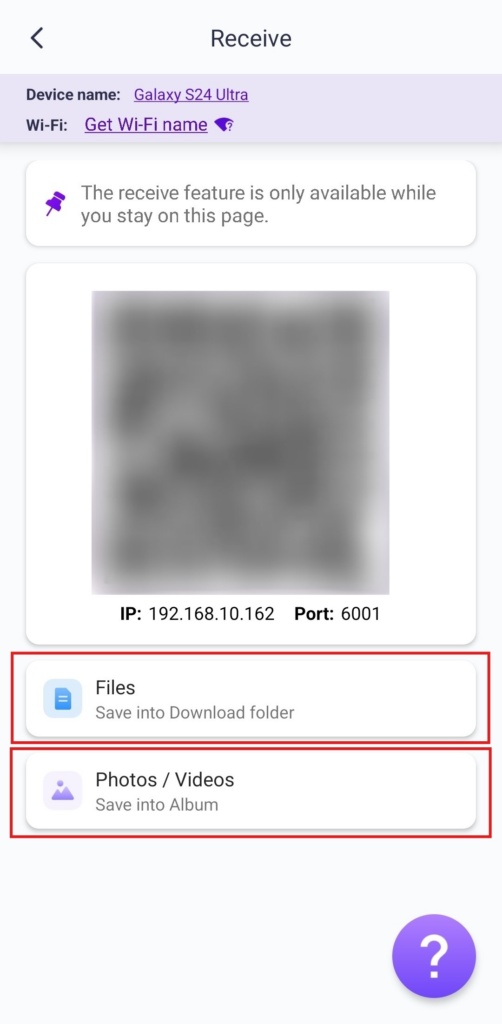
एक बार सफलतापूर्वक जोड़ने के बाद, आप आसानी से अपने फोन में फाइलें स्थानांतरित कर सकते हैं।.
प्राप्त फाइलें डाउनलोड फ़ोल्डर में सहेजी जाती हैं, और फ़ोटो/वीडियो एल्बम में।.
6. क्या आपको लक्षित डिवाइस नहीं मिल रहा है? कोड स्कैन करके पेयर करने का प्रयास करें।
यदि आपका डिवाइस सूची में दिखाई नहीं देता है, तो आप क्यूआर कोड को स्कैन करें त्वरित पेयरिंग के लिए रिसीविंग फोन की स्क्रीन पर प्रदर्शित।.
साथ 1टीपी1टी, आप आनंद ले सकते हैं वायरलेस, हाई-स्पीड फ़ाइल स्थानांतरण अपने उपकरणों के बीच कभी भी, कहीं भी! 🚀
अभी 1001 TVs प्राप्त करें
📥 मैक ऐप: ऐप स्टोर से डाउनलोड करें
📥 पीसी ऐप: यहां से डाउनलोड करें माइक्रोसॉफ्ट स्टोर
विस्तृत चरणों के लिए, देखें पीसी इंस्टॉलेशन गाइड
📱 iOS ऐप: ऐप स्टोर से डाउनलोड करें
📱 एंड्रॉइड ऐप: Google Play से डाउनलोड करें

और पढ़ें
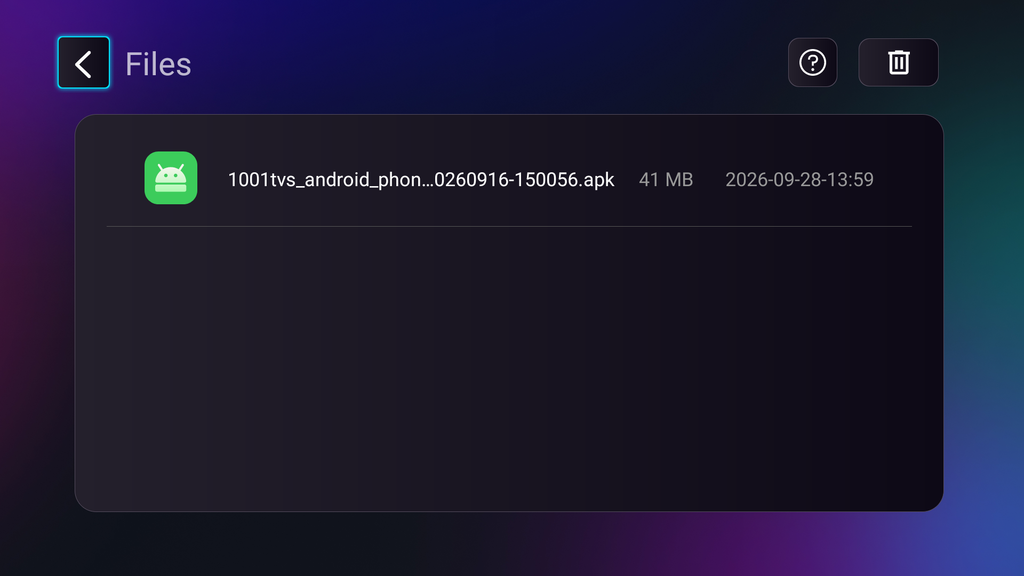 टीवी APK इंस्टॉलेशन गाइड: अपने पीसी या मैक से वाई-फाई के माध्यम से टीवी पर APK फ़ाइलें कैसे भेजें और इंस्टॉल करें
क्या आपके फोन, पीसी या मैक पर कोई APK फ़ाइल है जिसे आप अपने टीवी पर चलाना चाहते हैं? 1001 TVs के साथ, आप भेज सकते हैं…
टीवी APK इंस्टॉलेशन गाइड: अपने फोन से वाई-फाई के माध्यम से टीवी पर APK फ़ाइलें कैसे भेजें और इंस्टॉल करें
क्या आपके फोन या पीसी पर कोई APK फ़ाइल है जिसे आप अपने टीवी पर चलाना चाहते हैं? 1001 TVs के साथ, आप APK भेज सकते हैं…
टीवी APK इंस्टॉलेशन गाइड: अपने पीसी या मैक से वाई-फाई के माध्यम से टीवी पर APK फ़ाइलें कैसे भेजें और इंस्टॉल करें
क्या आपके फोन, पीसी या मैक पर कोई APK फ़ाइल है जिसे आप अपने टीवी पर चलाना चाहते हैं? 1001 TVs के साथ, आप भेज सकते हैं…
टीवी APK इंस्टॉलेशन गाइड: अपने फोन से वाई-फाई के माध्यम से टीवी पर APK फ़ाइलें कैसे भेजें और इंस्टॉल करें
क्या आपके फोन या पीसी पर कोई APK फ़ाइल है जिसे आप अपने टीवी पर चलाना चाहते हैं? 1001 TVs के साथ, आप APK भेज सकते हैं…

