
Αφαίρεση μαύρων γραμμών: Αντανακλάσεις σε κατακόρυφη και οριζόντια διάταξη

Βλέπετε μαύρες γραμμές κατά την προβολή της οθόνης σας; Είτε βρίσκεστε σε κατακόρυφη λειτουργία με γραμμές στα πλάγια, είτε σε οριζόντια λειτουργία με γραμμές στο πάνω, στο κάτω μέρος ή στα πλάγια — μην ανησυχείτε. Και τα δύο προβλήματα μπορούν να επιλυθούν με μερικές απλές ρυθμίσεις στην εφαρμογή 1001 TVs TV.
Για την αναστροφή σε κατακόρυφη διάταξη, υπάρχει μια ειδική ρύθμιση για την εξάλειψη των πλευρικών γραμμών. (Δείτε πώς να ρυθμίσετε την κατακόρυφη αναστροφή 👉Κάθετη αντανάκλαση οθόνης)
Όσον αφορά την αναστροφή της εικόνας σε οριζόντια διάταξη, υπάρχει επίσης ένας τρόπος να μειωθούν σημαντικά οι μαύρες λωρίδες.
Ακολουθήστε τα παρακάτω βήματα για να κάνετε το περιεχόμενό σας να εμφανίζεται πραγματικά σε πλήρη οθόνη και να προσφέρει μια απόλυτα καθηλωτική εμπειρία.
Για την αναπαραγωγή πορτρέτων
Βήμα 1. Στην τηλεόρασή σας, ανοίξτε την εφαρμογή 1001 TVs και μεταβείτε στην ενότητα “Ρύθμιση".
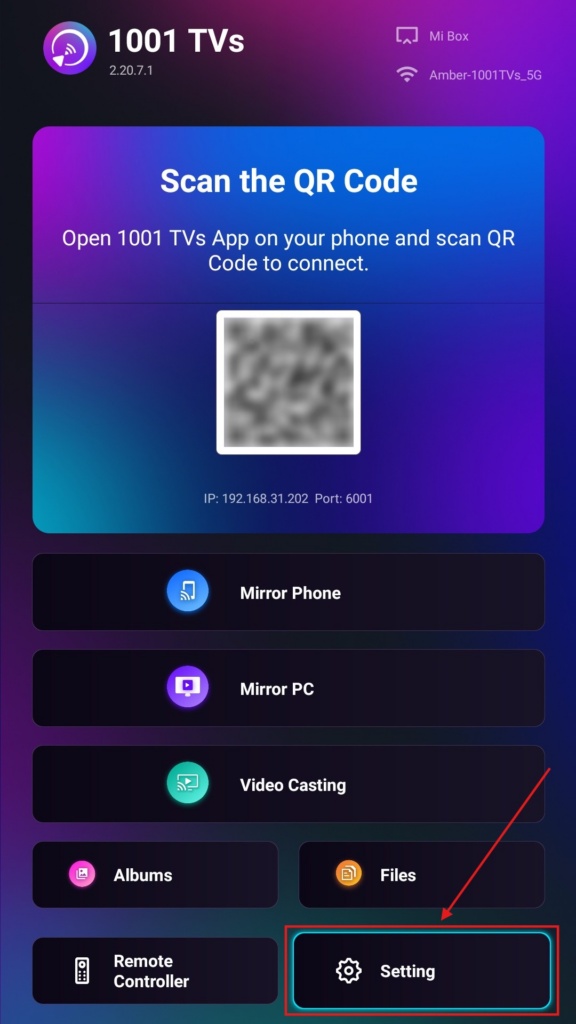
Βήμα 2. Επιλέξτε “Λειτουργία οθόνης πορτρέτου”.
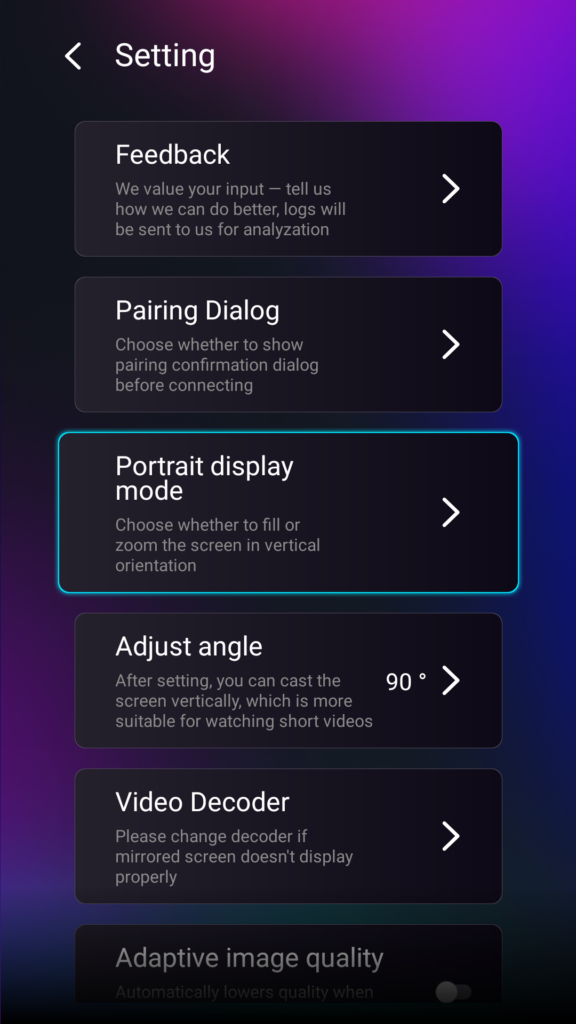
Βήμα 3. Απλώς επιλέξτε τη λειτουργία που προτιμάτε για την προβολή στην τηλεόρασή σας.
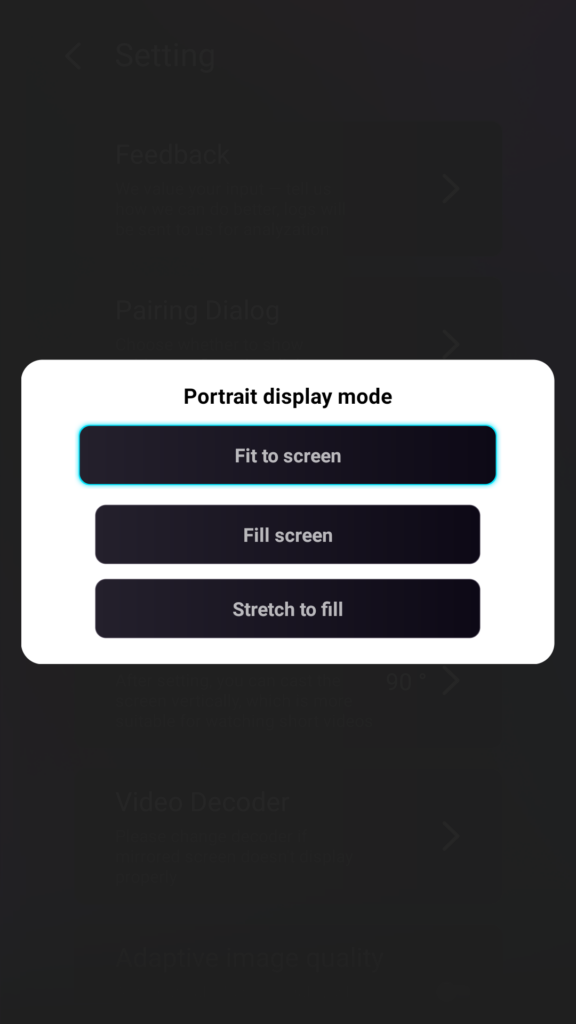
Συμβουλές σχετικά με τις λειτουργίες προβολής πορτρέτου
- Προσαρμογή στην οθόνη
Επεκτείνει το περιεχόμενο ώστε να καλύπτει πλήρως την κάθετη οθόνη της τηλεόρασής σας. Μόλις ενεργοποιηθεί, θα δείτε ένα εντελώς διαφορετικό αποτέλεσμα στην επόμενη συνεδρία αναπαραγωγής οθόνης. - Πλήρης οθόνη
Διατηρεί την αρχική αναλογία διαστάσεων. Ενδέχεται να εμφανίζονται μαύρες λωρίδες στις πλευρές, ανάλογα με τη συσκευή σας. - Επέκταση για πλήρωση
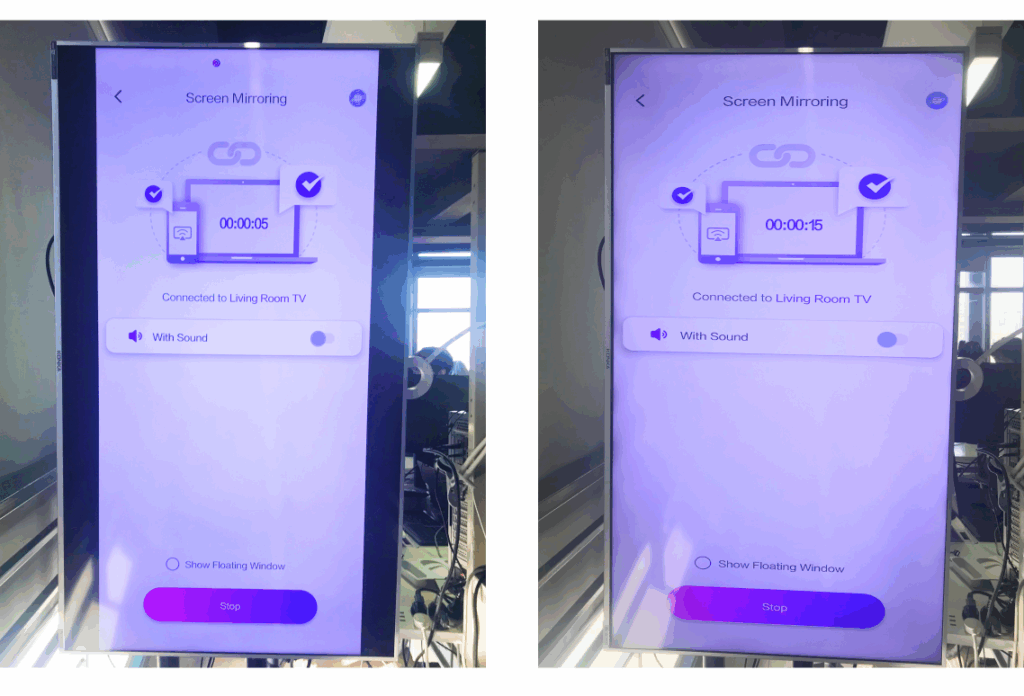
Γεμίζει τη μία πλευρά, διατηρώντας παράλληλα τις σωστές αναλογίες.
Δείτε την παρακάτω σύγκριση δίπλα-δίπλα (Επέκταση για πλήρωση (όπως φαίνεται στην εικόνα):
Πότε είναι χρήσιμη αυτή η λειτουργία;
Αυτή η ρύθμιση είναι ιδανική για:
- Καταστήματα λιανικής πώλησης που χρησιμοποιούν κάθετη ψηφιακή σήμανση
- Οι οικιακοί χρήστες δημιουργούν μια κατακόρυφη οθόνη περιβάλλοντος
- Εκπαιδευτικοί που παρουσιάζουν κάθετο υλικό της τάξης
- Προβολή κατακόρυφων φωτογραφιών ή βίντεο σε λειτουργία πορτραίτου
- Αναπαραγωγή TikTok/YouTube Shorts σε πλήρη οθόνη
- Στούντιο, γκαλερί ή καλλιτεχνική έκθεση
Για την αναπαραγωγή τοπίου
Βήμα 1. Στην τηλεόρασή σας, ανοίξτε την εφαρμογή 1001 TVs και μεταβείτε στην ενότητα “Ρύθμιση”.
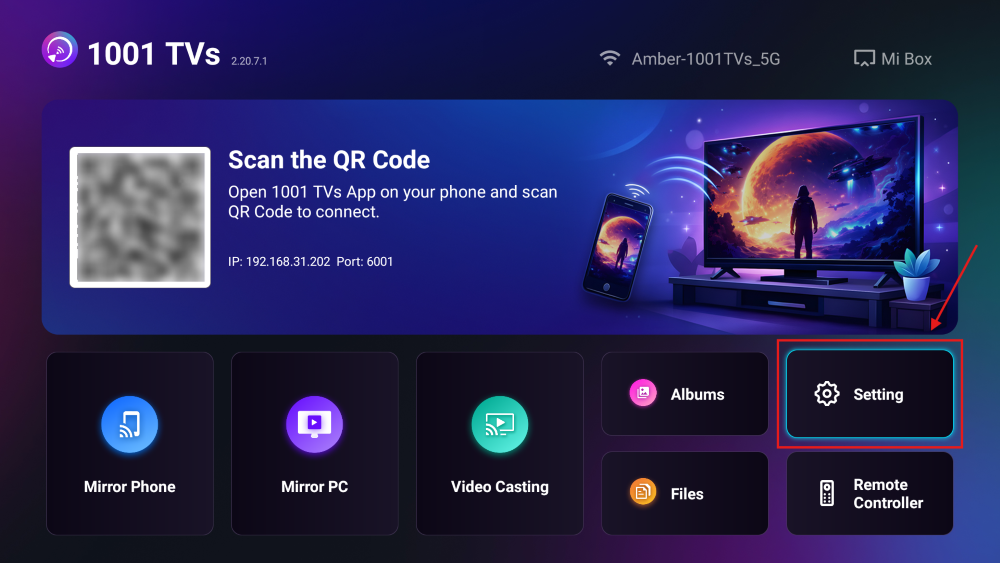
Βήμα 2. Ενεργοποιήστε τη “Λειτουργία πλήρωσης”.
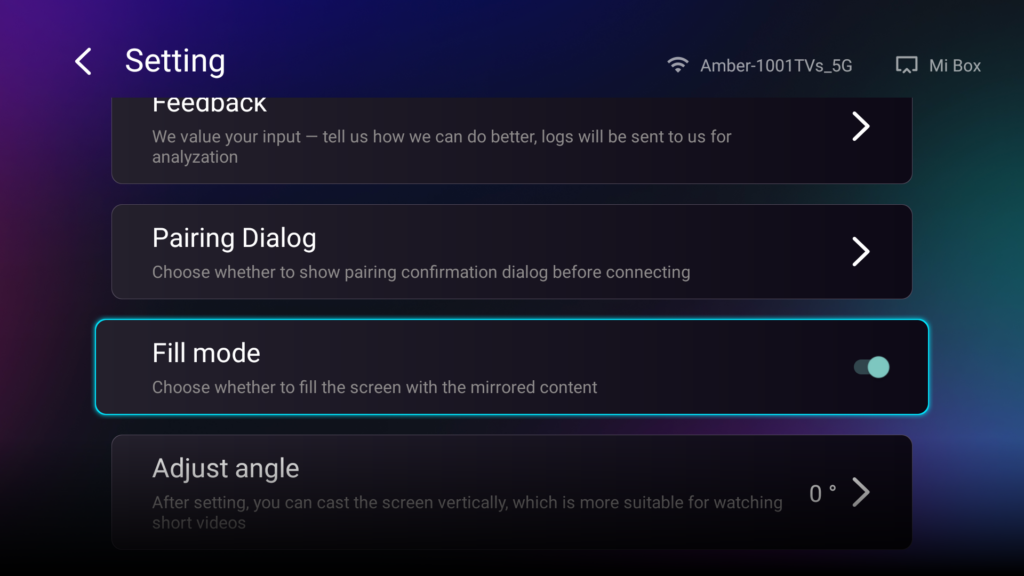
Αφού ενεργοποιήσετε αυτήν την επιλογή, χρησιμοποιήστε τα πλήκτρα πάνω/κάτω στο τηλεχειριστήριο της τηλεόρασής σας για να περιηγηθείτε στις διαθέσιμες λειτουργίες κλιμάκωσης: 1×, 2×, 3× και Προσαρμογή στην οθόνη.
- 1× / 2× / 3×
μεγέθυνση με σταθερά βήματα - Προσαρμογή στην οθόνη
προσαρμόζει αυτόματα το μέγεθος του περιεχομένου ώστε να καλύπτει ολόκληρη την οθόνη της τηλεόρασης
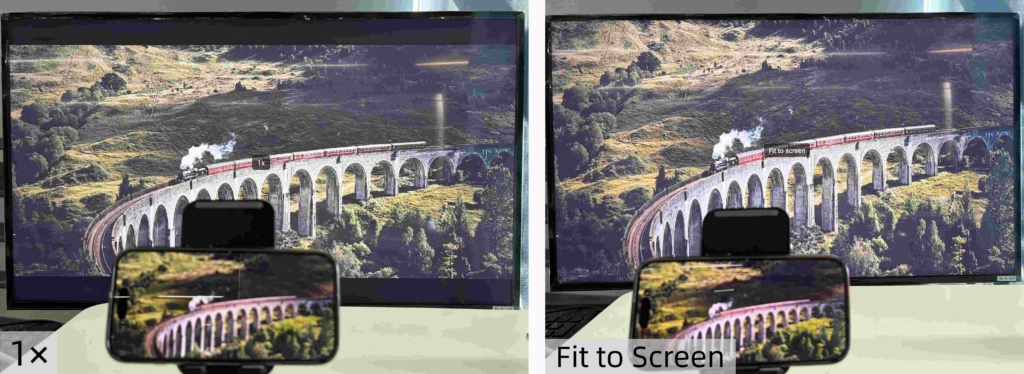
Τώρα μπορείτε να χαλαρώσετε και να απολαύσετε το περιεχόμενό σας — σε πλήρη οθόνη, χωρίς μαύρες λωρίδες, με απόλυτη εμβύθιση.
Περισσότερες συμβουλές και σεμινάρια: