
How to Use Your Phone as a Remote Control for Android TV
Want to control your Android TV, stream videos, or browse apps without hunting for the remote?
بىلەن 1001 TVs, you can turn your smartphone into a fully functional remote control in seconds—no extra hardware, no complicated setup. Launch Netflix, YouTube, or other streaming apps with one tap, and cast your favorite content to the big screen instantly.
Whether you’ve misplaced your physical remote, the batteries just died, or you simply want a more convenient way to navigate your entertainment, this guide shows you how to set up your phone as a remote and start controlling your devices step by step.
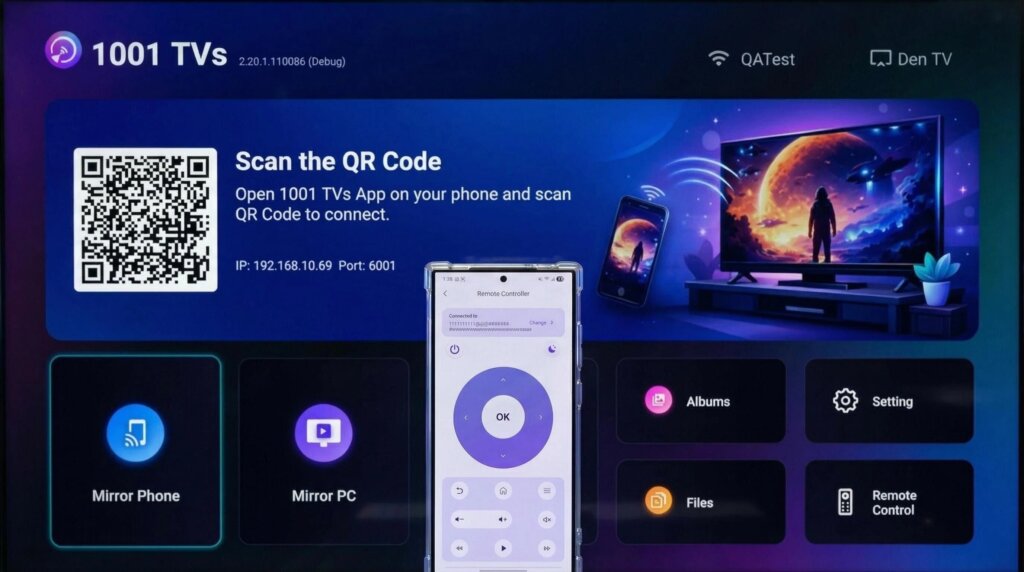
Step 1. Connect to the Same Wi-Fi
تېلېفونىڭىز ۋە تېلېۋىزورىڭىزنىڭ ئوخشاش Wi-Fi تورىغا ئۇلانغانلىقىغا كاپالەتلىك قىلىڭ.
ئەڭ ياخشى ئۈنۈمگە ئېرىشىش ئۈچۈن، بىرنى ئىشلىتىڭ 5 گىگاگېرتسلىق Wi-Fi تورى كېچىكىشنى ئازايتىش ۋە مۇقىملىقنى ياخشىلاش ئۈچۈن.
Step 2. Install and Open 1001 TVs App
Install and open the 1001 TVs app on your phone.
📱 iOS ئەپ: App Store دىن چۈشۈرۈڭ
📱 ئاندروئىد ئەپ: Google Play دىن چۈشۈرۈڭ
Step 3. Start pairing
چېكىڭ يىراقتىن كونترول قىلىش on your phone, then enter the pairing code that appears on your TV.
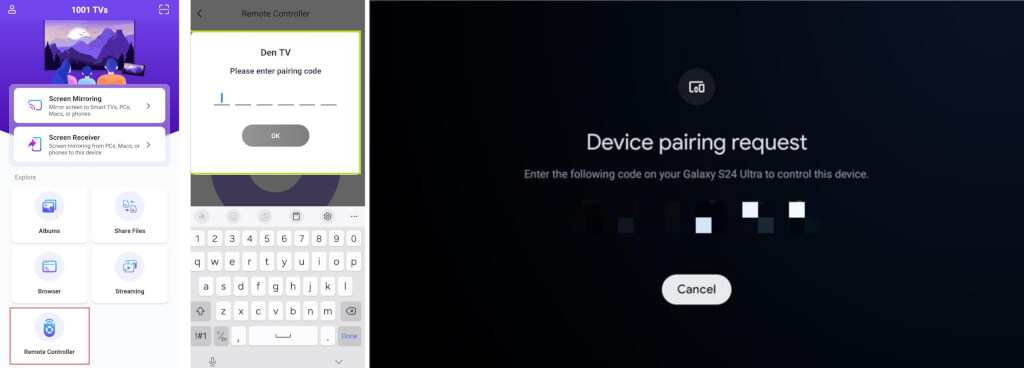
Step 4. Start control your TV
Once the virtual remote interface appears on your phone, you’re all set to control your TV.
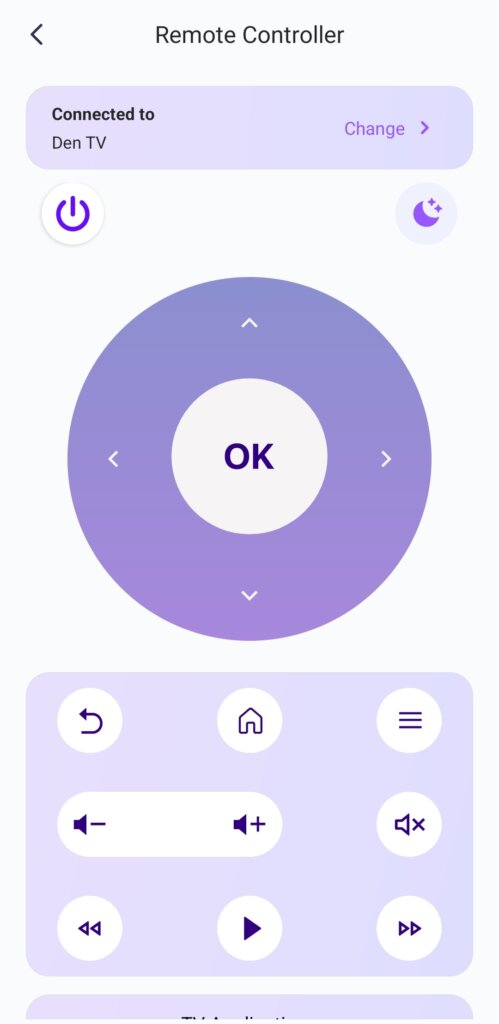
قوللايدىغان كونتروللار
⏻ كۈچ
🌙/☀ Night/Day Mode
🔊 ئاۋازنى يۇقىرى كۆتۈرۈش / تۆۋەنلىتىش
🏠 ئۆي
⬅️ ئارقىغا
⬆️⬇️⬅️➡️ يۆنىلىش تاختىسى (ئۈستى / ئاستى / سول / ئوڭ)
⭕ ماقۇل كۇنۇپكىسى
تەكلىپ: ئۇزۇن بېسىڭ ماقۇل كۇنۇپكىسى Android تېلېۋىزورىڭىزدىكى ئەپلەرنى ئۆچۈرۈش ئۈچۈن.
Advanced Features You’ll Love
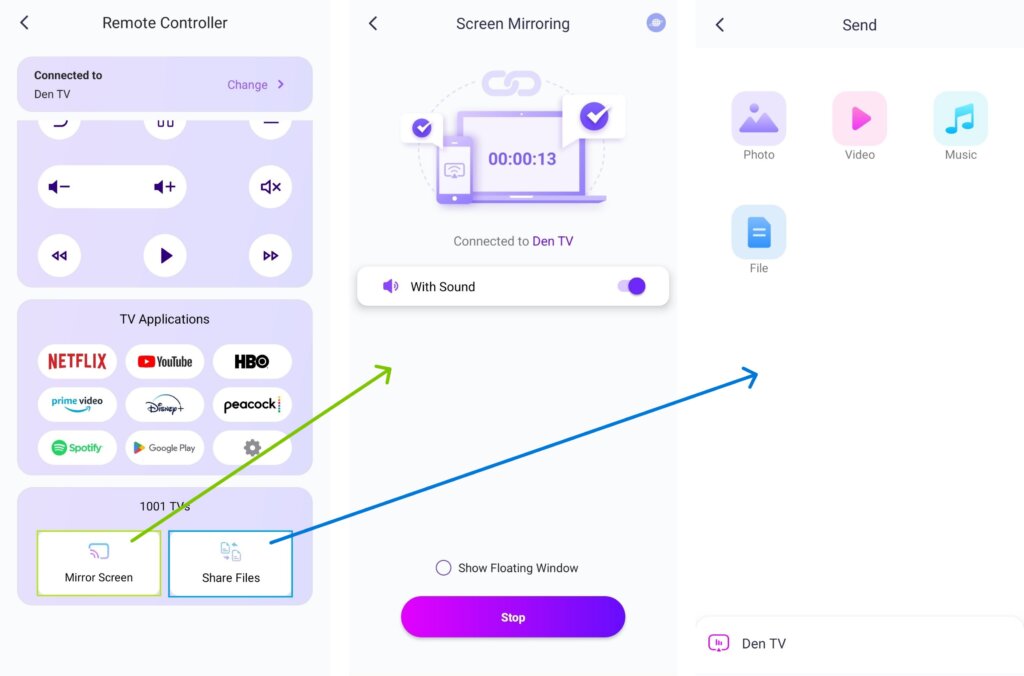
You can choose from the available TV apps—select YouTube, for example, and start streaming.
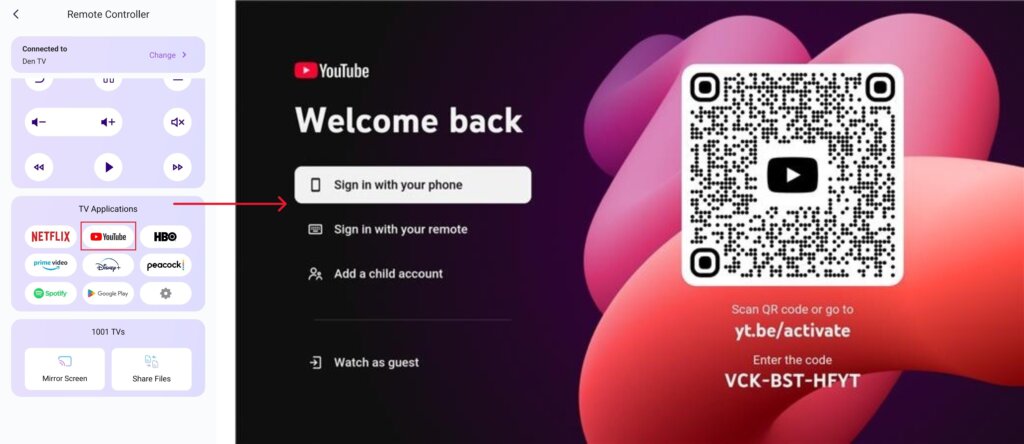
2) With 1001 TVs installed and opened on your TV, you can mirror your screen or share files with just one tap from the remote screen.
📥 تېلېۋىزىيە ئەپ دېتالى: تېلېۋىزورىڭىزغا 1001 TVs نى قانداق ئورنىتىش كېرەك
ھازىر 1001 TVs نى ئېلىڭ!
📥 تېلېۋىزىيە ئەپ دېتالى: تېلېۋىزورىڭىزغا 1001 TVs نى قانداق ئورنىتىش كېرەك
📱 iOS ئەپ: App Store دىن چۈشۈرۈڭ
📱 ئاندروئىد ئەپ: Google Play دىن چۈشۈرۈڭ