How to Cast Chinese New Year to Your TV with 1001 TVs App
It’s 2 AM in New York. You’re scrolling through Douyin and see a video from your hometown—the lion dance on the main street, red lanterns everywhere, the crowd cheering.
Your daughter walks in. “What are you watching?”

You want to show her, but the phone screen is too small. You open the 1001 TVs ئەپ, tap twice, and suddenly your hometown’s celebration fills the TV. Her eyes go wide. “Can we call Grandma?”
This is what casting Chinese New Year is about—bringing home to wherever you are.
What You’ll Actually Cast
Video calls with family back home – Your parents want to see the grandkids open red envelopes. Cast your WeChat call to the TV so everyone can sit on the couch naturally instead of passing a phone around.
Hometown videos from Douyin – Your cousin just posted a video of the temple fair in your neighborhood. The street food stalls, the calligraphy vendors, the kids with their new toys. Cast it to your TV and show your children where you grew up.
Spring Festival Gala – It’s 4 AM in LA when the CCTV Gala starts in Beijing. Whether you’re streaming from Chinese apps or websites, cast it to your TV and watch in comfort.
Cooking tutorials – Your mom’s dumpling recipe is a mystery. Find a tutorial that looks close, cast it to your kitchen TV, and finally learn the proper folding technique.
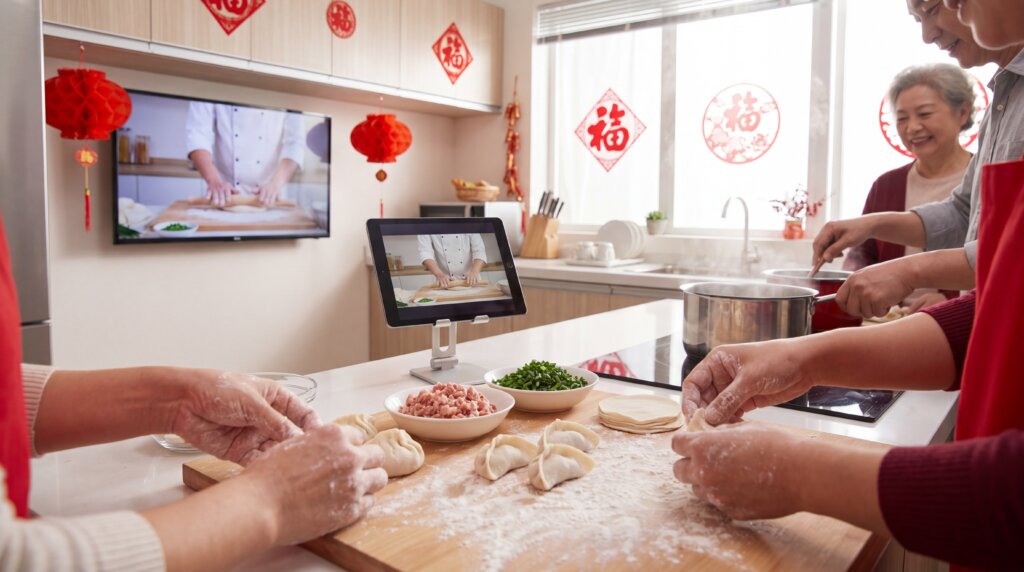
Photos during video calls – You just finished reunion dinner in Toronto. Your aunt in Taiwan wants to see everything—the decorations, the food, the kids in their new clothes. Cast your phone to your TV, open Photos, and swipe through while everyone watches together.
Why 1001 TVs App?
Works with any TV brand – Sony, Xiaomi, Android TV, Apple TV. No compatibility headaches.
Useful features:
- كامېرا ئەينەك – Show your hands making dumplings in real-time
- Album – Better photo viewing with zoom controls
- ئاق دوسكا – Draw zodiac animals with kids on the TV screen
Quick Setup (5 Minutes)
What You Need
- Smartphone (iPhone or Android)
- TV with Wi-Fi (any brand)
- Same Wi-Fi network for both
- 1001 TVs ئەپ
Three Simple Steps
Step 1: Download the App
- Phone/PC: App Store or Google Play, search “1001 TVs”
- TV : Search “1001 TVs” on the Google Play.
Step 2: Connect to Same Wi-Fi
Both devices must be on the same network. Choose the 5GHz network if you see two similar names—it’s faster.
Step 3: Start Casting
- Open 1001 TVs app on your phone
- Tap “Screen Mirroring”
- Select your TV’s name
- Done—your phone screen is now on your TV
Real Scenarios
Scenario 1: Video Call Your Parents
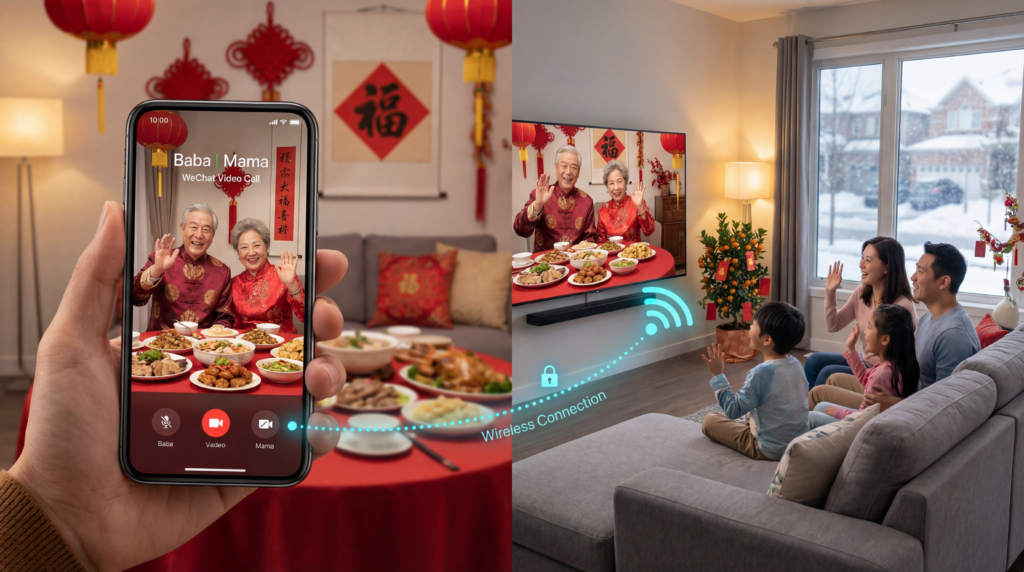
Situation: 7 PM New Year’s Eve in San Francisco, 11 AM New Year’s Day in Guangzhou.
How to cast:
- Start WeChat or Zoom call
- Open 1001 TVs app, tap “Screen Mirroring”
- Select your TV
- Position phone camera to capture your family on the couch
- Your parents see everyone; you see them on your 55-inch TV
تەكلىپ: Enable “Do Not Disturb” first so work emails don’t pop up on the big screen during your family call.
Scenario 2: Show Hometown Videos from Douyin
Situation: Your cousin posted a video of the Chinese New Year market in your hometown. Your kids have never been there.
How to cast:
- Open Douyin on your phone
- Find the video (or browse Chinese New Year content)
- Open 1001 TVs app and cast to your TV
- Watch together and tell stories about your childhood
If you see a black screen: The video or app may restrict screen mirroring. Try another playback method supported by the app or website.
Scenario 3: Watch Spring Festival Gala
Situation: The CCTV Gala is streaming on Chinese platforms.
How to cast:
- Open your streaming app or website
- Find the Gala stream
- Cast using 1001 TVs app
تەكلىپ: If the streaming app does not support screen mirroring, check whether the same video is available through another supported playback method.
Scenario 4: Share Photos with Relatives
Situation: Your aunt in Taiwan wants to see photos of your celebration.
How to cast:
- Start video call
- Cast your phone to TV
- Open Photos app and swipe through pictures
- Everyone sees photos together
Better option: Use 1001 TVs “Albums” feature for smoother viewing with zoom controls.
Quick Troubleshooting
Can’t find your TV?
- Check both devices are on the exact same Wi-Fi network
- Restart the app and devices
- Google “[your router model] disable AP isolation” if still not working
Connection drops?
- Move closer to Wi-Fi router
- Switch to 5GHz network
- Close other apps on your phone
- Reduce video quality in call settings
Video is laggy?
- Close unused apps
- Open the smooth mode on the 1001 TVs app setting
Audio plays on phone, not TV?
- Android/iPhone: Open the audio when you start to mirror
- TV: Make sure open the TV sound
- Disconnect and reconnect if needed
Creative Ideas
Virtual Red Envelope Ceremony – Design digital hongbao, cast to TV, and “open” them dramatically during video calls with relatives.
Cook Together Across Continents – Cast video call to kitchen TV, use Camera Mirroring to show your workspace so your mom can guide you through her recipes.
Bilingual Storytime – Cast Chinese New Year stories in Mandarin from YouTube or Bilibili, pause to explain in English, use Whiteboard to write new words.
Virtual Hometown Tour – Browse Douyin videos of your hometown’s celebrations, cast to TV, and show your kids where you grew up.
Family Trivia – Cast quiz questions about Chinese New Year traditions using Share Files feature. Winner gets extra red envelope!
Your Preparation Checklist
One Week Before:
- ✅ Download 1001 TVs app
- ✅ Test casting with a video call
- ✅ Check internet speed
- ✅ Coordinate time zones with relatives
Before Your Celebration:
- ✅ Connect devices to 5GHz Wi-Fi
- ✅ Close unnecessary apps
- ✅ Enable “Do Not Disturb”
- ✅ Test audio levels
- ✅ Have backup plan (regular phone call)
Final
Casting Chinese New Year to your TV takes 5 minutes to set up. The 1001 TVs app works with any TV brand and handles Chinese apps and websites better than built-in casting.
Use it to video call parents back home, watch Douyin videos from your hometown, stream the Spring Festival Gala, share photos with relatives, and show your kids the traditions you grew up with.
The distance between you and home is real. The time difference is challenging. But when your parents see their grandchildren on a 55-inch screen, when your kids watch a lion dance from your hometown street, when you’re making dumplings together across continents—home doesn’t feel so far away.
This Chinese New Year, bring home to wherever you are.
恭喜发财!新年快乐!
Download 1001 TVs App: iOS | Android | Smart TV

Read More
 iPhone Duo Screen Mirroring and Camera Preview
Apple’s foldable iPhone Duo introduces new ways to use a larger screen on a phone. This article focuses on two that connect particularly well…
iPhone Duo Screen Mirroring and Camera Preview
Apple’s foldable iPhone Duo introduces new ways to use a larger screen on a phone. This article focuses on two that connect particularly well…
 NFL Thanksgiving Eve Game 2026: Packers vs Rams & How to Watch
The Green Bay Packers will visit the Los Angeles Rams on Wednesday, November 25, 2026, at 8:00 p.m. ET / 5:00 p.m. PT. You…
NFL Thanksgiving Eve Game 2026: Packers vs Rams & How to Watch
The Green Bay Packers will visit the Los Angeles Rams on Wednesday, November 25, 2026, at 8:00 p.m. ET / 5:00 p.m. PT. You…

