
ئۈستەل يۈزىدە كۆپ خىل كۆزنەكلەرنى ئاپتوماتىك تەڭشەش
The 1001 TVs desktop app can automatically arrange multiple casting windows. Once enabled, mirrored phone screens are neatly organized based on a preset layout—no manual resizing or repositioning needed.
قانداق ئىشلىتىش كېرەك
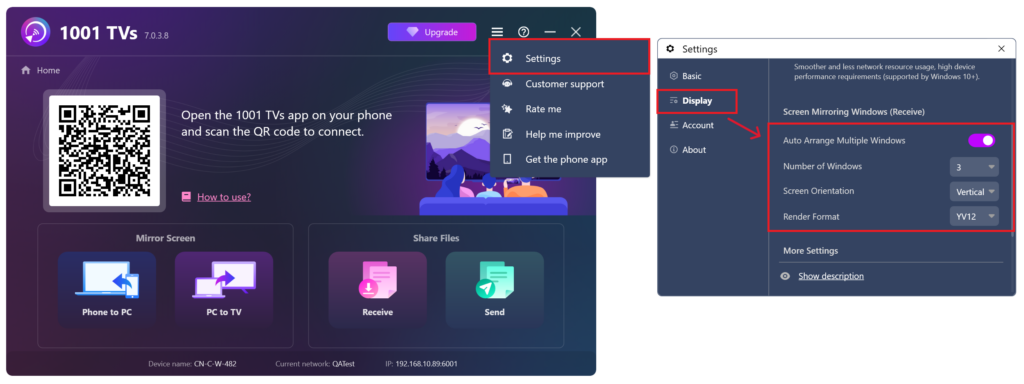
1-قەدەم: ئاپتوماتىك تەرتىپلەشنى قوزغىتىش
Open the 1001 TVs desktop app, go to تەڭشەكلەر, and turn on Auto-Arrange Multiple Windows. You can also set the number of windows to display simultaneously based on your preference.
ئاپتوماتىك تەرتىپلەش لايىھىسى ئەڭ كۆپ بولغاندا قوللايدۇ 20 دېرىزە. Note that while the layout has this limit, the casting feature itself does not restrict how many devices can be connected.
2-قەدەم: كۆچۈرۈش ئۈچۈن ئۈسكۈنىلەرنى ئۇلاڭ
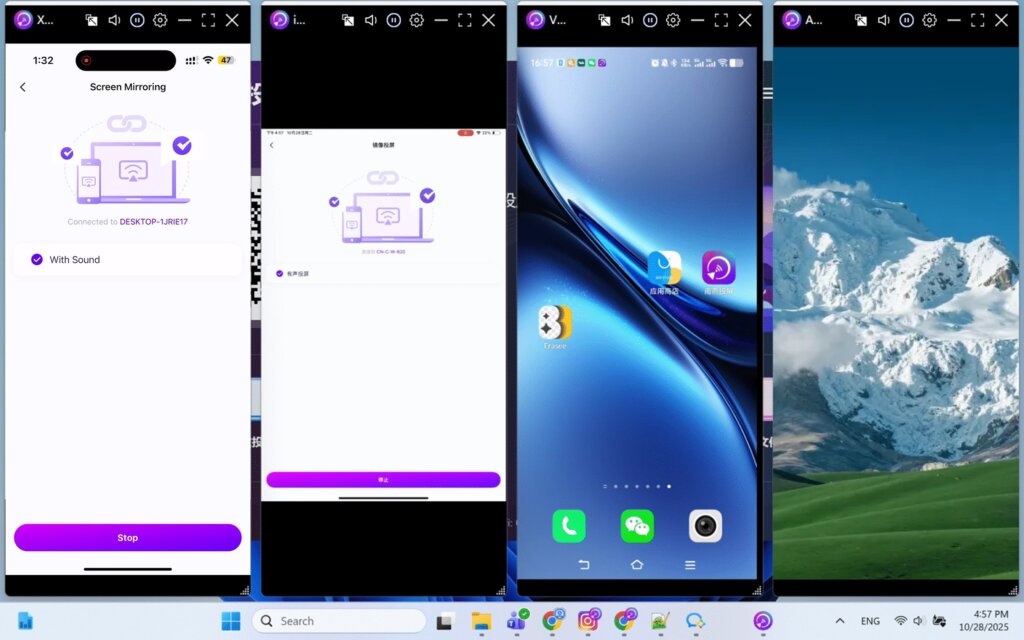
Follow the standard casting steps to mirror multiple phones to your computer. Once connected, all mirrored screens will be automatically arranged on your desktop based on the preset window count.
This feature also works when casting four phones simultaneously. For more details, see: 1001 TVs — بىر چېكىش ئارقىلىق ئاپتوماتىك كۆزنەك ئورۇنلاشتۇرۇش ئارقىلىق بىرلا ۋاقىتتا تۆت ئۈسكۈنىنى تارقىتىڭ.
قوللايدىغان پىلاتفورمىلار
قوللايدىغان سىستېمىلار:
- Windows 7 ياكى ئۇنىڭدىن كېيىنكى نەشرى
- macOS 10.15 ياكى ئۇنىڭدىن كېيىنكى نەشرى
قوللايدىغان تارقىتىش ھالىتى:
- يانفون ئېكرانىنى ئەكس ئەتتۈرۈش
ئىزاھاتلار
- Adjust the number of windows based on your screen resolution to ensure each mirrored screen displays properly.
- ئەگەر كۆزنەكلەر ئاپتوماتىك تەرتىپلەنمىسە، قايتا ئۇلىنىشتىن بۇرۇن ئەپنى قايتا قوزغىتىپ كۆرۈڭ ياكى ئاپتوماتىك تەرتىپلەش ئىقتىدارىنى ئېتىۋېتىپ قايتا قوزغىتىڭ.
ياردەم كېرەكمۇ؟
ئەگەر قانداقلا بولمىسۇن مەسىلىگە يولۇقسىڭىز، قوللاش گۇرۇپپىمىز بىلەن ئالاقىلىشىڭ:
- تېخىمۇ كۆپ قوللانمىلار: Guidance
- ئېلخەت: 1001tvs@nero.com
- تور بېكەت: www.1001tvs.com