
Windows نى ئېكرانغا قانداق ئەينەك قىلىش كېرەك
ئاندروئىدتىن Windowsقىچە
1. ئوخشاش Wi-Fi نى ئۇلاڭ
تېلېفونىڭىز ۋە كومپيۇتېرىڭىزنىڭ ئوخشاش Wi-Fi تورىغا ئۇلانغانلىقىغا كاپالەتلىك قىلىڭ. (ئەڭ ياخشى ئۈنۈم ئۈچۈن 5G بەلباغلىق Wi-Fi ئۇلىنىشى تەۋسىيە قىلىنىدۇ.)
2. 1001 TVs نى ئورنىتىڭ ۋە ئېچىڭ
تېلېفونىڭىز ۋە كومپيۇتېرىڭىزغا 1001 TVs نى قاچىلىغانلىقىڭىزغا كاپالەتلىك قىلىڭ.
📥 كومپيۇتېر نۇسخىسى: Windows ئۈچۈن چۈشۈرۈش
📱 ئاندروئىد نۇسخىسى: Google Play دىن چۈشۈرۈڭ
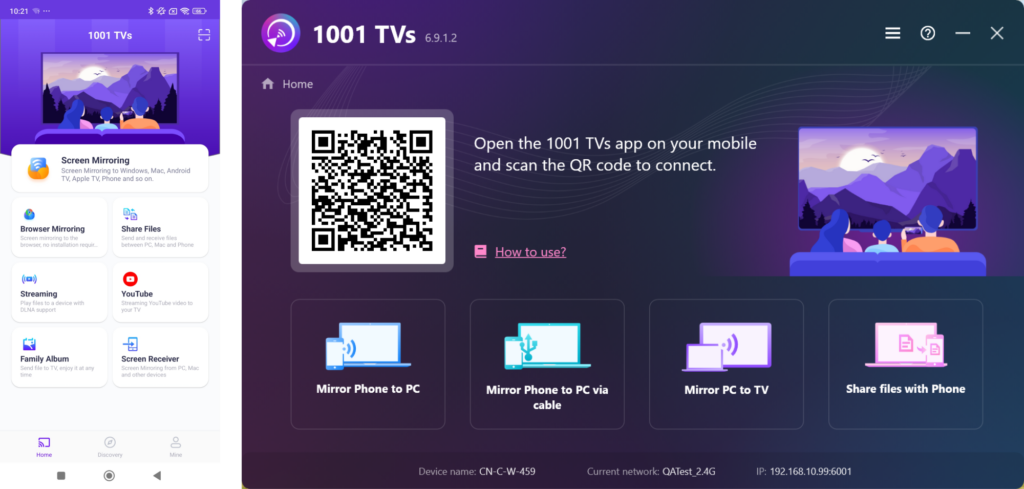
3. ئېكران ئەينىكىنى قوزغىتىش
باشلاشنىڭ ئۈچ خىل ئۇسۇلى بار:
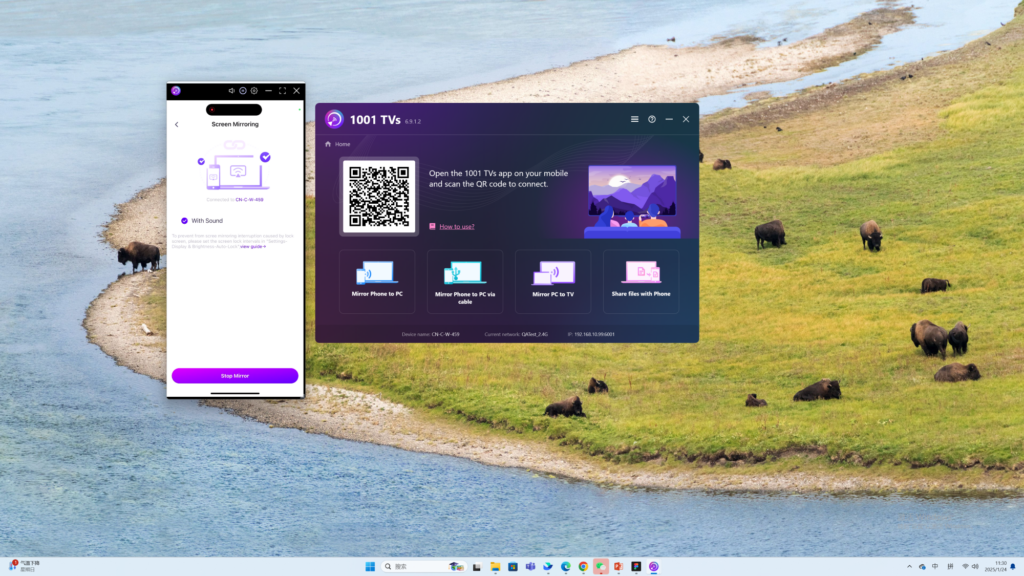
1) QR كودىنى سىكانىرلاڭ
سىز QR كودىنى سىكانىرلاپ ئەينەك قىلىشنى باشلىيالايسىز.
(ئەسكەرتىش: تۇنجى قېتىم سىكانىرلىغاندا كامېراغا رۇخسەت قىلىشىڭىز كېرەك.)
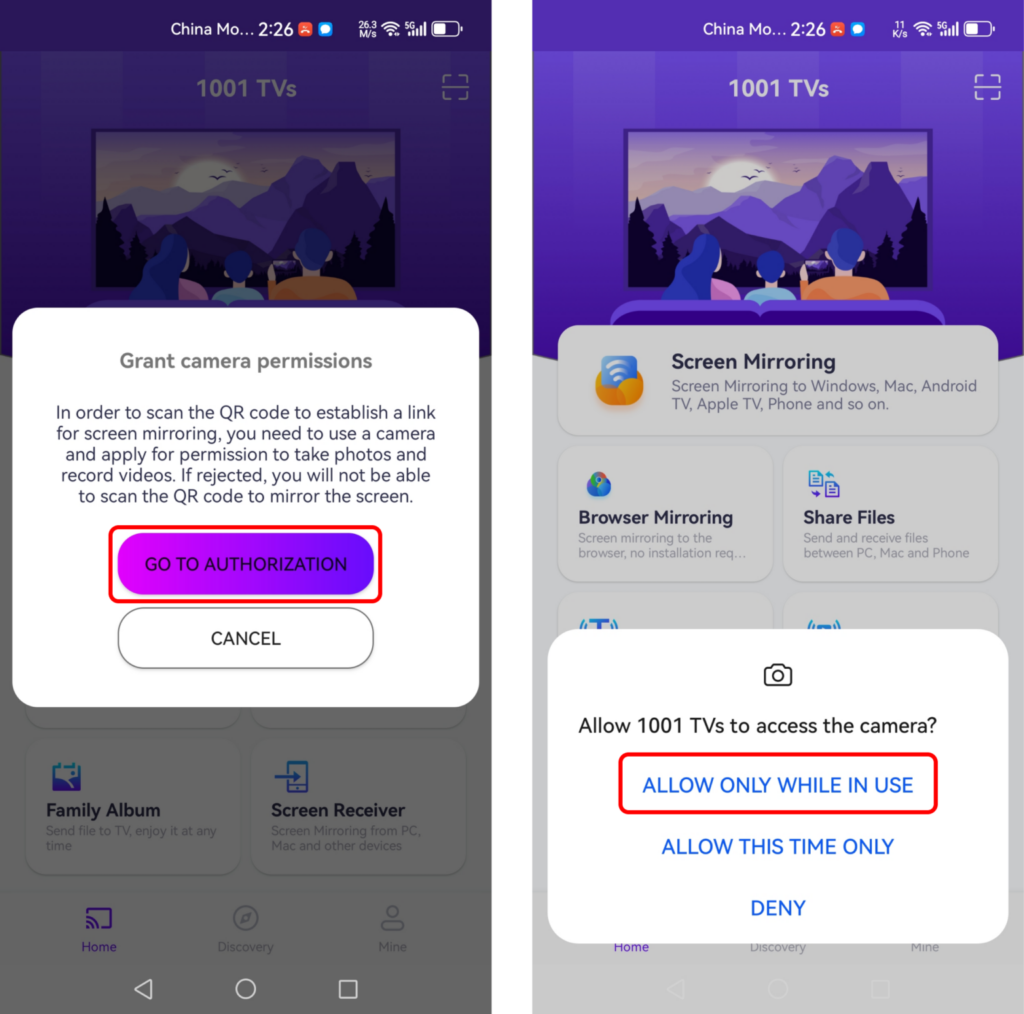
سىكانىرلاش مۇۋەپپەقىيەتلىك بولغاندىن كېيىن، ئېكراننى ئەكس ئەتتۈرۈشنى باشلىسىڭىز بولىدۇ.
2) يېقىن ئەتراپتىكى ئۈسكۈنىلەرنى تاللاڭ
1001 TVs ئەقلىي ئىقتىدارلىق تېلېۋىزورلار، تېلېۋىزور قۇتىلىرى ۋە ئوخشاش Wi-Fi تورىغا ئۇلانغان كومپيۇتېرلار قاتارلىق ئۈسكۈنىلەرنى ئاپتوماتىك بايقىيالايدۇ.
پەقەت تارقىتىشنى خالايدىغان ئۈسكۈنىڭىزنى تاللاڭ.
ئەسكەرتىش: ئۈسكۈنىنىڭ ئەپنى ئىجرا قىلىۋاتقانلىقىغا كاپالەتلىك قىلىڭ ۋە لازىم بولسا تىزىملىكنى يېڭىلاڭ.
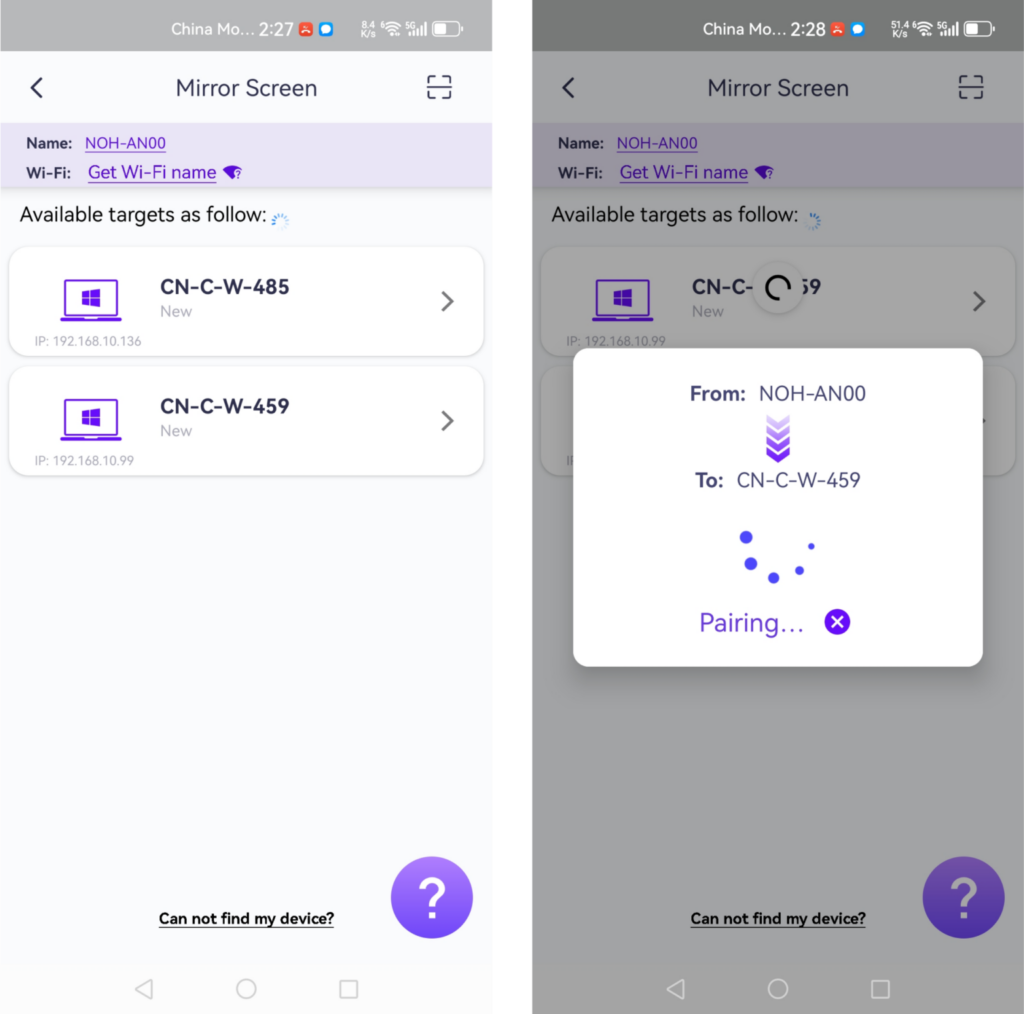
ئەينەكلەشتىن بۇرۇن، ئۇقتۇرۇش بالدىقىدا ئەھۋالنى كۆرۈش ئۈچۈن ئۇقتۇرۇشقا رۇخسەت قىلىشنى ئۇنتۇپ قالماڭ.
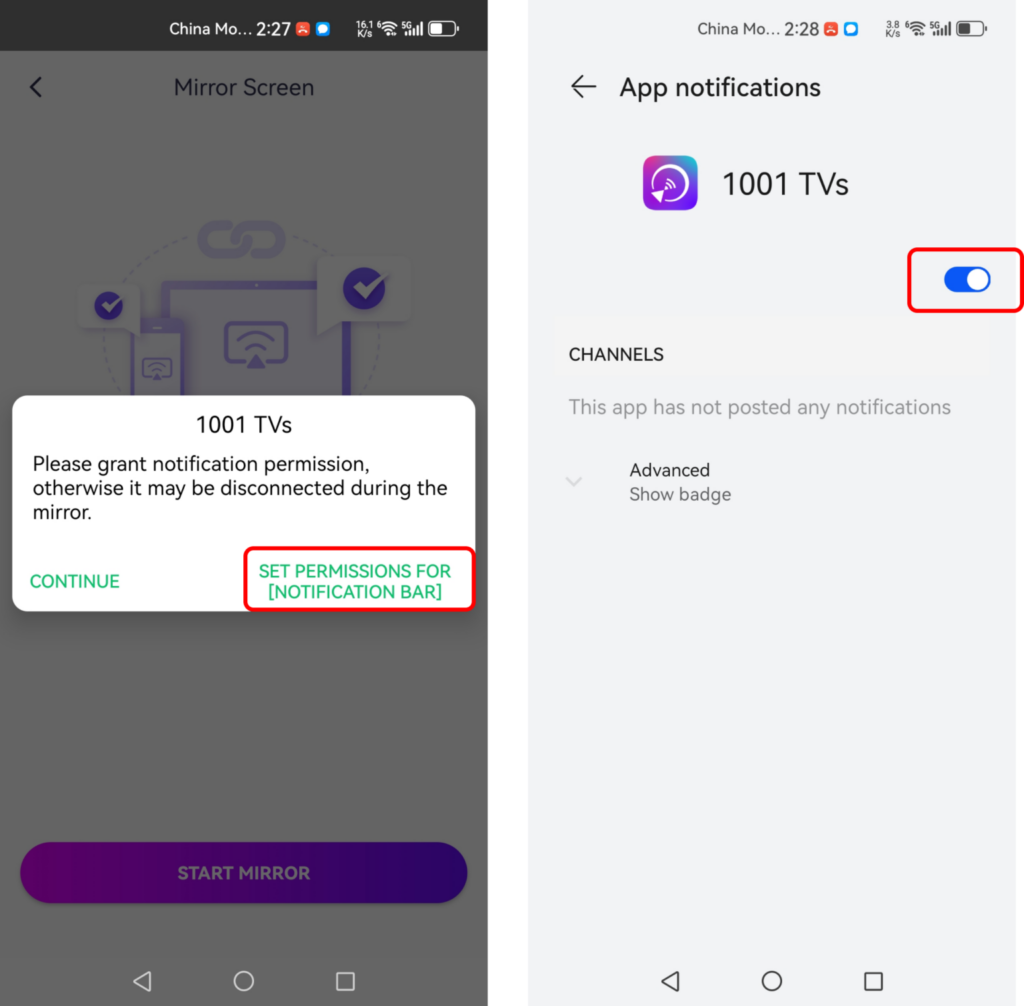
بۇ ئىقتىدار تەقدىماتلارنى كۆرسىتىش، تېلېفون ئېكرانىنى چوڭ يىغىن ئېكرانىغا چىقىرىش، ئويۇن ئويناۋاتقاندا نەق مەيداندىن تارقىتىش ياكى چوڭ ئېكراندا ئېلېكترونلۇق كىتاب ئوقۇش ئۈچۈن ناھايىتى ياخشى.
3) ئەينەك ئېكراننى تور كۆرگۈچكە ئايلاندۇرۇش
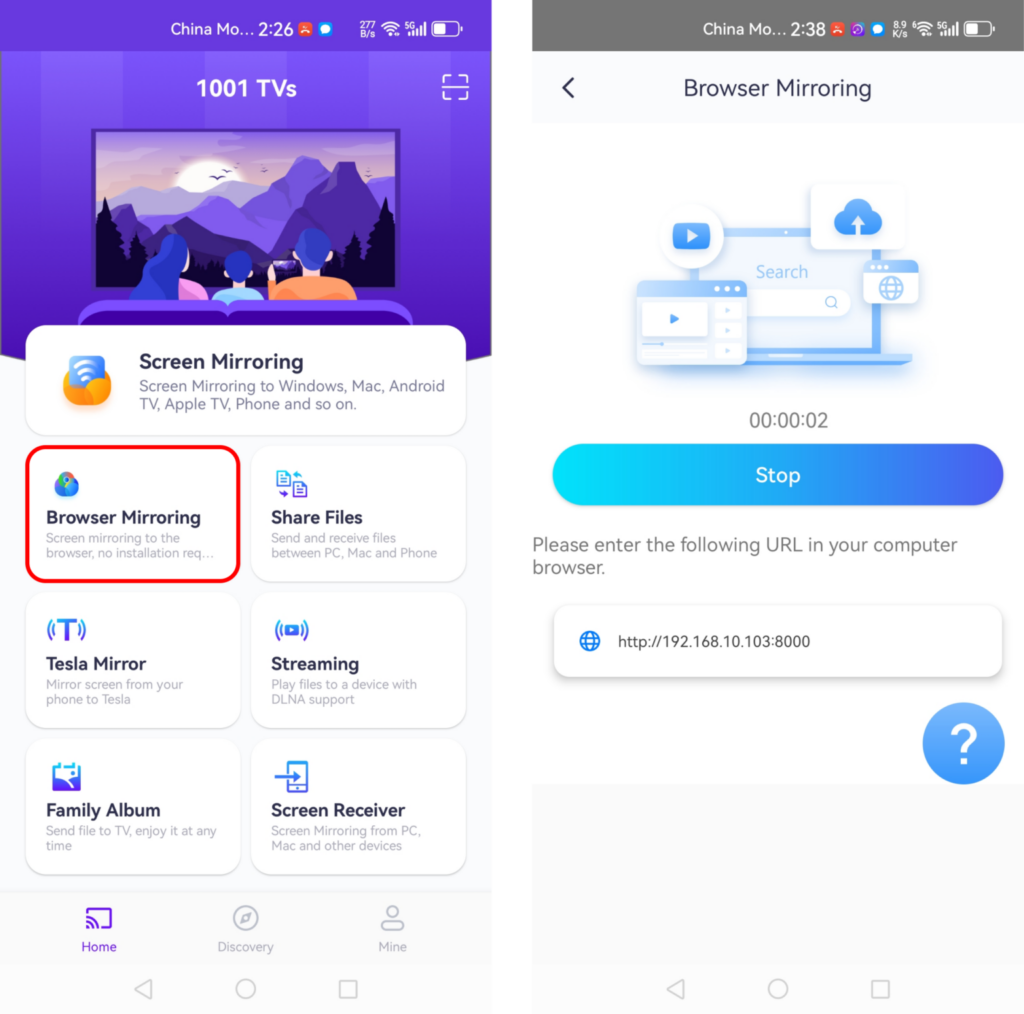
“نى چېكىڭ»توركۆرگۈچ ئەينىكى”باش بەتتە.».
ئېكران ئەينىكىنى كۆرسىتىشنى باشلاش ئۈچۈن تور كۆرگۈچكە كۆرسىتىلگەن URL نى كىرگۈزۈڭ! (Chrome تەۋسىيە قىلىنىدۇ)
4. تەڭشەكلەر
تەڭشەكلەرنى تەڭشەش:
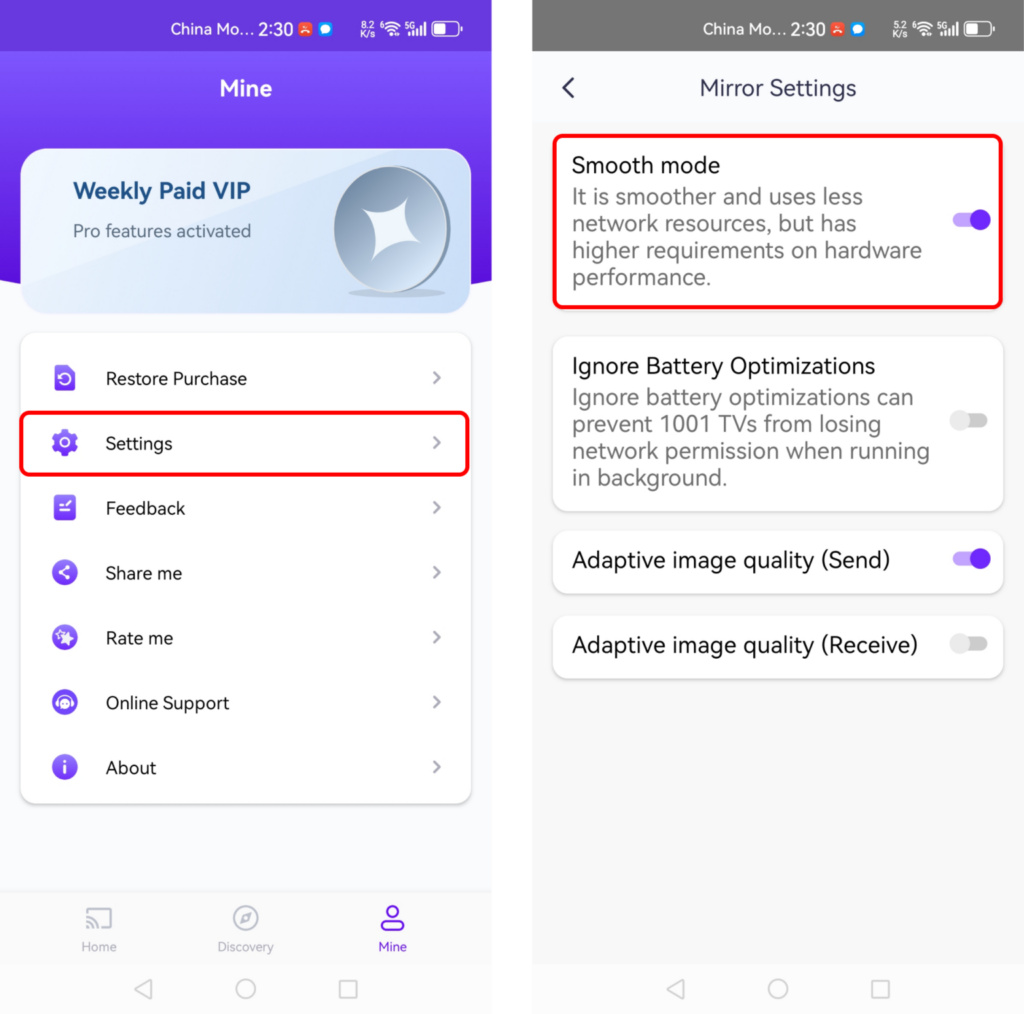
ئەگەر ئەينەك كۆرسىتىش جەريانىدا كېچىكىش ياكى ئېنىقلىق دەرىجىسى تۆۋەن بولسا، تېخىمۇ ياخشى تەجرىبە ئۈچۈن تەڭشەكلەرنى تەڭشەپ كۆرۈڭ.
· سىلىق ھالەت: بۇ ئۆزلۈكىدىن ئاپتوماتىك تاللىنىدۇ.
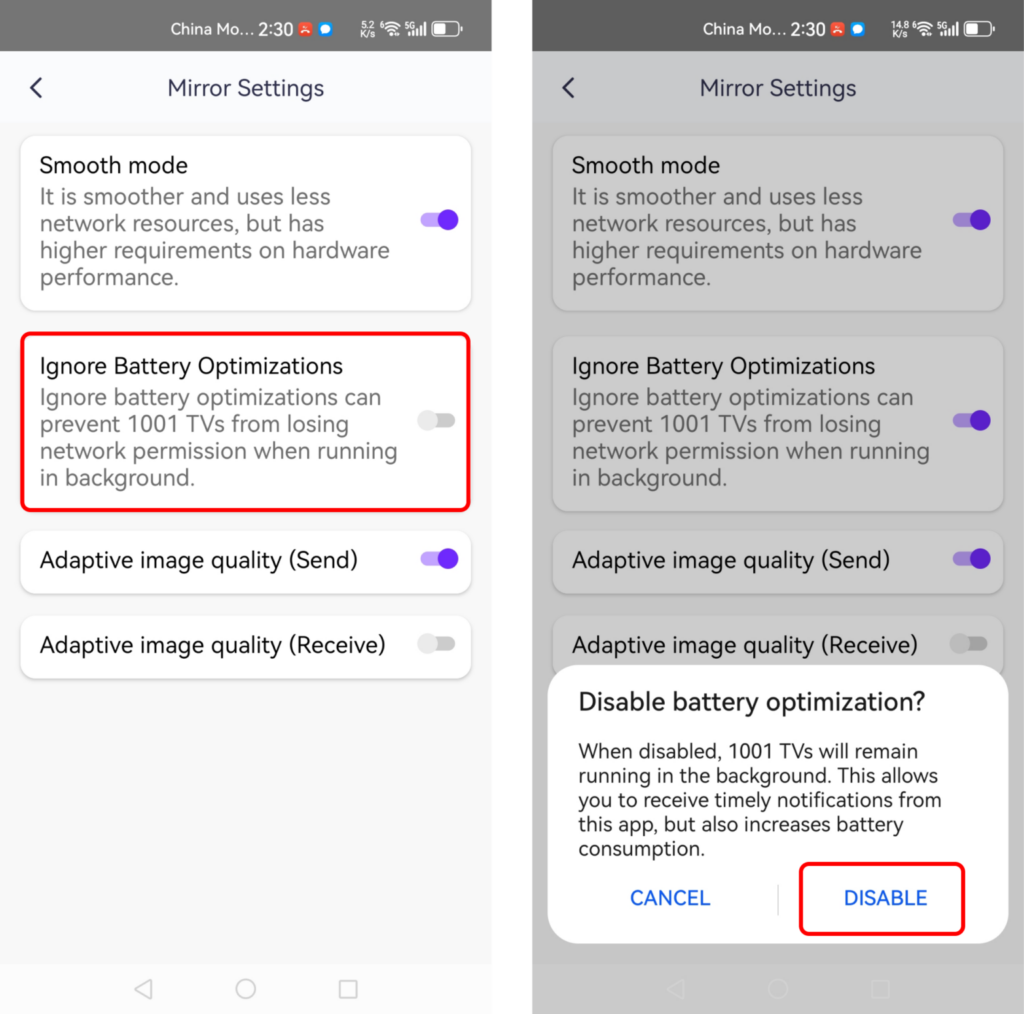
· باتارېيە ئەلالاشتۇرۇشنى چەكلەشبۇ تاللانمىنى قوزغىتىش ئېكران ئەينىكىنىڭ باتارېيە تېجەش ئىقتىدارى تەرىپىدىن ئۈزۈلۈپ قېلىشىنىڭ ئالدىنى ئېلىشقا ياردەم بېرىدۇ.
iOS دىن Windows غىچە
1. ئوخشاش Wi-Fi نى ئۇلاڭ:
تېلېفونىڭىز ۋە كومپيۇتېرىڭىزنىڭ ئوخشاش Wi-Fi تورىغا ئۇلانغانلىقىغا كاپالەتلىك قىلىڭ. (ئەڭ ياخشى ئۈنۈم ئۈچۈن 5G بەلباغلىق Wi-Fi ئۇلىنىشى تەۋسىيە قىلىنىدۇ.)
2. 1001 TVs نى ئورنىتىڭ ۋە ئېچىڭ
تېلېفونىڭىزغا ۋە ئېكراننى كۆچۈرمەكچى بولغان ئۈسكۈنىڭىزگە 1001 TVs نى قاچىلىغانلىقىڭىزغا كاپالەتلىك قىلىڭ.
📥 كومپيۇتېر نۇسخىسى: Windows ئۈچۈن چۈشۈرۈش
📱 iOS نەشرى: App Store دىن چۈشۈرۈڭ
3. ئېكران ئەينىكىنى قوزغىتىش
باشلاشنىڭ ئۈچ خىل ئۇسۇلى بار:
1) QR كودىنى سىكانىرلاڭ
سىز QR كودىنى بىۋاسىتە باش بەتتىن ياكى “نى تاللىغاندىن كېيىن» سىكانىرلىيالايسىز.“ئېكران ئەينىكى”تاللاش.».
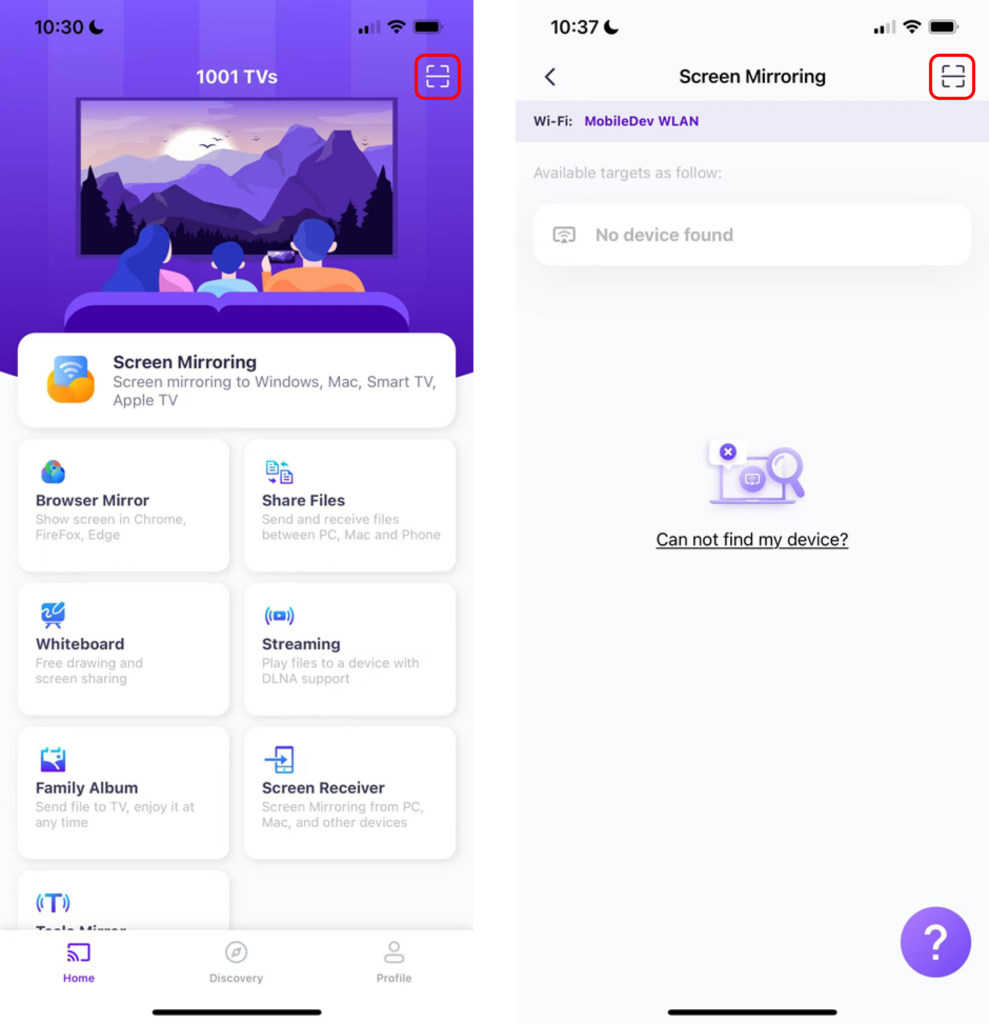
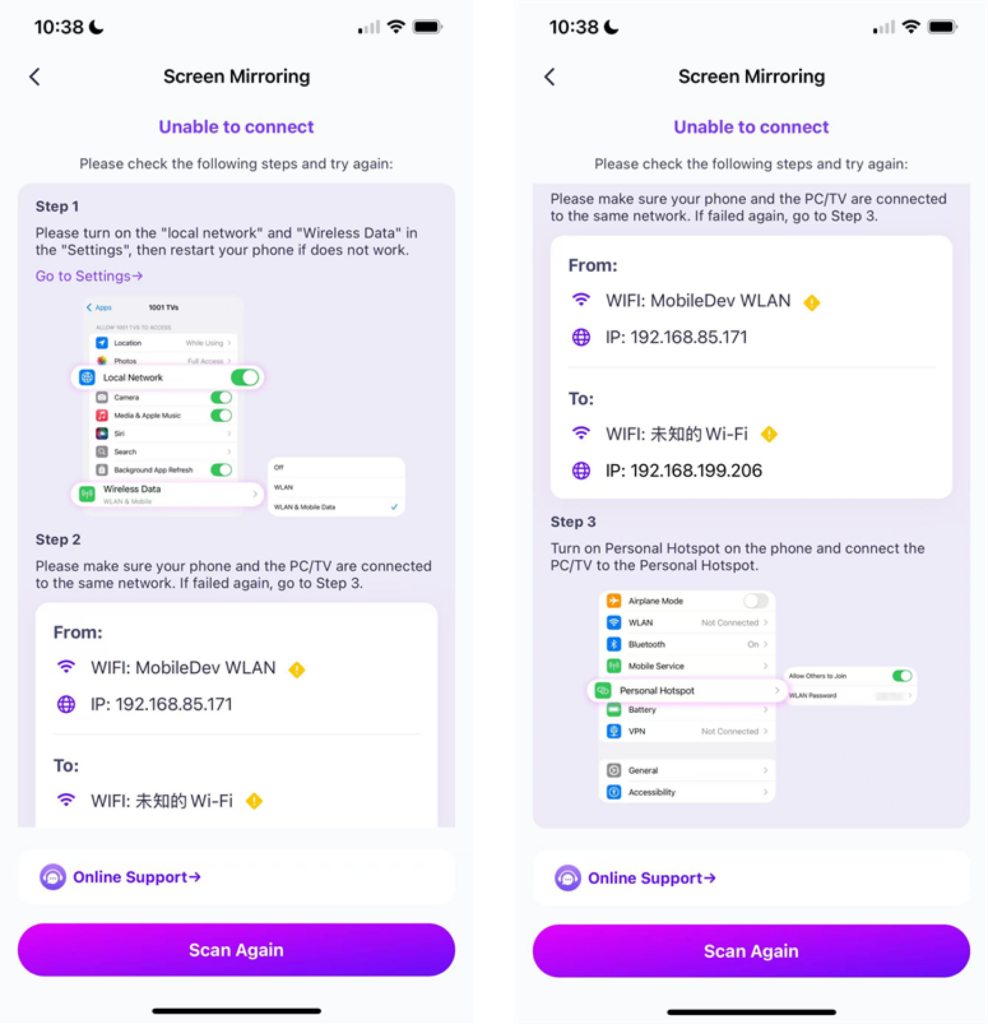
ئەگەر ئۇلىنىش مەغلۇپ بولسا، تۆۋەندىكى كۆرۈنمە يۈز كۆرۈنىدۇ.
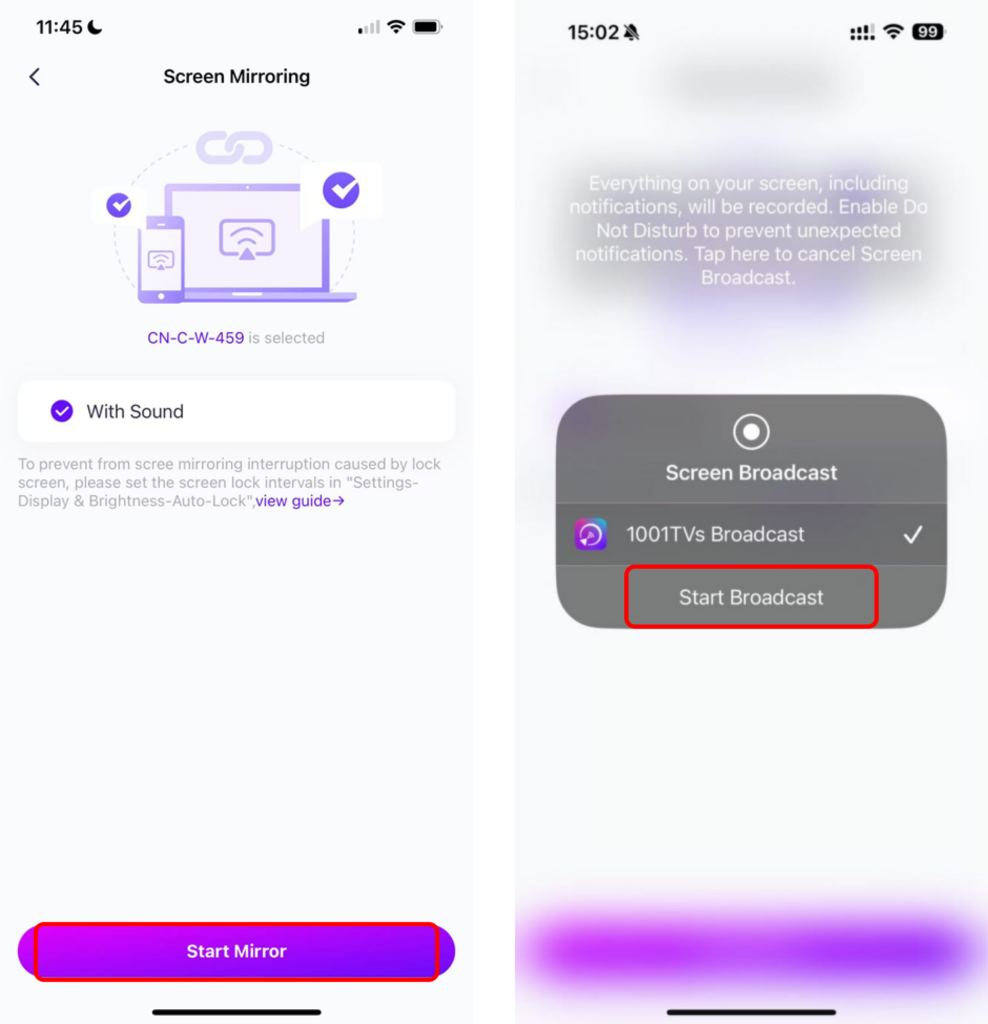
ئەگەر ئۇلىنىش مۇۋەپپەقىيەتلىك بولسا، سىز ئەينەك كۆرسىتىش كۆرۈنمە يۈزىنى كۆرىسىز.
“نى چېكىڭ»ئەينەكنى باشلاش”➜“تارقىتىشنى باشلاڭ”
2) يېقىن ئەتراپتىكى ئۈسكۈنىلەرنى تاللاڭ
1001 TVs ئەقلىي ئىقتىدارلىق تېلېۋىزورلار، تېلېۋىزور قۇتىلىرى ۋە ئوخشاش Wi-Fi تورىغا ئۇلانغان كومپيۇتېرلار قاتارلىق ئۈسكۈنىلەرنى ئاپتوماتىك بايقىيالايدۇ.
پەقەت تارقىتىشنى خالايدىغان ئۈسكۈنىڭىزنى تاللاڭ.
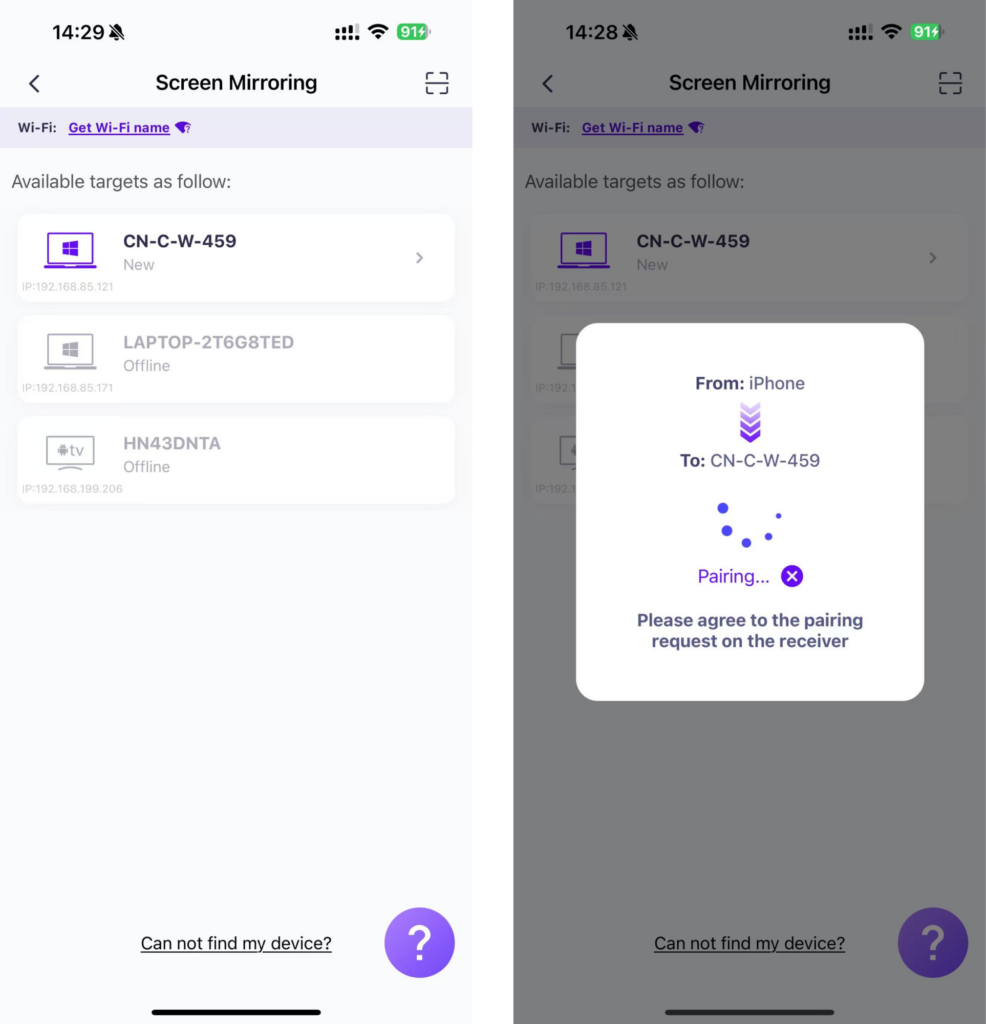
“نى چېكىڭ»ئەينەكنى باشلاش”➜“تارقىتىشنى باشلاڭ”
3) ئەينەك ئېكراننى تور كۆرگۈچكە ئايلاندۇرۇش
تەكشۈرۈشتىن ئۆتۈش 1001 TVs–[iOS] ئېكراننى iPhone دىن تور كۆرگۈچكە قانداق ئايلاندۇرۇش (Chrome)
تەبرىكلەيمىز! تېلېفون ئېكرانى كۆرسىتىلدى!
1001 TVs نى ھازىر چۈشۈرۈڭ
📥 كومپيۇتېر نۇسخىسى: Windows ئۈچۈن چۈشۈرۈش
📱 iOS نەشرى: App Store دىن چۈشۈرۈڭ
📱 ئاندروئىد نۇسخىسى: Google Play دىن چۈشۈرۈڭ