
[Windows] How to Mirror Windows PC Screen to Mac/Windows PC
1. ئوخشاش Wi-Fi غا ئۇلاڭ
ئىككىڭىزنىڭمۇ كومپيۇتېر ۋە قوبۇللىغۇچ ئۈسكۈنىسى (Mac/PC) ئوخشاش Wi-Fi تورىغا ئۇلانغان.
ئەڭ ياخشى ئۈنۈمگە ئېرىشىش ئۈچۈن، بىرنى ئىشلىتىڭ 5 گىگاگېرتسلىق Wi-Fi تورى كېچىكىشنى ئازايتىش ۋە مۇقىملىقنى ياخشىلاش ئۈچۈن.
2. 1001 TVs نى قاچىلاڭ ۋە ئېچىڭ
سىزدە ... بارلىقىغا كاپالەتلىك قىلىڭ 1001 TVs ئەپ ئىككى ئۈسكۈنىڭىزگە ئورنىتىلدى.
📥 Mac ئەپ دېتالى: App Store دىن چۈشۈرۈڭ
📥 كومپيۇتېر ئەپلىرى: چۈشۈرۈش Microsoft دۇكىنى
تەپسىلىي قەدەملەر ئۈچۈن، تۆۋەندىكىگە قاراڭ كومپيۇتېر ئورنىتىش قوللانمىسى
3. ئەينەك كۆرسىتىشنى باشلاڭ
كومپيۇتېرىڭىزدا، چېكىڭ “كومپيۇتېردىن تېلېۋىزورغا”, ، ئاندىن ئېكران ھالىتىنى تاللاڭ: “كۆپەيتىڭ، ”كېڭەيتىڭ“ ياكى “كۆزنەكنى تاللاڭ”.
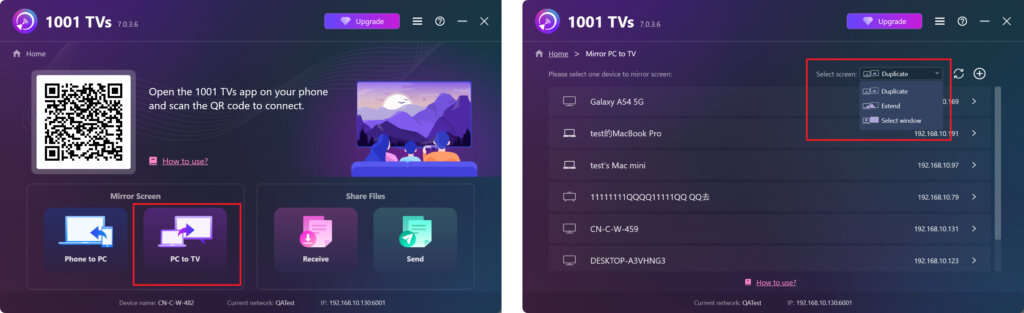
بۇ ئەپ ئاپتوماتىك ھالدا ئوخشاش Wi-Fi تورىغا ئۇلانغان ئۈسكۈنىلەرنى بايقىيالايدۇ.
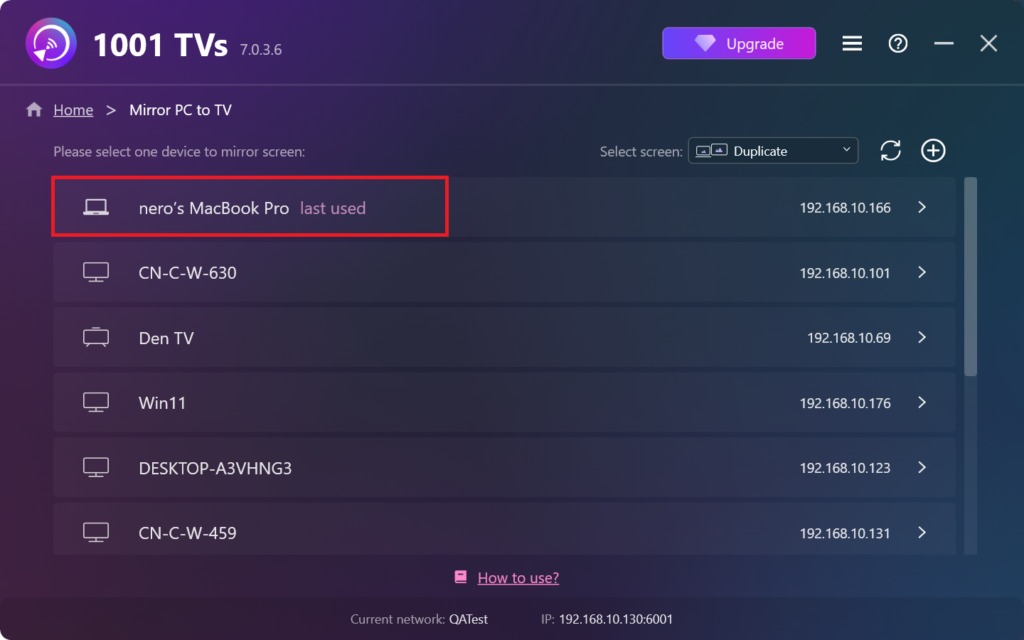
ئەينەك قىلماقچى بولغان ئۈسكۈنىنى تاللاڭ.
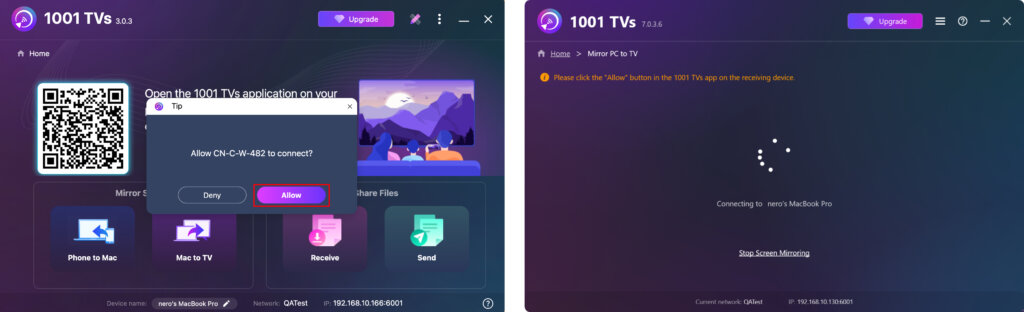
قوبۇل قىلغۇچى ئۈسكۈنىدە، چېكىڭ “رۇخسەت قىلىش” ئۇلىنىشنى جەزملەشتۈرۈش ئۈچۈن.
4. Once connected, you can start mirroring your screen to Windows PC/Mac instantly! ✨
ھازىر 1001 TVs نى ئېلىڭ!
📥 Mac ئەپ دېتالى: App Store دىن چۈشۈرۈڭ
📥 كومپيۇتېر ئەپلىرى: چۈشۈرۈش Microsoft دۇكىنى
تەپسىلىي قەدەملەر ئۈچۈن، تۆۋەندىكىگە قاراڭ كومپيۇتېر ئورنىتىش قوللانمىسى