So können Sie die Premier League über Ihr Smartphone auf Ihrem Fernseher verfolgen
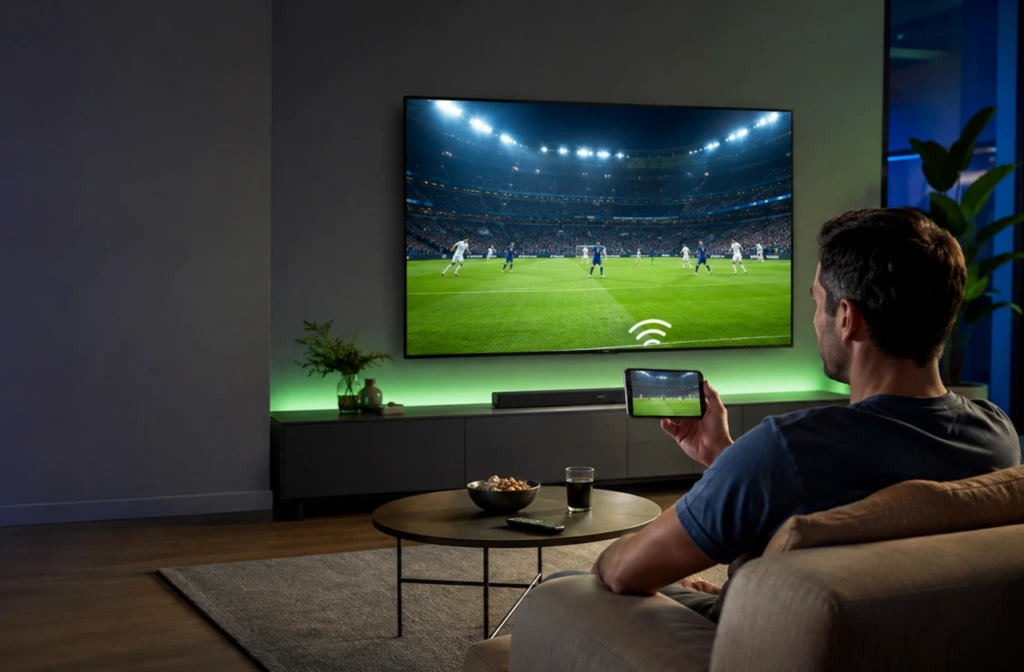
Ein Premier-League-Spiel auf dem Handy anzuschauen, ist praktisch, wenn man nicht zu Hause ist. Ein Fernseher ist in der Regel die bessere Wahl, wenn man Zugang zu einem hat.
Es stehen mehrere Verbindungsmethoden zur Verfügung. Welche Option für Sie am besten geeignet ist, hängt von Ihrem Smartphone, Ihrem Fernseher und dem von Ihnen genutzten Sender ab. Probieren Sie zunächst die „Cast“- oder „AirPlay“-Funktion der Streaming-App aus. Falls sich Ihre Geräte nicht direkt miteinander verbinden lassen, Nero 1001 TVs kann ein kompatibles Smartphone über WLAN auf einen größeren Bildschirm spiegeln. Ein HDMI-Adapter ist eine weitere zuverlässige Alternative.
Sie benötigen weiterhin einen autorisierten Premier-League-Stream. Casting- und Mirroring-Tools verbinden zwar Geräte miteinander, bieten jedoch keine Spiele an und ersetzen kein Sportabonnement.
Spielplan der Premier League 2026/27 und wo man die Spiele sehen kann
Wann beginnt die Premier-League-Saison 2026/27?
Die Premier-League-Saison 2026/27 beginnt am Freitag, dem 21. August 2026. Der letzte Spieltag findet am Sonntag, dem 30. Mai 2027, statt.
Alle 20 Vereine bestreiten 38 Ligaspiele, was insgesamt 380 Spielpaarungen ergibt. Die Saison umfasst 33 Spieltage am Wochenende und fünf Spieltage unter der Woche.
Die Anstoßzeiten können sich nach Veröffentlichung des Spielplans noch ändern. TV-Übertragungen, nationale Pokalwettbewerbe und europäische Wettbewerbe können sich auf den Spielplan auswirken.
Prüfen Sie die Offizieller Spielplan der Premier League 2026/27 vor jedem Spiel. Du kannst auch die Digitaler Kalender der Premier League auf Ihr Smartphone. Die Anzeige wird aktualisiert, sobald sich die Leuchten bewegen.
Wo kann man die Premier League sehen?
Die Übertragungsrechte für die Premier League werden nach Ländern und Regionen verkauft. Es gibt kein einheitliches weltweites Streaming-Abonnement für die Premier League.
In der folgenden Tabelle sind ausgewählte offizielle Rechteinhaber für die Saison 2026/27 aufgeführt.
| Land oder Region | Offizieller Rechteinhaber |
| Vereinigtes Königreich | Sky Sports und TNT Sports; BBC Sport mit den Höhepunkten |
| Vereinigte Staaten | NBC Sports |
| Kanada | Fubo |
| Australien | Stan Sport |
| Neuseeland | Sky NZ |
| China | Migu |
| Hongkong, China | PCCW |
| Chinesisch-Taipeh | ELTA |
| Japan | U-Next |
| Südkorea | Coupang |
| Singapur | StarHub |
| Malaysia | Astro |
| Indien und Südasien | JioStar |
| Frankreich | CANAL+ |
| Deutschland und Österreich | Sky Deutschland |
| Spanien und Portugal | DAZN |
| Italien | Sky Italia |
| Dänemark, Finnland, Norwegen und Schweden | Viaplay |
| Island | Syn |
| Naher Osten und Nordafrika | beIN Sport |
| Afrika südlich der Sahara | SuperSport |
| Brasilien und andere südamerikanische Märkte | ESPN |
Diese Rechte gelten für die Saison 2026/27. Jeder Rechteinhaber kann die Spiele jedoch über verschiedene Kanäle, Apps oder Abonnementmodelle übertragen.
Die Wiedergabe auf Mobilgeräten umfasst nicht immer die Übertragung auf den Fernseher. Informieren Sie sich vor dem Abschluss eines Abonnements über die aktuellen Geräterichtlinien des Anbieters. Die Seite der Übertragungspartner der Premier League enthält die vollständige Liste der Regionen.
Wählen Sie die richtige Methode zur Übertragung vom Smartphone auf den Fernseher
Das direkte Streamen ist der beste Einstieg. Es ist in der Regel praktischer als das Spiegeln des gesamten Smartphone-Bildschirms und verhindert, dass persönliche Benachrichtigungen auf dem Fernseher angezeigt werden.
AirPlay ist die naheliegende Wahl für ein iPhone und einen kompatiblen Fernseher. Android-Nutzer können auf Google Cast, Screen Cast oder Samsung Smart View zurückgreifen.
Haushalte mit verschiedenen Geräten benötigen manchmal eine andere Lösung. Beispielsweise können das Smartphone und der Fernseher unterschiedliche Casting-Systeme verwenden. In diesem Fall kann 1001 TVs einen kompatiblen Empfänger auf unterstützten Geräten bereitstellen.
Eine kabelgebundene HDMI-Verbindung ist eine Überlegung wert, wenn das WLAN überlastet ist.
| Ihre Konfiguration | Empfohlene Vorgehensweise |
| Die Streaming-App verfügt über eine „Cast“-Schaltfläche | Nutzen Sie die in der App integrierte Cast-Funktion |
| iPhone mit Apple TV oder einem AirPlay-kompatiblen Fernseher | AirPlay verwenden |
| Android mit Chromecast, Google TV oder ein Fernseher mit Google Cast | Google Cast verwenden |
| Samsung Galaxy-Smartphone mit einem kompatiblen Samsung-Fernseher | „Smart View“ verwenden |
| Telefon und Fernseher nutzen unterschiedliche Systeme | Probier mal 1001 TVs aus |
| Der Fernseher verfügt über einen HDMI-Anschluss, bietet jedoch nur eingeschränkte Smart-Funktionen | Verwenden Sie einen kompatiblen HDMI-Adapter |
| Die drahtlose Wiedergabe ist instabil | Versuchen Sie es mit HDMI oder verbessern Sie die Netzwerkverbindung |
Verwenden Sie immer die Cast- oder AirPlay-Schaltfläche des jeweiligen Senders, sofern diese verfügbar ist. Einige Anbieter erlauben das direkte Casting, blockieren jedoch die Vollbild-Spiegelung.
So können Sie die Premier League von Ihrem Smartphone auf dem Fernseher verfolgen
Öffnen Sie vor dem Verbinden die App auf Ihrem Smartphone, um zu überprüfen, ob der Stream funktioniert. Aktualisieren Sie gegebenenfalls die App des Senders.
Bei drahtlosen Verbindungsmethoden müssen sich Smartphone und Fernseher in der Regel im selben WLAN-Netzwerk befinden. Vermeiden Sie das Gast-WLAN, da dies dazu führen kann, dass sich die Geräte im selben Netzwerk nicht gegenseitig erkennen können.
Testen Sie die Einrichtung vor dem Anpfiff. Ein kurzer Test gibt Ihnen Zeit, auf eine andere Methode auszuweichen, falls die erste Option fehlschlägt.
Methode 1: Verwenden Sie die „Cast“-Funktion der Streaming-App
Google Cast ist auf Chromecast, dem Google TV Streamer und Fernsehern mit Google Cast verfügbar. Die Streaming-App muss diese Funktion ebenfalls unterstützen.
- Verbinden Sie das Telefon und das Empfangsgerät mit demselben WLAN-Netzwerk.
- Öffnen Sie die autorisierte Streaming-App.
- Wählen Sie das Premier-League-Spiel aus.
- Tippen Sie im Videoplayer auf das „Cast“-Symbol.
- Wählen Sie Ihren Fernseher oder Ihr Streaming-Gerät aus.
- Warten Sie, bis die Wiedergabe auf dem Fernseher beginnt.
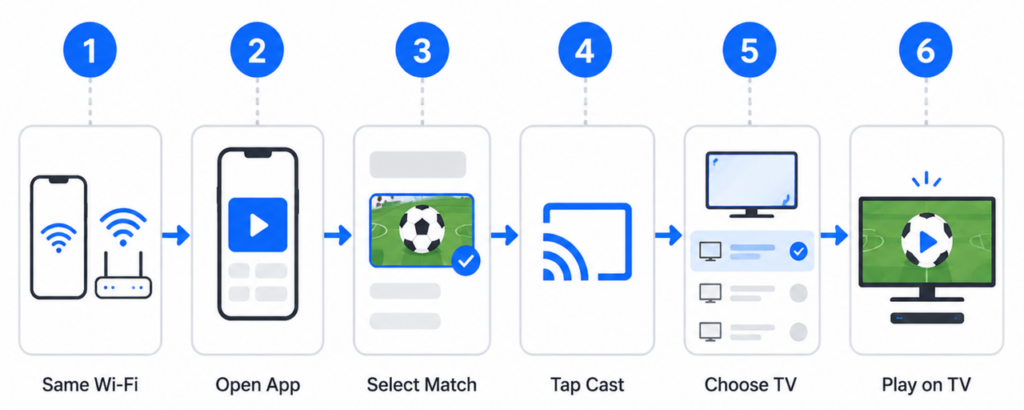
Das Empfangsgerät übernimmt in der Regel die Wiedergabe, während Ihr Smartphone als Steuerung dient. Möglicherweise können Sie das Smartphone sperren oder eine andere App nutzen, ohne das Spiel anzuhalten.
Falls keine „Cast“-Schaltfläche angezeigt wird, sehen Sie bitte auf der Seite zur Geräteunterstützung des Senders nach. Möglicherweise unterstützt der Dienst Google Cast nicht.
Google stellt in seinem eine aktuelle Liste der Anforderungen zur Verfügung Offizieller Casting-Leitfaden.
Methode 2: AirPlay von einem iPhone nutzen
AirPlay funktioniert mit Apple TV und kompatiblen Smart-TVs. Die Video-App muss AirPlay unterstützen, damit ein direktes Streaming möglich ist.
- Verbinden Sie das iPhone und den Fernseher mit demselben WLAN-Netzwerk.
- Öffnen Sie die App des Senders.
- Starte das Spiel.
- Tippen Sie auf die AirPlay-Schaltfläche.
- Wählen Sie Ihr Apple TV oder einen kompatiblen Smart-TV aus.
- Geben Sie den auf dem Fernseher angezeigten Code ein, falls Sie dazu aufgefordert werden.
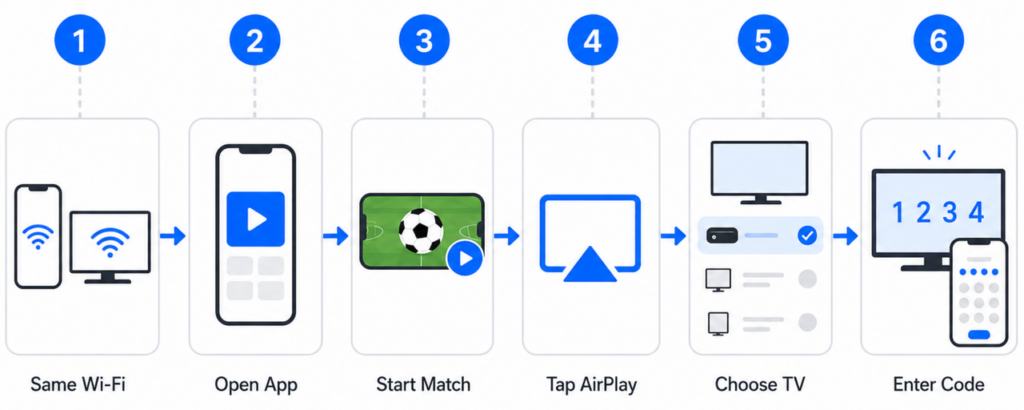
Wenn eine App keine AirPlay-Schaltfläche hat, können Sie das Kontrollzentrum öffnen und “Bildschirmspiegelung” auswählen. Dadurch wird der gesamte iPhone-Bildschirm einschließlich der Benachrichtigungen übertragen.
Einige Sport-Apps blockieren die Vollbild-Spiegelung. Verwenden Sie die offizielle TV-App des Anbieters, falls das Video schwarz angezeigt wird.
Apple beschreibt beide Optionen in seiner Anleitung zu AirPlay und Bildschirmspiegelung.
Methode 3: Von Android aus übertragen oder spiegeln
Android-Hersteller verwenden verschiedene Bezeichnungen für Funktionen zur drahtlosen Bildschirmübertragung. Achten Sie auf Bezeichnungen wie „Cast“, „Screen Cast“, „Smart View“ oder „Wireless Display“.
- Verbinden Sie das Android-Smartphone und den Fernseher mit demselben WLAN-Netzwerk.
- Öffnen Sie die App des Senders.
- Suchen Sie zunächst nach der Schaltfläche „Cast“.
- Falls keine Schaltfläche angezeigt wird, öffnen Sie die Schnelleinstellungen auf dem Smartphone.
- Wählen Sie „Cast“, „Screen Cast“ oder „Smart View“ aus.
- Wählen Sie das Empfangsgerät aus.
- Bestätigen Sie die Anfrage auf dem Fernseher, falls Sie dazu aufgefordert werden.
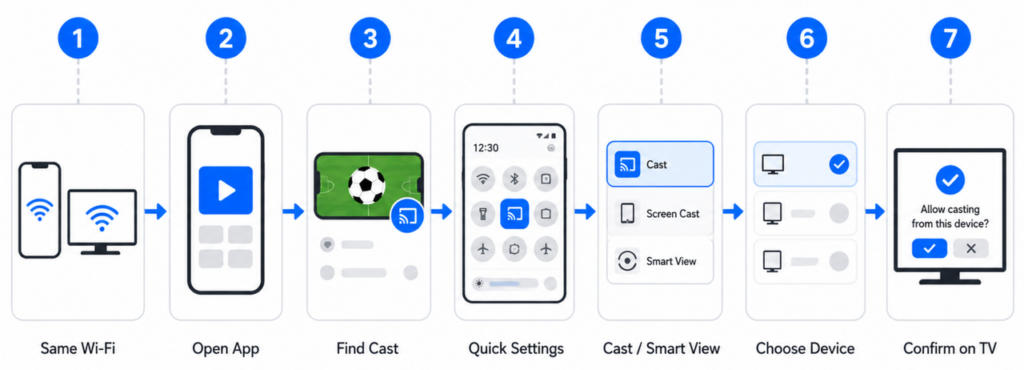
Nutzer eines Samsung Galaxy können den Anweisungen von Samsung folgen Offizielle Smart View-Anleitung.
Google-Pixel-Smartphones nutzen Google Cast für die drahtlose Bildschirmübertragung. Laut Google können Nutzer entweder eine einzelne App oder den gesamten Bildschirm übertragen. Das Pixel 8 und neuere Modelle unterstützen zudem kompatible kabelgebundene Bildschirmverbindungen. Weitere Details finden Sie in der Leitfaden zur Pixelanzeige.
Bei der Vollbild-Spiegelung werden möglicherweise Anrufe und Benachrichtigungen angezeigt. Dies kann auch durch die Regeln zum Schutz von Inhalten des Senders blockiert werden.
Methode 4: Spiegelung mit 1001 TVs
1001 TVs ist nützlich, wenn die integrierten Casting-Optionen nicht übereinstimmen. Die App unterstützt iOS, Android, Windows, macOS und verschiedene Smart-TV-Plattformen.
- Installieren Sie 1001 TVs auf dem Smartphone und dem kompatiblen Empfangsgerät.
- Verbinden Sie beide Geräte mit demselben WLAN-Netzwerk.
- Öffnen Sie „1001 TVs“ auf beiden Bildschirmen.
- Wählen Sie auf dem Smartphone die Option “Bildschirmspiegelung” aus.
- Wählen Sie den Fernseher aus oder scannen Sie den angezeigten QR-Code.
- Bestätigen Sie die Anfrage auf dem empfangenden Gerät.
- Starten Sie die Spiegelung und öffnen Sie anschließend den autorisierten Spiel-Stream.
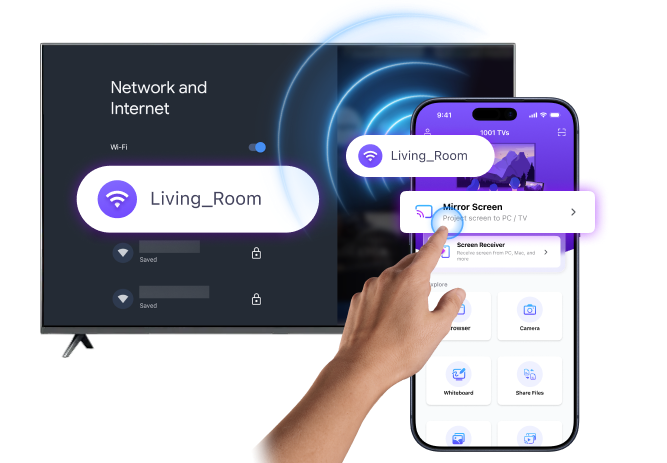
Eine ausführliche Anleitung für das iPhone finden Sie in der 1001 TVs – Anleitung zur iOS-Spiegelung. Nutzer von Android TV können die Produkt- und Einrichtungsseite für Android TV.
Installationsprogramme und Links zum App Store finden Sie unter 1001 TVs-Download-Center.
1001 TVs verbindet kompatible Geräte miteinander. Es bietet keine Übertragungen der Premier League oder Sportabonnements an. Ein Sender kann gespiegelte Videos möglicherweise weiterhin durch DRM-Maßnahmen oder Einschränkungen bei der Bildschirmaufnahme blockieren.
Methode 5: Anschluss über HDMI
Eine HDMI-Verbindung kann Abhilfe schaffen, wenn die drahtlose Wiedergabe instabil ist. Sie funktioniert zudem mit vielen Fernsehern, die nicht über moderne Casting-Funktionen verfügen.
- Prüfen Sie, welchen Anschluss Ihr Telefon verwendet.
- Vergewissern Sie sich, dass das Telefon die Videoausgabe unterstützt.
- Schließen Sie einen kompatiblen Bildschirmadapter an das Telefon an.
- Schließen Sie ein HDMI-Kabel an den Adapter an.
- Stecken Sie das andere Ende in den Fernseher.
- Wählen Sie den entsprechenden HDMI-Eingang am Fernseher aus.
- Öffnen Sie den autorisierten Stream auf dem Smartphone.
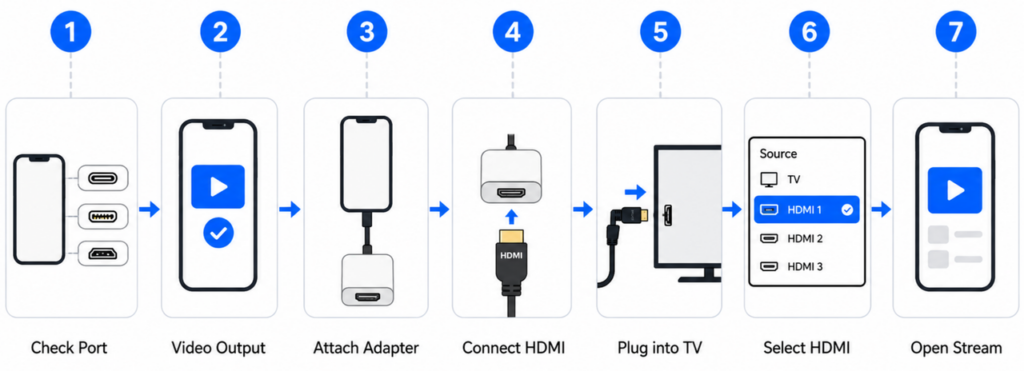
Das iPhone 15 und neuere Modelle verwenden USB-C. Ältere, unterstützte iPhone-Modelle verwenden Lightning. Apple erläutert die verfügbaren Adaptertypen in seiner Anleitung für kabelgebundene Displays.
Die Android-Kompatibilität variiert je nach Modell. Ein USB-C-Ladeanschluss unterstützt nicht automatisch die HDMI-Videoausgabe. Überprüfen Sie vor dem Kauf eines Adapters die technischen Daten des Herstellers.
Ein Kabelanschluss hat keinen Vorrang vor den Inhaltsrichtlinien des Senders. Für geschützte Videos ist möglicherweise weiterhin eine zugelassene App oder ein zugelassenes Empfangsgerät erforderlich.
So erhalten Sie einen flüssigen und zuverlässigen Stream auf Ihrem Fernseher
Falls das Casting oder Spiegeln nicht funktioniert
Verbindungsfehler sind in der Regel auf Probleme bei der Netzwerkerkennung, Geräteberechtigungen, Protokollunterschiede oder Inhaltsbeschränkungen zurückzuführen. Ein schwarzer Bildschirm kann auch darauf hindeuten, dass die Streaming-App die Videospiegelung blockiert.
Eine vollständige Liste der Korrekturen finden Sie unter Bildschirmspiegelung funktioniert nicht? Häufige Ursachen und praktische Lösungen. Dabei geht es um fehlende Geräte, instabile Verbindungen, Berechtigungen im lokalen Netzwerk, Protokollkonflikte und geschützte Inhalte.
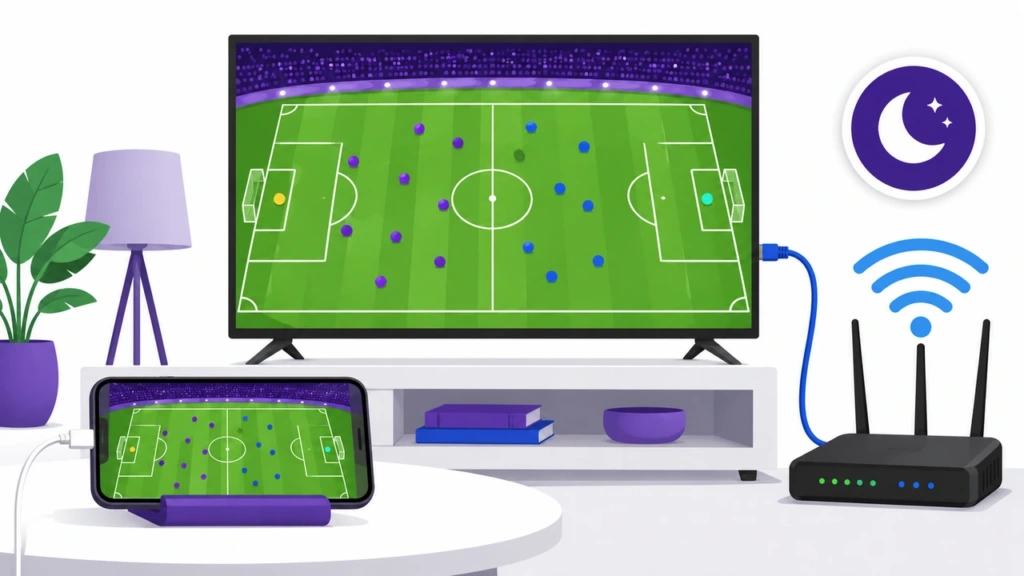
Tipps für ein besseres Spieltagsfoto
- Überprüfen Sie vor Spielbeginn die Stream- und TV-Verbindung.
- Verwenden Sie nach Möglichkeit die „Cast“-Taste des Geräts anstelle der Vollbild-Spiegelung.
- Verbinden Sie beide Geräte mit einem starken 5-GHz-WLAN-Signal, sofern dies unterstützt wird.
- Pausieren Sie Downloads, Cloud-Backups und andere netzwerkintensive Aktivitäten.
- Aktivieren Sie den Modus „Nicht stören“, bevor Sie den gesamten Bildschirm Ihres Smartphones spiegeln.
- Drehen Sie das Smartphone in den Querformatmodus, falls das Bild nicht den gesamten Fernsehbildschirm ausfüllt.
- Schließen Sie das Smartphone bei längeren Spiegelungssitzungen an die Stromversorgung an.
- Verwenden Sie Ethernet für den Fernseher oder HDMI über das Smartphone, falls das WLAN weiterhin instabil ist.
1001 TVs-Nutzer können zudem die Ausgabeauflösung und die Bildrate anpassen. Höhere Einstellungen erfordern eine leistungsfähigere Netzwerkverbindung. Die Leitfaden zur Qualität der Bildschirmspiegelung erläutert die verfügbaren Bedienelemente.
Häufig gestellte Fragen
Kann ich alle Spiele der Premier League über denselben Streaming-Dienst anschauen?
Nicht immer. Die Verfügbarkeit der Spiele hängt von Ihrem Land, dem Sender und Ihrem Abonnement ab. Informieren Sie sich vor Spielbeginn über den aktuellen Sendeplan des Anbieters.
Unterstützen alle Streaming-Apps der Premier League das Casting?
Nein. Einige Apps unterstützen Google Cast oder AirPlay, während andere die Wiedergabe nur auf zugelassenen Geräten ermöglichen. Einzelheiten entnehmen Sie bitte den Geräterichtlinien des Anbieters.
Welche Methode zur Übertragung vom Smartphone auf den Fernseher weist die geringste Verzögerung auf?
Eine kompatible HDMI-Verbindung verursacht in der Regel die geringste lokale Verzögerung. Das direkte Casting über eine App ist oft die beste drahtlose Option. Bei der Vollbild-Spiegelung kann es zu einer höheren Latenz kommen.
Müssen mein Handy und mein Fernseher dasselbe WLAN nutzen?
Ja, bei den meisten drahtlosen Übertragungsmethoden, darunter Google Cast, AirPlay, Smart View und 1001 TVs. In Gastnetzwerken kann es vorkommen, dass sich die Geräte nicht gegenseitig erkennen können.
Warum wird das Spiel auf meinem Fernseher nur als schwarzer Bildschirm angezeigt?
Der Sender verwendet möglicherweise DRM oder einen Schutz gegen Bildschirmaufnahmen. Probieren Sie die offizielle Cast-Funktion oder die Smart-TV-App aus. Versuchen Sie nicht, die Einschränkung zu umgehen.
Kann ich mir das auf meinem Handy auch ohne WLAN ansehen?
Sie können ein kompatibles Smartphone über HDMI anschließen. Das Smartphone benötigt weiterhin mobile Daten oder eine andere Internetverbindung, um den Stream zu laden.
Bietet 1001 TVs Spiele der Premier League an?
Nr. 1001 TVs ist eine App für Bildschirmspiegelung und Geräteverbindung. Sie bietet keine Spielpaarungen, Kanäle oder Streaming-Abonnements an.
Kann ich mein Handy während des Films weiter benutzen?
In der Regel ja, wenn Sie die Übertragung über eine App nutzen. Bei der Vollbild-Spiegelung wird alles angezeigt, was Sie auf dem Smartphone tun, sodass das Gerät nicht privat genutzt werden kann.
Schau dir das nächste Spiel auf einem größeren Bildschirm an
Beginnen Sie mit der „Cast“- oder „AirPlay“-Schaltfläche in der App Ihres Senders. Das ist in der Regel der einfachste Weg, ein Spiel von Ihrem Smartphone auf den Fernseher zu übertragen.
Wenn native Optionen nicht kompatibel sind, Nero 1001 TVs Unterstützte Geräte können über dasselbe WLAN-Netzwerk verbunden werden. HDMI bleibt eine nützliche Alternative für Fernseher mit eingeschränkter WLAN-Unterstützung.
Egal, für welche Methode Sie sich entscheiden: Richten Sie sie vor dem Anpfiff ein. Ein kurzer Test ist viel einfacher als die Fehlersuche, nachdem das Spiel bereits begonnen hat.

Weiterlesen
 So streamen Sie den Super Bowl vom iPhone, Android oder Mac auf den Fernseher im Jahr 2027
Um den Super Bowl von einem iPhone, Android-Smartphone oder Mac auf Ihrem Fernseher anzusehen, nutzen Sie die vom Sender unterstützte AirPlay- oder Google Cast-Funktion,...
So streamen Sie den Super Bowl vom iPhone, Android oder Mac auf den Fernseher im Jahr 2027
Um den Super Bowl von einem iPhone, Android-Smartphone oder Mac auf Ihrem Fernseher anzusehen, nutzen Sie die vom Sender unterstützte AirPlay- oder Google Cast-Funktion,...
 Wie man die FIFA Fussball-Weltmeisterschaft 2026 auf den Fernseher überträgt: AirPlay, Chromecast und mehr
Um WM-Aufnahmen auf Ihren Fernseher zu übertragen, nutzen Sie die von Ihrer Streaming-App unterstützte „Cast“- oder „AirPlay“-Funktion oder eine kompatible HDMI-Verbindung. Apps zur Bildschirmspiegelung...
Wie man die FIFA Fussball-Weltmeisterschaft 2026 auf den Fernseher überträgt: AirPlay, Chromecast und mehr
Um WM-Aufnahmen auf Ihren Fernseher zu übertragen, nutzen Sie die von Ihrer Streaming-App unterstützte „Cast“- oder „AirPlay“-Funktion oder eine kompatible HDMI-Verbindung. Apps zur Bildschirmspiegelung...

