
(Android) Deaktivieren von Audio-Casting standardmäßig in 1001 TVs
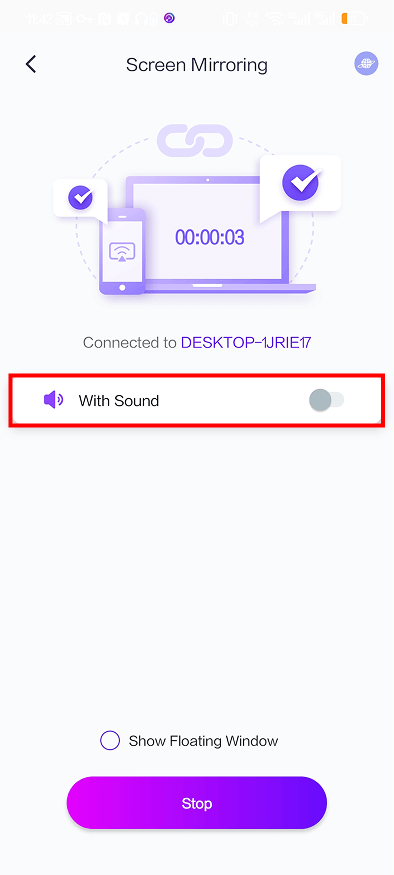
Wenn Sie nicht möchten, dass jedes Mal, wenn Sie Ihren Bildschirm spiegeln, Ton übertragen wird, oder wenn Sie es leid sind, “Audio-Casting” manuell zu deaktivieren, zeigt Ihnen diese Kurzanleitung, wie Sie das Audio-Casting standardmäßig in Nero 1001 TVs.
Befolgen Sie diese drei einfachen Schritte:
❶ Öffnen Sie die 1001 TVs-App und tippen Sie auf das Symbol in der oben links Ecke.
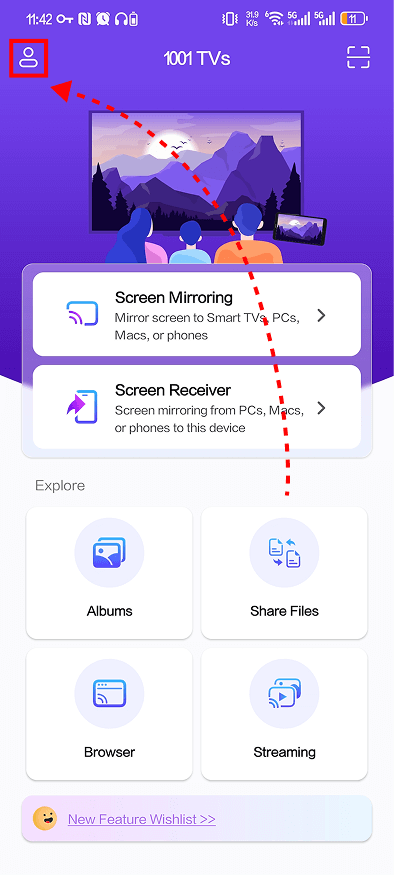
❷ Tippen Sie auf der Seite “Mine” auf Einstellungen spiegeln.

❸ Ausschalten Ton automatisch aktivieren.
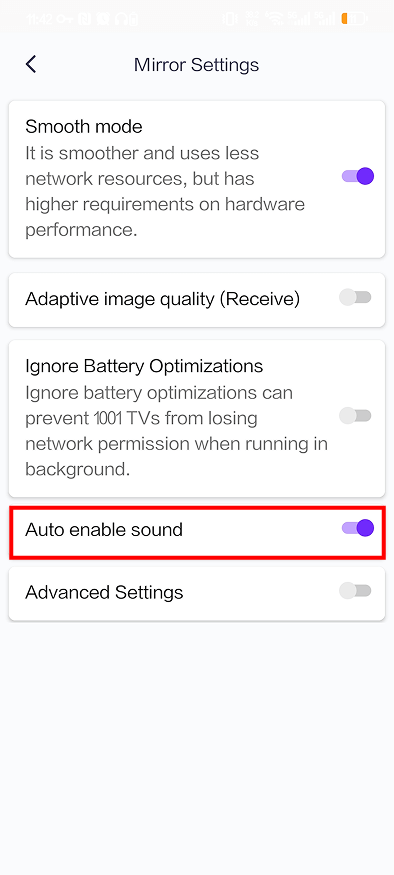
Sobald sie ausgeschaltet ist, bleibt das Audio-Casting erhalten standardmäßig deaktiviert wenn Sie das nächste Mal werfen. Sie müssen es nicht mehr jedes Mal manuell ausschalten.
Weitere Tipps
Weitere Anleitungen zur Bildschirmspiegelung für 1001 TVs finden Sie hier:
👉 https://www.1001tvs.com/guidance/