
اینڈرائیڈ فون یا آئی فون پر اپنی اسکرین کا عکس کیسے لگائیں۔
1. اسی Wi-Fi سے جڑیں:
یقینی بنائیں کہ آپ کا بھیجنے والا آلہ (مثال کے طور پر، PC، Mac، ٹیبلیٹ، یا فون) اور آپ کا وصول کرنے والا آلہ (Android یا iOS فون) ایک ہی Wi-Fi نیٹ ورک سے جڑے ہوئے ہیں۔.
بہترین کارکردگی کے لیے، استعمال کریں a 5 GHz Wi-Fi نیٹ ورک تاخیر کو کم کرنے اور استحکام کو بہتر بنانے کے لیے۔.
2. دونوں آلات پر 1001 TVs انسٹال اور کھولیں۔
📥 میک ایپ: ایپ اسٹور سے ڈاؤن لوڈ کریں۔
📥 پی سی ایپ: سے ڈاؤن لوڈ کریں۔ مائیکروسافٹ اسٹور
تفصیلی اقدامات کے لیے، کا حوالہ دیں۔ پی سی انسٹالیشن گائیڈ
📱 iOS ایپ: ایپ اسٹور سے ڈاؤن لوڈ کریں۔
📱 اینڈرائیڈ ایپ: گوگل پلے سے ڈاؤن لوڈ کریں۔
3. آئینہ لگانا شروع کریں۔
1) فون/آئی پیڈ/اینڈرائیڈ ٹیبلٹ کو فون پر آئینہ کریں
وصول کرنے والے فون پر،تھپتھپائیں۔ “"اسکرین وصول کنندہ"” اور آلہ کو کنکشن کے لیے تیار رکھیں۔.
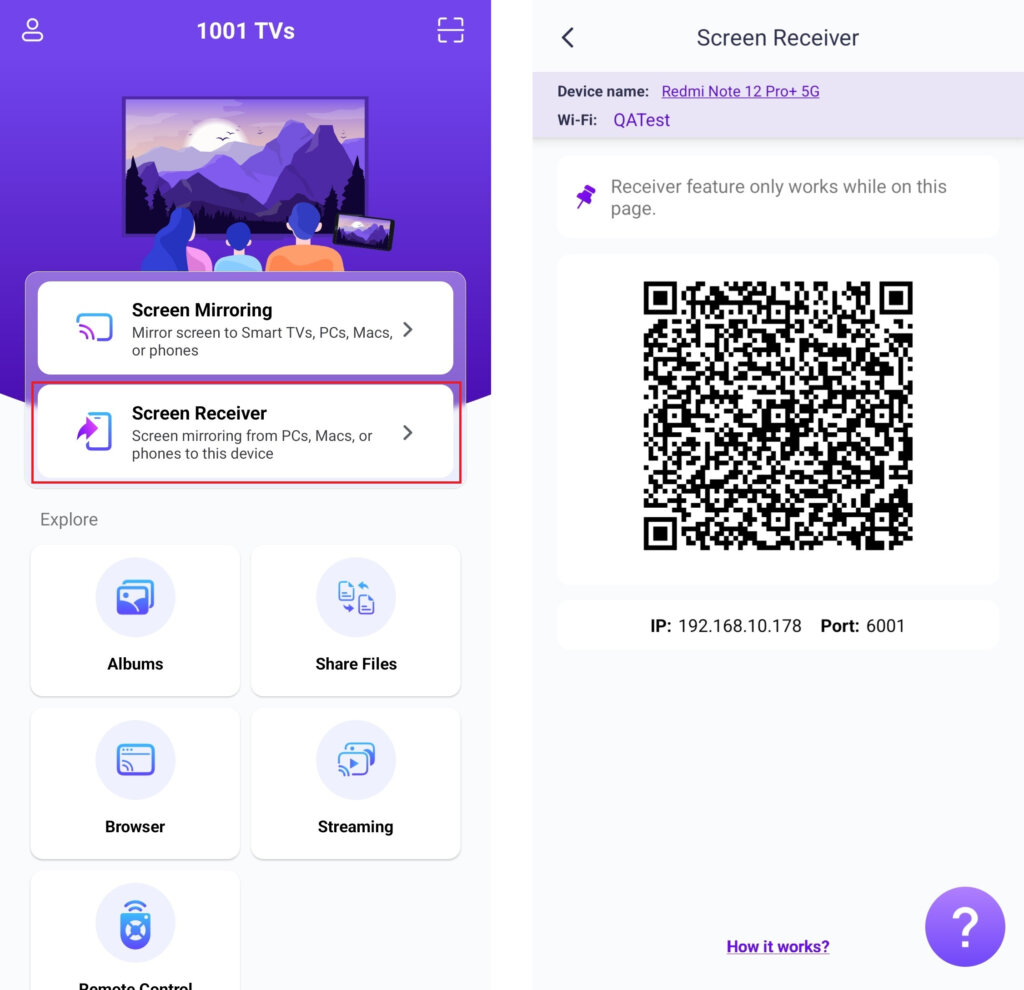
بھیجنے والے فون پر، کنکشن کا طریقہ منتخب کریں:
• QR کوڈ کو ہوم اسکرین پر یا پر اسکین کریں۔ اسکرین مررنگ صفحہ.
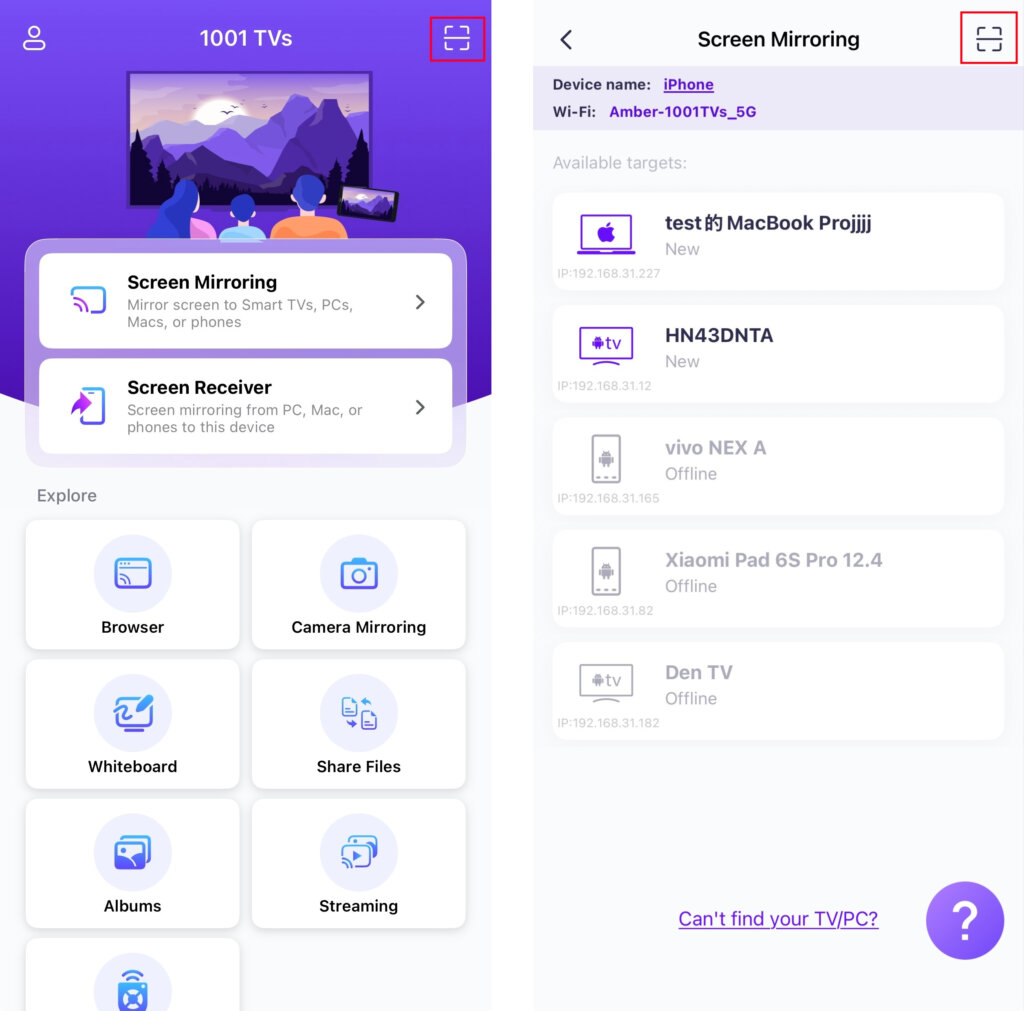
• یا ٹیپ کریں "“سکرین مررنگ"”, ایپ کے دستیاب آلات کا پتہ لگانے کا انتظار کریں، اور اپنے ہدف والے آلے کو منتخب کریں۔.
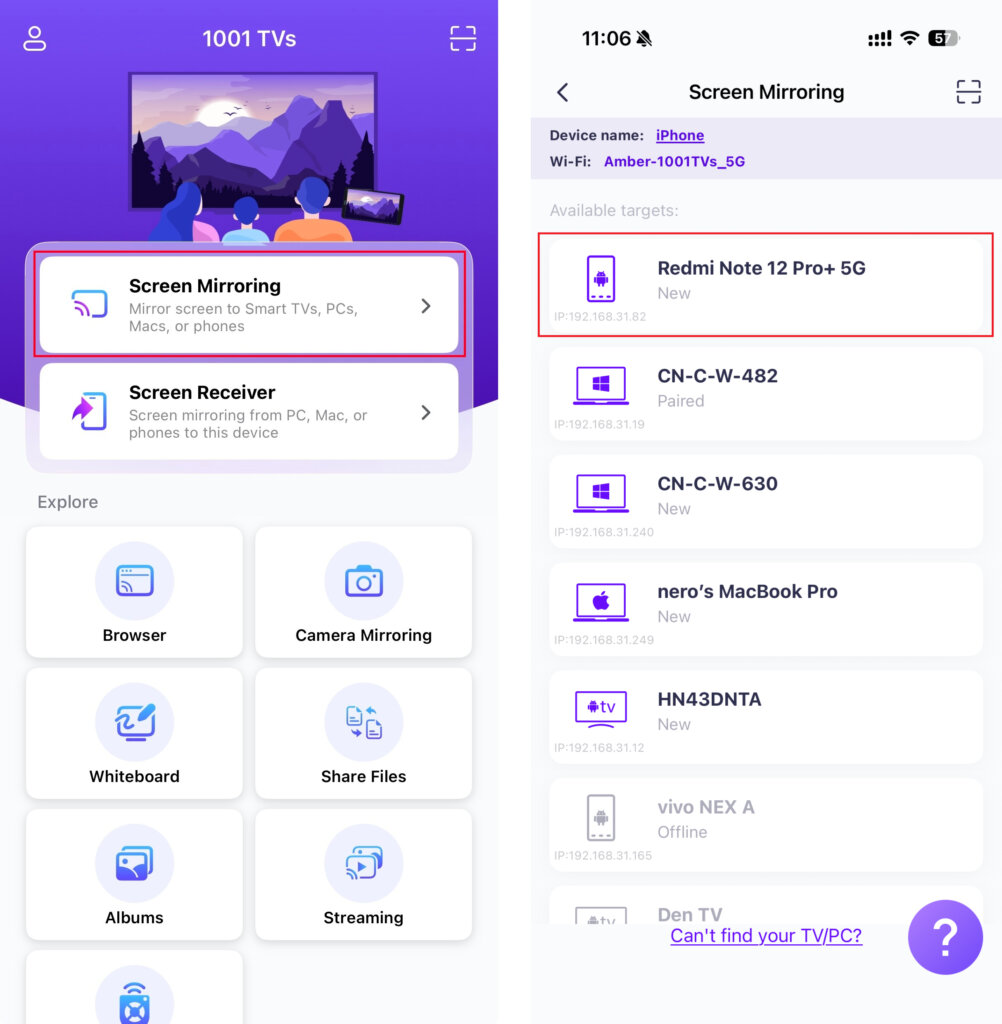
2) کمپیوٹر کو فون پر آئینہ دیں۔
وصول کرنے والے فون پر،تھپتھپائیں۔ “"اسکرین وصول کنندہ"” اور آلہ کو کنکشن کے لیے تیار رکھیں۔.
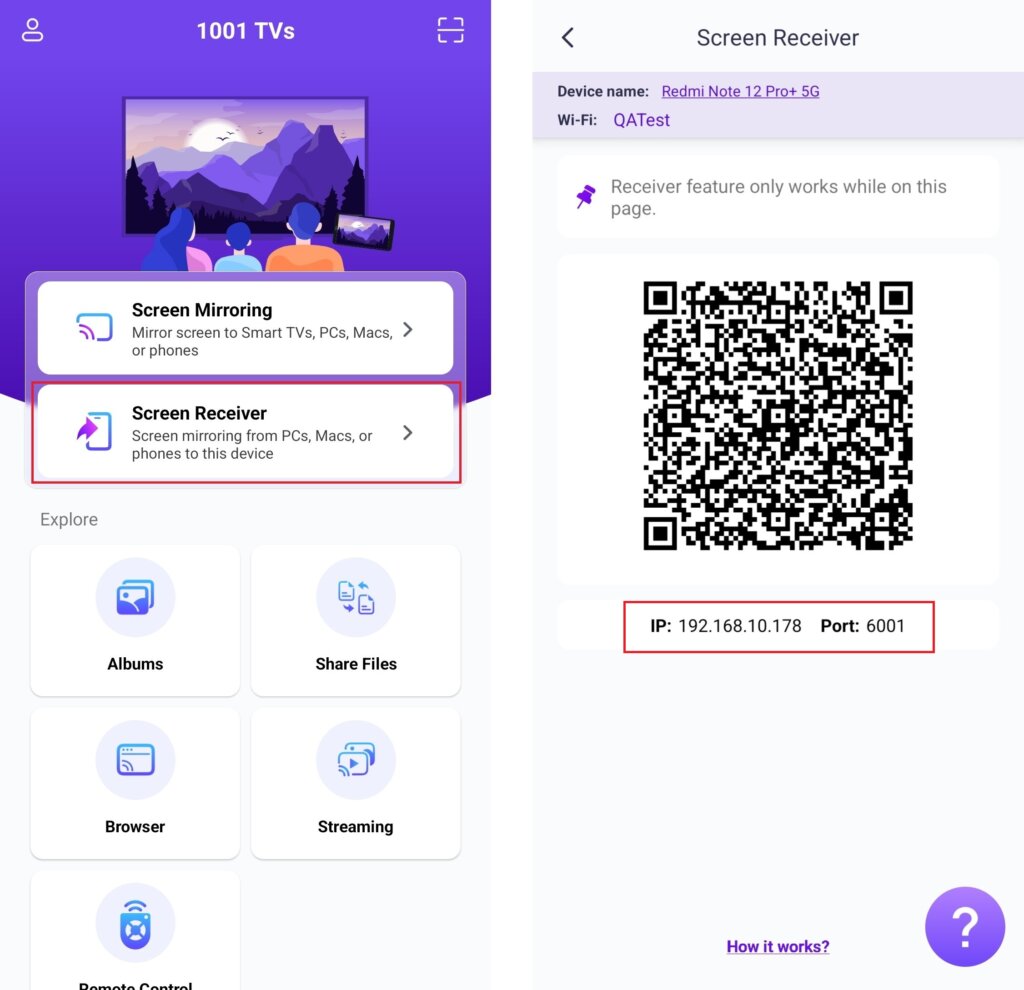
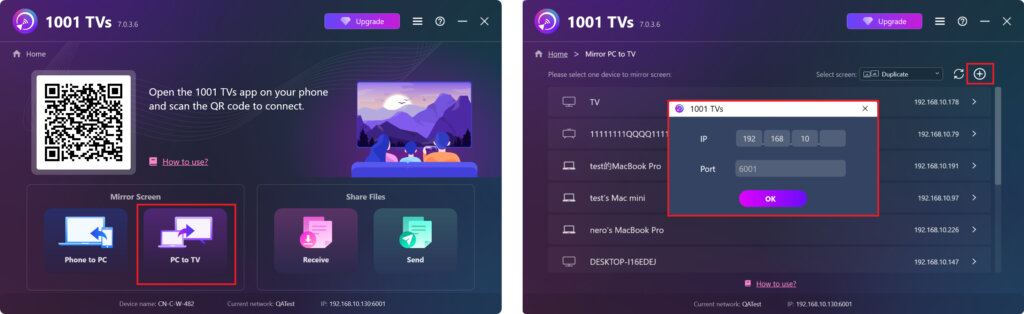
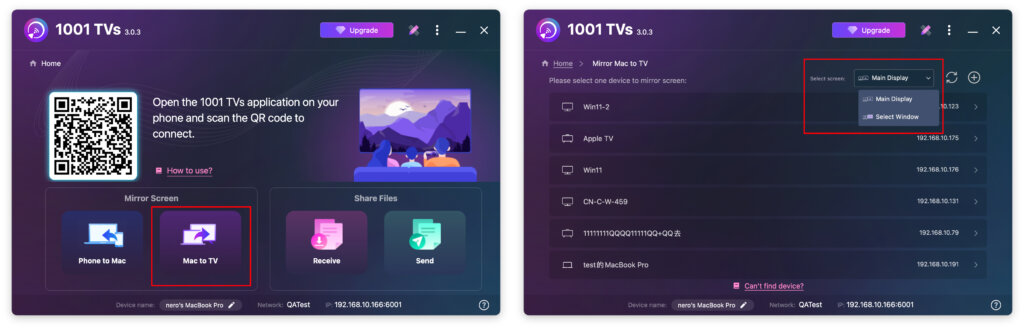
اپنے کمپیوٹر پر، منتخب کریں۔ “"پی سی سے ٹی وی"” یا “"میک سے ٹی وی"”.
پر کلک کریں۔ + آئیکن اوپری دائیں کونے میں، پھر اپنے فون پر دکھایا گیا IP ایڈریس درج کریں۔.
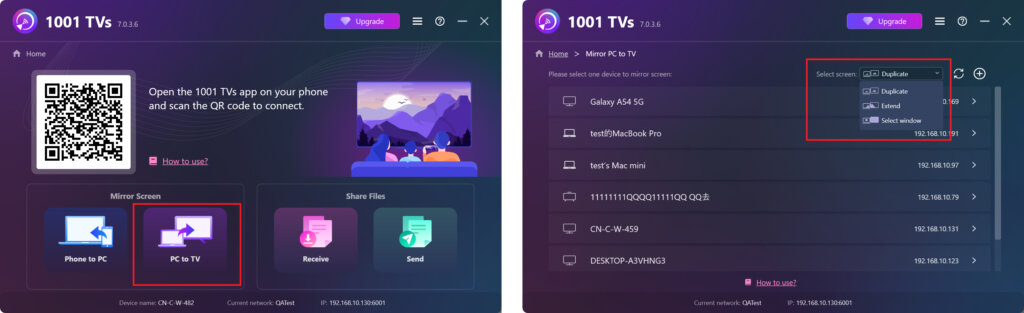
- ونڈوز مندرجہ ذیل اسکرین طریقوں کی حمایت کرتا ہے: “"نقل"“, ”توسیع کریں“, ، یا ”"سلیکٹ ونڈو"“
- میک مندرجہ ذیل اسکرین طریقوں کی حمایت کرتا ہے: ”"مین ڈسپلے"“ یا ”"سلیکٹ ونڈو"“
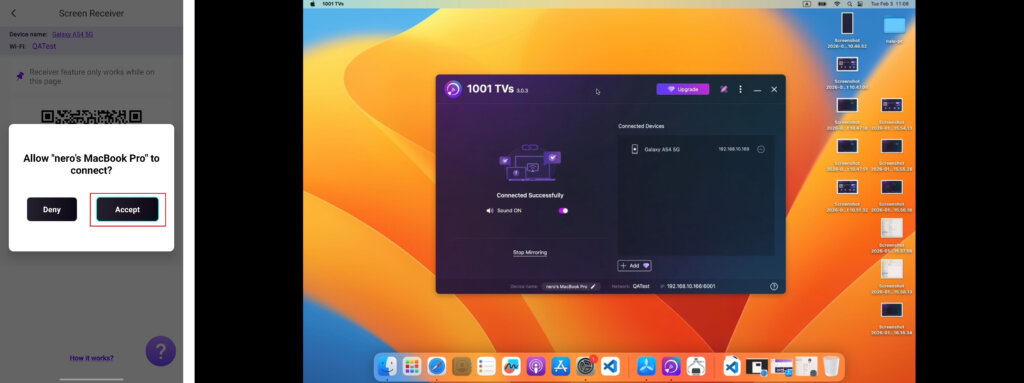
وصول کرنے والے فون پر،تھپتھپائیں۔ ”قبول“ درخواست کی تصدیق اور عکس بندی شروع کرنے کے لیے۔.
ابھی 1001 TVs حاصل کریں۔!
📥 میک ایپ: ایپ اسٹور سے ڈاؤن لوڈ کریں۔
📥 پی سی ایپ: سے ڈاؤن لوڈ کریں مائیکروسافٹ اسٹور
تفصیلی اقدامات کے لیے، کا حوالہ دیں۔ پی سی انسٹالیشن گائیڈ
📱 iOS ایپ: ایپ اسٹور سے ڈاؤن لوڈ کریں۔
📱 اینڈرائیڈ ایپ: گوگل پلے سے ڈاؤن لوڈ کریں۔