
1001 TVs البمز: صرف تصاویر ہی نہیں – ویڈیوز بھی اپ لوڈ کریں! عمودی ویڈیوز کے لیے بہترین سپورٹ
بڑی اسکرین پر اپنی پسندیدہ ویڈیوز سے لطف اندوز ہونا چاہتے ہیں؟ 1001 TVs' کے ساتھ’ البمز خصوصیت، آپ آسانی سے اپنے فون سے اپنے TV پر ویڈیوز اپ لوڈ کر سکتے ہیں اور انہیں کسی بھی وقت چلا سکتے ہیں۔ آپ کو شروع کرنے کے لیے یہاں ایک مرحلہ وار گائیڈ ہے۔.
آپ کو کیا ضرورت ہو گی۔
شروع کرنے سے پہلے، یقینی بنائیں کہ آپ کے پاس ہے:
- 1001 TVs ایپ آپ کے فون پر انسٹال ہے (یہاں سے ڈاؤن لوڈ کریں۔)
- 1001 TVs ایپ آپ کے ٹی وی پر انسٹال ہے۔
- دونوں ڈیوائسز ایک ہی Wi-Fi نیٹ ورک سے منسلک ہیں۔
مرحلہ وار گائیڈ
مرحلہ 1: اپنے فون پر البمز کھولیں۔
لانچ کریں۔ 1001 TVs ایپ اپنے فون پر اور ٹیپ کریں۔ 【البمز】 مرکزی سکرین سے۔.
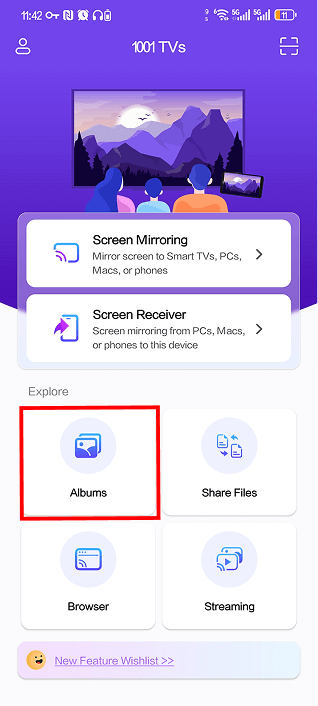
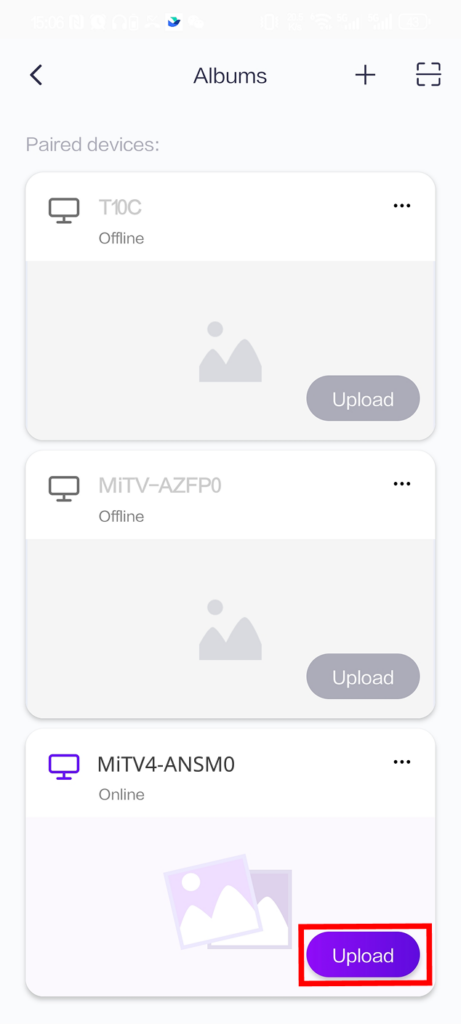
مرحلہ 2: اپنا ٹی وی ڈیوائس منتخب کریں۔
آپ کو "جوڑا بنانے والے آلات" کے تحت جوڑا بنائے گئے آلات کی فہرست نظر آئے گی۔ اپنا TV تلاش کریں اور ٹیپ کریں۔ 【اپ لوڈ کریں】 اس کے آگے بٹن.
نوٹ: اگر آپ کا TV "آف لائن" دکھاتا ہے، تو یقینی بنائیں کہ دونوں آلات ایک ہی Wi-Fi نیٹ ورک پر ہیں اور TV ایپ چل رہی ہے۔.
مرحلہ 3: اپ لوڈ کرنے کے لیے ویڈیوز کا انتخاب کریں۔
وہ ویڈیوز منتخب کریں جنہیں آپ اپنے فون کی گیلری سے اپ لوڈ کرنا چاہتے ہیں۔ آپ ایک ساتھ متعدد ویڈیوز منتخب کر سکتے ہیں۔ تیار ہونے پر، تھپتھپائیں۔ 【اپ لوڈ کریں】 اسکرین کے نیچے۔.
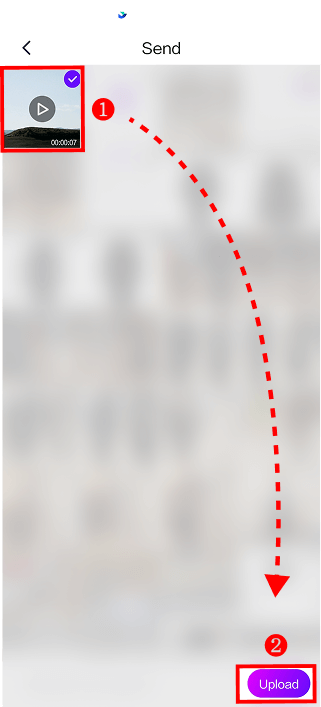
اپ لوڈ خود بخود شروع ہو جائے گا۔ آپ کے ویڈیو کے سائز اور Wi-Fi کی رفتار پر منحصر ہے، اس میں کچھ لمحے لگ سکتے ہیں۔.
مرحلہ 4: اپنے TV پر البمز تک رسائی حاصل کریں۔
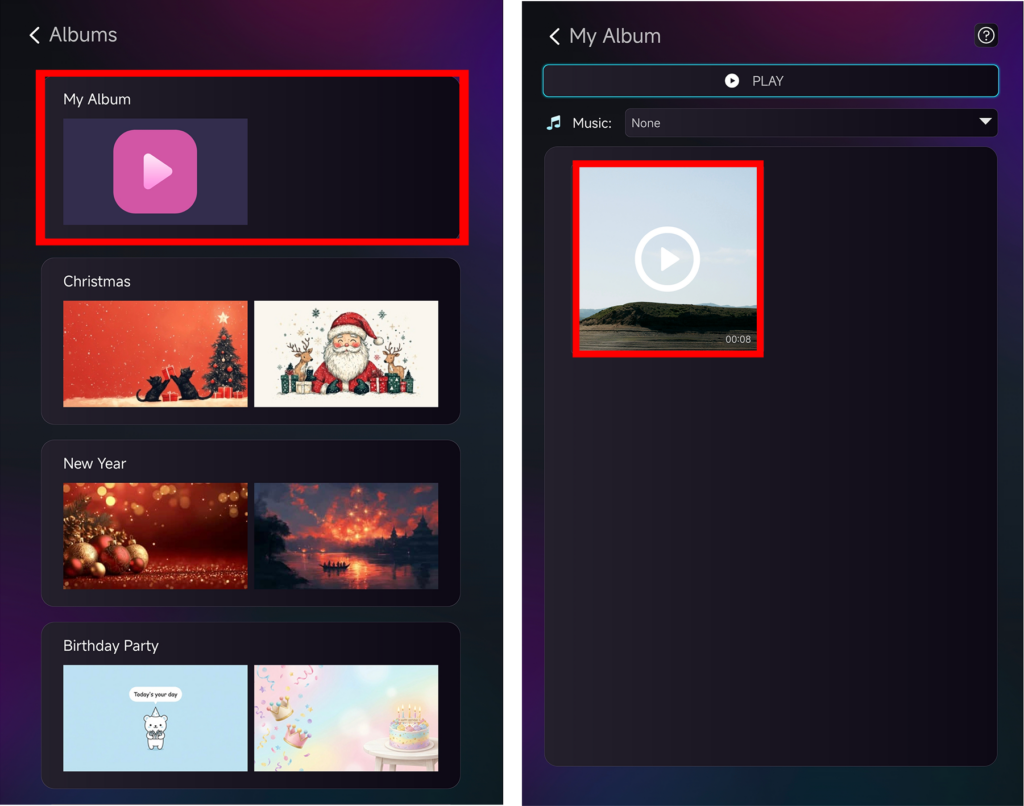
اپنے TV پر، کھولیں۔ 1001 TVs ایپ اور منتخب کریں 【البمز】 مین مینو سے۔.
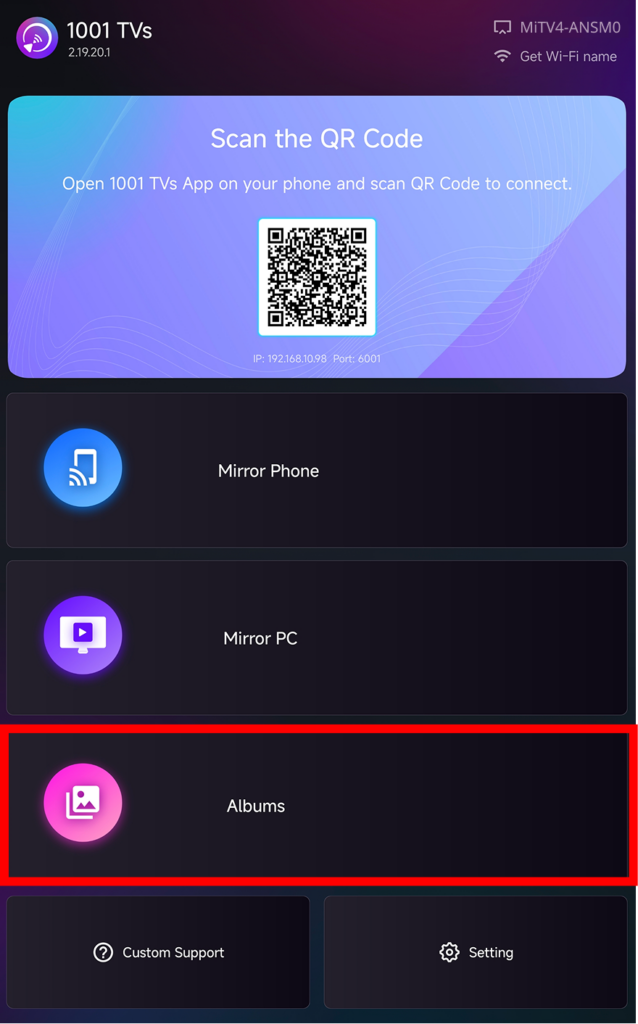
مرحلہ 5: اپنے ویڈیوز دیکھیں اور چلائیں۔
آپ کی اپ لوڈ کردہ ویڈیوز اس میں ظاہر ہوں گی۔ 【میرا البم】. آپ انہیں مختلف زمروں میں بھی ترتیب دے سکتے ہیں جیسے کرسمس، نیو ایئر، یا برتھ ڈے پارٹی۔.
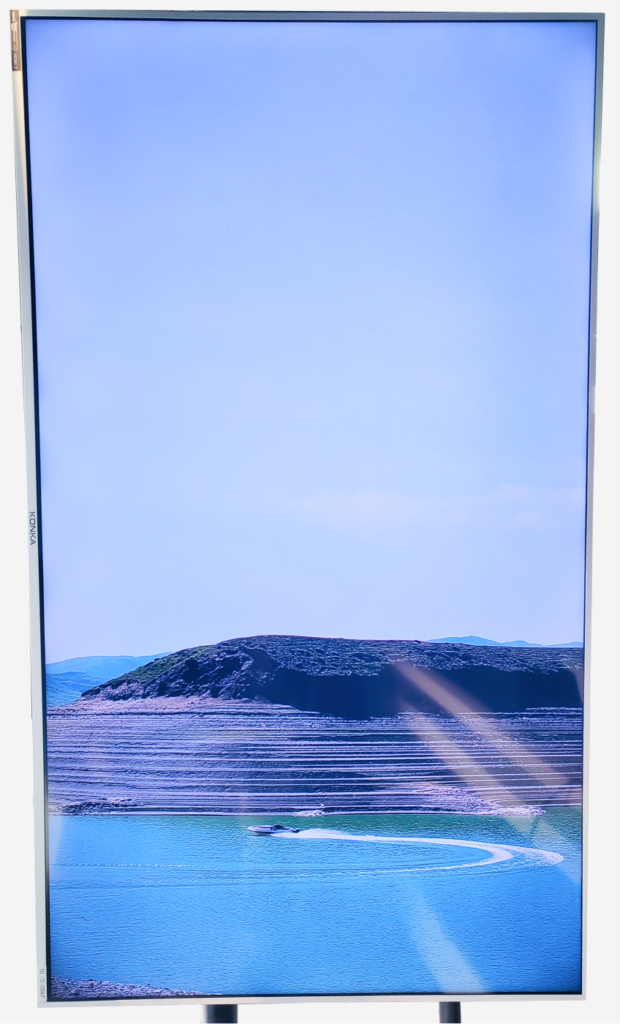
کسی بھی ویڈیو کو اپنی TV اسکرین پر چلانا شروع کرنے کے لیے اس پر کلک کریں!
نتائج چیک کریں - بہت اچھا لگتا ہے، ہے نا!
اضافی گائیڈز
📱 اپنے فون کو عمودی موڈ میں عکس بند کرنے کا طریقہ نہیں جانتے؟ اس ٹیوٹوریل پر عمل کریں:
👉 ٹی وی پر عمودی اسکرین کا عکس کیسے لگائیں۔
(افقی عکس بندی کا عمل وہی ہے جو اوپر دی گئی گائیڈ ہے)
✂️ سیاہ سلاخوں کو ہٹانا چاہتے ہیں؟ اپنے دیکھنے کے تجربے کو بہتر بنائیں:
👉 عمودی اسکرین کی عکس بندی کرتے وقت سیاہ سلاخوں کو کیسے ہٹایا جائے۔
خرابی کا سراغ لگانا
میرا TV آلہ نہیں دیکھ سکتا؟
- یقینی بنائیں کہ دونوں ڈیوائسز ایک ہی Wi-Fi نیٹ ورک پر ہیں۔.
- فون اور TV ایپس دونوں کو دوبارہ شروع کریں۔.
اپ لوڈ ناکام ہو گیا؟
- اپنے Wi-Fi کنکشن کی استحکام کو چیک کریں۔.
- پہلے چھوٹی فائلیں اپ لوڈ کرنے کی کوشش کریں۔.
ویڈیو نہیں چلے گی؟
- تصدیق کریں کہ ویڈیو فارمیٹ تعاون یافتہ ہے۔.
مدد کی ضرورت ہے؟
اگر آپ کو کوئی مسئلہ درپیش ہے تو بلا جھجھک ہماری سپورٹ ٹیم سے رابطہ کریں:
مزید گائیڈز: ہمارا گائیڈنس پیج وزٹ کریں۔
ای میل: 1001tvs@nero.com
ویب سائٹ: www.1001tvs.com