اینڈرائیڈ ٹی وی پر عمودی اسکرین موڈ: بڑی اسکرین پر آئینہ، شیئر اور لطف اٹھائیں۔
1001 TVs کے ساتھ، آپ اب روایتی افقی عکس بندی تک محدود نہیں ہیں۔.
اب آپ اپنے Android TV پر مکمل طور پر بہتر بنائے گئے عمودی دیکھنے کے تجربے سے لطف اندوز ہو سکتے ہیں۔.
چاہے آپ مختصر ویڈیوز دیکھ رہے ہوں، سوشل میڈیا براؤز کر رہے ہوں، البمز شیئر کر رہے ہوں، یا فائلیں منتقل کر رہے ہوں، 1001 TVs بڑی اسکرین پر ہر چیز کو ہموار اور آسان بنا دیتا ہے۔.
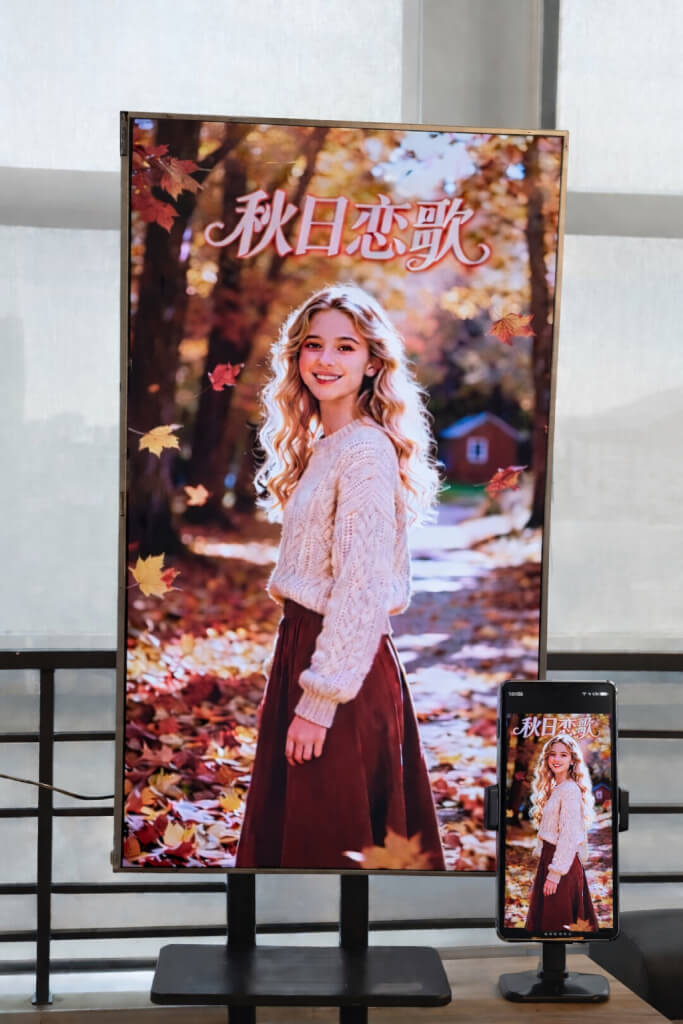
1. اپنے Android TV پر 1001 TVs انسٹال کریں۔
ڈاؤن لوڈ اور انسٹال کریں۔ 1001 TVs ایپ آپ کے فون اور Android TV دونوں پر۔.
یقینی بنائیں کہ آپ کا TV اور موبائل ڈیوائس ایک ہی Wi-Fi نیٹ ورک سے جڑے ہوئے ہیں۔.
📥 ٹی وی ایپ: اپنے ٹی وی پر 1001 TVs کیسے انسٹال کریں۔
📱 iOS ایپ: ایپ اسٹور سے ڈاؤن لوڈ کریں۔
📱 اینڈرائیڈ ایپ: گوگل پلے سے ڈاؤن لوڈ کریں۔
اپنے TV پر 1001 TVs ایپ کھولیں اور پر جائیں۔ ترتیب.
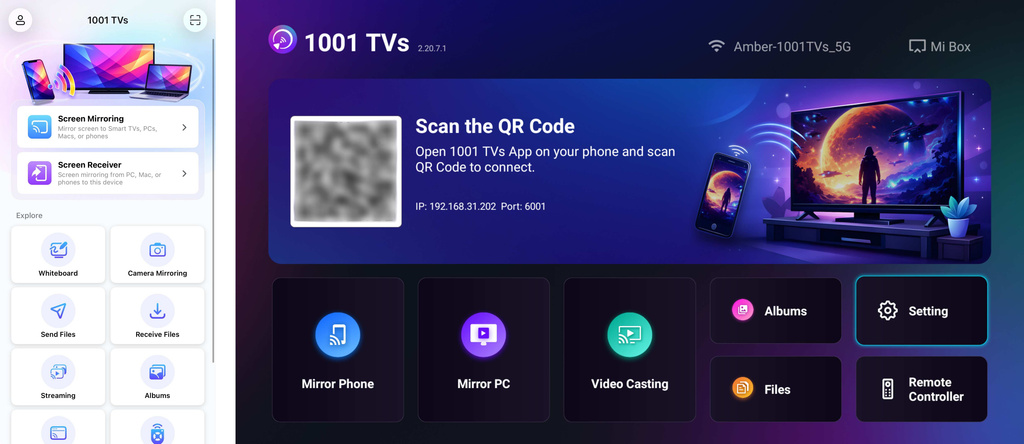
2. اسکرین کی سمت کو ایڈجسٹ کریں۔
میں ترتیب, ، منتخب کریں۔ زاویہ کو ایڈجسٹ کریں۔.
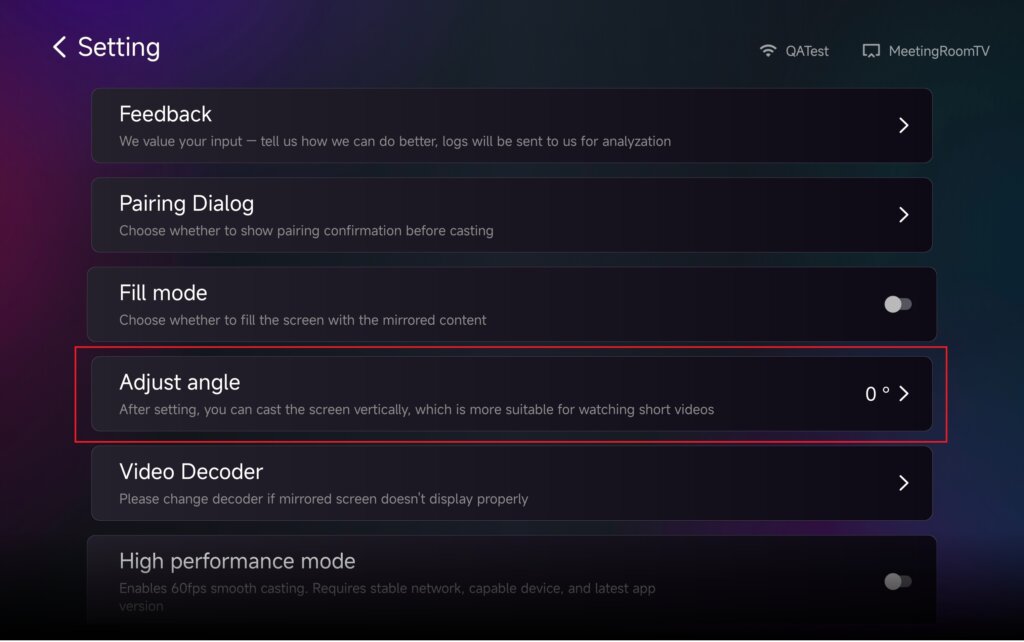
اپنی ضروریات کی بنیاد پر عمودی وضع کو فعال کرنے کے لیے زاویہ کو ایڈجسٹ کریں۔.
زاویہ تبدیل کرنے کے بعد، براہ مہربانی دوبارہ شروع کریں تبدیلیوں کو لاگو کرنے کے لیے ایپ۔.
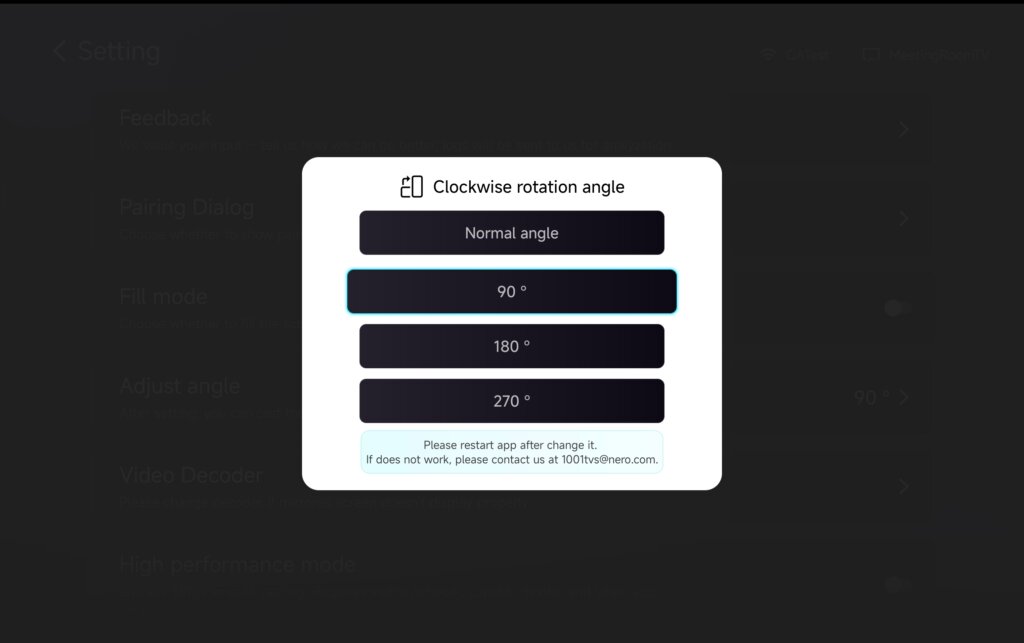
3. عکس بندی، فائلوں کی منتقلی اور البمز کے ساتھ عمودی موڈ استعمال کریں۔
اسکرین مررنگ
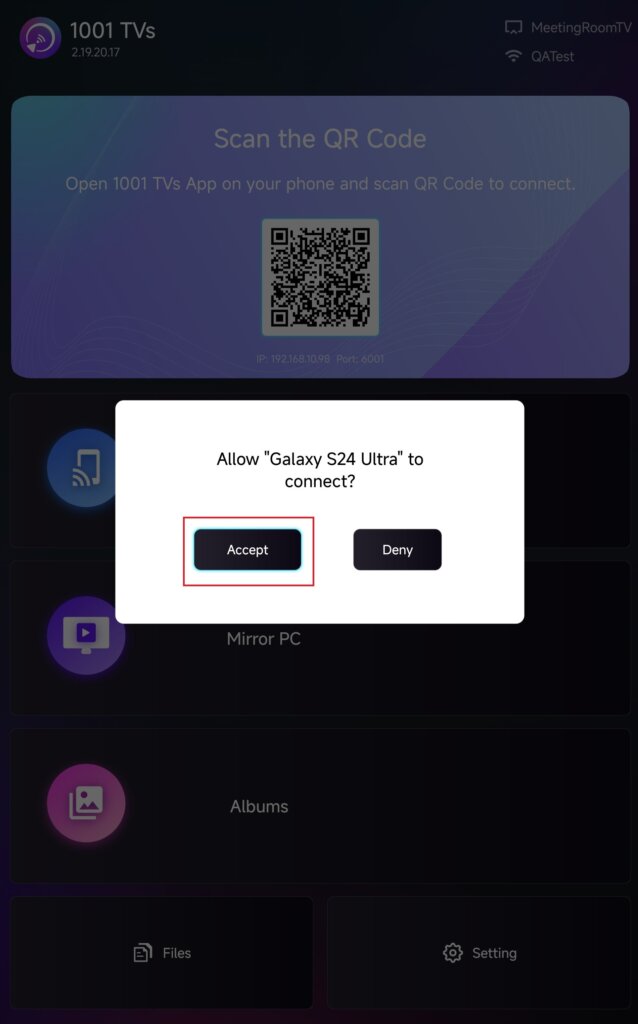
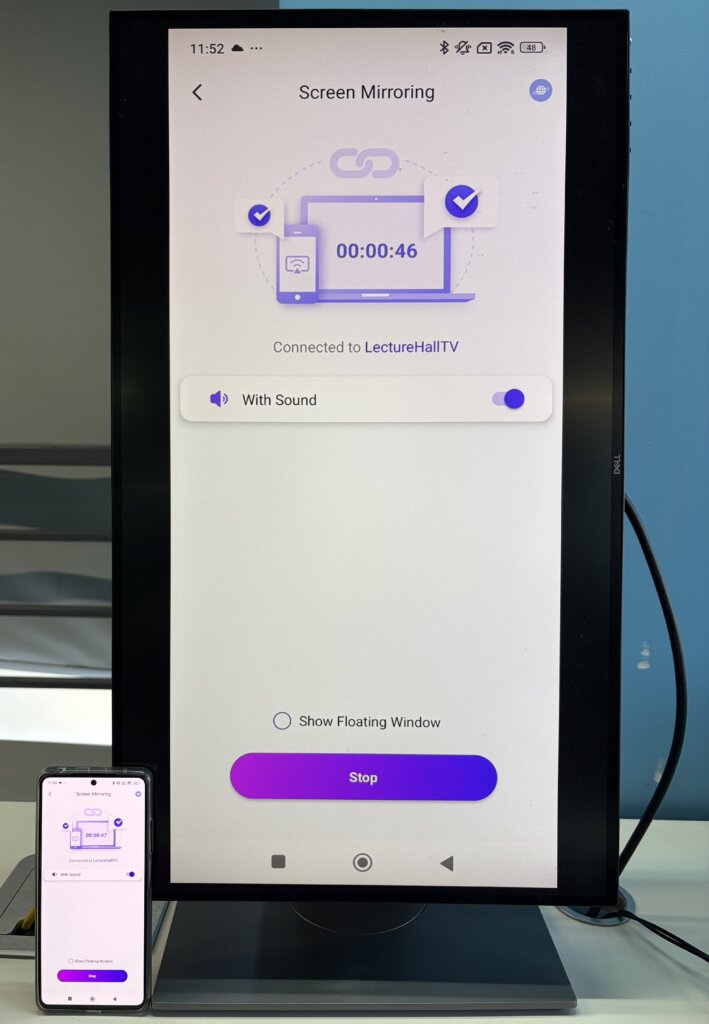
ڈیوائس کی فہرست سے اپنا TV منتخب کریں، یا اپنی TV اسکرین پر دکھائے گئے QR کوڈ کو اسکین کریں۔.
جڑ جانے کے بعد، تھپتھپائیں۔ قبول کریں۔ اپنے ٹی وی پر عکس بند کرنا شروع کریں۔.
فائلیں بھیجیں۔
کنکشن قائم کرنے کے لیے آلہ کی فہرست سے اپنا TV منتخب کریں۔.
پھر ٹیپ کریں۔ بھیجیں۔ اور ان فائلوں کا انتخاب کریں جنہیں آپ منتقل کرنا چاہتے ہیں۔.
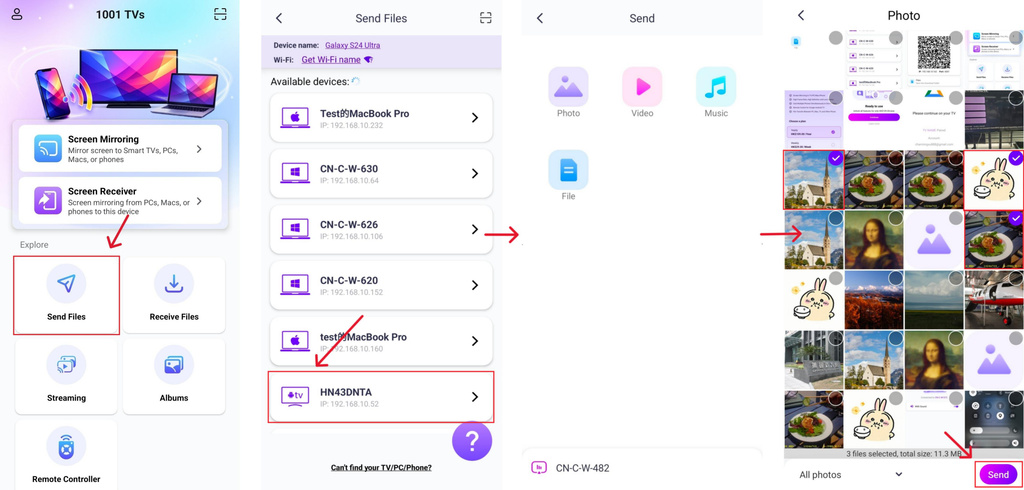
فائلیں براہ راست آپ کے TV پر پہنچائی جائیں گی اور کھلنے کے لیے تیار ہیں۔.
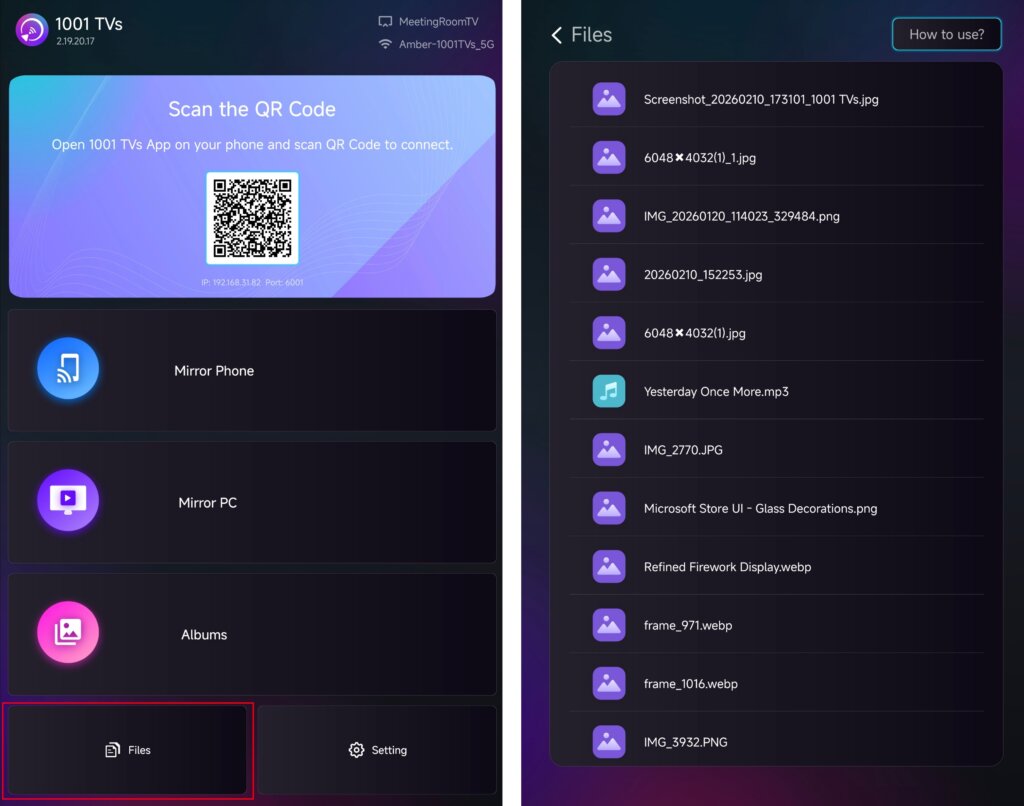
تفصیلی ہدایات کے لیے، ٹیوٹوریل دیکھیں: اپنے فون سے ٹی وی پر فائلیں بھیجیں۔
البمز
ڈیوائس کی فہرست سے اپنا TV منتخب کریں اور اپنے فون سے اپنی تصاویر یا ویڈیوز اپ لوڈ کریں۔.
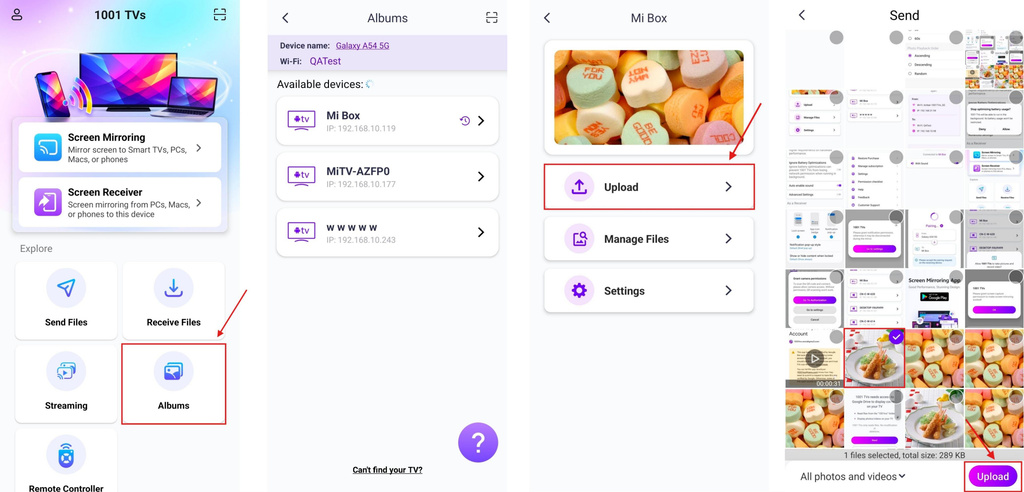
اپنے TV پر، کھولیں۔ البمز کسی بھی وقت اپ لوڈ کردہ مواد کو براؤز کرنے اور چلانے کے لیے۔.
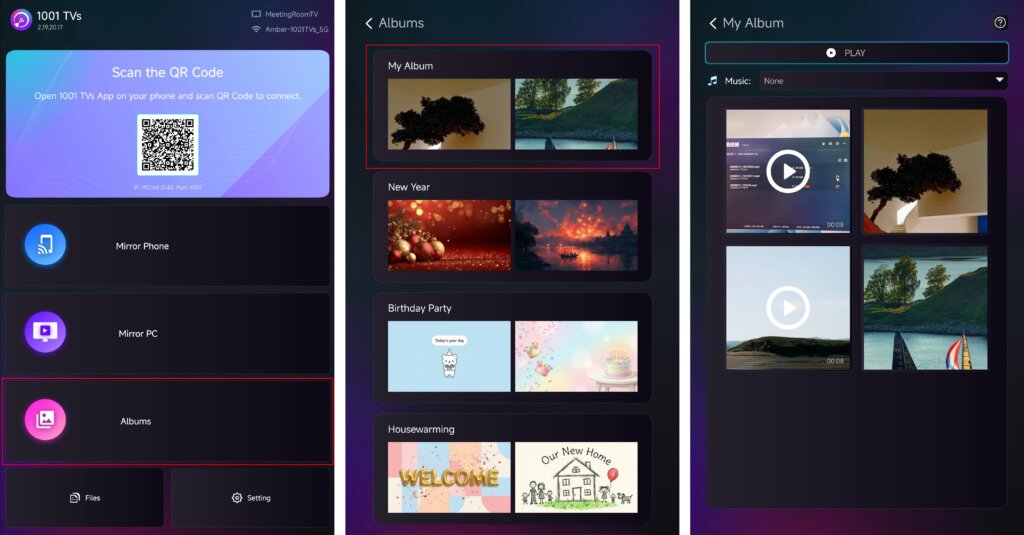
تفصیلی ہدایات کے لیے، ٹیوٹوریل دیکھیں: ہوم سلائیڈ شو/فیملی البم کو فون سے ٹی وی پر کیسے شیئر کریں۔
سلسلہ بندی
✅ Android TV 2.20.2.0+ پر تعاون یافتہ
ڈیوائس کی فہرست سے اپنا TV منتخب کریں اور وہ مواد منتخب کریں جسے آپ اسٹریم کرنا چاہتے ہیں۔.
میڈیا آپ کے ٹی وی پر خود بخود چلنا شروع ہو جائے گا، جس سے آپ بڑی اسکرین پر اس سے لطف اندوز ہو سکیں گے۔.
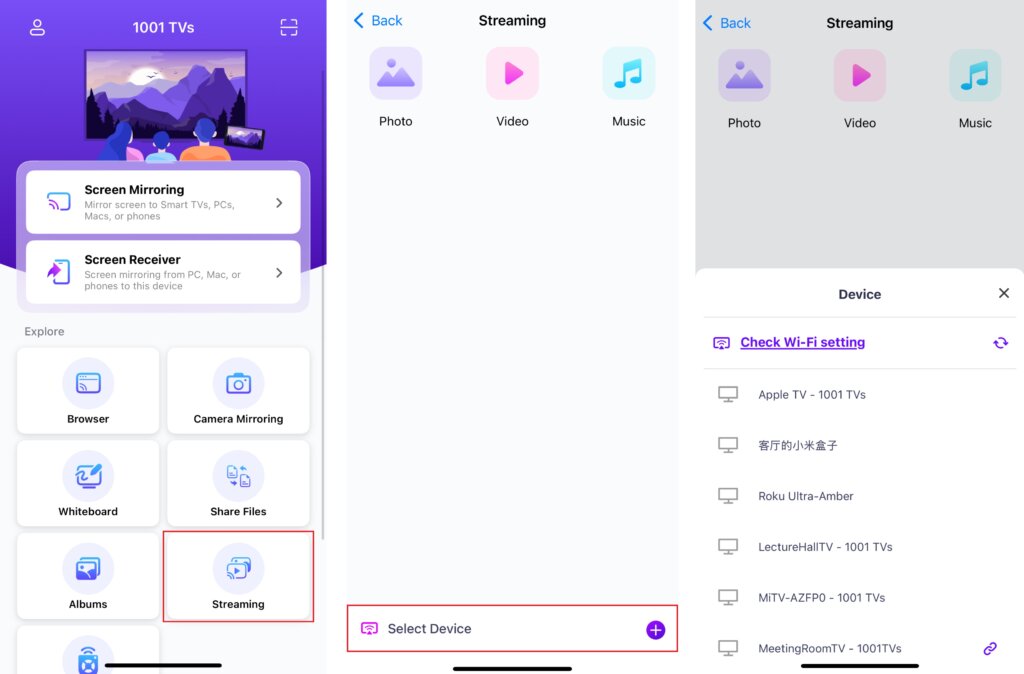
تفصیلی ہدایات کے لیے، ٹیوٹوریل دیکھیں: میڈیا فائلوں کو فون سے ٹی وی تک کیسے سٹریم کریں۔
4. اسکرین کے مواد کا سائز تبدیل کریں۔
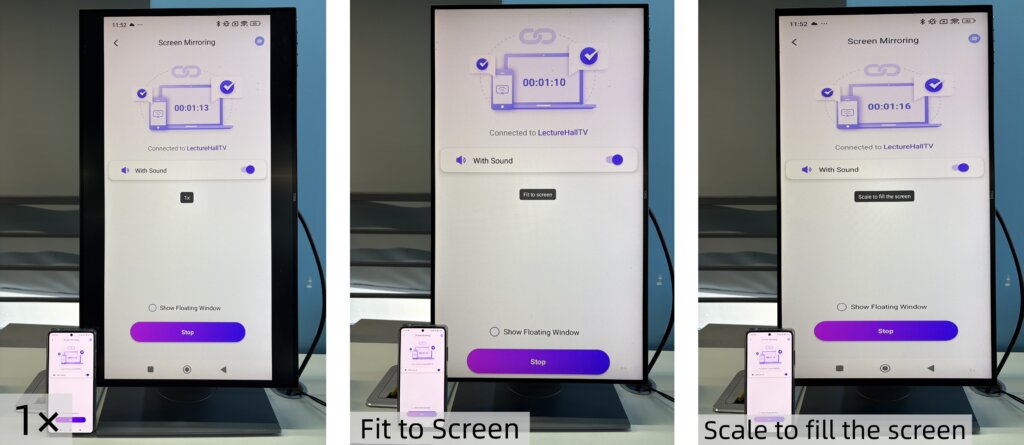
ڈسپلے کردہ مواد کے سائز کو ٹھیک کرنے کے لیے، دبائیں۔ اوپر اور نیچے آپ کے ٹی وی ریموٹ پر بٹن۔.
آپ درج ذیل ڈسپلے موڈز کے درمیان سوئچ کر سکتے ہیں:
- 1 × - اصل سائز میں ڈسپلے کریں۔
- اسکرین پر فٹ کریں۔ - اصل پہلو تناسب کو برقرار رکھتے ہوئے اسکرین کو بھرنے کے لیے خودکار طور پر سائز تبدیل کرتا ہے۔
- اسکرین کو بھرنے کے لیے اسکیل کریں۔ - اسکرین کو مکمل طور پر بھرنے کے لیے تصویر کو کھینچتا ہے۔
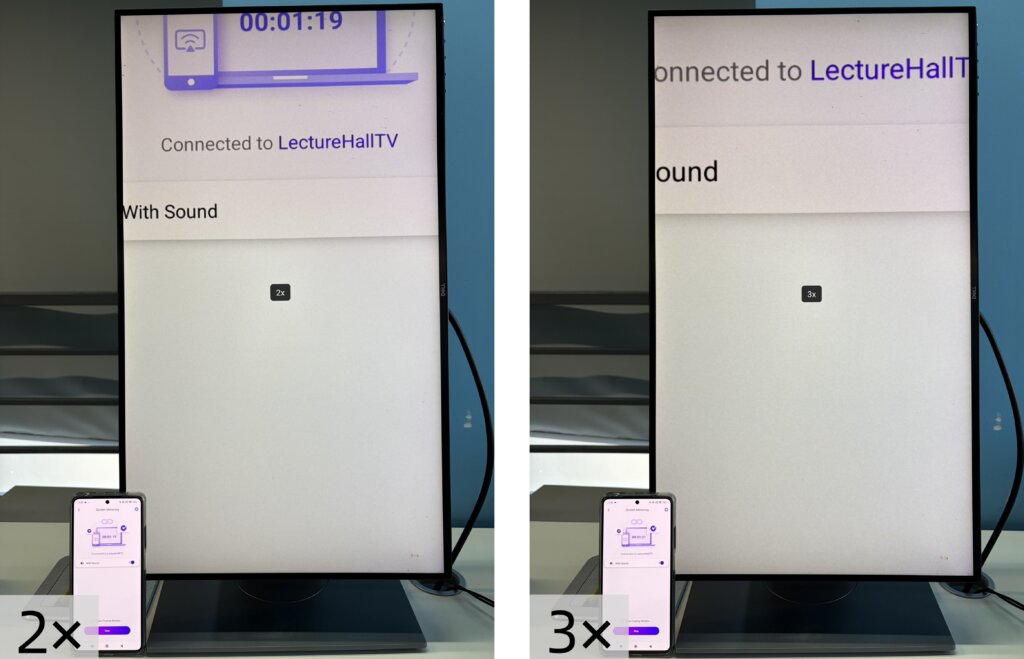
- 2×/3× - قریب سے دیکھنے کے لیے زوم ان کریں۔
وہ ڈسپلے موڈ منتخب کریں جو آپ کی دیکھنے کی ضروریات کے مطابق ہو۔.
نوٹ:
سائز تبدیل کرنے کے طریقوں کو مکمل طور پر تعاون یافتہ ہے۔ اسکرین مررنگ.
میں ان کی حمایت نہیں کی جاتی ہے۔ سلسلہ بندی.
میں فائلیں اور البمز, ، 2× اور 3× زوم دستیاب نہیں ہیں۔.
5. عمودی موڈ کا لطف اٹھائیں۔
آپ بالکل تیار ہیں۔ عمودی موڈ میں عکس بندی یا مواد کا اشتراک شروع کریں اور اپنے TV پر دیکھنے کے ایک نئے تجربے سے لطف اٹھائیں۔.
ابھی 1001 TVs حاصل کریں۔!
📥 ٹی وی ایپ: اپنے ٹی وی پر 1001 TVs کیسے انسٹال کریں۔
📱 iOS ایپ: ایپ اسٹور سے ڈاؤن لوڈ کریں۔
📱 اینڈرائیڈ ایپ: گوگل پلے سے ڈاؤن لوڈ کریں۔

مزید پڑھیں
 iOS: اسکرین مررنگ کے دوران غائب ایپ نوٹیفیکیشنز کو کیسے ٹھیک کریں
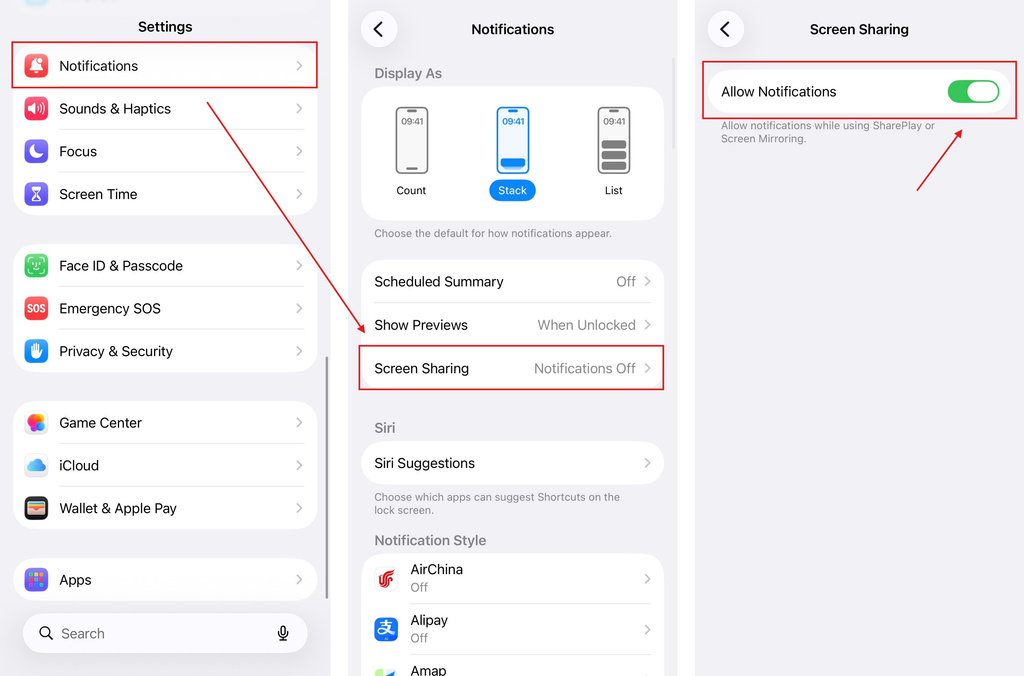
جب آپ اپنا iPhone اسکرین مرر کرتے ہیں تو دوسری ایپس کے نوٹیفیکیشنز مرر شدہ اسکرین پر ظاہر نہیں ہوتے۔ یہ ہو سکتا ہے…
iOS: اسکرین مررنگ کے دوران غائب ایپ نوٹیفیکیشنز کو کیسے ٹھیک کریں
جب آپ اپنا iPhone اسکرین مرر کرتے ہیں تو دوسری ایپس کے نوٹیفیکیشنز مرر شدہ اسکرین پر ظاہر نہیں ہوتے۔ یہ ہو سکتا ہے…
 'Enable Virtual ID Required' پاپ اپ کو کیسے ٹھیک کریں
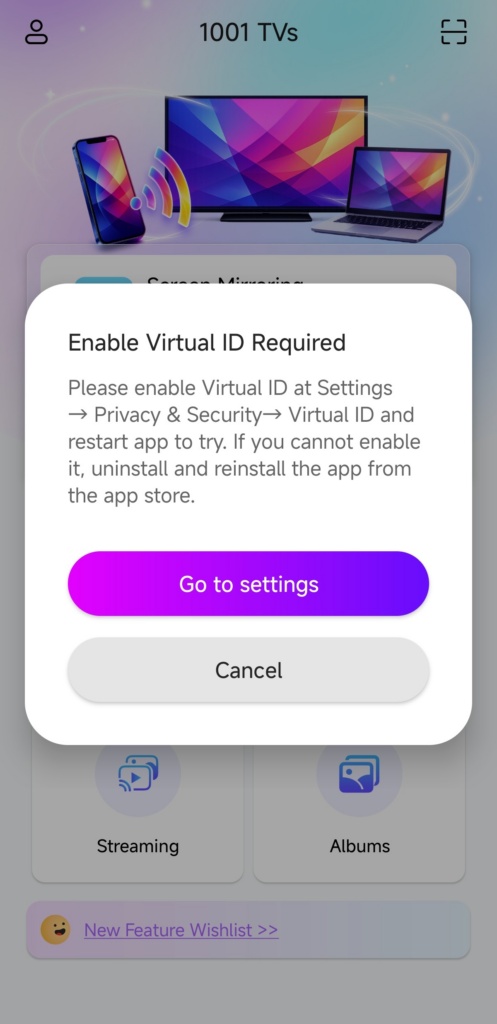
اگر آپ Xiaomi یا Redmi فون یا ٹیبلٹ استعمال کر رہے ہیں تو جب آپ … لانچ کرتے ہیں تو آپ کو ایک پاپ اپ نظر آ سکتا ہے جس میں لکھا ہوتا ہے "ورچوئل آئی ڈی کو فعال کرنا ضروری ہے"۔
'Enable Virtual ID Required' پاپ اپ کو کیسے ٹھیک کریں
اگر آپ Xiaomi یا Redmi فون یا ٹیبلٹ استعمال کر رہے ہیں تو جب آپ … لانچ کرتے ہیں تو آپ کو ایک پاپ اپ نظر آ سکتا ہے جس میں لکھا ہوتا ہے "ورچوئل آئی ڈی کو فعال کرنا ضروری ہے"۔

