ทำไม Wi-Fi ของโรงแรมมักทำให้การส่งภาพไปยังหน้าจอถูกขัดจังหวะระหว่างการแข่งขันฟุตบอลโลก
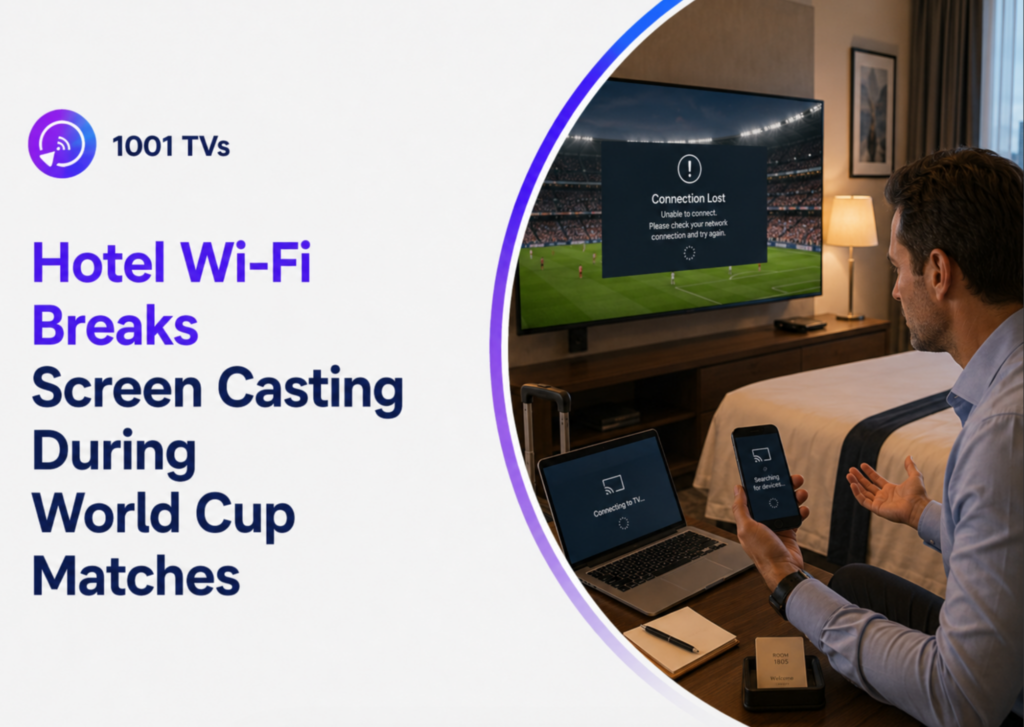
Wi-Fi ของโรงแรมมักทำให้การส่งภาพไปยังหน้าจอหยุดชะงักระหว่างการแข่งขันฟุตบอลโลก เนื่องจากโรงแรมหลายแห่งบล็อกการค้นหาอุปกรณ์และจำกัดแบนด์วิธบนเครือข่ายผู้เข้าพักที่มีผู้ใช้จำนวนมาก ซึ่งอาจทำให้เกิดการบัฟเฟอร์ การเชื่อมต่อ AirPlay ล้มเหลว หรือปัญหาในการตรวจจับ Chromecast ระหว่างการสตรีมฟุตบอลสด.
ไม่ว่าคุณจะเดินทางเพื่อพักผ่อน ธุรกิจ การประชุม หรือทำงานจากระยะไกล การตั้งค่าที่เหมาะสมก็ยังคงช่วยให้การสตรีมมิ่งในโรงแรมเป็นไปอย่างราบรื่นยิ่งขึ้น โดยการใช้เครื่องมือเช่น 1001 TVs, อะแดปเตอร์ HDMI หรือเราเตอร์สำหรับเดินทาง สามารถช่วยให้คุณรับชมการแข่งขันฟุตบอลโลก FIFA 2026 บนหน้าจอที่ใหญ่ขึ้น โดยไม่พลาดช่วงเวลาสำคัญใดๆ.
ทำไม Wi-Fi ของโรงแรมมักทำให้การส่งภาพไปยังหน้าจอถูกขัดจังหวะระหว่างการแข่งขันฟุตบอลโลก
เครือข่าย Wi-Fi ของโรงแรมแตกต่างอย่างมากจากระบบอินเทอร์เน็ตที่บ้าน โรงแรมหลายแห่งใช้ระบบแยกเครือข่ายและระบบลงชื่อเข้าใช้ ซึ่งอาจก่อให้เกิดปัญหาในการใช้งาน Chromecast, AirPlay และเทคโนโลยีการสะท้อนหน้าจออื่น ๆ นอกจากนี้ ในช่วงการแข่งขันฟุตบอลโลก FIFA 2026 ความแออัดของแบนด์วิธในโรงแรมยังอาจทำให้การสตรีมวิดีโอเกิดการบัฟเฟอร์และสัญญาณไม่เสถียรได้อีกด้วย.
โรงแรมปิดกั้นการสื่อสารระหว่างอุปกรณ์กับอุปกรณ์
โรงแรมหลายแห่งเปิดใช้งานฟังก์ชัน AP Isolation ซึ่งป้องกันไม่ให้อุปกรณ์ที่อยู่ในเครือข่าย Wi-Fi เดียวกันสามารถตรวจพบกันได้ สิ่งนี้ช่วยเพิ่มความปลอดภัยให้กับแขก แต่ในขณะเดียวกันก็ทำให้ฟังก์ชันการส่งเนื้อหาแบบไร้สาย เช่น Chromecast และ AirPlay ไม่สามารถใช้งานได้.
หน้าเข้าสู่ระบบของโรงแรมก่อให้เกิดปัญหาในการสตรีมมิ่ง
โรงแรมส่วนใหญ่ต้องการให้แขกเข้าสู่ระบบผ่านพอร์ทัลบนเบราว์เซอร์ก่อนที่จะสามารถใช้งาน Wi-Fi ได้ อุปกรณ์สตรีมมิ่งและทีวีอัจฉริยะบางรุ่นมักมีปัญหาในการใช้งานพอร์ทัลแบบบังคับนี้ ทำให้การตั้งค่าใช้งานยากกว่าเมื่ออยู่ที่บ้าน.
การถ่ายทอดสดฟุตบอลก่อให้เกิดปริมาณการจราจรในเครือข่ายที่หนาแน่น
ในช่วงการแข่งขันสำคัญ เครือข่าย Wi-Fi ของโรงแรมจะแออัด เนื่องจากมีแขกจำนวนมากที่รับชมการถ่ายทอดสดพร้อมกัน ซึ่งอาจทำให้เกิดความล่าช้า การบัฟเฟอร์ คุณภาพวิดีโอที่ลดลง หรือการตัดการเชื่อมต่อแบบสุ่มระหว่างการถ่ายทอดสดการแข่งขันฟุตบอล.
ทีวีในโรงแรมบางแห่งมีฟังก์ชัน Casting ที่จำกัด
ไม่ใช่ทุกทีวีในโรงแรมที่รองรับ AirPlay, Chromecast หรือการสะท้อนหน้าจอ บางโรงแรมยังปิดการสลับช่อง HDMI หรือจำกัดการใช้งานฟีเจอร์ของสมาร์ททีวี ซึ่งทำให้ผู้เดินทางมักต้องเตรียมตัวเลือกสำรอง เช่น อะแดปเตอร์ HDMI หรือเราเตอร์สำหรับเดินทาง.
วิธีที่ดีที่สุดในการรับชมฟุตบอลโลก FIFA ครั้งที่ 26 ผ่านทีวีในโรงแรม
ใช้แอปสะท้อนหน้าจอแบบไร้สายโดยไม่ต้องตั้งค่าที่ซับซ้อน
แอปสะท้อนหน้าจอแบบไร้สายอาจเป็นทางเลือกที่รวดเร็วสำหรับการรับชมการแข่งขันฟุตบอลโลกในโรงแรม แต่ต้องขึ้นอยู่กับเงื่อนไขสำคัญหนึ่งข้อ คือ โทรศัพท์ของคุณและทีวีของโรงแรมต้องสามารถสื่อสารกันผ่านเครือข่ายท้องถิ่นเดียวกันได้.
หาก Wi-Fi ของโรงแรมมีฟังก์ชัน AP Isolation เปิดใช้งานอยู่ แอปพลิเคชันสำหรับการส่งสัญญาณแบบไร้สาย — เช่น 1001 TVs, Chromecast และ AirPlay — อาจไม่สามารถตรวจพบทีวีหรือเชื่อมต่อได้สำเร็จ ในกรณีดังกล่าว ให้ใช้การเชื่อมต่อ HDMI แบบมีสาย หรือเราเตอร์สำหรับเดินทางแทน.
หากโรงแรมอนุญาตให้มีการสื่อสารระหว่างอุปกรณ์ คุณสามารถลองใช้ 1001 TVs ได้หลังจากเสร็จสิ้นขั้นตอนการเข้าสู่ระบบ Wi-Fi ของโรงแรมบนโทรศัพท์และทีวีแล้ว.
วิธีสะท้อนหน้าจอด้วย 1001 TVs:
1. เชื่อมต่อโทรศัพท์มือถือและทีวีในโรงแรมเข้ากับเครือข่าย Wi-Fi เดียวกัน.
2. กรอกข้อมูลในหน้าเข้าสู่ระบบ Wi-Fi ของโรงแรมหากจำเป็น.
3. เปิด 1001 TVs และเลือกคุณสมบัติ Screen Mirroring.
4. สแกนรหัส QR บนทีวี หรือเลือกทีวีจากรายชื่ออุปกรณ์.
5. เริ่มดูการถ่ายทอดสดฟุตบอลโลกบนโทรศัพท์ของคุณ.
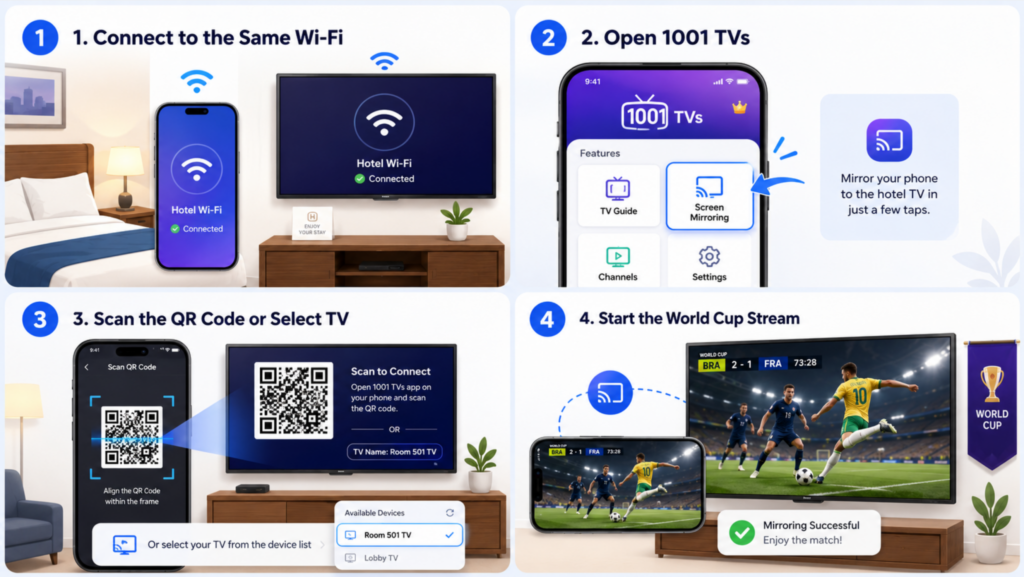
เมื่อเชื่อมต่อแล้ว คุณสามารถรับชมการแข่งขันสด แสดงภาพจากแอปกีฬา หรือสตรีมคลิปไฮไลท์ที่ดาวน์โหลดมาได้โดยตรงบนหน้าจอทีวีของโรงแรม หากทีวีไม่ปรากฏในรายชื่ออุปกรณ์ เครือข่ายของโรงแรมอาจกำลังบล็อกการค้นหาอุปกรณ์ในเครือข่ายท้องถิ่น ดังนั้น ให้เปลี่ยนไปใช้ HDMI หรือตั้งค่าเราเตอร์ส่วนตัวสำหรับการเดินทาง.
หากคุณต้องการเรียนรู้วิธีถ่ายทอดสดการแข่งขันฟุตบอลโลก FIFA 2026 จาก iPhone, Android, Windows หรือ Mac ไปยังทีวีที่บ้านด้วย ให้ดูคู่มือฉบับสมบูรณ์ของเรา: วิธีดูฟุตบอลโลก FIFA 2026 บนทีวีโดยใช้ฟังก์ชัน Screen Mirroring
การเชื่อมต่อสาย HDMI
การเชื่อมต่อ HDMI แบบมีสายยังคงเป็นตัวเลือกที่น่าเชื่อถือที่สุดสำหรับการสตรีมมิ่งในโรงแรม โดยการเชื่อมต่อโทรศัพท์มือถือ แท็บเล็ต หรือแล็ปท็อปของคุณโดยตรงกับทีวี คุณสามารถหลีกเลี่ยงข้อจำกัดของ Wi-Fi ในโรงแรมได้อย่างสมบูรณ์ และหลีกเลี่ยงปัญหาการสตรีมมิ่งที่พบบ่อยได้หลายอย่าง.
HDMI มีประโยชน์เป็นพิเศษสำหรับการถ่ายทอดสดฟุตบอล เนื่องจากช่วยลดความล่าช้าและทำให้การรับชมมีความเสถียรมากขึ้นในช่วงเวลาที่มีผู้ชมจำนวนมากระหว่างการแข่งขัน นักเดินทางที่มีประสบการณ์หลายคนมักพกพาตัวแปลง USB-C เป็น HDMI หรือ Lightning เป็น HDMI มาด้วย โดยเฉพาะอย่างยิ่งสำหรับการแข่งขันสำคัญที่การบัฟเฟอร์หรือการหลุดการเชื่อมต่ออาจทำให้ประสบการณ์การรับชมเสียหายได้.
อุปกรณ์สตรีมมิ่งแบบพกพา (Chromecast / Fire TV / Roku)
อุปกรณ์สตรีมมิ่งแบบพกพาอาจสะดวกใช้ แต่โรงแรมเป็นหนึ่งในสภาพแวดล้อมที่ยากที่สุดสำหรับอุปกรณ์เหล่านี้ที่จะทำงานได้อย่างถูกต้อง.
Chromecast และ AirPlay ขึ้นอยู่กับเทคโนโลยีการค้นหาอุปกรณ์ เช่น Bonjour และเครือข่ายมัลติแคสต์ เครือข่ายสำหรับแขกของโรงแรมมักบล็อกคุณสมบัติเหล่านี้ด้วยเหตุผลด้านความปลอดภัย.
หากคุณมีแผนจะเดินทางพร้อมอุปกรณ์สตรีมมิ่งในช่วงฟุตบอลโลก 2026 ให้ลองทดสอบการตั้งค่าก่อนออกเดินทาง แทนที่จะคิดว่า Wi-Fi ของโรงแรมจะทำงานเหมือนอินเทอร์เน็ตที่บ้าน.
ควรนำอะไรไปเมื่อไปชมฟุตบอลโลก 26 ระหว่างการเดินทาง
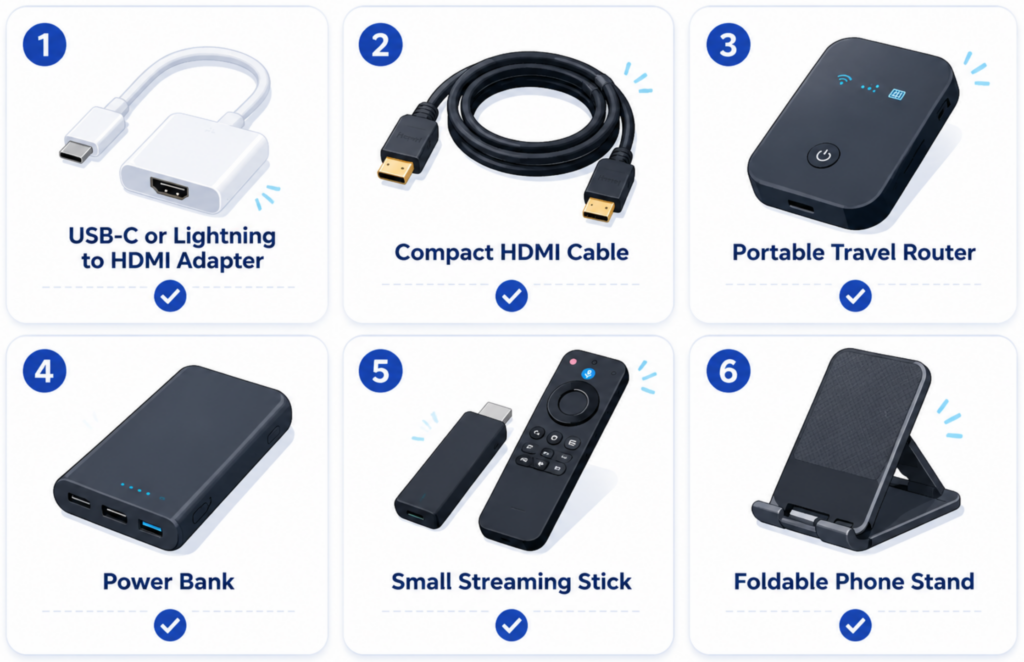
ชุดอุปกรณ์สตรีมมิ่งสำหรับการเดินทางที่เรียบง่ายสามารถป้องกันปัญหาการสตรีมมิ่งในโรงแรมได้ส่วนใหญ่ สิ่งที่แนะนำให้เตรียม ได้แก่:
- ตัวแปลง USB-C หรือ Lightning เป็น HDMI
- สาย HDMI ขนาดกะทัดรัด
- เราเตอร์เดินทางแบบพกพา
- แบตเตอรี่สำรอง
- อุปกรณ์สตรีมมิ่งขนาดเล็ก
- ขาตั้งโทรศัพท์แบบพับได้
ผู้เดินทางบ่อยครั้งอาจได้รับประโยชน์จากการดาวน์โหลดแมตช์หรือไฮไลท์ไว้ล่วงหน้า เพื่อป้องกันกรณีที่อินเทอร์เน็ตในโรงแรมไม่เสถียร.
เคล็ดลับ Wi-Fi ในโรงแรมที่ดีที่สุด เพื่อดูการถ่ายทอดสดฟุตบอลอย่างราบรื่น
แม้ว่าการสะท้อนหน้าจอจะทำงานได้ในโรงแรมของคุณ การถ่ายทอดสดฟุตบอลก็อาจยังคงประสบปัญหาความล่าช้า การบัฟเฟอร์ หรือคุณภาพวิดีโอที่ไม่เสถียร ระหว่างการแข่งขันฟุตบอลโลก FIFA 2026 ต่างจากภาพยนตร์หรือวิดีโอสั้น การถ่ายทอดสดกีฬานั้นต้องการแบนด์วิธที่เสถียรและเวลาแฝงที่ต่ำ โดยเฉพาะในช่วงเวลาที่มีผู้ชมจำนวนมาก.
เชื่อมต่อและทดสอบก่อนเริ่มการแข่งขัน
สัญญาณ Wi-Fi ของโรงแรมมักช้าที่สุดก่อนการเริ่มการแข่งขันและในช่วงพักครึ่ง เมื่อมีแขกจำนวนมากเริ่มสตรีมเนื้อหาพร้อมกัน การเชื่อมต่ออุปกรณ์ของคุณไว้ล่วงหน้าและทดสอบการสะท้อนหน้าจอ (screen mirroring) ก่อนการแข่งขันจะเริ่ม สามารถช่วยหลีกเลี่ยงปัญหาการเชื่อมต่อในนาทีสุดท้ายได้.
นอกจากนี้ ควรให้อุปกรณ์เชื่อมต่ออยู่ตลอดเวลาตลอดการแข่งขัน การเชื่อมต่อใหม่ซ้ำๆ บนเครือข่ายโรงแรมที่มีผู้ใช้จำนวนมาก มักทำให้ Chromecast, AirPlay หรือการสะท้อนหน้าจอเกิดข้อผิดพลาดอย่างไม่คาดคิด.
ใช้ Wi-Fi 5GHz เมื่อมีโอกาส
หากโรงแรมมีเครือข่ายทั้ง 2.4GHz และ 5GHz ตัวเลือก 5GHz มักจะดีกว่าสำหรับการสตรีมฟุตบอลสด เนื่องจากโดยทั่วไปแล้วจะให้ความเร็วที่สูงกว่า ความหน่วงที่ต่ำกว่า และมีการรบกวนน้อยลงสำหรับการส่งสัญญาณแบบไร้สาย.
แถบความถี่ 2.4GHz มักจะแออัดในโรงแรม เนื่องจากอุปกรณ์ของผู้เข้าพักหลายเครื่องใช้ช่องสัญญาณเดียวกัน ในช่วงการแข่งขันฟุตบอลโลกนัดสำคัญ ความแออัดนี้อาจทำให้เกิดการบัฟเฟอร์ วิดีโอล่าช้า และประสิทธิภาพการสะท้อนหน้าจอที่ไม่เสถียร.
วางอุปกรณ์ของคุณให้อยู่ใกล้กัน
การส่งสัญญาณแบบไร้สายจะมีความเสถียรน้อยลงเมื่อโทรศัพท์มือถือ แล็ปท็อป อุปกรณ์สตรีมมิ่ง และทีวีอยู่ห่างกันมากเกินไป นอกจากนี้ ทีวีในโรงแรมมักถูกติดตั้งอยู่ด้านหลังตู้หรือแผงโลหะ ซึ่งทำให้สัญญาณไร้สายอ่อนลง.
การวางอุปกรณ์ให้อยู่ใกล้กันมากขึ้นสามารถช่วยลดความล่าช้าและเพิ่มความเสถียรของการเชื่อมต่อได้ บางคนเมื่อเดินทางยังใช้สายต่อ HDMI แบบสั้นเพื่อย้ายอุปกรณ์สตรีมมิ่งให้ห่างจากด้านหลังทีวี เพื่อรับสัญญาณไร้สายได้ดีขึ้น.
ลดคุณภาพการสตรีมหากเริ่มเกิดการบัฟเฟอร์
เครือข่ายโรงแรมหลายแห่งมักประสบปัญหาในการสตรีมสด 4K อย่างเสถียรในช่วงเวลาที่มีผู้ใช้บริการหนาแน่น หากเกิดการบัฟเฟอร์ระหว่างการแข่งขัน การลดความละเอียดของสตรีมลงเป็น 1080p หรือ 720p มักจะช่วยให้ประสบการณ์การรับชมราบรื่นขึ้น.
สำหรับฟุตบอลถ่ายทอดสด การเล่นวิดีโอที่เสถียรมักสำคัญกว่าคุณภาพภาพสูงสุด การสตรีมที่เสถียรแม้มีความละเอียดต่ำกว่า มักดีกว่าการสตรีมที่มีคุณภาพสูงแต่เกิดการค้างในช่วงเวลาสำคัญ.
เตรียมตัวเลือกสำรองไว้สำหรับการแข่งขันสำคัญ
นักเดินทางที่มีประสบการณ์มักเตรียมอุปกรณ์สำรองไว้เสมอ เพื่อป้องกันกรณีที่ Wi-Fi ของโรงแรมอาจทำงานไม่เสถียรในช่วงการแข่งขันสำคัญ อะแดปเตอร์ HDMI ยังคงเป็นหนึ่งในตัวเลือกที่น่าเชื่อถือที่สุด เนื่องจากสามารถหลีกเลี่ยงข้อจำกัดของเครือข่ายไร้สายในโรงแรมได้อย่างสมบูรณ์.
ฮอตสปอตแบบพกพาและเราเตอร์สำหรับเดินทางยังมีประโยชน์สำหรับนักเดินทางที่มักพักในโรงแรมเป็นประจำ ไม่ว่าจะเป็นการเดินทางเพื่อธุรกิจหรือการเดินทางระยะไกล เราเตอร์ส่วนตัวสำหรับเดินทางสามารถช่วยปรับปรุงการตรวจจับ Chromecast และ AirPlay พร้อมทั้งสร้างเครือข่ายการส่งสัญญาณภายในห้องให้เสถียรยิ่งขึ้น.

คำถามที่พบบ่อย
Chromecast สามารถใช้งานได้กับ Wi-Fi ของโรงแรมได้หรือไม่?
ใช่ครับ แต่เครือข่ายโรงแรมหลายแห่งมักบล็อกการค้นหาอุปกรณ์และการสื่อสารสำหรับการส่งเนื้อหาไปยังอุปกรณ์อื่น ๆ เราเตอร์สำหรับการเดินทางหรือฮอตสปอตมักช่วยปรับปรุงความเข้ากันได้.
ทำไม AirPlay ไม่สามารถตรวจพบทีวีในโรงแรมได้?
โรงแรมมักปิดกั้น Bonjour และคุณสมบัติการสื่อสารในเครือข่ายท้องถิ่นที่ AirPlay จำเป็นต้องใช้.
HDMI ดีกว่าการสะท้อนหน้าจอสำหรับการดูฟุตบอลสดหรือไม่?
เพื่อความเสถียรและความหน่วงต่ำ HDMI มักจะมีความน่าเชื่อถือมากกว่าในการถ่ายทอดสดกีฬา.
วิธีที่ง่ายที่สุดในการดูถ่ายทอดสดการแข่งขันฟุตบอลโลกในโรงแรมคืออะไร?
สำหรับนักท่องเที่ยวส่วนใหญ่ การใช้แอปสะท้อนหน้าจอหรือสาย HDMI จะสะดวกกว่าการตั้งค่าอุปกรณ์สตรีมมิ่งบนเครือข่ายของโรงแรม.
สรุป
ข้อจำกัดของ Wi-Fi ในโรงแรมอาจทำให้การส่งภาพหน้าจอระหว่างการแข่งขันฟุตบอลโลก FIFA 2026 เป็นเรื่องที่สร้างความหงุดหงิดมากกว่าการสตรีมมิ่งที่บ้าน เนื่องจากเครือข่ายที่แออัด การบล็อกการค้นหาอุปกรณ์ และการเชื่อมต่อที่ไม่เสถียร นักท่องเที่ยวจึงมักประสบปัญหาการบัฟเฟอร์หรือการส่งภาพหน้าจอไม่สำเร็จพอดีในช่วงที่การแข่งขันกำลังเข้มข้น.
โชคดีที่การตั้งค่าที่ถูกต้องสามารถทำให้การสตรีมวิดีโอในโรงแรมมีความเสถียรมากขึ้นได้ ไม่ว่าคุณจะเลือกใช้การสะท้อนหน้าจอแบบไร้สาย การเชื่อมต่อ HDMI หรือเราเตอร์สำหรับเดินทาง การเตรียมการตั้งค่าไว้ล่วงหน้าจะช่วยให้คุณเพลิดเพลินกับการสตรีมฟุตบอลได้อย่างราบรื่นยิ่งขึ้นบนหน้าจอที่ใหญ่ขึ้นขณะเดินทาง.
หากคุณต้องการวิธีที่เร็วและง่ายกว่าในการถ่ายทอดสดการแข่งขันฟุตบอลโลกในโรงแรม ให้ลอง 1001 TVs เพื่อสะท้อนหน้าจอโทรศัพท์หรือแล็ปท็อปของคุณไปยังทีวีในโรงแรมโดยตรง โดยไม่ต้องตั้งค่าอุปกรณ์ที่ซับซ้อน.

อ่านเพิ่มเติม
 วิธีดู NBA ทางโทรทัศน์ในสหรัฐอเมริกา
การดูการแข่งขัน NBA บนทีวีในสหรัฐอเมริกาจะง่ายที่สุดเมื่อคุณตัดสินใจสองเรื่องตามลำดับ: ก่อนอื่น ให้ตรวจสอบว่าบริการที่ได้รับอนุญาตใดที่ถ่ายทอด...
วิธีดู NBA ทางโทรทัศน์ในสหรัฐอเมริกา
การดูการแข่งขัน NBA บนทีวีในสหรัฐอเมริกาจะง่ายที่สุดเมื่อคุณตัดสินใจสองเรื่องตามลำดับ: ก่อนอื่น ให้ตรวจสอบว่าบริการที่ได้รับอนุญาตใดที่ถ่ายทอด...
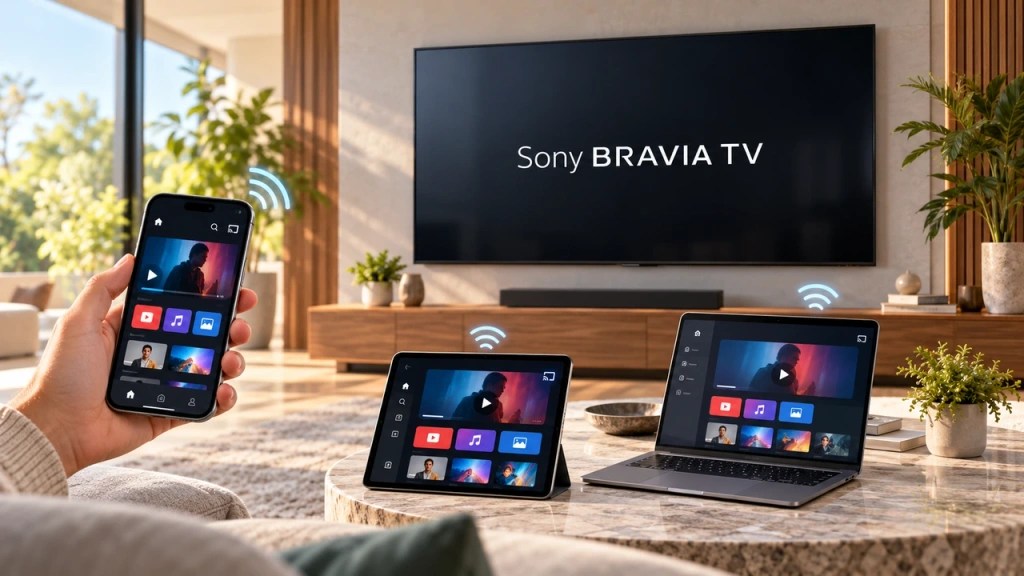 วิธีสะท้อนหน้าจอไปยังทีวี Sony Bravia (Google TV)
โทรทัศน์ Sony Bravia Google TV ไม่ใช้วิธีการ “Screen Mirroring” แบบเดียวที่เหมาะกับทุกโทรศัพท์มือถือและคอมพิวเตอร์ การเลือกวิธีที่เหมาะสมขึ้นอยู่กับทั้งสองปัจจัย...
วิธีสะท้อนหน้าจอไปยังทีวี Sony Bravia (Google TV)
โทรทัศน์ Sony Bravia Google TV ไม่ใช้วิธีการ “Screen Mirroring” แบบเดียวที่เหมาะกับทุกโทรศัพท์มือถือและคอมพิวเตอร์ การเลือกวิธีที่เหมาะสมขึ้นอยู่กับทั้งสองปัจจัย...

