ส่งภาพจากแล็ปท็อปไปยังทีวีเพื่อชมฟุตบอลโลก 26: วิธีง่ายๆ ในปี 2026
ฟุตบอลโลก 2026 จะเริ่มขึ้นในวันที่ 11 มิถุนายน หากคุณกำลังวางแผนจะดูผ่านแล็ปท็อป คุณคงจะตระหนักได้ภายใน 10 นาทีหลังเริ่มการแข่งขันนัดเปิดสนามว่าต้องการหน้าจอที่ใหญ่กว่า นี่คือวิธีส่งภาพไปยังทีวีของคุณโดยไม่เจอปัญหาทางเทคนิคที่มักเกิดขึ้น.
การบันทึกหน้าจอหมายถึงอะไรกันแน่
การส่งภาพหน้าจอจะส่งสิ่งที่ปรากฏบนแล็ปท็อปของคุณไปยังทีวีแบบเรียลไทม์ โดยภาพที่แสดงบนทั้งสองหน้าจอจะเหมือนกัน ซึ่งแตกต่างจากการใช้ทีวีเป็นจอแสดงผลที่สอง ที่แต่ละหน้าจอจะแสดงเนื้อหาที่แตกต่างกัน.
สำหรับฟุตบอลโลก นี่หมายความว่าคุณสามารถรับชมการแข่งขันทั้ง 104 นัดบนหน้าจอขนาดใหญ่ได้ จัดงานรับแขกโดยไม่ต้องให้ทุกคนเบียดเสียดกันรอบๆ แล็ปท็อปขนาด 13 นิ้ว หรือเก็บแล็ปท็อปไว้ใช้สำหรับดูสถิติสดระหว่างที่การแข่งขันกำลังถ่ายทอดทางทีวี.
สามารถส่งภาพจากแล็ปท็อปไปยังทีวีได้ไหม?
ใช่ครับ คอมพิวเตอร์พกพาส่วนใหญ่ที่ผลิตในช่วงไม่กี่ปีที่ผ่านมาสามารถทำสิ่งนี้ได้ Windows 10 และ 11 มี Miracast ติดตั้งมาพร้อมตัว Mac สามารถใช้ AirPlay ได้ หรือคุณสามารถใช้แอปพลิเคชัน หรือเพียงแค่ต่อสาย HDMI เข้าไปก็ได้.
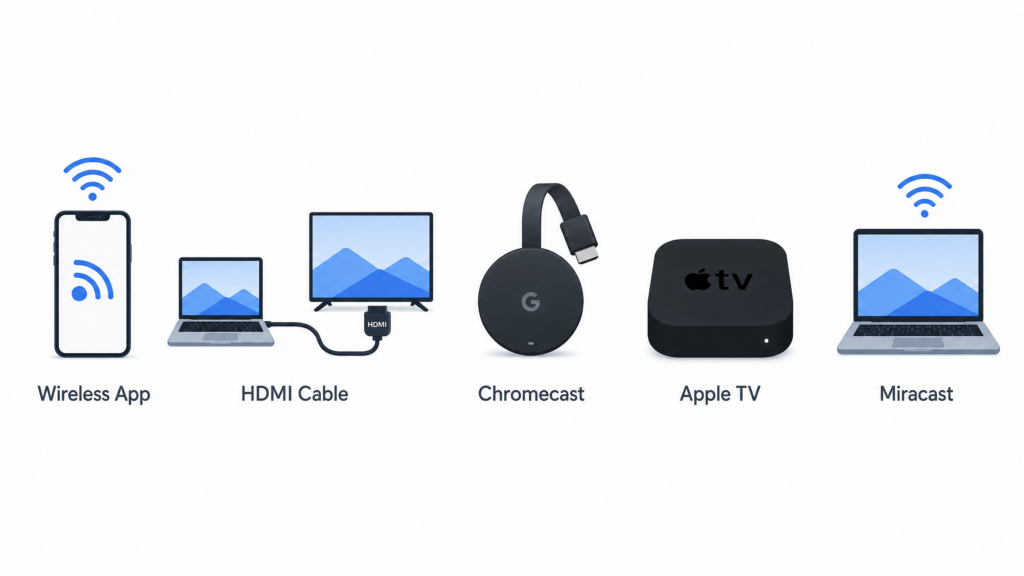
นี่คือตัวเลือกที่มีอยู่:
| วิธีการ | การเชื่อมต่อ | อุปกรณ์เสริม | การตั้งค่า | ความเสถียร | ความล่าช้า | เหมาะที่สุดสำหรับ |
|---|---|---|---|---|---|---|
| 1001 TVs แอป | ไร้สาย | ไม่ | ง่าย | สูง | ต่ำ | Android TV และ Apple TV |
| สาย HDMI | Wired | ใช่ ($10-25) | ง่ายมาก | สูงมาก | ไม่มี | การแข่งขันแบบน็อกเอาต์ ไม่มีความเสี่ยง |
| โครเมแคสต์ | ไร้สาย | ใช่ ($30-50) | ระดับกลาง | ระดับกลาง-สูง | ระดับกลาง | หากคุณมีอยู่แล้ว |
| แอปเปิล แอร์เพลย์ | ไร้สาย | ไม่* | ง่าย | สูง | ต่ำ | Mac + Apple TV |
| มิราคัสต์ | ไร้สาย | ไม่* | ระดับกลาง | ระดับกลาง | ระดับกลาง | ตัวเลือกด่วนของ Windows |
*หากทีวีของคุณรองรับ หรือคุณมี Apple TV
สรุปสั้นๆ:
- 1001 TVs หากคุณต้องการอุปกรณ์ที่ใช้งานได้กับ Smart TV ส่วนใหญ่ โดยเฉพาะ Android TV และ Apple TV
- สาย HDMI สำหรับนัดชิงชนะเลิศหรือการแข่งขันใดก็ตามที่คุณไม่ควรพลาด
- แอร์เพลย์ หากคุณได้ทุ่มเทกับ Apple แล้ว
- โครเมแคสต์ ถ้ามันอยู่ในลิ้นชักของคุณแล้ว
วิธีส่งภาพจากแล็ปท็อปไปยังทีวีอย่างถูกต้อง
วิธีที่ 1: ใช้แอป 1001 TVs
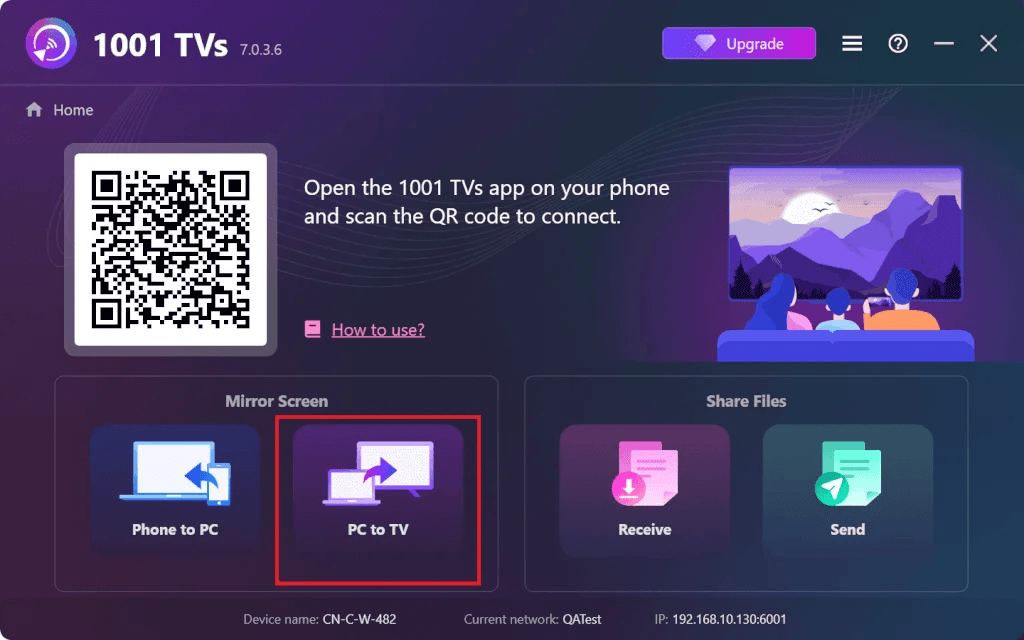
1001 TVs ทำงานได้กับ Windows, Mac และ Smart TV ส่วนใหญ่ ต่างจากตัวเลือกที่มาพร้อมเครื่องซึ่งทำงานได้เฉพาะเมื่อคุณอยู่ในระบบนิเวศที่เหมาะสม ตัวเลือกนี้มีความยืดหยุ่นมากกว่า โดยเฉพาะอย่างยิ่งเมื่อใช้กับ Android TV และ Apple TV.
1001 TVs การสะท้อนหน้าจอ

สำหรับคำแนะนำการตั้งค่าอย่างละเอียด โปรดดูที่ คู่มือครบถ้วนเกี่ยวกับวิธีสะท้อนหน้าจอคอมพิวเตอร์ไปยังทีวี.
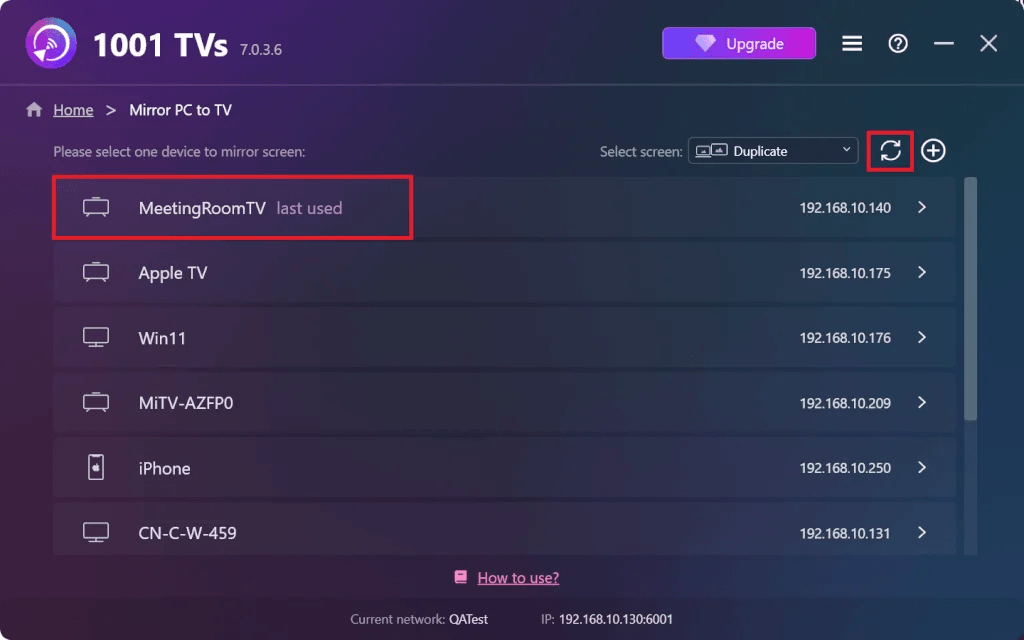
เหตุผลที่วิธีนี้ทำงานได้ดี:
- รองรับ Windows, Mac, Android TV และ Apple TV
- ไม่มี Chromecast รุ่น $50 ที่สามารถซื้อได้
- ความหน่วงต่ำ เหมาะสำหรับการดูกีฬาสด
- สะท้อนหน้าจอแล็ปท็อปไปยังทีวีที่รองรับได้ เมื่อคุณไม่ต้องการใช้สาย HDMI.
วิธีที่ 2: ใช้สาย HDMI
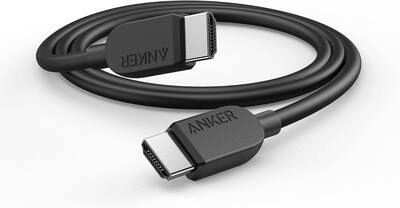
นี่คือตัวเลือกที่เรียบง่ายแต่ไม่เคยทำให้ผิดหวัง ไม่มีปัญหาการเชื่อมต่อไร้สาย ไม่มีอาการหน่วง ไม่มีคำถามว่า “ทำไมไม่เชื่อมต่อได้”
ขั้นตอนที่ 1. เสียบสาย HDMI เข้ากับแล็ปท็อปของคุณ หากแล็ปท็อปของคุณเป็นรุ่นใหม่ที่มีพอร์ต USB-C เท่านั้น ให้ใช้อะแดปเตอร์ USB-C เป็น HDMI ($15-20).
ขั้นตอนที่ 2. เสียบปลายอีกด้านเข้ากับทีวีของคุณ ทีวีส่วนใหญ่มีพอร์ต HDMI 2-4 พอร์ต ซึ่งถูกระบุไว้ว่า HDMI 1, HDMI 2, เป็นต้น.
ขั้นตอนที่ 3. กดปุ่ม “Input” หรือ “Source” บนรีโมททีวีของคุณ แล้วเลือกพอร์ต HDMI ที่คุณเพิ่งใช้ไป.
ขั้นตอนที่ 4. คอมพิวเตอร์พกพาของคุณควรปรากฏบนทีวีโดยอัตโนมัติ หากไม่ปรากฏ:
- Windows: กด Windows + P แล้วเลือก “Duplicate” หรือ “Extend”
- Mac: การตั้งค่าระบบ → จอแสดงผล → การจัดวาง
เสร็จแล้ว ไม่มีความล่าช้า ไม่มีการบัฟเฟอร์.
เมื่อใดควรใช้สิ่งนี้:
- สหรัฐอเมริกา vs เม็กซิโก หรือการแข่งขันแบบน็อกเอาต์ใดๆ
- WiFi ของคุณช้าหรือไม่เสถียร
- คุณต้องการให้ไม่มีความล่าช้าเลย
- นัดชิงชนะเลิศฟุตบอลโลกวันที่ 19 กรกฎาคม (ไม่มีความเสี่ยง)
วิธีที่ 3: ใช้ Chromecast
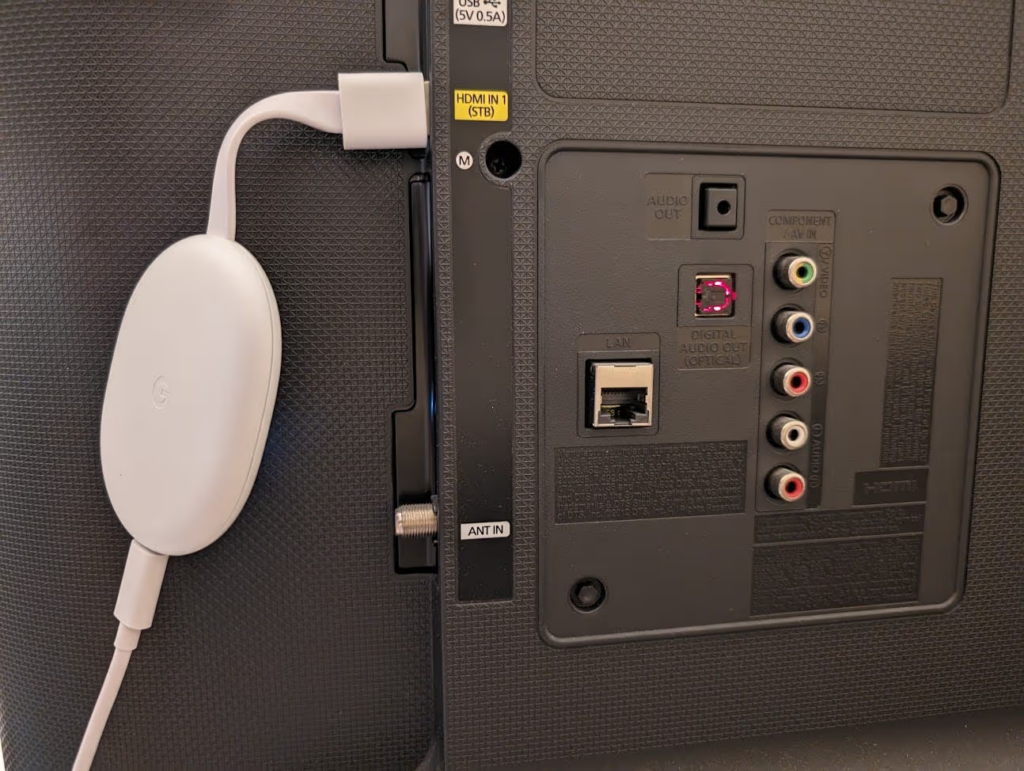
หากคุณใช้ผลิตภัณฑ์ของ Google แล้ว Chromecast ก็ใช้งานได้ง่ายมาก.
ขั้นตอนที่ 1. เสียบ Chromecast เข้ากับทีวีและเปิดเครื่อง หากเป็นเครื่องใหม่ ให้ใช้แอป Google Home บนโทรศัพท์ของคุณเพื่อเชื่อมต่อกับ WiFi.
ขั้นตอนที่ 2. เปิด Chrome บนแล็ปท็อปของคุณ คลิกจุดสามจุด (⋮) ที่มุม แล้วเลือก “Cast…”
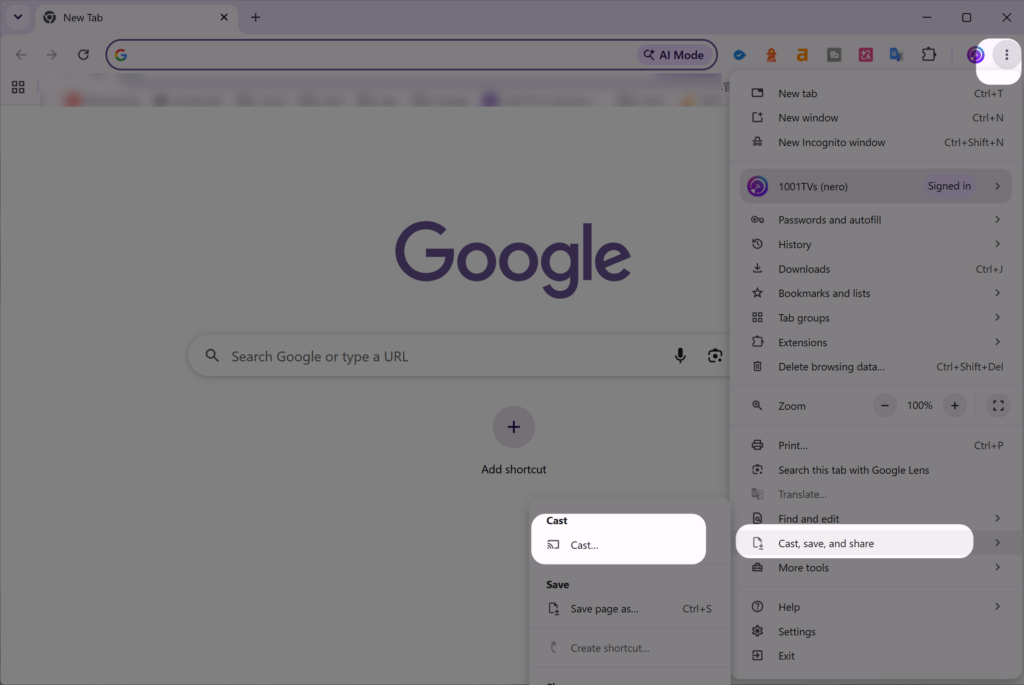
ขั้นตอนที่ 3. เลือก Chromecast ของคุณ เพื่อสะท้อนหน้าจอทั้งหมด ให้เลือก “Cast Desktop”
ขั้นตอนที่ 4. เปิดเว็บไซต์สตรีมมิ่งของคุณและรับชมได้เลย.
หมายเหตุ: หากยังไม่มีอุปกรณ์นี้ ราคาจะอยู่ที่ $30-50 หากต้องการใช้เครือข่ายไร้สายโดยไม่ต้องซื้ออุปกรณ์ 1001 TVs จะถูกกว่า.
วิธีที่ 4: ใช้ AirPlay (เฉพาะ Mac)
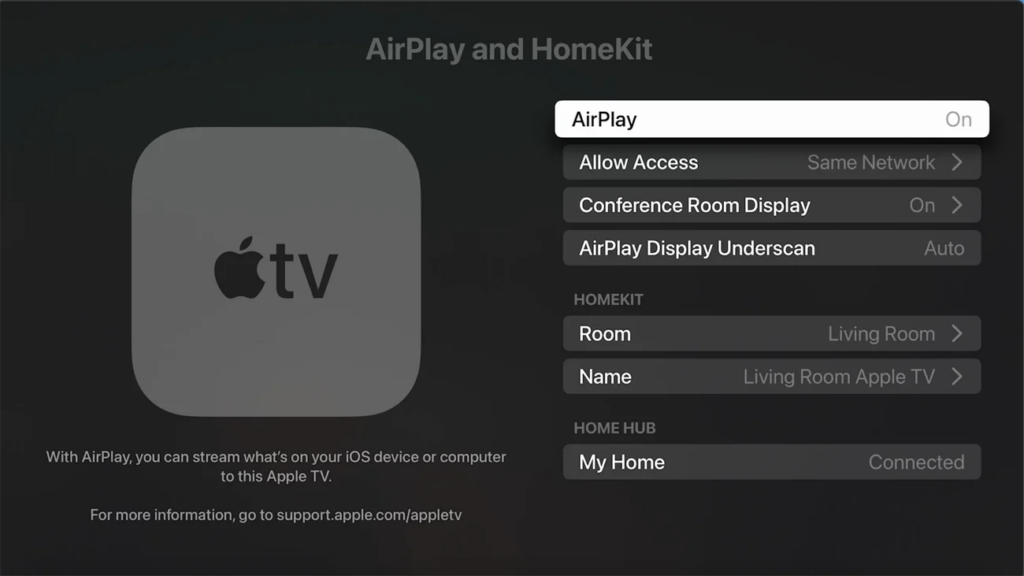
หากคุณมี MacBook และ Apple TV แล้ว AirPlay จะถูกติดตั้งมาพร้อมเครื่องและทำงานได้ดี.
ขั้นตอนที่ 1. ตรวจสอบให้แน่ใจว่า Mac และ Apple TV ของคุณเชื่อมต่อกับเครือข่าย WiFi เดียวกัน.
ขั้นตอนที่ 2. คลิกที่ Control Center (มุมบนขวา) แล้วเลือก “Screen Mirroring”
ขั้นตอนที่ 3. เลือก Apple TV ของคุณ แล้วป้อนรหัสหากระบบขอ.
ขั้นตอนที่ 4. เลือก “Mirror Display” หรือ “Use as Separate Display”
ขั้นตอนที่ 5. เปิดเว็บไซต์สตรีมมิ่งของคุณ.
หมายเหตุ: คุณจำเป็นต้องมี Apple TV ($129+) หรือทีวีที่รองรับ AirPlay 2 หากใช้ Windows หรือทีวีที่ไม่ใช่ Apple TV รุ่น 1001 TVs จะมีความยืดหยุ่นมากกว่า.
วิธีที่ 5: ใช้ Miracast (Windows)
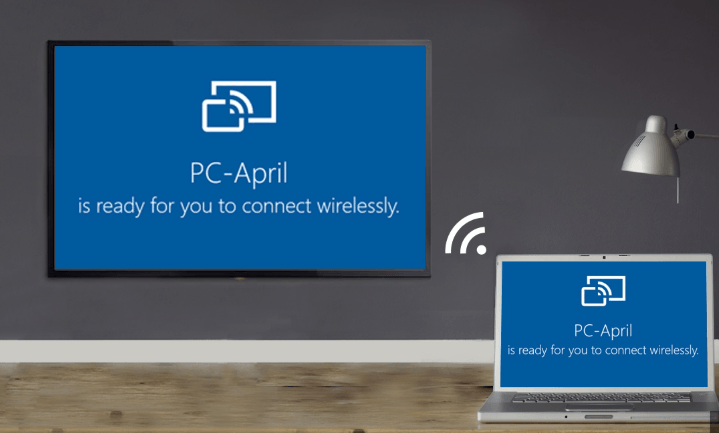
Miracast ถูกติดตั้งมาพร้อมใน Windows 10 และ 11 เป็นบริการฟรี แต่การทำงานไม่ราบรื่นเท่าตัวเลือกอื่น ๆ.
ขั้นตอนที่ 1. เปิดฟังก์ชัน Screen Mirroring บนทีวีของคุณ โดยทั่วไปจะอยู่ในเมนู การตั้งค่า → เครือข่าย → Screen Mirroring (แต่ละแบรนด์อาจซ่อนตัวเลือกนี้ไว้ในตำแหน่งที่ต่างกัน)
ขั้นตอนที่ 2. บนแล็ปท็อปของคุณ ให้กด Windows + K.
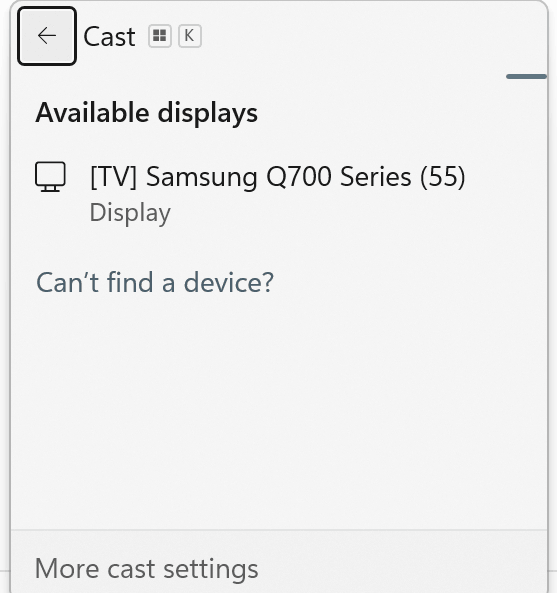
ขั้นตอนที่ 3. รอจนกว่าทีวีของคุณจะปรากฏขึ้น แล้วคลิกที่มัน.
ขั้นตอนที่ 4. กด Windows + P เพื่อเลือก “Duplicate” หรือ “Extend”
หมายเหตุ: Miracast มีความล่าช้ามากขึ้น (1-2 วินาที) และมักจำกัดความละเอียดสูงสุดที่ 1080p ซึ่งก็ใช้ได้ แต่ไม่เหมาะสำหรับกีฬาถ่ายทอดสดที่เวลาเป็นปัจจัยสำคัญ.
บริการสตรีมมิ่งสำหรับฟุตบอลโลก 2026
| แพลตฟอร์ม | ผลการแข่งขัน | ค่าใช้จ่าย | คุณภาพ | ใช้งานได้กับทุกวิธี |
|---|---|---|---|---|
| Fox Sports | 51 (ภาษาอังกฤษ) | ดูฟรีผ่านระบบเคเบิล | สูงสุด 4K | ใช่ |
| นกยูง | ทั้งหมด 104 | $6-12 ครั้งต่อเดือน | สูงสุด 4K | ใช่ |
| เทเลมุนโด | ทั้งหมด 104 (ภาษาสเปน) | ดูฟรีผ่านระบบเคเบิล | สูงสุด 4K | ใช่ |
ผมกำลังสมัคร Peacock Premium Plus ($12/เดือน) เพื่อดูการแข่งขันทั้ง 104 นัด คุณสามารถดูได้ 4 นัดพร้อมกันในช่วงรอบแบ่งกลุ่ม ซึ่งจริง ๆ แล้วมีประโยชน์มาก.
สำหรับคู่มือครบถ้วนเกี่ยวกับสถานที่รับชมการแข่งขันฟุตบอลโลก FIFA 2026 แบบสด รวมถึงตัวเลือกการสตรีมทั้งหมดและข้อมูลเกี่ยวกับความพร้อมใช้งานในแต่ละภูมิภาค โปรดดูที่ คู่มือที่ละเอียดนี้.
สรุปแล้ว
คุณคงไม่อยากต้องแก้ไขปัญหา Chromecast ของตัวเองในนาทีที่ 88 ของการแข่งขันที่ผลเสมอกัน ลองทดสอบการตั้งค่าของคุณตอนนี้ด้วยการแข่งขันกีฬาสด ดูว่าทำงานได้หรือไม่กับเกม MLS หรือรอบเพลย์ออฟ NBA แก้ไขปัญหาเมื่อยังไม่มีแรงกดดัน.
ฟุตบอลโลก 2026 จะมี 48 ทีมแข่งขันตลอด 39 วัน เป็นทัวร์นาเมนต์ที่ใหญ่ที่สุดในประวัติศาสตร์ ตั้งระบบการคัดเลือกของคุณ ทดสอบระบบในเดือนพฤษภาคม และเตรียมตัวให้พร้อมเมื่อถึงวันที่ 11 มิถุนายน.
คำถามที่พบบ่อย
สามารถส่งสัญญาณได้โดยไม่ต้องใช้ HDMI ได้ไหม?
ใช่ครับ ใช้ 1001 TVs, Chromecast, AirPlay หรือ Miracast ได้ครับ 1001 TVs เป็นตัวเลือกที่ยืดหยุ่นที่สุด เพราะสามารถใช้งานได้กับแล็ปท็อปและทีวีทุกชนิด เพียงแต่ต้องแน่ใจว่าทั้งสองอุปกรณ์เชื่อมต่อกับเครือข่าย WiFi เดียวกัน.
วิธีใดมีความหน่วงน้อยที่สุด?
HDMI ไม่มีความล่าช้าเลย สำหรับการเชื่อมต่อแบบไร้สาย 1001 TVs และ AirPlay เป็นตัวเลือกที่ดีที่สุด (0.3–0.8 วินาที) ตามด้วย Chromecast (0.5–1 วินาที) และ Miracast (1–2 วินาที) สำหรับการถ่ายทอดสดการแข่งขัน ให้ใช้ HDMI หรือ 1001 TVs.
ต้องใช้อินเทอร์เน็ตเพื่อสตรีมได้ไหม?
HDMI ไม่จำเป็นต้องใช้อินเทอร์เน็ตเลย เพราะเป็นสายเชื่อมต่อโดยตรง ส่วนวิธีการไร้สายนั้น อุปกรณ์ทั้งสองต้องเชื่อมต่อกับเครือข่าย WiFi เดียวกัน นอกจากนี้ คุณยังต้องใช้อินเทอร์เน็ตเพื่อสตรีมการแข่งขันจาก Fox Sports หรือ Peacock.
ทำไมฟังก์ชันการสะท้อนหน้าจอของฉันไม่ทำงาน?
โดยทั่วไป: อุปกรณ์ที่เชื่อมต่อกับเครือข่าย WiFi ที่ต่างกัน, สัญญาณอ่อน, VPN ที่บล็อกสัญญาณ, เฟิร์มแวร์ TV ที่เก่า หรือการตั้งค่าอินพุตของ TV ที่ผิด ให้รีสตาร์ททุกอุปกรณ์ หากยังไม่ได้ผล ให้ใช้สาย HDMI.
เสียงทำงานได้ไหมครับ?
ใช่ครับ ทุกวิธีจะส่งเสียงไปยังทีวี หากภาพแสดงได้แต่เสียงยังอยู่ในแล็ปท็อป ให้เข้าไปที่การตั้งค่าเสียง แล้วเลือกทีวีเป็นอุปกรณ์ส่งออก.
1001 TVs ดีกว่า Chromecast หรือไม่?
1001 TVs ทำงานได้กับทุกอุปกรณ์ (จาก Windows ไป Apple TV, จาก Mac ไป Android TV, หรือการผสมผสานอุปกรณ์ใดก็ตามที่คุณมี) โดยไม่ต้องซื้ออุปกรณ์เพิ่มเติม Chromecast มีราคา $50 และทำงานได้หลักๆ ในระบบของ Google ทั้งสองมีระดับความล่าช้าและคุณภาพที่คล้ายกัน 1001 TVs มีความยืดหยุ่นมากกว่าและราคาถูกกว่า ($20 ต่อปี เทียบกับ $50 จ่ายครั้งเดียว).
พร้อมสำหรับวันที่ 11 มิถุนายนแล้วหรือยัง? ดาวน์โหลด 1001 TVs หรือ ซื้อ 1001 TVs สำหรับ Windows/Mac. มีเวอร์ชันทดลองใช้ฟรี โปรดตรวจสอบให้แน่ใจว่าทุกอย่างทำงานได้ปกติก่อนที่การแข่งขันจะเริ่ม.

อ่านเพิ่มเติม
 วิธีสตรีม FIFA World Cup 2026 ไปยังทีวี: AirPlay, Chromecast และอื่นๆ
เพื่อส่งคลิปวิดีโอฟุตบอลโลกไปยังทีวีของคุณ ให้ใช้ตัวเลือก Cast หรือ AirPlay ที่แอปสตรีมมิ่งของคุณรองรับ หรือใช้การเชื่อมต่อ HDMI ที่เข้ากันได้ แอปสำหรับสะท้อนหน้าจอ...
วิธีสตรีม FIFA World Cup 2026 ไปยังทีวี: AirPlay, Chromecast และอื่นๆ
เพื่อส่งคลิปวิดีโอฟุตบอลโลกไปยังทีวีของคุณ ให้ใช้ตัวเลือก Cast หรือ AirPlay ที่แอปสตรีมมิ่งของคุณรองรับ หรือใช้การเชื่อมต่อ HDMI ที่เข้ากันได้ แอปสำหรับสะท้อนหน้าจอ...
 คู่มือปี 2027: วิธีสะท้อนหน้าจอคอมพิวเตอร์ไปยังทีวี
เพื่อแสดงหน้าจอคอมพิวเตอร์บนทีวี ให้ต่อสาย HDMI แล้วกด Windows + P → Duplicate หรือกด Windows + K...
คู่มือปี 2027: วิธีสะท้อนหน้าจอคอมพิวเตอร์ไปยังทีวี
เพื่อแสดงหน้าจอคอมพิวเตอร์บนทีวี ให้ต่อสาย HDMI แล้วกด Windows + P → Duplicate หรือกด Windows + K...

