
1001 TVs: Espelhe o ecrã do seu PC em vários receptores ao mesmo tempo (TV, Tablet, Telefone, PC)
Na última versão do 1001 TVs para Windows (v7.0.0.7), adicionámos uma nova e poderosa funcionalidade - o seu computador pode agora espelhar para vários receptores em simultâneo (televisores, tablets, telemóveis ou mesmo outro PC).
Eis o que parece em ação - quase como se o seu PC estivesse a “transmitir para todo o mundo”. 😄
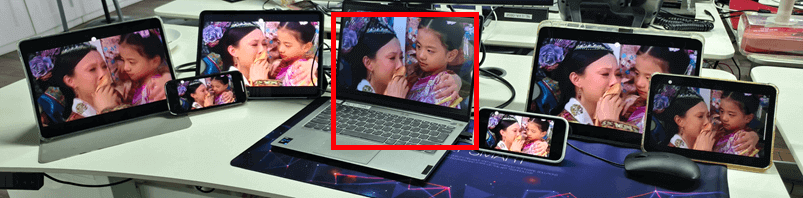
O PC no centro (realçado a vermelho) está a espelhar para seis dispositivos diferentes em simultâneo.
Naturalmente, esta funcionalidade é especialmente útil em salas de reuniões onde um único computador tem de apresentar conteúdos em vários televisores.
Tutorial
❶ Comece por espelhar o seu PC para o primeiro recetor.
Quando o primeiro dispositivo estiver ligado com êxito, abra a interface de espelhamento e adicione simplesmente mais receptores.
Nota: esta funcionalidade de espelhamento de vários dispositivos requer um plano pago.
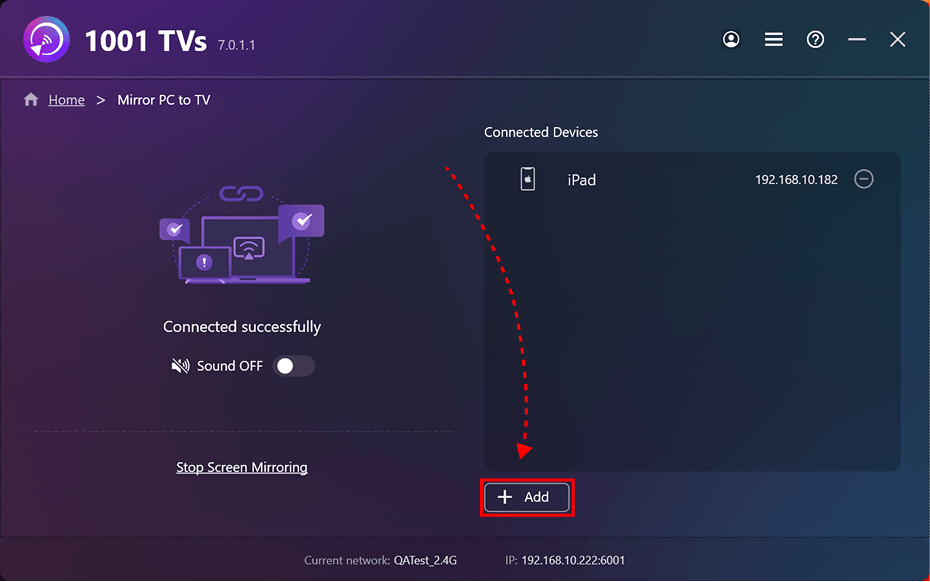
Tutorial de espelhamento do primeiro dispositivo:
[Windows] Como espelhar o ecrã do PC na TV?
Mais tutoriais:
https://www.1001tvs.com/features/