
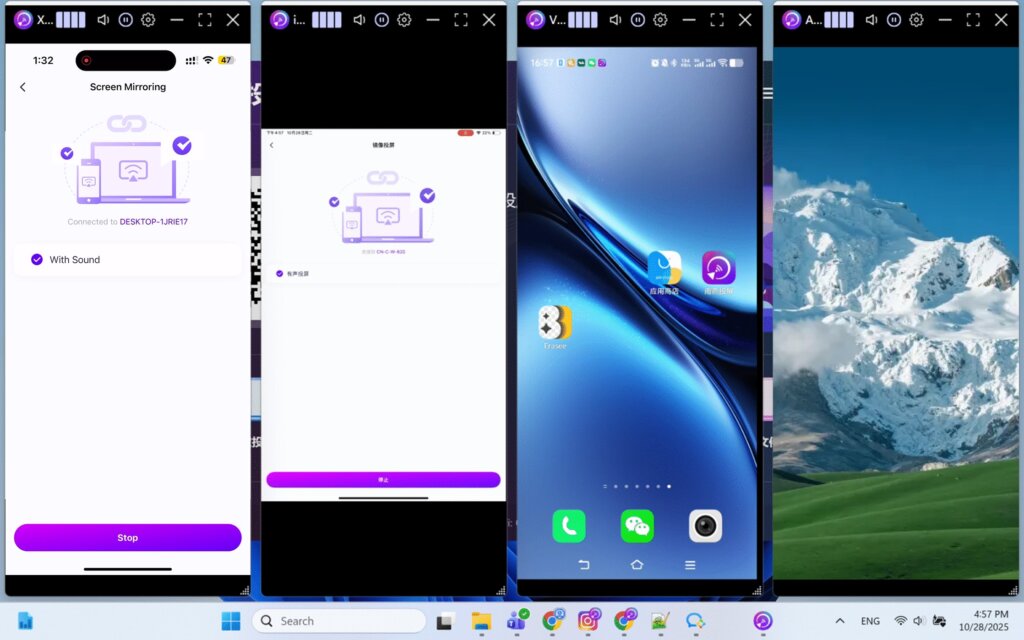
Obsługuje cztery urządzenia jednocześnie dzięki funkcji automatycznego rozmieszczania okien jednym kliknięciem
Gdy wiele telefonów lub tabletów jest jednocześnie dublowanych na komputerze, okna rzutowania często nakładają się na siebie i wymagają ręcznej zmiany położenia i rozmiaru.
Wersja 7.0.0.7 aplikacji komputerowej 1001 TVs rozwiązuje ten problem dzięki nowej funkcji automatycznego układania okien. W lewym górnym rogu każdego okna z castingiem znajdują się następujące elementy cztery ikony pionowego paska, z których każdy reprezentuje wstępnie ustawioną pozycję.
Kliknięcie jednego z pasków powoduje natychmiastowe przesunięcie okna castingu do odpowiedniej pozycji na ekranie. Rozmiar okna jest dostosowywany automatycznie, zapewniając przejrzysty i uporządkowany układ.
Aby skupić się na jednym urządzeniu, wystarczy kliknij dwukrotnie środek okna lub kliknij przycisk Pełny ekran na pasku tytułu. Kliknij dwukrotnie ponownie, aby powrócić do oryginalnego układu.
Jeśli jest to funkcja, której szukałeś, upewnij się, że uaktualniłeś do najnowszej wersji na komputery stacjonarne.
Więcej samouczków:
https://www.1001tvs.cn/features/
Limity urządzenia
Jest brak limitu liczby urządzeń które mogą być przesyłane w tym samym czasie. Jeśli tylko sprzęt jest w stanie to obsłużyć, można utworzyć kopię lustrzaną dowolnej liczby urządzeń.
Potrzebujesz pomocy?
Jeśli napotkasz jakiekolwiek problemy, skontaktuj się z naszym zespołem pomocy technicznej:
- Więcej przewodników: Przewodnik
- E-mail: 1001tvs@nero.com
- Strona internetowa: www.1001tvs.com