
1001 TVs: عكس شاشة الكمبيوتر الشخصي على أجهزة استقبال متعددة في الوقت نفسه (تلفزيون، كمبيوتر لوحي، هاتف، كمبيوتر شخصي)
في أحدث إصدار لنظام التشغيل Windows من 1001 TVs (الإصدار 7.0.0.7)، أضفنا ميزة جديدة قوية - يمكن لجهاز الكمبيوتر الخاص بك الآن أن يعكس أجهزة استقبال متعددة في وقت واحد (أجهزة التلفاز، أو الأجهزة اللوحية، أو الهواتف، أو حتى جهاز كمبيوتر آخر).
إليك ما يبدو عليه الأمر أثناء العمل - كما لو كان جهاز الكمبيوتر الخاص بك “يبث إلى العالم بأسره”. 😄
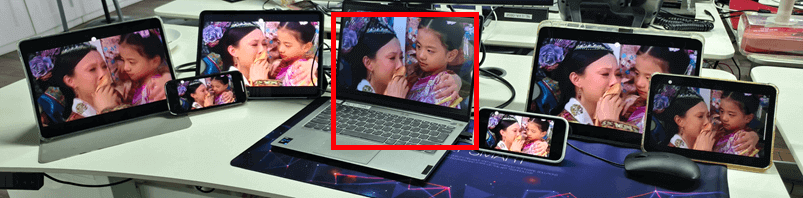
الكمبيوتر الشخصي الموجود في المنتصف (مظلّل باللون الأحمر) ينعكس إلى ستة أجهزة مختلفة في وقت واحد.
وبالطبع، هذه الميزة مفيدة بشكل خاص في غرف الاجتماعات حيث يحتاج جهاز كمبيوتر واحد إلى عرض المحتوى عبر أجهزة تلفاز متعددة.
برنامج تعليمي
❶ ابدأ بنسخ جهاز الكمبيوتر الخاص بك إلى جهاز الاستقبال الأول.
❷ بمجرد توصيل الجهاز الأول بنجاح، افتح واجهة النسخ المتطابق وأضف المزيد من أجهزة الاستقبال ببساطة.
يُرجى الملاحظة: تتطلب ميزة النسخ المتطابق متعدد الأجهزة هذه خطة مدفوعة.
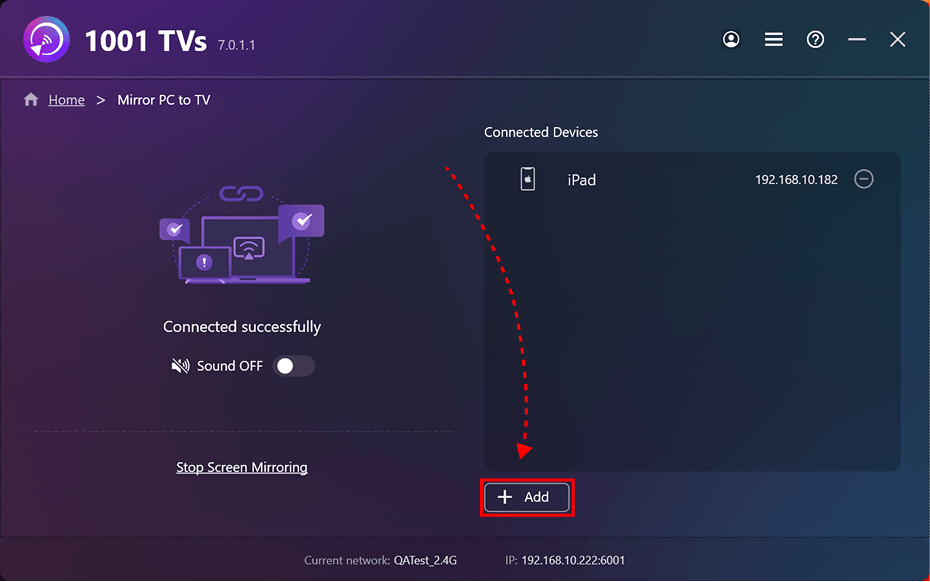
البرنامج التعليمي للنسخ المتطابق للجهاز الأول
[Windows] كيفية عكس الشاشة من جهاز الكمبيوتر إلى التلفزيون؟
المزيد من الدروس التعليمية:
https://www.1001tvs.com/features/