确保 HUAWEI 手机(如 Mate40 Pro)上的稳定屏幕镜像连接
如果您的华为手机在使用 1001 TVs 进行屏幕镜像时总是断开连接,很可能是因为电源管理设置限制了后台活动。您可以通过调整一些设置来轻松解决这个问题,从而保持稳定的连接。
该怎么做?
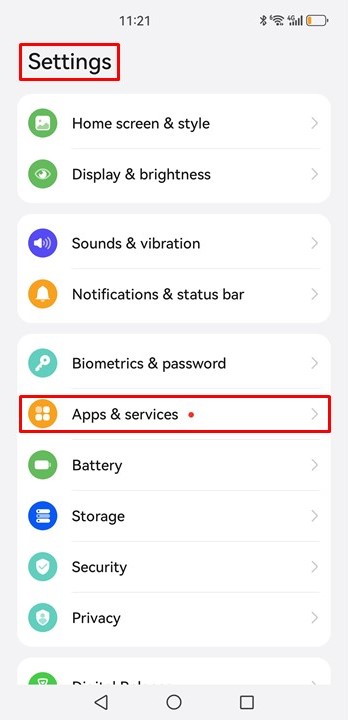
1.打开 设置应用程序
2.轻敲 "应用程序和服务"
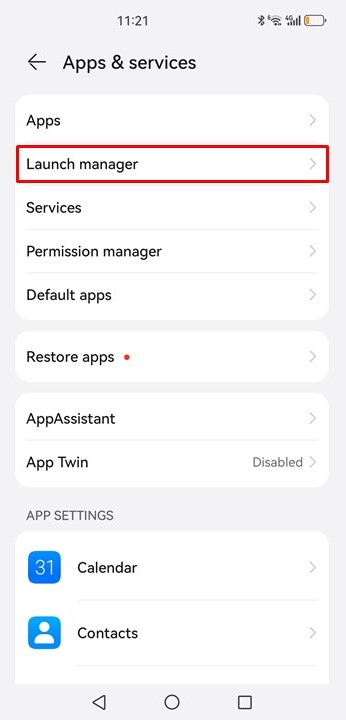
3.轻敲 "启动管理器"
4.找到 1001 TVs,关闭 "自动管理"
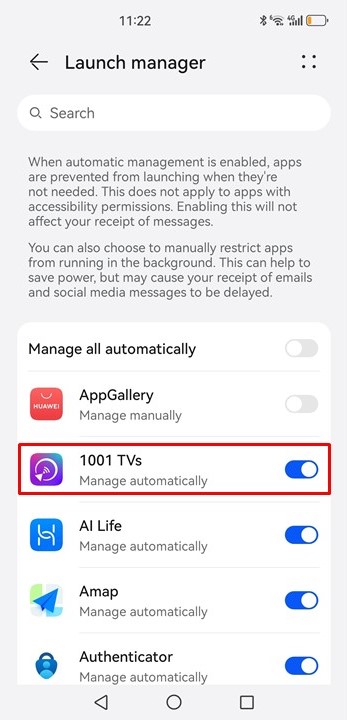
5.打开 "后台运行"
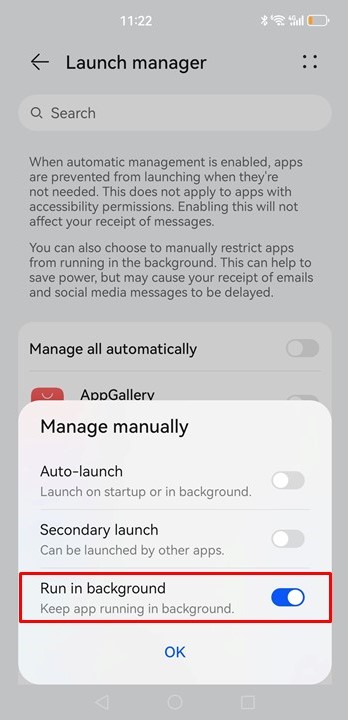
进行这些更改后,请再次尝试屏幕镜像。只要您的手机保持开机状态并连接到 WLAN,1001 TVs 就能提供无缝、不间断的体验,即使长时间使用也是如此!🚀

閱讀更多
在 TCL 65 英寸 4 系列 4K UHD HDR LED 智能安卓电视上使用 1001 TVs 进行屏幕镜像的指南
1.Download and Install 1001 TVs: Search 1001 TVs in the Google Play store, or Visit the 1001 TVs website and download the app. Install it on...
通过 1001 TVs,我将屏幕从 Samsung s10 镜像到 Dell OptiPlex 7050,还将文件传输到 Windows
Let's introduce how to archive it. Screen mirroring from S10 to PC, very easy to do it. 2. Not only screen mirroring, also can...