
วิธีดูรูปภาพและวิดีโอแนวตั้งบนทีวีแนวตั้งด้วยอัลบั้ม 1001 TVs
คุณมีทีวีแนวตั้งและต้องการดูรูปภาพและวิดีโอแนวตั้งของคุณในทิศทางที่ถูกต้องหรือไม่?
ด้วย แสดงอัลบั้ม คุณสมบัติของ 1001 TVs แอป, คุณสามารถอัปโหลดรูปภาพและวิดีโอจากโทรศัพท์ของคุณได้อย่างง่ายดาย และเพลิดเพลินกับพวกมันบนหน้าจอแนวตั้งขนาดใหญ่ — เหมาะสำหรับการแบ่งปันความทรงจำกับครอบครัวและเพื่อน ๆ.
ไม่แน่ใจว่าจะเปิดการแสดงผลแนวตั้งได้อย่างไร?
ตรวจสอบคู่มือนี้ 👉 การสะท้อนหน้าจอแบบแนวตั้ง: สร้างประสบการณ์การมองเห็นที่สดใหม่
1. วิธีใช้ฟีเจอร์อัลบั้ม
❶ เปิดอัลบั้ม
บนหน้าจอหลัก 1001 TVs เลื่อนไปที่ สำรวจ ส่วนและแตะ แสดงอัลบั้ม.
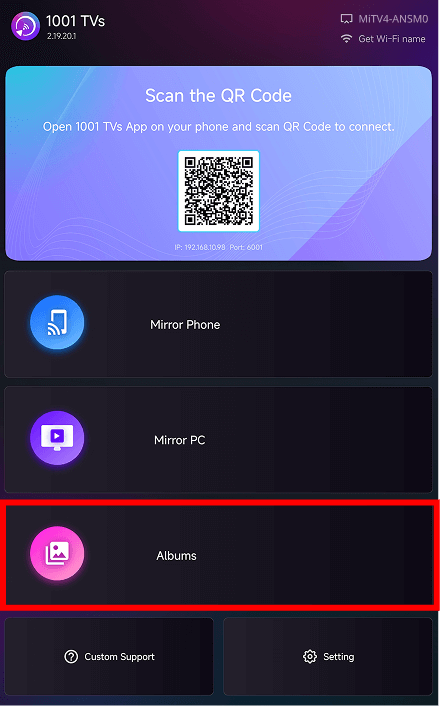
❷ เลือกหมวดหมู่อัลบั้ม
ภายในอัลบั้ม คุณสามารถอัปโหลดรูปภาพและวิดีโอของคุณเอง หรือเรียกดูอัลบั้มที่มีธีมในตัว:
- อัลบั้มของฉัน – รายการทั้งหมดที่คุณอัปโหลด
- คริสต์มาส – ภาพที่มีธีมคริสต์มาส
- ปีใหม่ – ภาพเฉลิมฉลองปีใหม่
- งานวันเกิด – งานศิลปะธีมวันเกิด
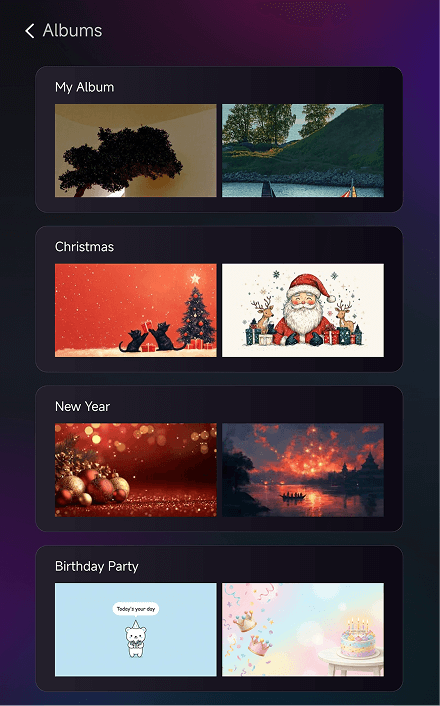
❸ เรียกดูและเล่น
แตะที่อัลบั้มใดก็ได้เพื่อเข้าสู่หน้าข้อมูลรายละเอียด.
แตะที่ภาพขนาดย่อเพื่อดูภาพในโหมดเต็มหน้าจอหรือเพื่อเล่นวิดีโอ.
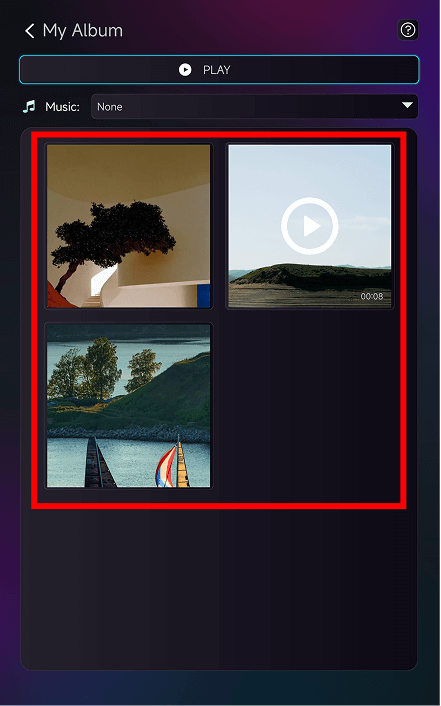
❹ ฟีเจอร์เพิ่มเติม
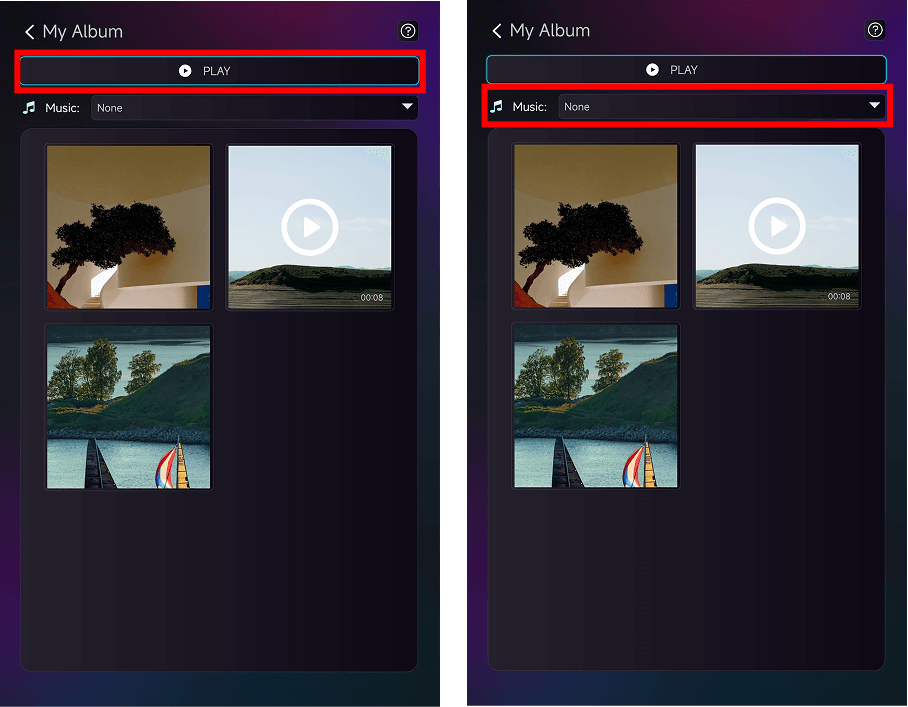
ภายใน อัลบั้มของฉันคุณสามารถ:
- แตะ เล่น ที่ด้านบนเพื่อเริ่มการนำเสนอแบบสไลด์โชว์
- เลือกเพลงพื้นหลังจาก ดนตรี เมนูแบบเลื่อนลง
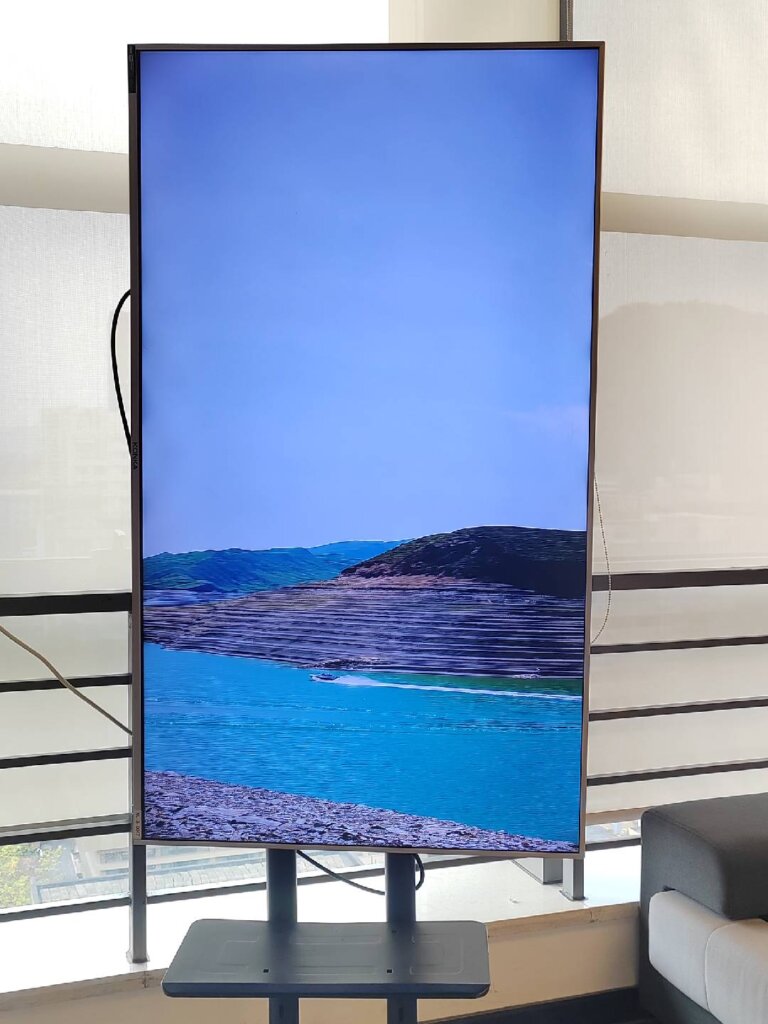
คุณสามารถเห็นผลลัพธ์การแสดงผลสุดท้ายบนทีวีแนวตั้งของคุณได้แบบนี้!
2. เมื่อใดควรใช้
- การรวมตัวของครอบครัว – แสดงรูปถ่ายการเดินทางของคุณบนหน้าจอแนวตั้งขนาดใหญ่
- การเฉลิมฉลองวันหยุด – เปิดอัลบั้มเพลงตามธีมเพื่อสร้างบรรยากาศ
- งานเลี้ยงวันเกิด – แสดงความทรงจำและเน้นช่วงเวลาพิเศษ
- การพบปะสังสรรค์ของเพื่อน – ดูวิดีโอสนุก ๆ ซ้ำบนหน้าจอแนวตั้งขนาดใหญ่
ด้วยการปรับมุมมองแนวตั้งให้เหมาะสม ภาพถ่ายและวิดีโอของคุณจะดูมีชีวิตชีวาและสมจริงยิ่งขึ้น.
3. วิธีการอัปโหลดรูปภาพและวิดีโอ
สำหรับบทเรียนเต็มรูปแบบ โปรดดูที่:
👉 การอัปเกรดจอแสดงผลแนวตั้ง: อัปเกรดการสะท้อนแนวตั้ง: รูปภาพและวิดีโอในอัลบั้มสามารถเล่นในแนวตั้งได้แล้ว!
ต้องการความช่วยเหลือหรือไม่?
หากคุณพบปัญหาใด ๆ โปรดอย่าลังเลที่จะติดต่อทีมสนับสนุนของเรา:
- คู่มือเพิ่มเติม: คำแนะนำ
- อีเมล: 1001tvs@nero.com
- เว็บไซต์: www.1001tvs.com