
فون سے ہوم سلائیڈ شو/البم کو اینڈرائیڈ/ایپل ٹی وی پر کیسے شیئر کریں
کیا آپ اپنی تازہ ترین تعطیلاتی تصاویر دکھانا چاہتے ہیں یا خاندانی لمحات بڑی اسکرین پر شیئر کرنا چاہتے ہیں؟ 1001 TVs آپ کے فون کے البمز کو کاسٹ کرنا آسان بناتا ہے اینڈرائیڈ ٹی وی یا ایپل ٹی وی. یہاں بتایا گیا ہے کہ آپ ایک ہموار سلائیڈ شو کیسے ترتیب دے سکتے ہیں اور اس سے لطف اندوز ہو سکتے ہیں۔.
1. اسی Wi-Fi سے جڑیں۔:
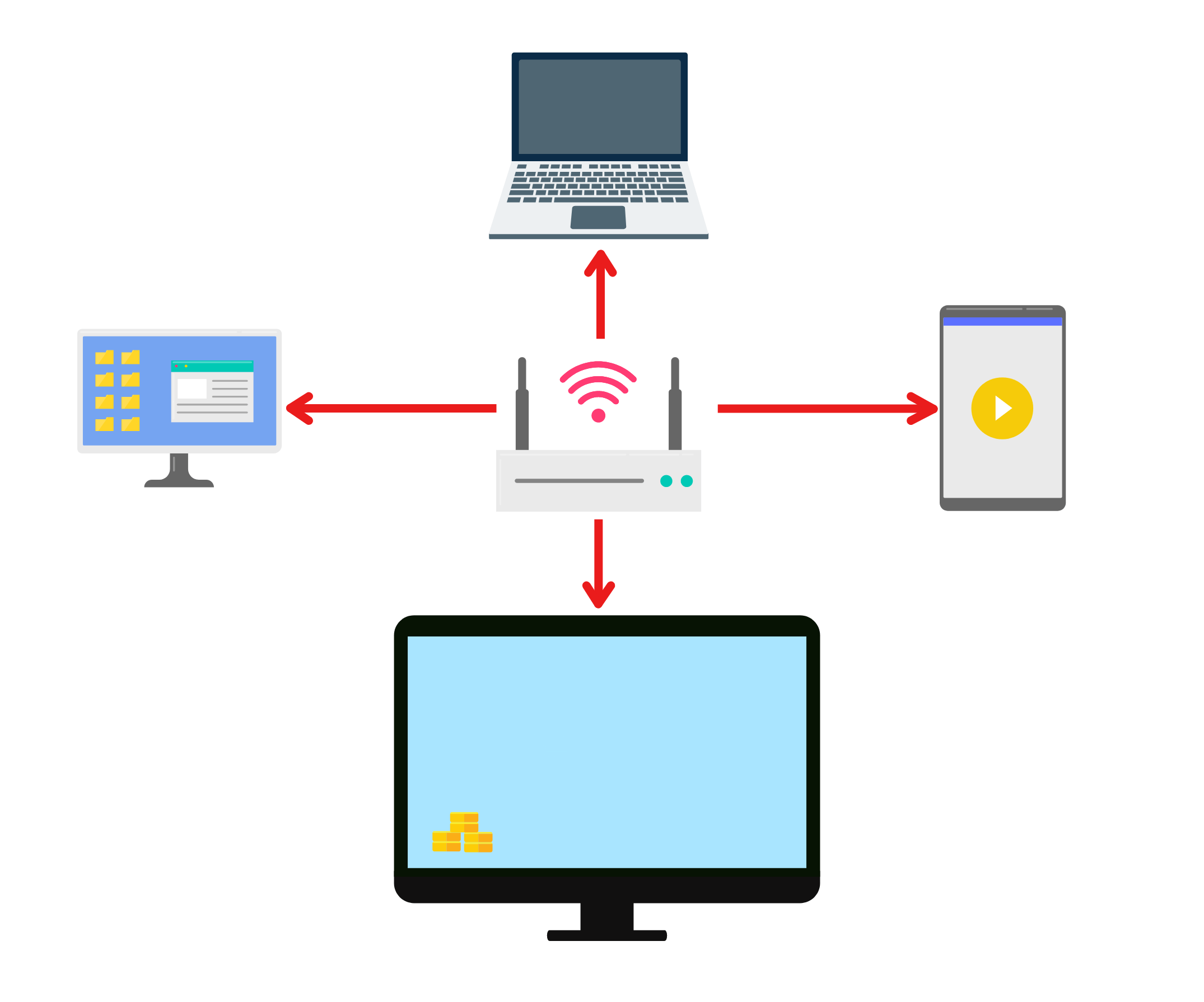
یقینی بنائیں کہ آپ کا فون اور ٹی وی دونوں ایک ہی وائی فائی نیٹ ورک سے منسلک ہوں۔.
(بہترین کارکردگی کے لیے 5 گیگاہرٹز وائی فائی کنکشن کی سفارش کی جاتی ہے۔)
2. دونوں ڈیوائسز پر 1001 TVs انسٹال کریں اور کھولیں۔
📥 ٹی وی ایپ: اپنے ٹی وی پر 1001 TVs کیسے انسٹال کریں۔
📱 iOS ایپ: ایپ اسٹور سے ڈاؤن لوڈ کریں۔
📱 اینڈرائیڈ ایپ: گوگل پلے سے ڈاؤن لوڈ کریں۔
3. جوڑنا شروع کریں
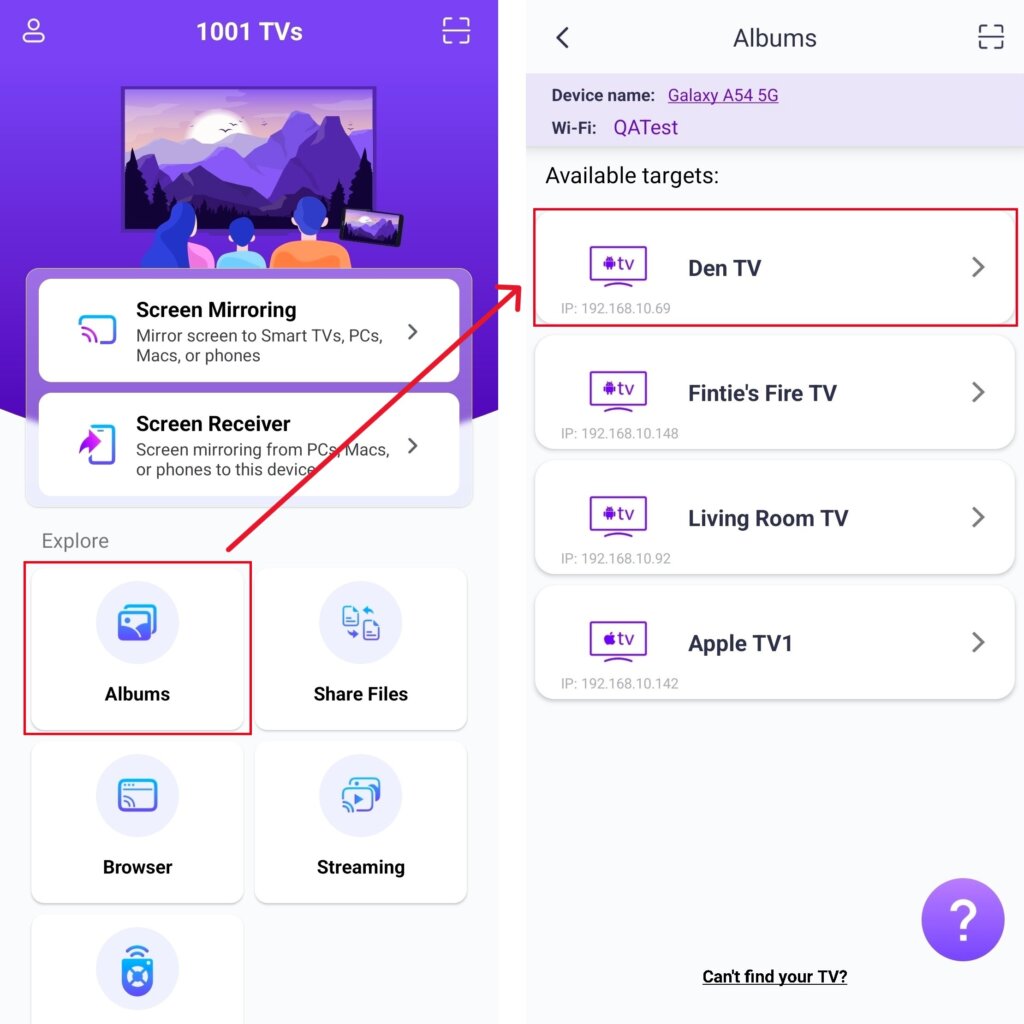
اپنے فون پر، تھپتھپائیں۔ البمز اور اپنا ہدف ٹی وی منتخب کریں۔.
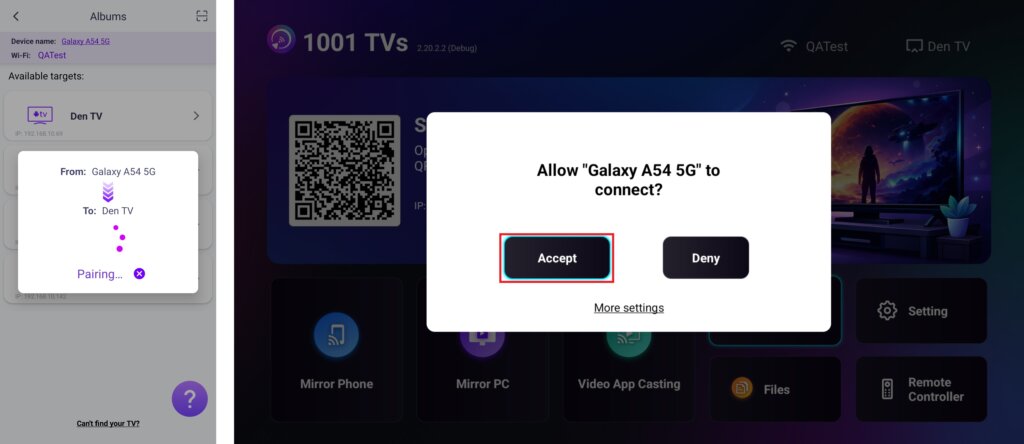
اپنے ٹی وی پر کلک کریں۔ قبول کریں۔ کنکشن کی تصدیق کرنے کے لیے۔.
۴۔ اپنا میڈیا اپ لوڈ اور منظم کریں
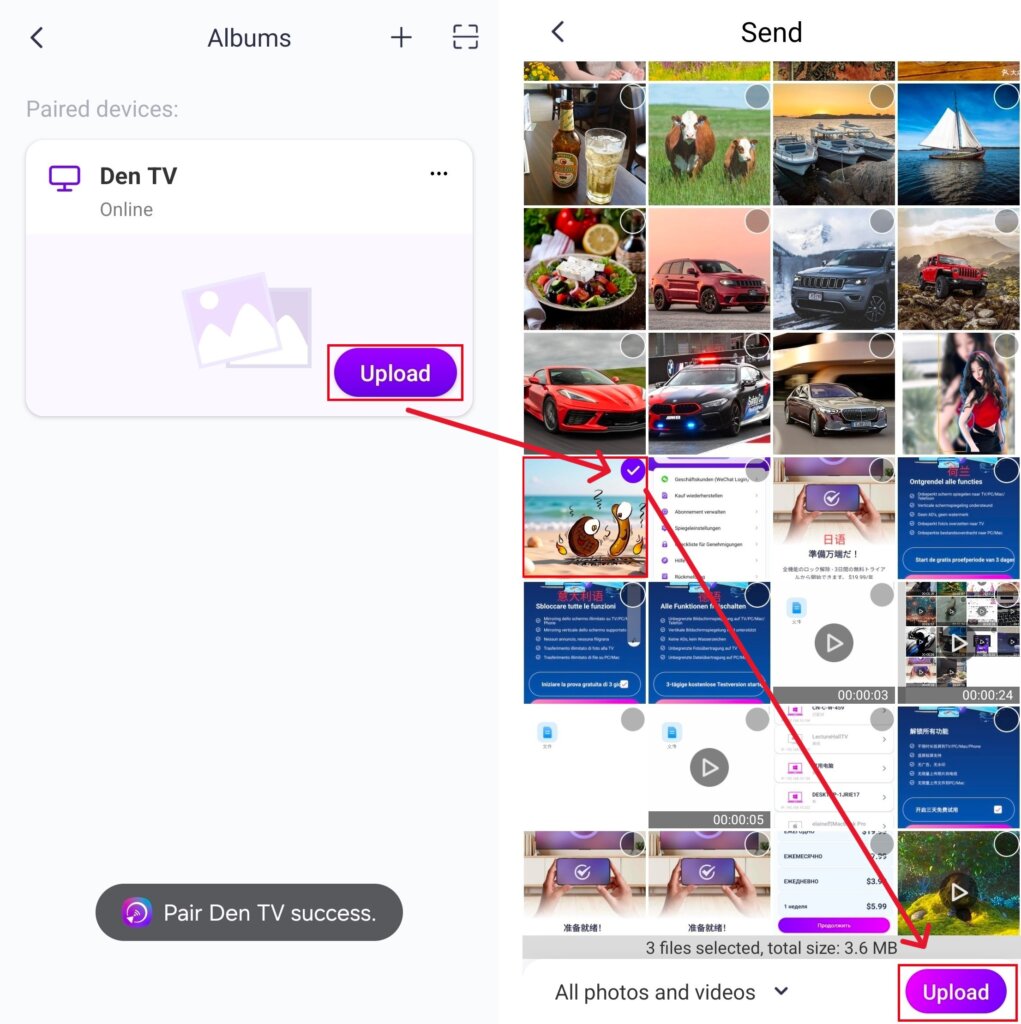
ایک بار کامیابی سے جوڑنے کے بعد، ٹیپ کریں۔ اپ لوڈ کریں۔ اور وہ تصاویر/ویڈیوز منتخب کریں جنہیں آپ شیئر کرنا چاہتے ہیں۔.
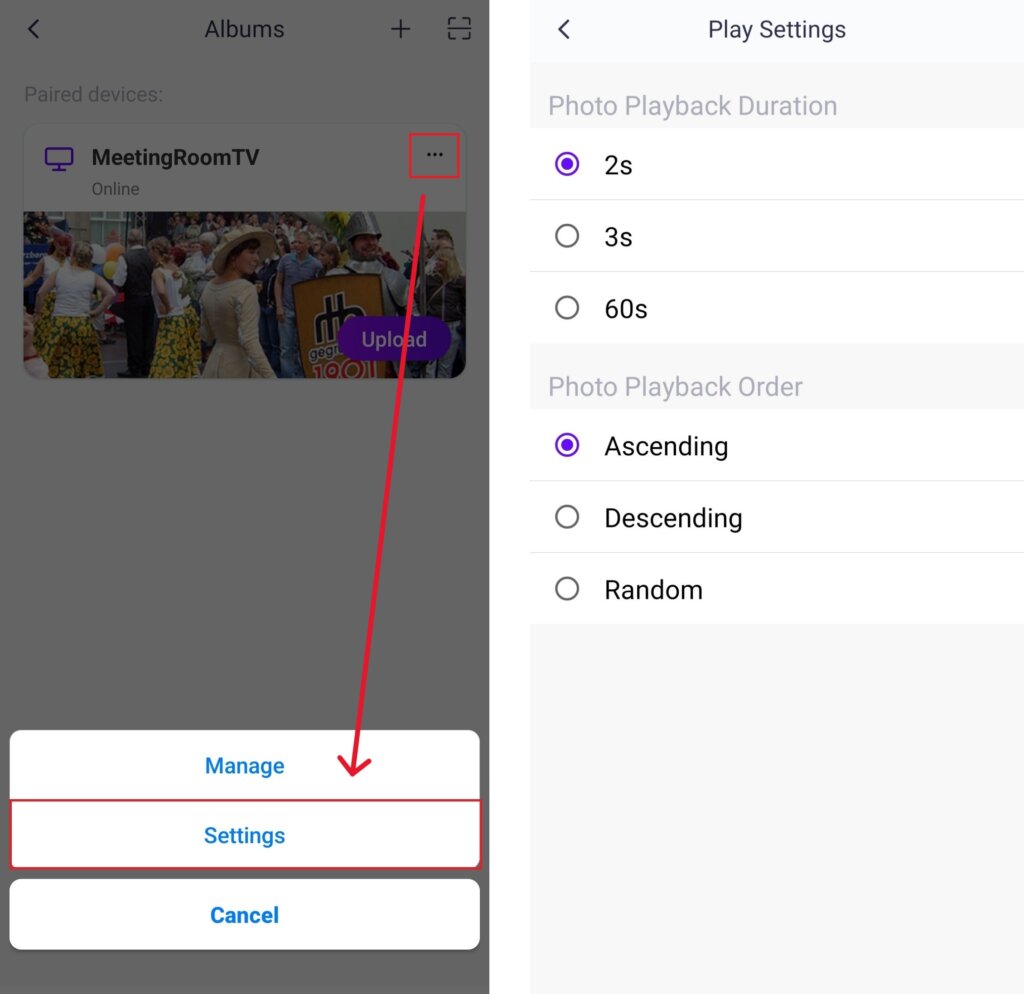
· میں ترتیبات, آپ ہر تصویر کے لیے پلے بیک کا دورانیہ — 2، 3، یا 60 سیکنڈ — مقرر کر سکتے ہیں اور ڈسپلے کے ترتیب کے اختیارات: بڑھتی ہوئی، گھٹتی ہوئی، یا بے ترتیب منتخب کر سکتے ہیں۔.
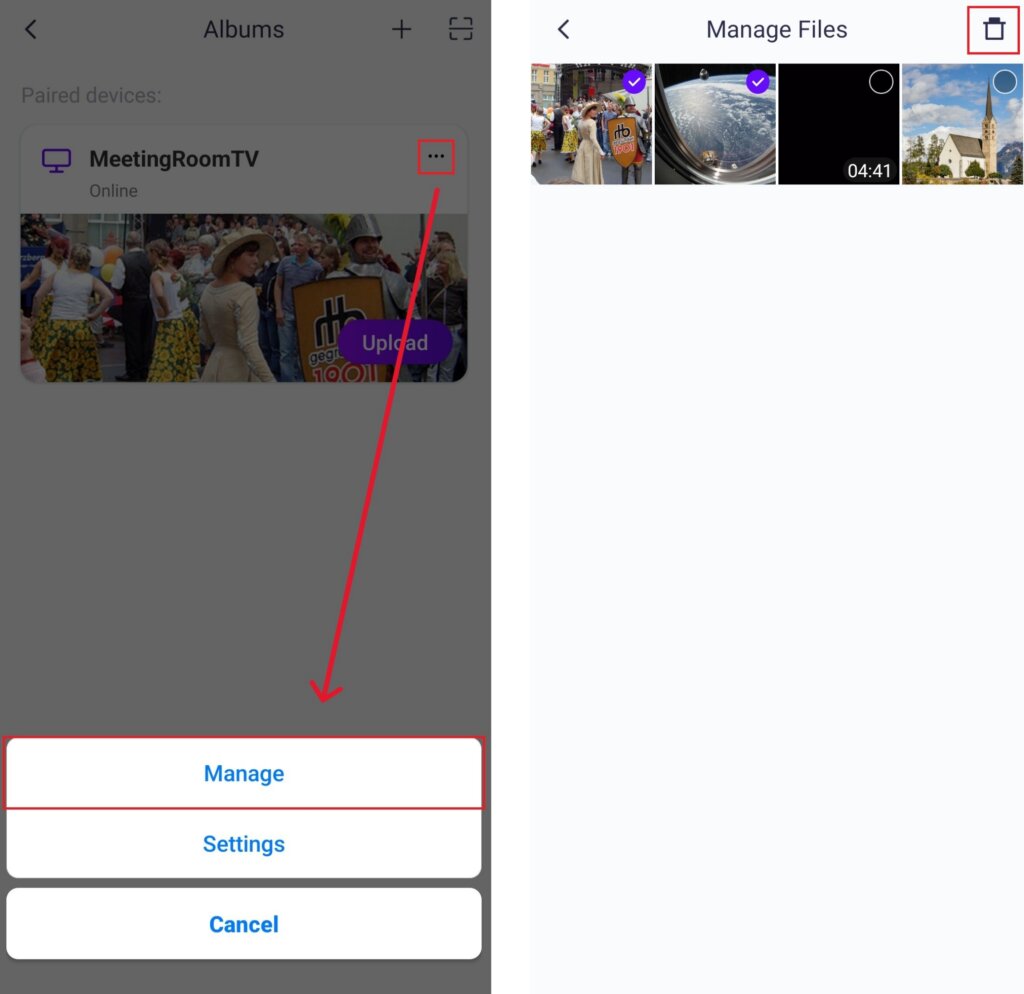
· میں انتظام کریں, آپ آسانی سے وہ تمام تصاویر یا ویڈیوز حذف کر سکتے ہیں جو آپ نے پہلے کاسٹ کی تھیں۔.
· نیا آلہ منسلک کرنے کے لیے، “ پر ٹیپ کریں۔“+”جوڑنے کے لیے اوپر دائیں کونے میں موجود "بٹن" پر کلک کریں۔.
· اگر کوئی آلہ ظاہر ہو آف لائن, براہ کرم ایک مستحکم نیٹ ورک کنکشن کو یقینی بنائیں۔ آپ کسی بھی وقت اپنی ٹی وی پر پہلے سے موصول شدہ فائلز دیکھ سکتے ہیں۔.
۵۔ سلائیڈ شو شروع کریں
ایک فولڈر (مثلاً تصاویر، ویڈیوز) منتخب کریں اور کلک کریں۔ چلائیں سلائیڈ شو شروع کرنے کے لیے۔.
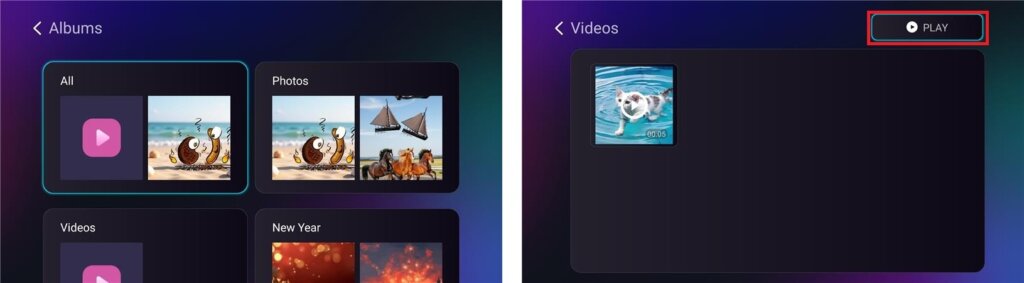
اب آپ کر سکتے ہیں۔ اپنی یادوں کو زندہ کریں۔ ایک پر بڑی سکرین آسانی کے ساتھ! 📸📺
ابھی 1001 TVs حاصل کریں۔!
📥 ٹی وی ایپ: اپنے ٹی وی پر 1001 TVs کیسے انسٹال کریں۔
📥 پی سی ایپ: سے ڈاؤن لوڈ کریں۔ مائیکروسافٹ اسٹور
تفصیلی اقدامات کے لیے، کا حوالہ دیں۔ پی سی انسٹالیشن گائیڈ
📱 iOS ایپ: ایپ اسٹور سے ڈاؤن لوڈ کریں۔
📱 اینڈرائیڈ ایپ: گوگل پلے سے ڈاؤن لوڈ کریں۔
اسے ابھی آزمائیں اور اپنے خاندانی لمحات کو زندہ کریں! 🚀