
[ونڈوز] ونڈوز پی سی کی اسکرین کو میک/ونڈوز پی سی پر کیسے مِرر کریں
1. اسی Wi-Fi سے جڑیں۔
یقینی بنائیں کہ آپ دونوں پی سی اور وصول کرنے والا آلہ (Mac/PC) ایک ہی Wi-Fi نیٹ ورک سے جڑے ہوئے ہیں۔.
بہترین کارکردگی کے لیے، استعمال کریں a 5 GHz Wi-Fi نیٹ ورک تاخیر کو کم کرنے اور استحکام کو بہتر بنانے کے لیے۔.
2. 1001 TVs انسٹال اور کھولیں۔
یقینی بنائیں کہ آپ کے پاس ہے۔ 1001 TVs ایپ آپ کے دونوں آلات پر انسٹال ہے۔.
📥 میک ایپ: ایپ اسٹور سے ڈاؤن لوڈ کریں۔
📥 پی سی ایپ: سے ڈاؤن لوڈ کریں۔ مائیکروسافٹ اسٹور
تفصیلی اقدامات کے لیے، کا حوالہ دیں۔ پی سی انسٹالیشن گائیڈ
3. آئینہ لگانا شروع کریں۔
اپنے پی سی پر، کلک کریں۔ “"پی سی سے ٹی وی"”, ، پھر اسکرین موڈ منتخب کریں: "“ڈپلیکیٹ"، "توسیع کریں"” یا “"ونڈو کو منتخب کریں"”.
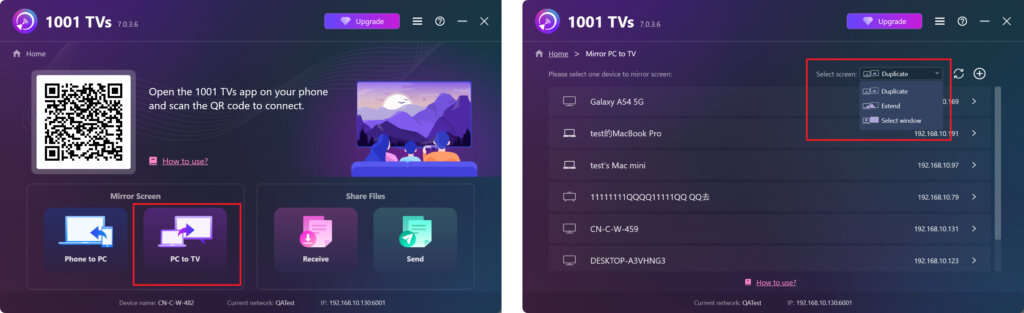
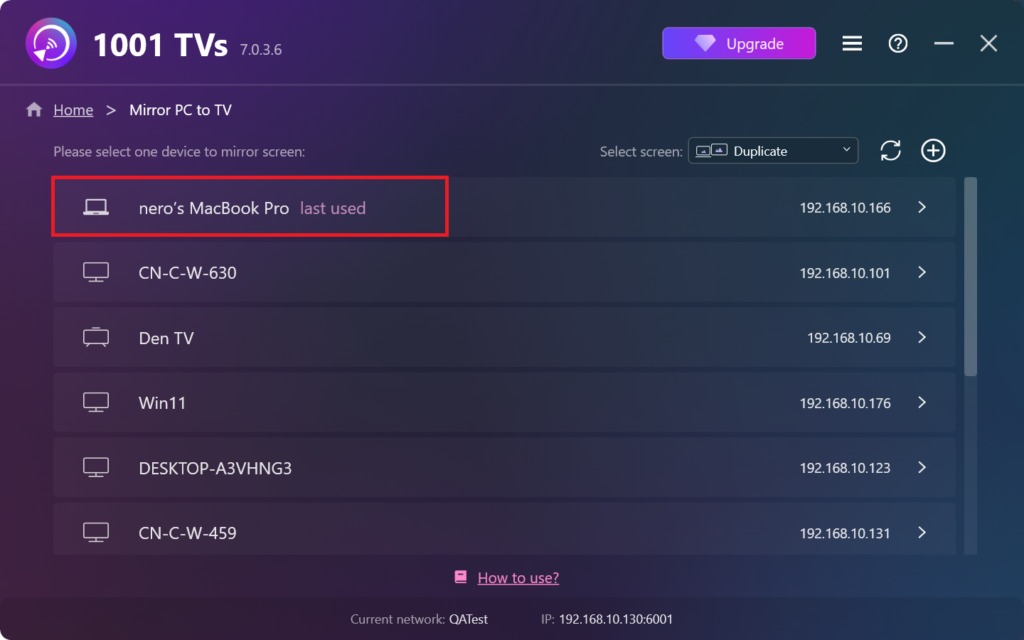
ایپ خود بخود اسی Wi-Fi نیٹ ورک سے منسلک آلات کا پتہ لگائے گی۔.
وہ آلہ منتخب کریں جس کا آپ عکس بنانا چاہتے ہیں۔.
وصول کرنے والے آلے پر، کلک کریں۔ “"اجازت دیں"” کنکشن کی تصدیق کرنے کے لیے۔.
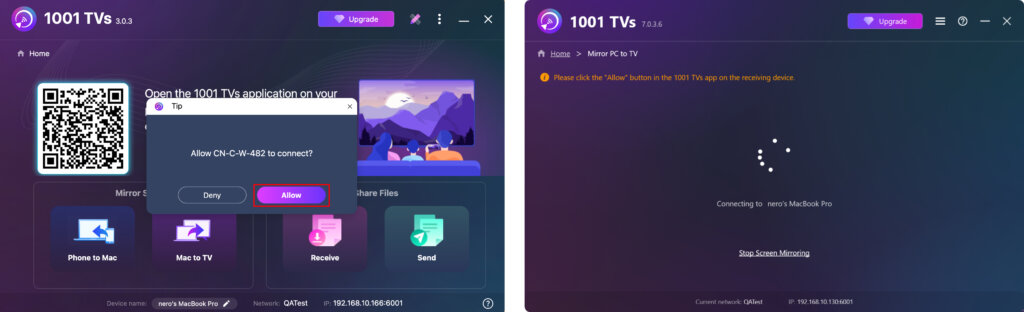
4. ایک بار کنکٹ ہونے کے بعد، آپ فوری طور پر اپنی اسکرین کو ونڈوز پی سی/میک پر اسٹریم کرنا شروع کر سکتے ہیں! ✨
ابھی 1001 TVs حاصل کریں۔!
📥 میک ایپ: ایپ اسٹور سے ڈاؤن لوڈ کریں۔
📥 پی سی ایپ: سے ڈاؤن لوڈ کریں۔ مائیکروسافٹ اسٹور
تفصیلی اقدامات کے لیے، کا حوالہ دیں۔ پی سی انسٹالیشن گائیڈ