
अपनी स्क्रीन को एंड्रॉइड फोन या आईफोन पर मिरर कैसे करें
1. एक ही वाई-फाई से कनेक्ट करें:
सुनिश्चित करें कि आपका भेजने वाला उपकरण (जैसे पीसी, मैक, टैबलेट या फोन) और प्राप्त करने वाला उपकरण (एंड्रॉइड या आईओएस फोन) दोनों एक ही वाई-फाई नेटवर्क से जुड़े हों।.
सर्वोत्तम प्रदर्शन के लिए, इसका उपयोग करें 5 GHz वाई-फाई नेटवर्क विलंब को कम करने और स्थिरता में सुधार करने के लिए।.
2. दोनों डिवाइसों पर 1001 TVs इंस्टॉल करें और खोलें।
📥 मैक ऐप: ऐप स्टोर से डाउनलोड करें
📥 पीसी ऐप: यहां से डाउनलोड करें माइक्रोसॉफ्ट स्टोर
विस्तृत चरणों के लिए, देखें पीसी इंस्टॉलेशन गाइड
📱 iOS ऐप: ऐप स्टोर से डाउनलोड करें
📱 एंड्रॉइड ऐप: Google Play से डाउनलोड करें
3. मिररिंग शुरू करें
1) फ़ोन को फ़ोन पर मिरर करना
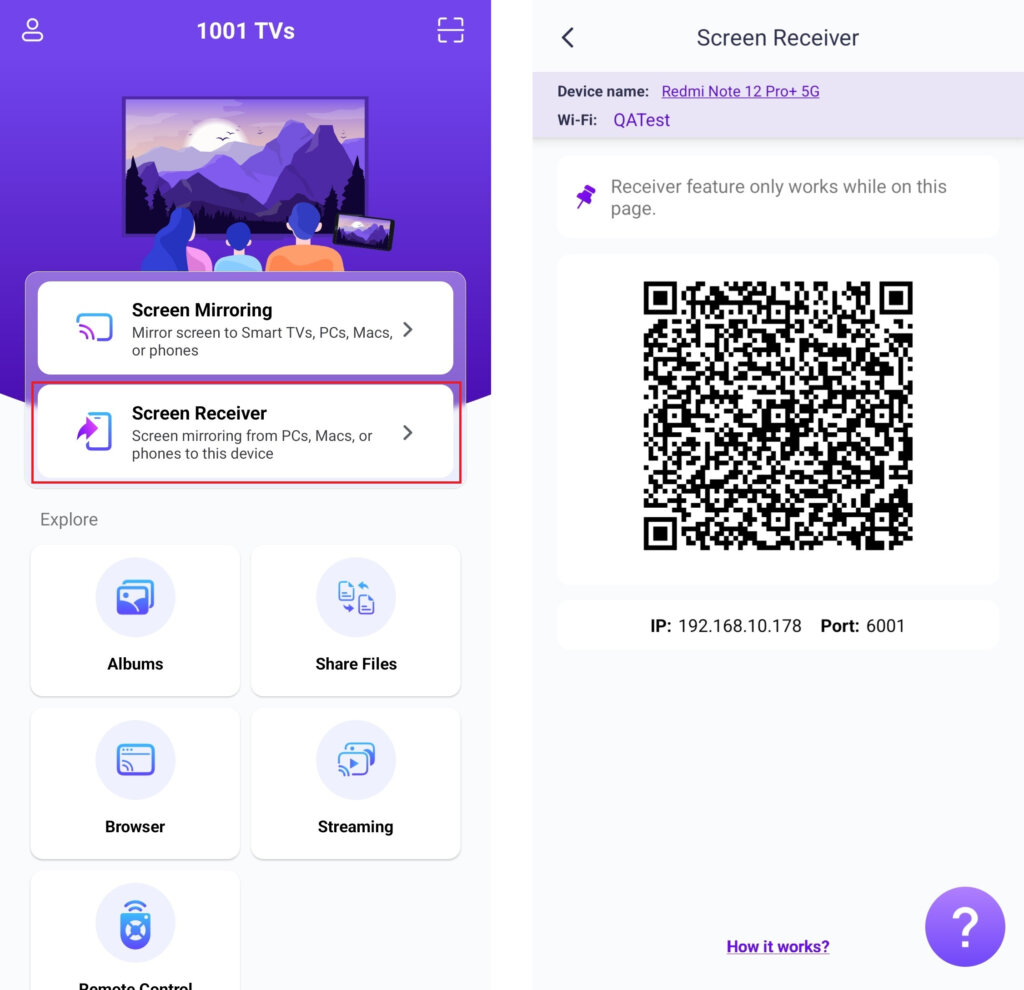
प्राप्तकर्ता फ़ोन पर टैप करें “स्क्रीन रिसीवर” और डिवाइस को कनेक्शन के लिए तैयार रखें।.
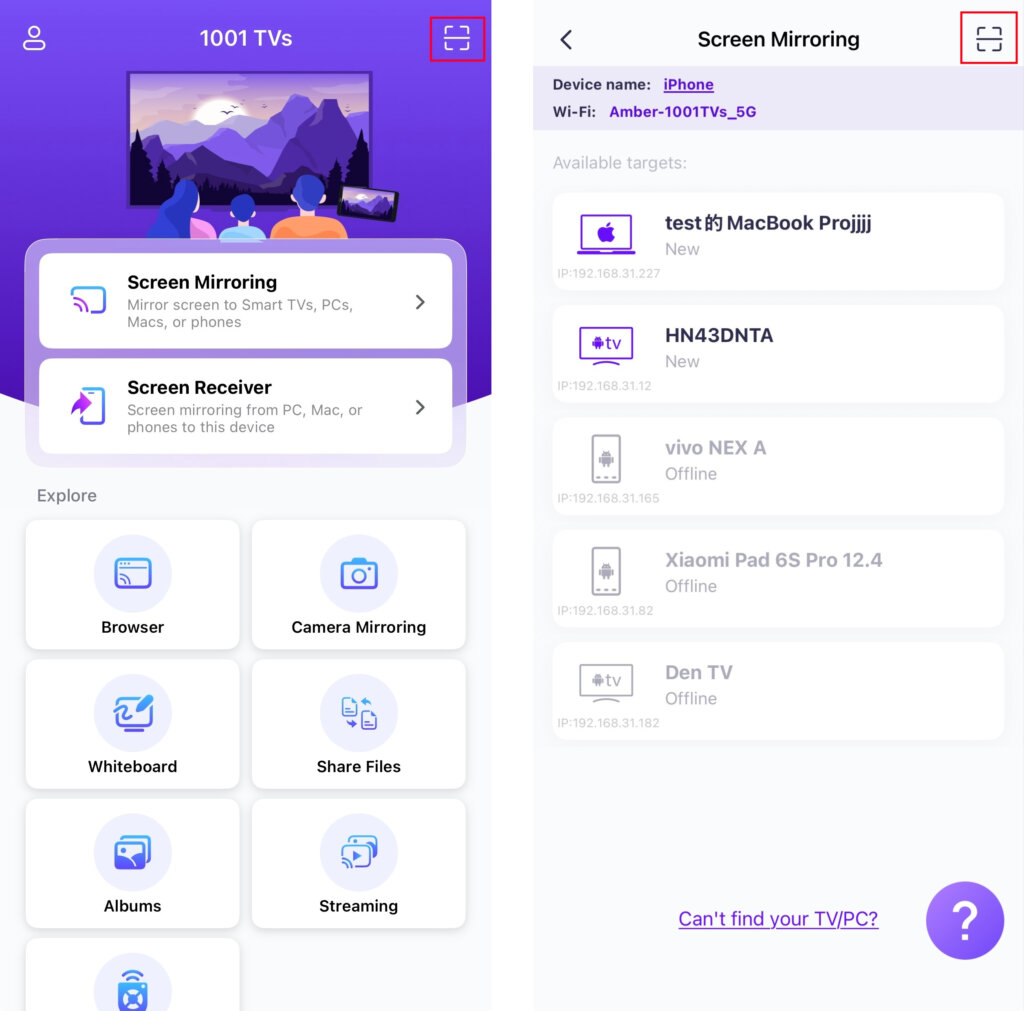
भेजने वाले फोन पर, कनेक्शन विधि चुनें:
• होम स्क्रीन या पर मौजूद क्यूआर कोड को स्कैन करें स्क्रीन मिरर पृष्ठ।.
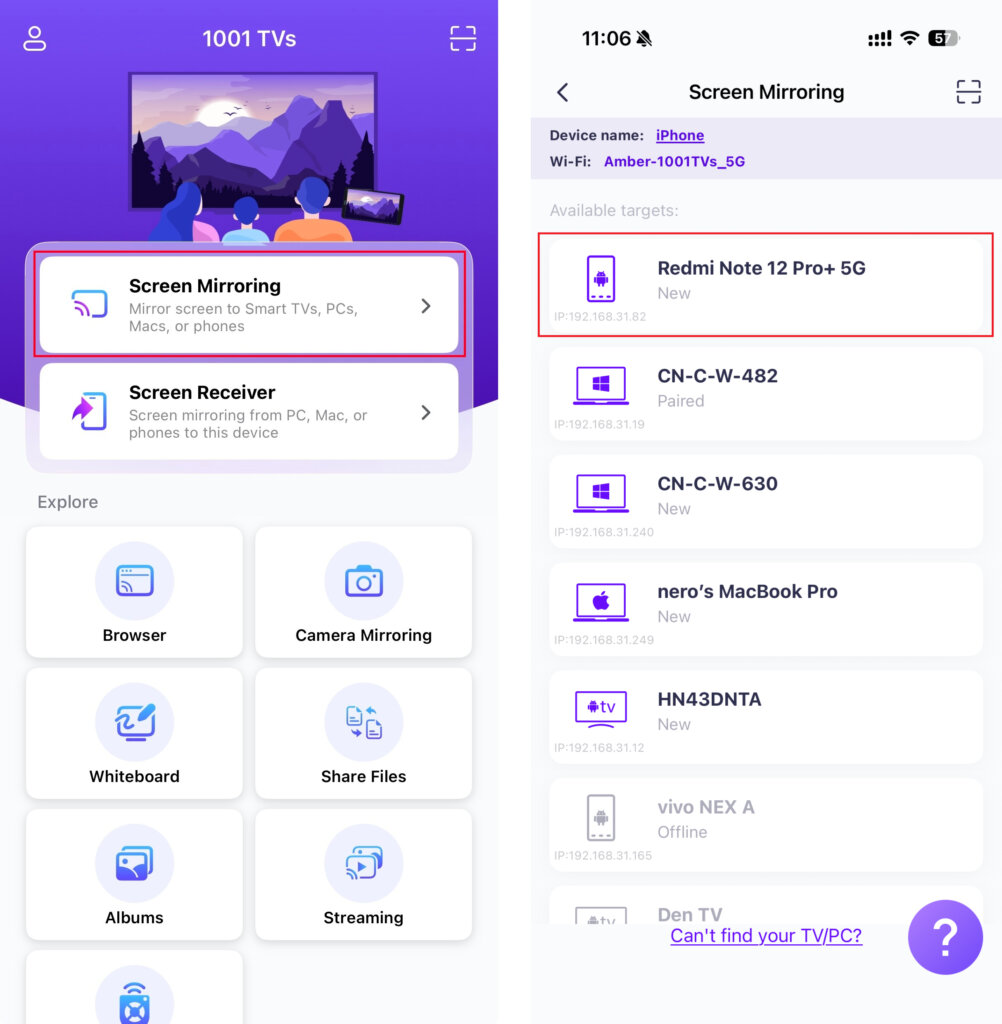
• या “ पर टैप करें“स्क्रीन मिरर"”, ऐप द्वारा उपलब्ध डिवाइसों का पता लगाने की प्रतीक्षा करें, और अपना लक्षित डिवाइस चुनें।.
2) कंप्यूटर को फ़ोन पर मिरर करें
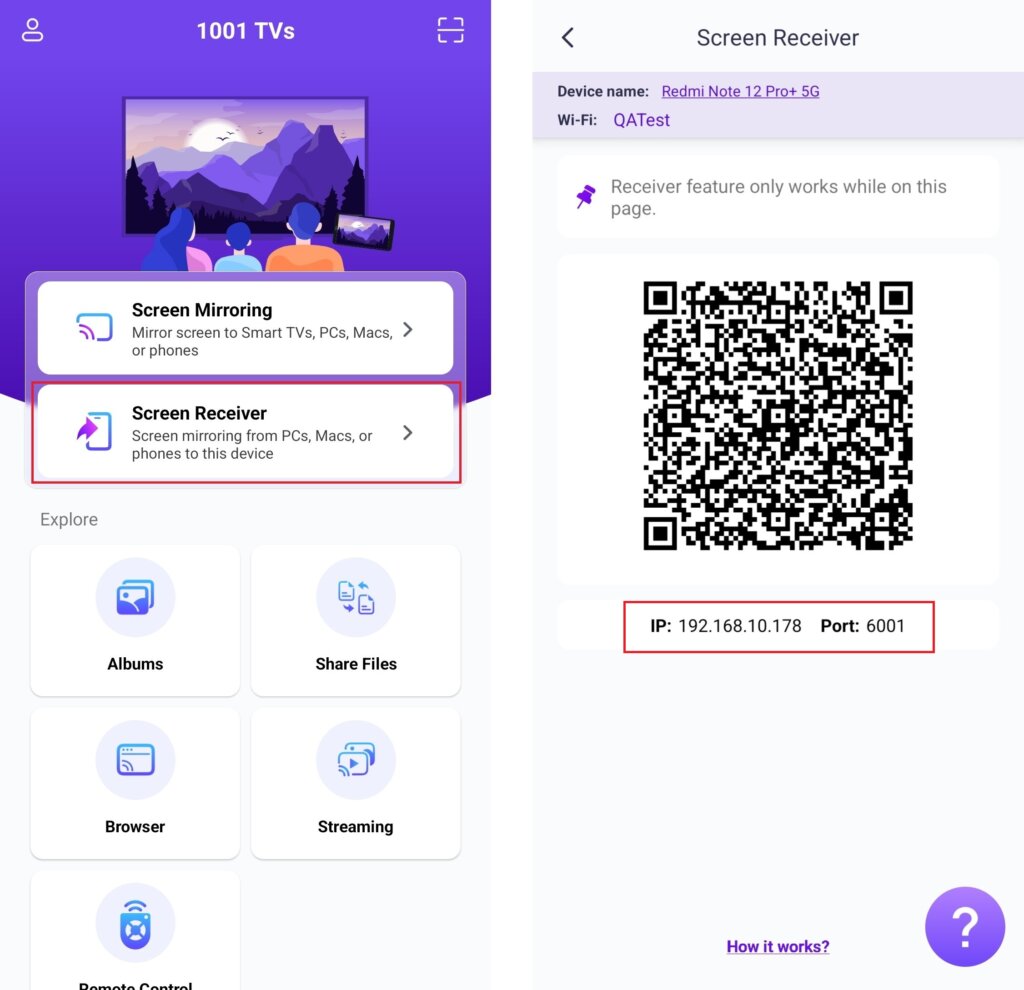
प्राप्तकर्ता फ़ोन पर टैप करें “स्क्रीन रिसीवर” और डिवाइस को कनेक्शन के लिए तैयार रखें।.
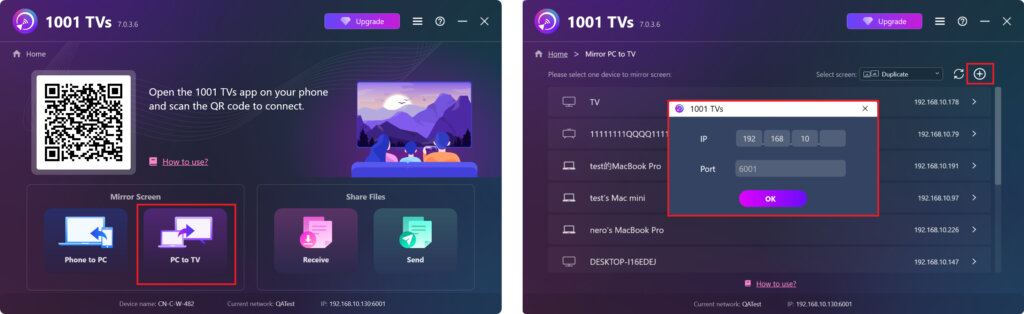
अपने कंप्यूटर पर, चुनें “पीसी से टीवी” या “मैक से टीवी”.
क्लिक करें + आइकन ऊपरी दाएं कोने में, अपने फोन पर प्रदर्शित आईपी पता दर्ज करें।.
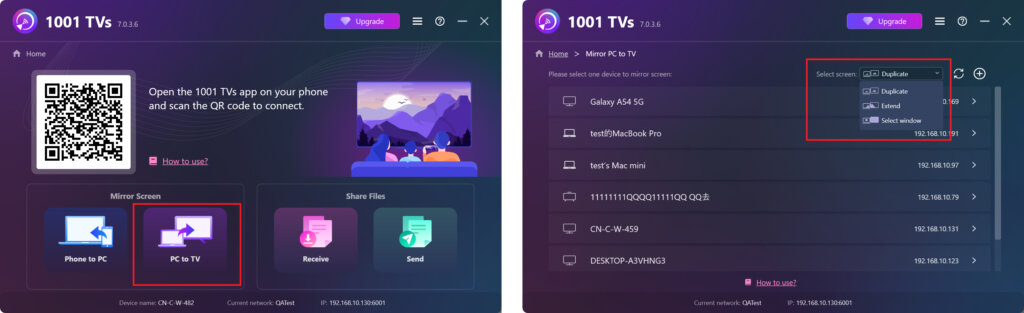
- विंडोज़ निम्नलिखित स्क्रीन मोड का समर्थन करता है: “डुप्लिकेट“, ”"बढ़ाना"“, या ”"विंडो चुनें"“
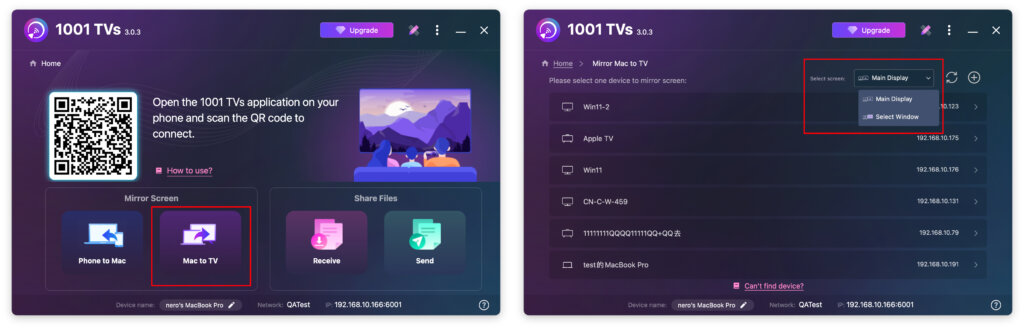
- मैक निम्नलिखित स्क्रीन मोड का समर्थन करता है: ”मुख्य डिस्प्ले“ या ”"विंडो चुनें"“
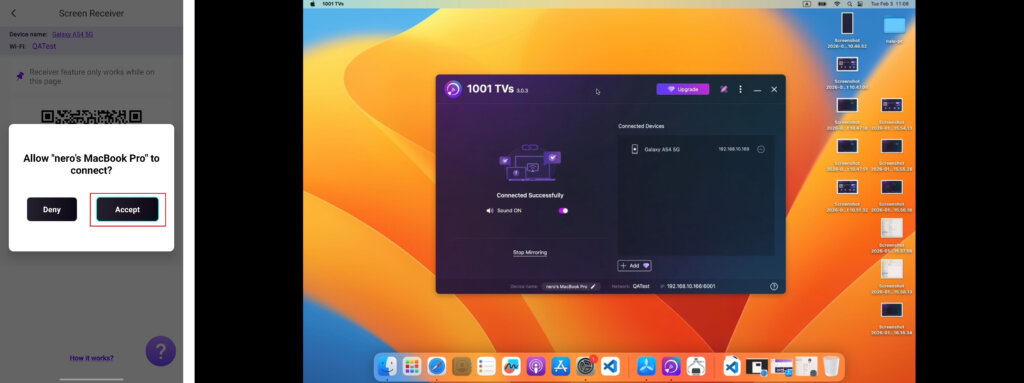
प्राप्तकर्ता फ़ोन पर टैप करें ”"स्वीकार करना"“ अनुरोध की पुष्टि करने और मिररिंग शुरू करने के लिए।.
अभी 1001 TVs प्राप्त करें!
📥 मैक ऐप: ऐप स्टोर से डाउनलोड करें
📥 पीसी ऐप: यहां से डाउनलोड करें माइक्रोसॉफ्ट स्टोर
विस्तृत चरणों के लिए, देखें पीसी इंस्टॉलेशन गाइड
📱 iOS ऐप: ऐप स्टोर से डाउनलोड करें
📱 एंड्रॉइड ऐप: Google Play से डाउनलोड करें