
Λειτουργία κατακόρυφης οθόνης στο Android TV: Κατοπτρισμός, κοινή χρήση και απόλαυση στη μεγάλη οθόνη
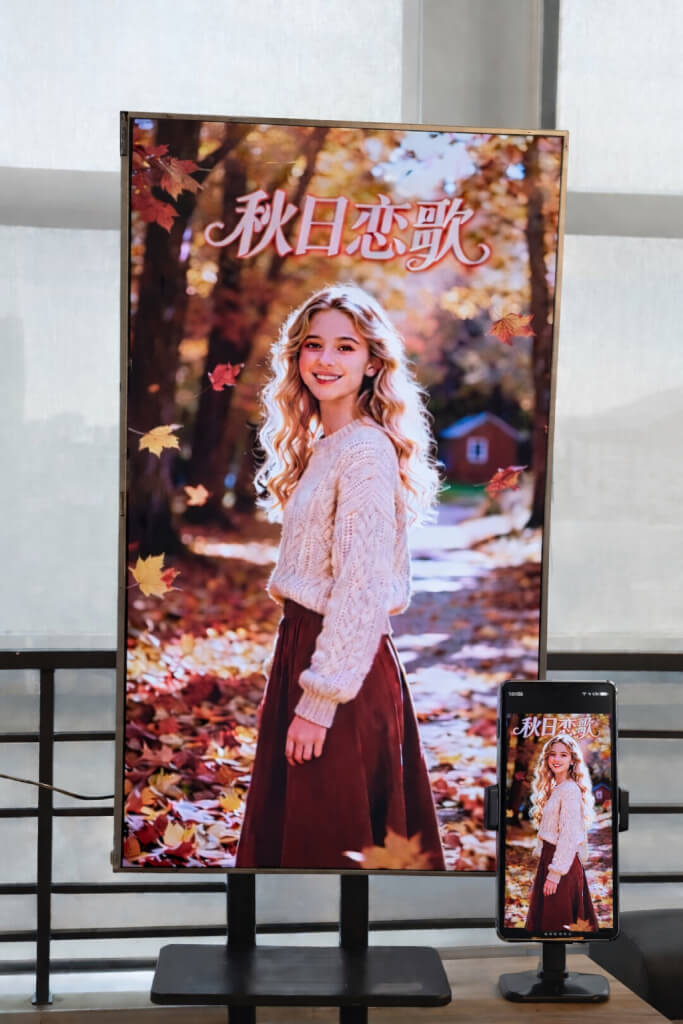
Με το 1001 TVs, δεν περιορίζεστε πλέον στον παραδοσιακό οριζόντιο αντικατοπτρισμό.
Τώρα μπορείτε να απολαμβάνετε μια πλήρως βελτιστοποιημένη εμπειρία κάθετης προβολής στην Android TV σας.
Είτε παρακολουθείτε σύντομα βίντεο, είτε περιηγείστε στα μέσα κοινωνικής δικτύωσης, είτε μοιράζεστε άλμπουμ, είτε μεταφέρετε αρχεία, το 1001 TVs κάνει τα πάντα ομαλά και αβίαστα στη μεγάλη οθόνη.
1. Εγκαταστήστε το 1001 TVs στο Android TV σας
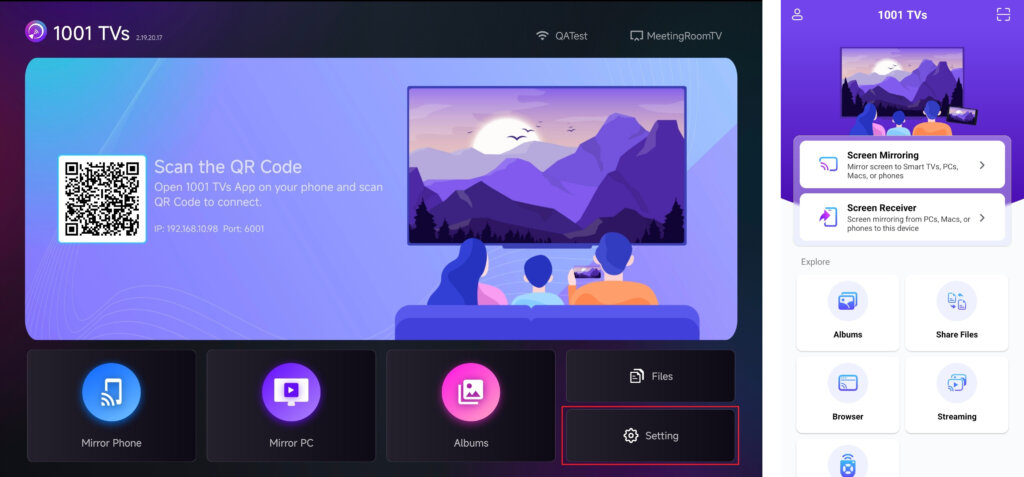
Κατεβάστε και εγκαταστήστε Εφαρμογή 1001 TVs τόσο στο τηλέφωνό σας όσο και στο Android TV.
Βεβαιωθείτε ότι η τηλεόραση και η κινητή συσκευή σας είναι συνδεδεμένες στο ίδιο δίκτυο Wi-Fi.
📥 Εφαρμογή τηλεόρασης: Πώς να εγκαταστήσετε το 1001 TVs στην τηλεόρασή σας
📱 Εφαρμογή iOS: Λήψη από το App Store
📱 Εφαρμογή Android: Λήψη από το Google Play
Ανοίξτε την εφαρμογή 1001 TVs στην τηλεόρασή σας και μεταβείτε στη διεύθυνση Ρύθμιση.
2. Ρύθμιση του προσανατολισμού της οθόνης
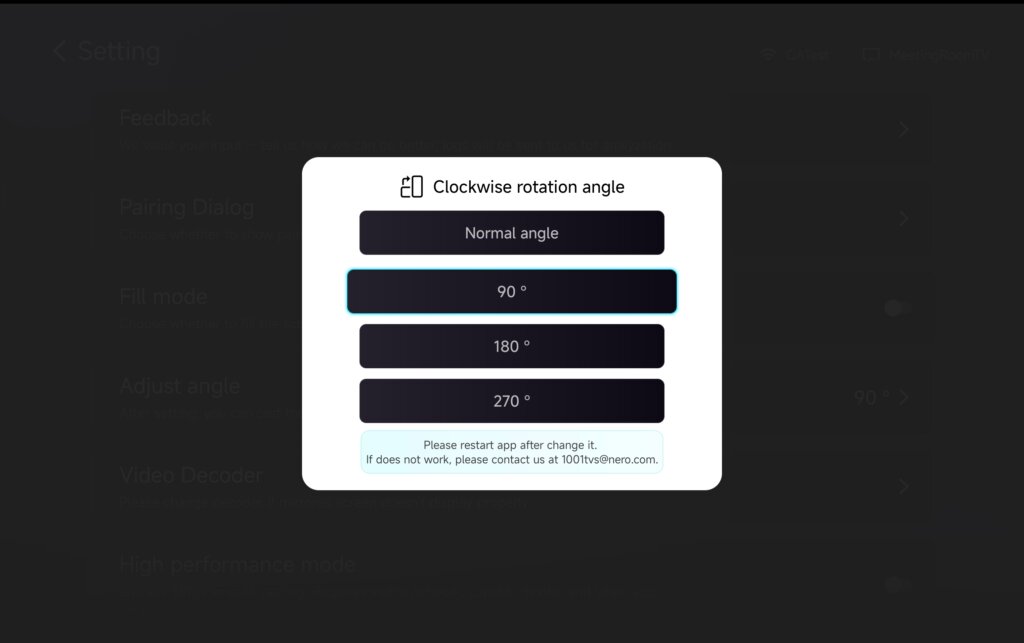
Στο Ρύθμιση, επιλέξτε Ρυθμίστε τη γωνία.
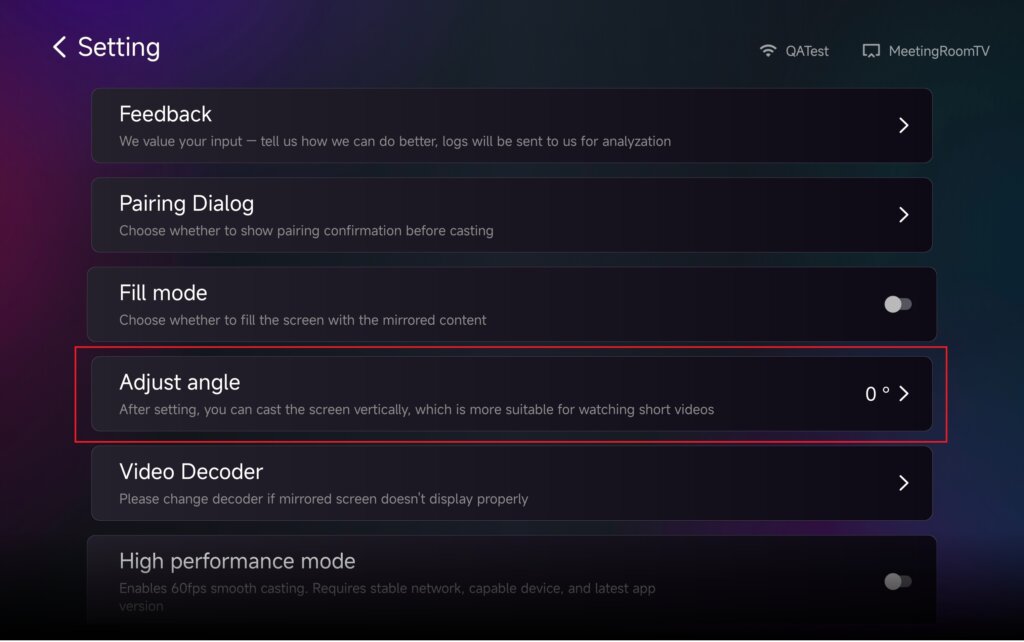
Ρυθμίστε τη γωνία για την ενεργοποίηση της κατακόρυφης λειτουργίας ανάλογα με τις ανάγκες σας.
Αφού αλλάξετε τη γωνία, παρακαλούμε επανεκκίνηση την εφαρμογή για να εφαρμόσετε τις αλλαγές.
3. Χρήση κάθετης λειτουργίας με καθρέφτισμα, μεταφορά αρχείων και άλμπουμ
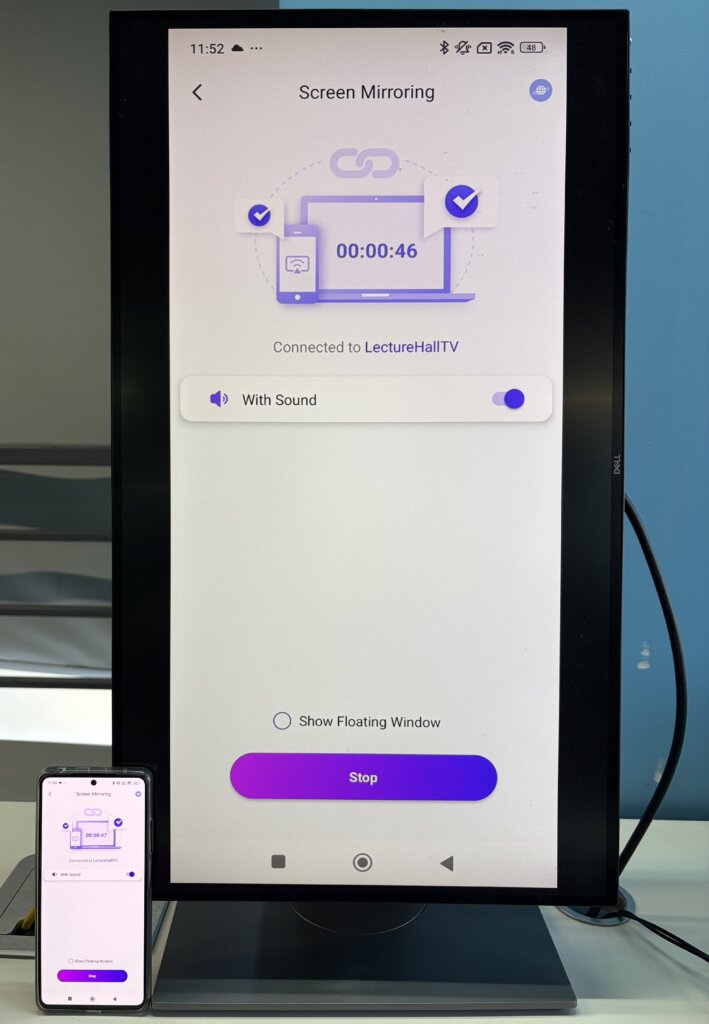
Αντικατοπτρισμός οθόνης
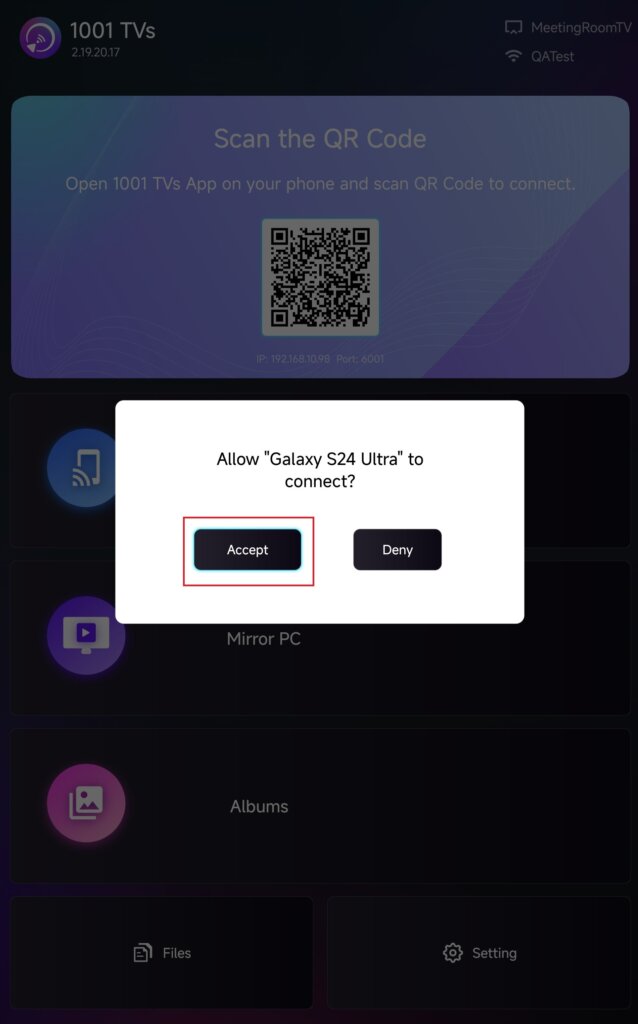
Επιλέξτε την τηλεόρασή σας από τη λίστα συσκευών ή σαρώστε τον κωδικό QR που εμφανίζεται στην οθόνη της τηλεόρασής σας.
Μόλις συνδεθείτε, πατήστε Αποδοχή στην τηλεόρασή σας για να ξεκινήσει η αντανάκλαση.
Αποστολή αρχείων
Επιλέξτε την τηλεόρασή σας από τη λίστα συσκευών για να δημιουργήσετε μια σύνδεση.
Στη συνέχεια, πατήστε Στείλτε και επιλέξτε τα αρχεία που θέλετε να μεταφέρετε.
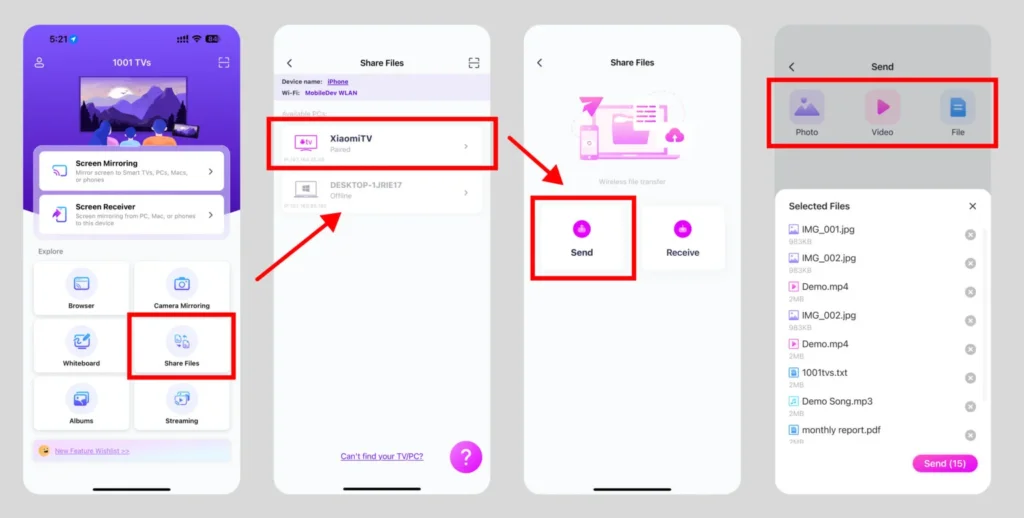
Τα αρχεία θα παραδοθούν απευθείας στην τηλεόρασή σας και θα είναι έτοιμα για άνοιγμα.
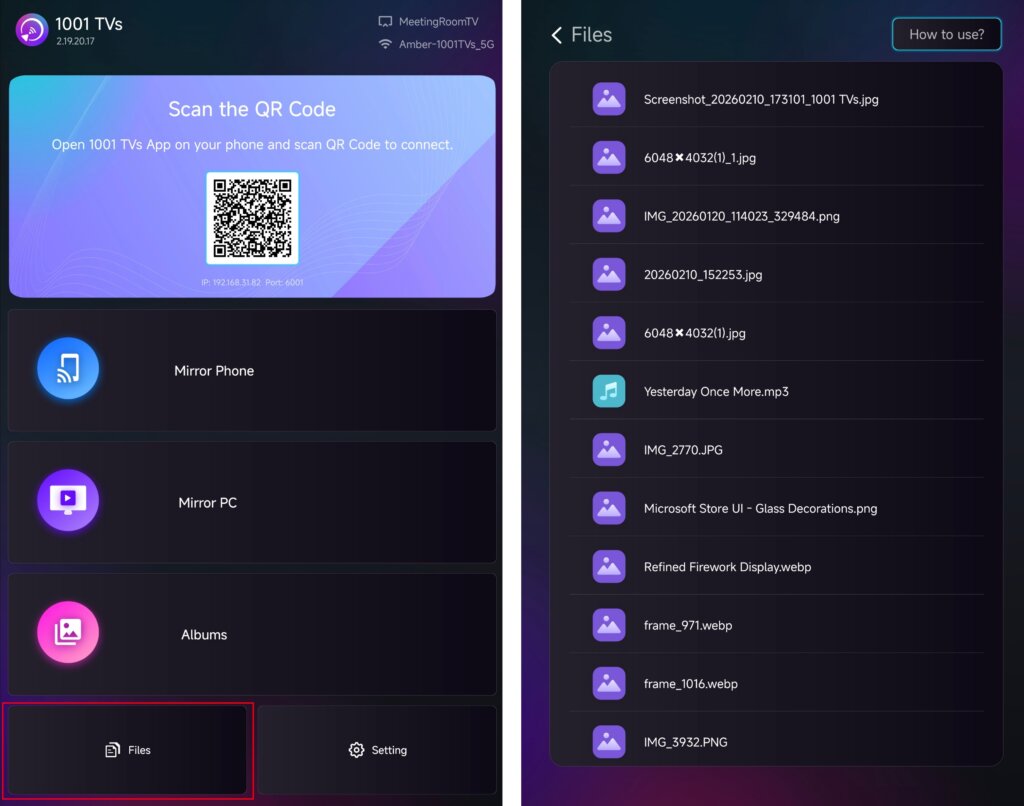
Για λεπτομερείς οδηγίες, ανατρέξτε στο σεμινάριο: Αποστολή αρχείων στην τηλεόραση από το τηλέφωνό σας
Άλμπουμ προβολής
Επιλέξτε την τηλεόρασή σας από τη λίστα συσκευών και μεταφορτώστε τις φωτογραφίες ή τα βίντεό σας από το τηλέφωνό σας.
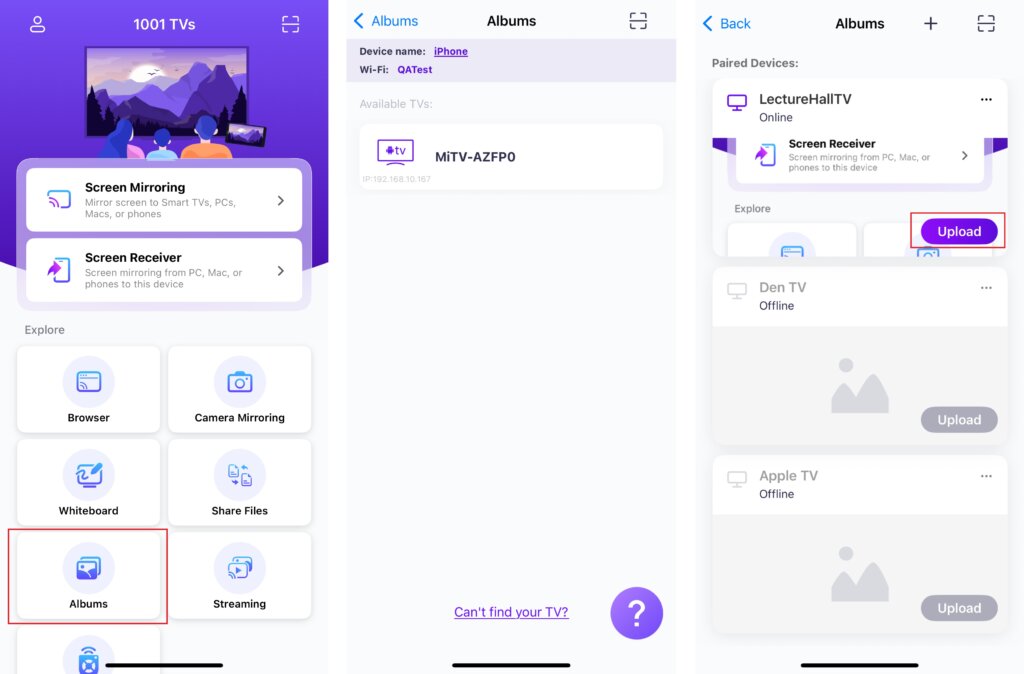
Στην τηλεόρασή σας, ανοίξτε Άλμπουμ προβολής για να περιηγηθείτε και να αναπαράγετε το περιεχόμενο που έχει μεταφορτωθεί ανά πάσα στιγμή.
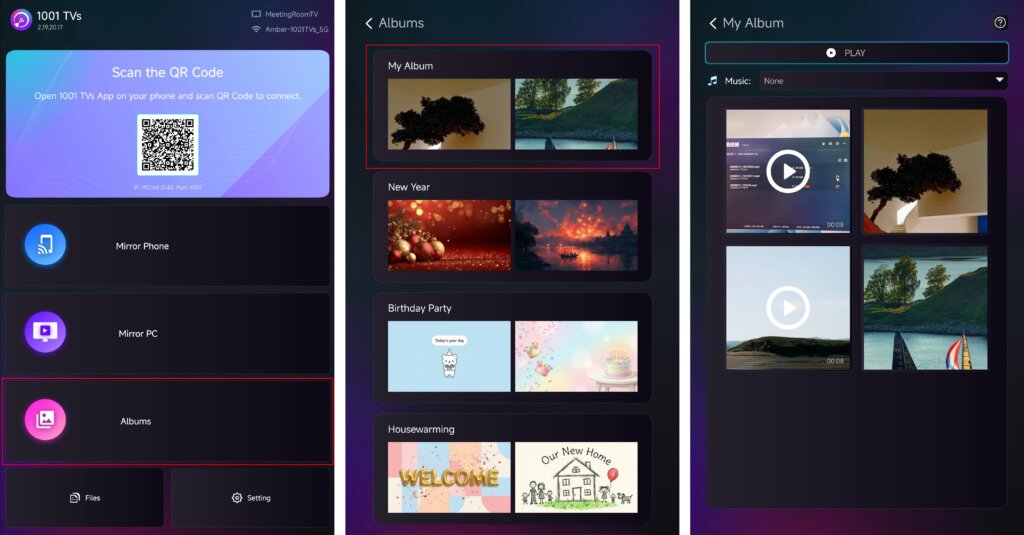
Για λεπτομερείς οδηγίες, ανατρέξτε στο σεμινάριο: Πώς να μοιραστείτε την προβολή διαφανειών στο σπίτι/το οικογενειακό άλμπουμ από το τηλέφωνο στην τηλεόραση
Streaming
✅ Υποστηρίζεται σε Android TV 2.20.2.0+
Επιλέξτε την τηλεόρασή σας από τη λίστα συσκευών και επιλέξτε το περιεχόμενο που θέλετε να μεταδώσετε.
Η αναπαραγωγή των πολυμέσων θα ξεκινήσει αυτόματα στην τηλεόρασή σας, επιτρέποντάς σας να τα απολαύσετε σε μεγαλύτερη οθόνη.
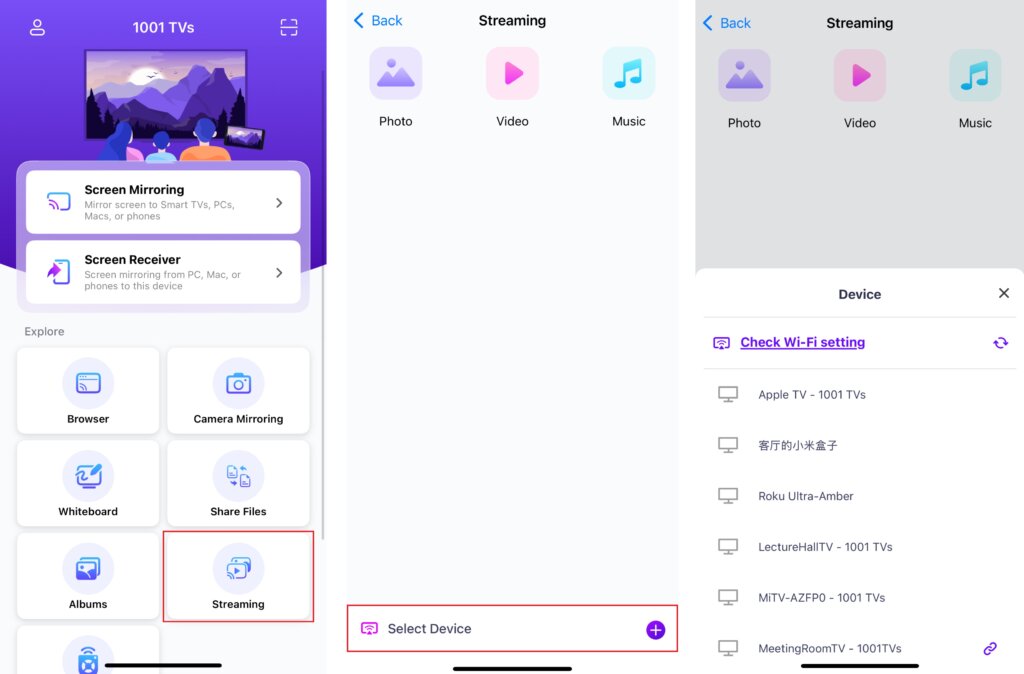
Για λεπτομερείς οδηγίες, ανατρέξτε στο σεμινάριο: Πώς να μεταφέρετε αρχεία πολυμέσων από το τηλέφωνο στην τηλεόραση
4. Αλλαγή μεγέθους του περιεχομένου της οθόνης
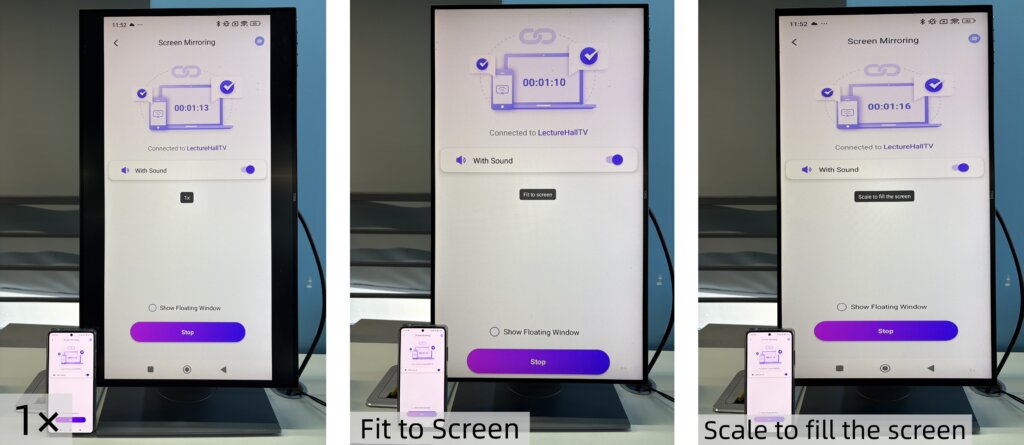
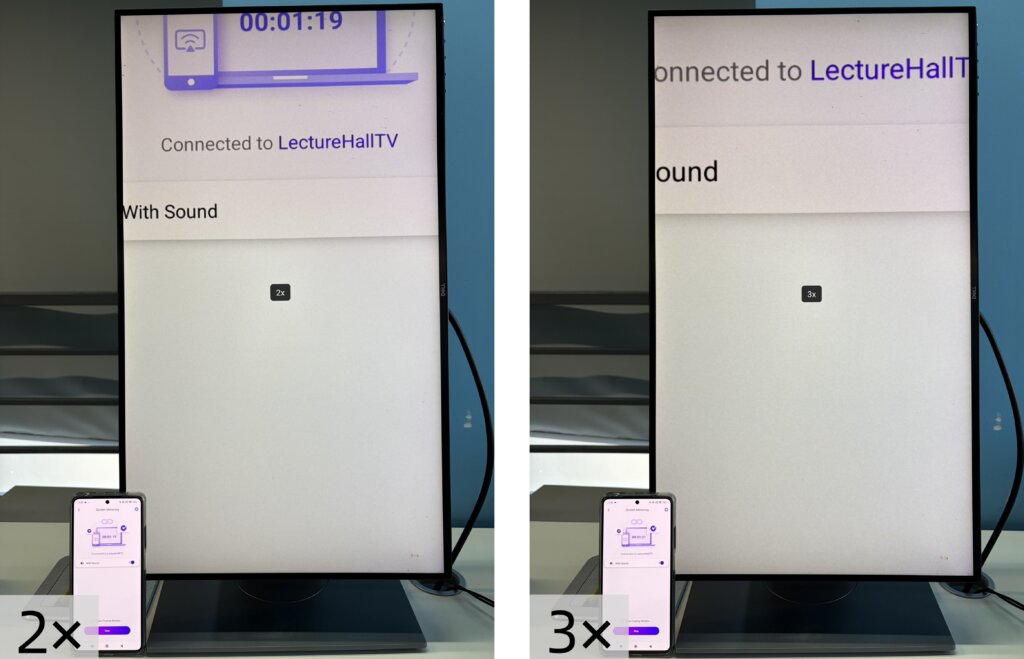
Για να ρυθμίσετε το μέγεθος του περιεχομένου που εμφανίζεται, πατήστε το κουμπί Up και Κάτω στο τηλεχειριστήριο της τηλεόρασής σας.
Μπορείτε να αλλάξετε μεταξύ των ακόλουθων τρόπων εμφάνισης:
- 1 × - Εμφάνιση στο αρχικό μέγεθος
- Προσαρμογή στην οθόνη - Αλλάζει αυτόματα το μέγεθος για να γεμίσει την οθόνη, διατηρώντας την αρχική αναλογία διαστάσεων
- Κλίμακα για να γεμίσει η οθόνη - Τεντώνει την εικόνα για να γεμίσει πλήρως την οθόνη
- 2× / 3× - Μεγέθυνση για πιο κοντινή άποψη
Επιλέξτε τη λειτουργία προβολής που ταιριάζει καλύτερα στις ανάγκες προβολής σας.
Σημείωση:
Οι λειτουργίες αλλαγής μεγέθους υποστηρίζονται πλήρως στο Αντικατοπτρισμός οθόνης.
Δεν υποστηρίζονται σε Streaming.
Στο Αρχεία και Άλμπουμ προβολής, το ζουμ 2× και 3× δεν είναι διαθέσιμο.
5. Απολαύστε κάθετη λειτουργία
Είστε έτοιμοι. Ξεκινήστε την αντανάκλαση ή την κοινή χρήση περιεχομένου στην Κάθετη λειτουργία και απολαύστε μια νέα εμπειρία θέασης στην τηλεόρασή σας.
Αποκτήστε το 1001 TVs τώρα!
📥 Εφαρμογή τηλεόρασης: Πώς να εγκαταστήσετε το 1001 TVs στην τηλεόρασή σας
📱 Εφαρμογή iOS: Λήψη από το App Store
📱 Εφαρμογή Android: Λήψη από το Google Play