
[विंडोज] विंडोज पीसी स्क्रीन को मैक/पीसी पर मिरर कैसे करें
1. एक ही वाई-फाई से कनेक्ट करें
सुनिश्चित करें कि आपके दोनों पीसी और यह प्राप्त करने वाला उपकरण (मैक/पीसी) एक ही वाई-फाई नेटवर्क से जुड़े हुए हैं।.
सर्वोत्तम प्रदर्शन के लिए, इसका उपयोग करें 5 GHz वाई-फाई नेटवर्क विलंब को कम करने और स्थिरता में सुधार करने के लिए।.
2. 1001 TVs इंस्टॉल करें और खोलें
सुनिश्चित करें कि आपके पास है 1टीपी1टी ऐप आपके दोनों डिवाइस पर इंस्टॉल हो चुका है।.
📥 मैक ऐप: ऐप स्टोर से डाउनलोड करें
📥 पीसी ऐप: यहां से डाउनलोड करें माइक्रोसॉफ्ट स्टोर
विस्तृत चरणों के लिए, देखें पीसी इंस्टॉलेशन गाइड
3. मिररिंग शुरू करें
अपने पीसी पर क्लिक करें “पीसी से टीवी”, फिर एक स्क्रीन मोड चुनें: “डुप्लिकेट”, “विस्तार करें” या “विंडो चुनें”.
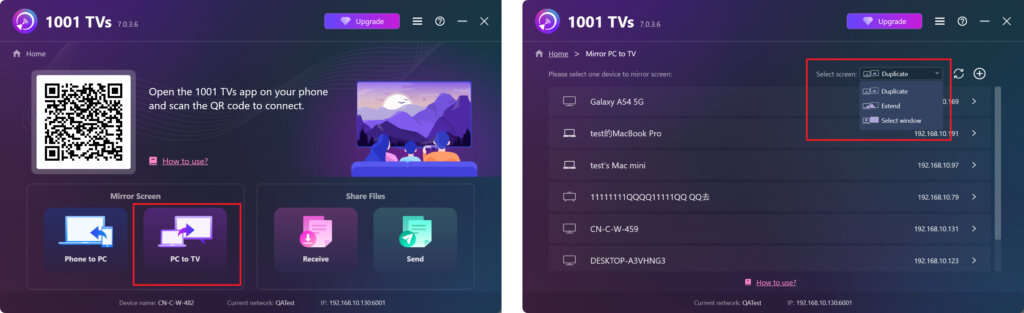
यह ऐप एक ही वाई-फाई नेटवर्क से जुड़े उपकरणों का स्वचालित रूप से पता लगा लेगा।.
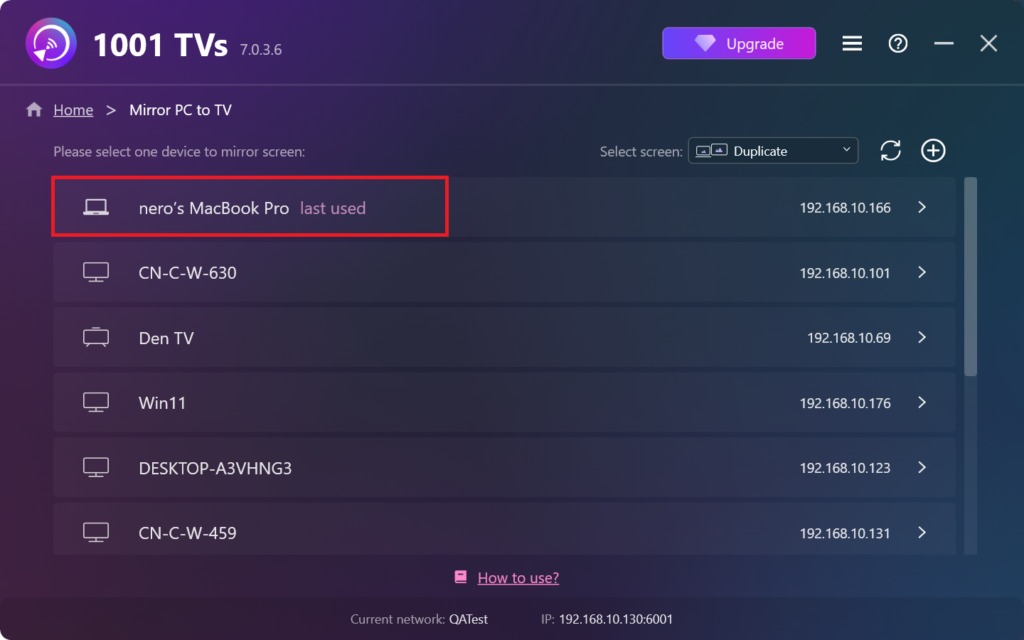
वह डिवाइस चुनें जिस पर आप मिररिंग करना चाहते हैं।.
प्राप्तकर्ता डिवाइस पर क्लिक करें “"अनुमति दें"” कनेक्शन की पुष्टि करने के लिए।.
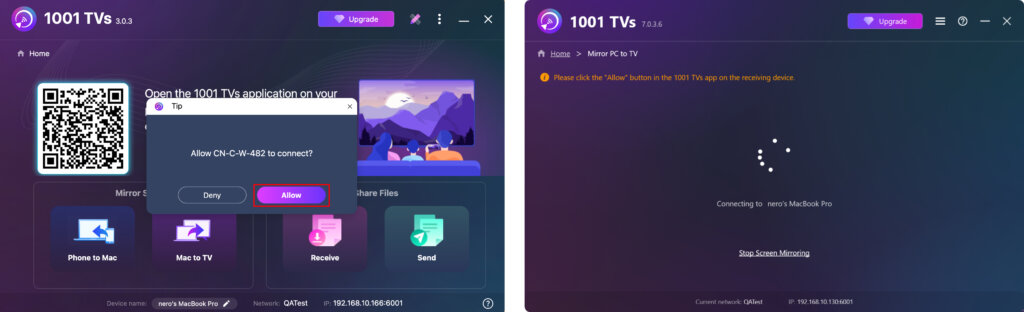
4. एक बार कनेक्ट हो जाने पर, आप तुरंत अपनी स्क्रीन को पीसी/मैक पर मिरर करना शुरू कर सकते हैं! ✨
अभी 1001 TVs प्राप्त करें!
📥 मैक ऐप: ऐप स्टोर से डाउनलोड करें
📥 पीसी ऐप: यहां से डाउनलोड करें माइक्रोसॉफ्ट स्टोर
विस्तृत चरणों के लिए, देखें पीसी इंस्टॉलेशन गाइड